Free Lessons
Courses
Seminars
TechHelp
Fast Tips
Templates
Topic Index
Forum
ABCD
 
Home   Courses   TechHelp   Help   Contact   Merch   Join   Order   Logon   Forums   
 
Home > TechHelp > Directory > Access > Cascading Without VBA > Cascading Combo Boxes for Cities by James Ogier >
Back to Cascading Without VBA    Comments List
Upload Images | @Reply | Bookmark | Link | Email | Next Unseen |
Cascading Combo Boxes for Cities
James Ogier 
      
45 days ago
Best way to handle duplicate cities? Bristol Tenn. and Bristol England as an example.
Jim O.
Richard Rost  @Reply  
            
45 days ago
It wouldn't be a problem with cascading combo boxes because you're coming in from the top. You pick the country first, then the state, province, or equivalent, and then the city. At that point, the city list is already limited to cities belonging to the selected state, which belongs to that country.

If you were entering the city first, then yes, you'd need a way to distinguish between duplicate names, such as asking which Bristol the user means. But that's a different problem from the normal top-down cascading setup.
James Ogier OP  @Reply  
      
45 days ago
So if I understand your point,  you cannot list cities in the city table as (duplicates permitted). Bristol Tennessee would be listed as (country) USA, (state) Tennessee and Bristol England would show up as (country), United Kingdom (state) England.
Sandra Truax  @Reply  
         
45 days ago
CityName should be set to allow duplicates and then the StateID in the CityT table will correctly populate the city combo box after you select the state in the state combo box. In Richard's table, for CityName, Indexed is set to No.
Matt Hall  @Reply  
           
45 days ago
I thought he used a multi-field index, including CityName and StateID, with duplicates set to NO.  Maybe I am remembering wrong.
Kevin Yip  @Reply  
      
45 days ago
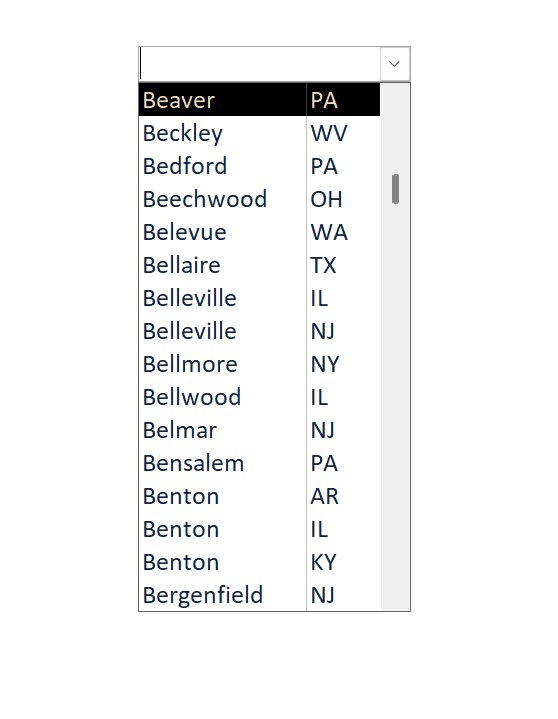
I'm not a big fan of cascading combo boxes in general because of the extra mouse-clicking and list-browsing the user has to do.  If I could avoid them, I would, such as making one combo box for both city and state as shown below.  The list would be longer, but the user might actually find it more convenient.  Extra VBA coding would probably be needed to process this, but it's worth it to save time for the user.
Kevin Yip  @Reply  
      
45 days ago

James Ogier OP  @Reply  
      
41 days ago
I like Kevin's approach. I have not tried it yet but it seems if you search for a city and using Kevin's list, you would get a list 'filtered' by city and the state would be displayed as well. I am I reading that correct?
Richard Rost  @Reply  
            
41 days ago
Yep, that's the idea. A combo box can display both the city and its state (and even country, if needed), so if there are multiple Bristols the user can see which one they want before selecting it.

For a long list, I'd also make the combo searchable by typing the city name. Access will jump to matching entries, and the additional displayed columns remove the ambiguity.
Kevin Yip  @Reply  
      
41 days ago
If a list is really really long, say, thousands or high hundreds of rows, then cascading combos would be helpful.

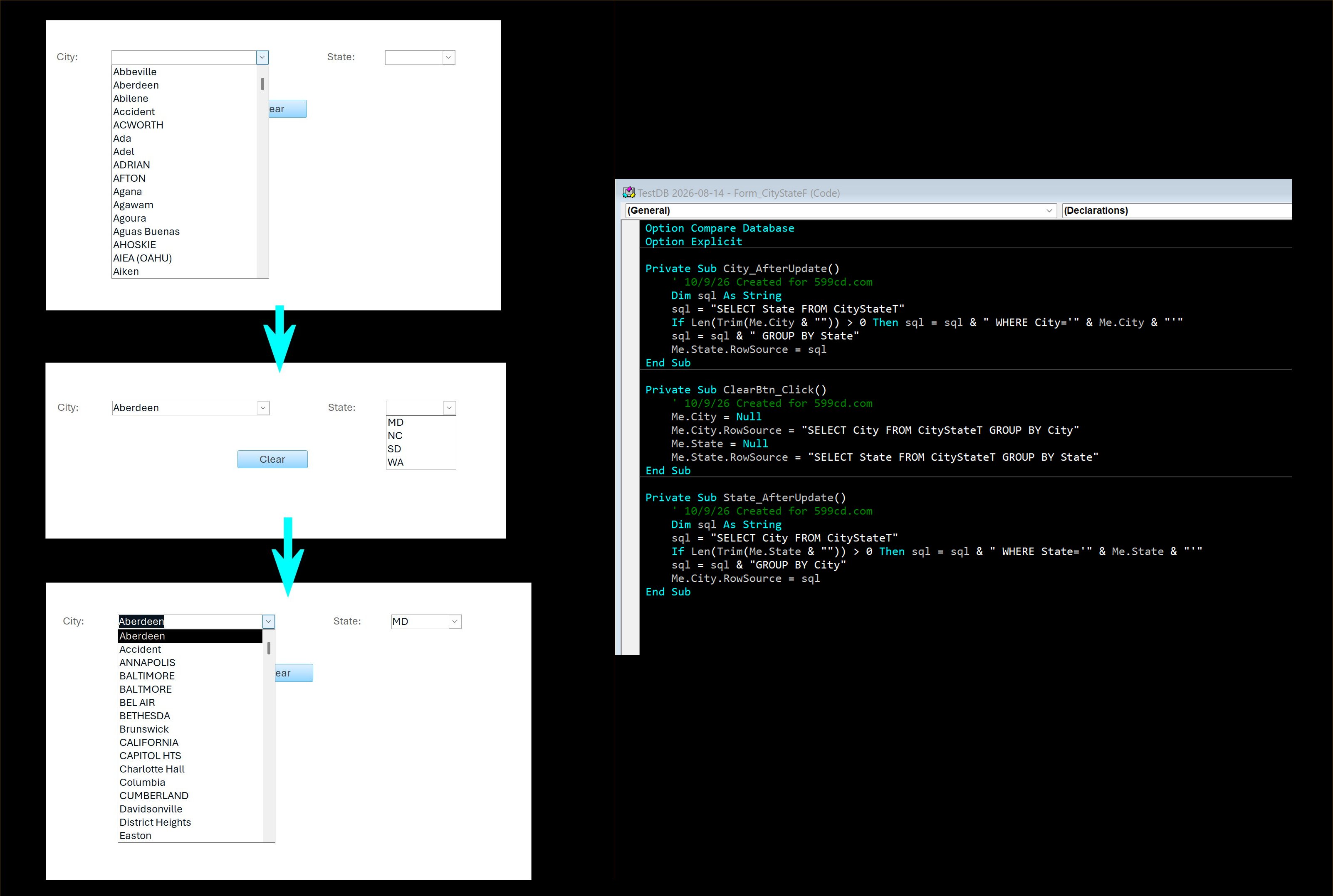
Also, has anyone tried "two-way" cascading combo boxes?  E.g. Look up a city to get a list of states with that city, or look up a state to get a list of cities in that state, with only one city combo box and one state combo box.  I haven't tried it, but it seems it could be possible, and helpful.
Richard Rost  @Reply  
            
41 days ago
That would be similar to what I did in the extended cut. You could have a City combo box and a State combo box, then let the user choose whether the filter between them is AND or OR. The resulting records would match both the selected city and state, or either one of them.

You could then use that result to populate another combo box if you wanted. That part would likely require some VBA, but it's certainly doable.
Kevin Yip  @Reply  
      
41 days ago
Richard  What I mean is that the combo boxes can cascade in two directions.  For instance, in the picture below, when you first open the City combo, it shows all cities. Pick "Aberdeen" and it will show only the 4 states with Aberdeen.  Then, if you pick Maryland (MD), you can go back to the City combo and it will only show cities in Maryland.  This allows you to go back and forth, and it ensures that only an existing city-state pair can be shown and entered.  In order to start fresh, you must clear both combo boxes (either manually or clicking the "Clear" button I made for this purpose).  This is what I meant by two-way, bi-directional cascading.  I'm not sure if this has been covered (anywhere) yet.  The row sources of the combo boxes have to keep adding and removing the WHERE clause, so VBA seems to be the only way.
Kevin Yip  @Reply  
      
41 days ago

Richard Rost  @Reply  
            
40 days ago
Ah, that's a good idea. No, I haven't covered that yet, but thanks for the suggestion. I'll put it on the list for a future video. I appreciate it.

This thread is now CLOSED. If you wish to comment, start a NEW discussion in Cascading Without VBA.
 

Next Unseen


What's This?


The following is a paid advertisement
Computer Learning Zone is not responsible for any content shown or offers made by these ads.
 

Learn
 
Access - index
Excel - index
Word - index
Windows - index
PowerPoint - index
Photoshop - index
Visual Basic - index
ASP - index
Seminars
More...
Customers
 
Login
My Account
My Courses
Lost Password
Memberships
Student Databases
Change Email
Info
 
Latest News
New Releases
User Forums
Topic Glossary
Tips & Tricks
Search The Site
Code Vault
Collapse Menus
Help
 
Customer Support
Web Site Tour
FAQs
TechHelp
Consulting Services
About
 
Background
Testimonials
Jobs
Affiliate Program
Richard Rost
Free Lessons
Mailing List
PCResale.NET
Order
 
Video Tutorials
Handbooks
Memberships
Learning Connection
Idiot's Guide to Excel
Volume Discounts
Payment Info
Shipping
Terms of Sale
Contact
 
Contact Info
Support Policy
Mailing Address
Phone Number
Fax Number
Course Survey
Email Richard
[email protected]
Blog RSS Feed    YouTube Channel

LinkedIn
Copyright 2026 by Computer Learning Zone, Amicron, and Richard Rost. All Rights Reserved. Current Time: 11/19/2026 8:02:01 PM. PLT: 1s