Free Lessons
Courses
Seminars
TechHelp
Fast Tips
Templates
Topic Index
Forum
ABCD
 
Home   Courses   TechHelp   Help   Contact   Merch   Join   Order   Logon   Forums   
 
Back to Access Developers    Comments List
Upload Images | @Reply | Bookmark | Link | Email | Next Unseen |
Copying the Above Row
Adrian Connolly 
      
41 hours ago
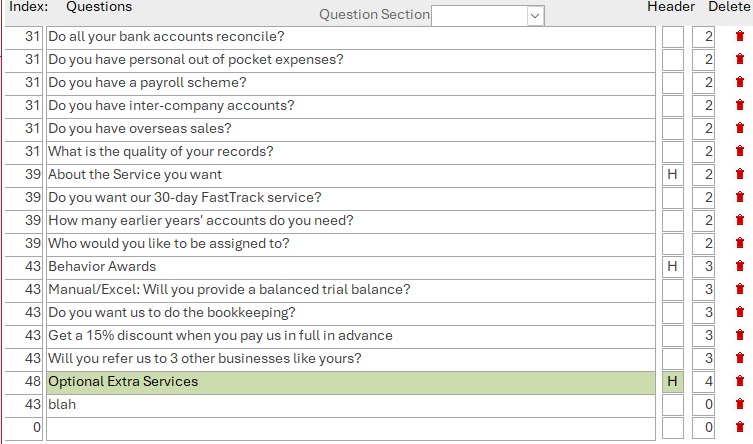
Hi, i have a form that i have code that mimics the short key ctrl+'. the problem i have it reads the row above the objective row field. using the after update event

Details    ' retrive the section id from the questioner section eg; review questions, rewards etc
    Dim rs ' As DAO.Recordset
    ' If numIndexSection is already True/Filled, exit early
    If Me.numIndexSection = True Then Exit Sub
    ' 1. Create a clone of the form's underlying records
    Set rs = Me.RecordsetClone
    ' 2. Sync the clone's position to our current row
    rs.Bookmark = Me.Bookmark
    ' 3. Move to the record directly above
    rs.MovePrevious
    ' 4. Only run if we didn't step past the very first row (BOF = Beginning of File)
    If Not rs.BOF Then
        ' 5. Grab the value from numindexsection above, and drop it into numindexsection on this row
        Me.numIndexSection.Value = rs("numindexsection").Value
    End If
    ' Clean up memory
    rs.Close
    Set rs = Nothing
Adrian Connolly OP  @Reply  
      
41 hours ago

Adrian Connolly OP  @Reply  
      
41 hours ago
as you can see the index shows 43 instead of 48 after i have entered  the question crieria on the after event
Richard Rost  @Reply  
           
32 hours ago
Your clone code copies from the previous record in the form's recordset order. If it is picking up 43, then the record containing 43 is the previous record as far as Access is concerned.

Make sure the form has an explicit, stable sort order. Don't rely on the table's apparent order. Set the form's Record Source query to include an ORDER BY clause using the field(s) that determine the order you see on screen, such as:

ORDER BY SectionID, QuestionNumber

Also, this line doesn't test whether NumIndexSection already has a value:

If Me.numIndexSection = True Then Exit Sub

Since NumIndexSection contains numbers like 43 or 48, use this instead if you only want to fill it when it is blank:

If Not IsNull(Me.numIndexSection) Then Exit Sub

Once the form is explicitly sorted correctly, MovePrevious should retrieve the value from the row immediately above the current one.
Adrian Connolly OP  @Reply  
      
18 hours ago
Hi
I don't mean rude ask this, but have you got a file that demostrates what i'm achive vira VBA, becuase only one have is the short key crrtl+'
i could do this mannually but i want hide the field once i'm satisfied that it's doing what i intended it to do.
the field
Richard Rost  @Reply  
           
10 hours ago
I don't have a sample file specifically for that, but the code you posted is essentially how I would do it: use a RecordsetClone, synchronize it with the current record using the Bookmark, move to the previous record, and copy the value.

The important part is that "previous" only has meaning when the form's Record Source has a defined ORDER BY. Once you add the correct ORDER BY to the form's query, your code should copy the NumIndexSection value displayed directly above the current record, just like Ctrl+'.

Also, make sure you're testing for a blank value, not True:

If Not IsNull(NumIndexSection) Then Exit Sub

After you've confirmed it works, you can set the NumIndexSection control's Visible property to No. The field can remain in the form's Record Source even if the control is hidden.
Add a Reply Upload an Image
Next Unseen


What's This?


The following is a paid advertisement
Computer Learning Zone is not responsible for any content shown or offers made by these ads.
 

Learn
 
Access - index
Excel - index
Word - index
Windows - index
PowerPoint - index
Photoshop - index
Visual Basic - index
ASP - index
Seminars
More...
Customers
 
Login
My Account
My Courses
Lost Password
Memberships
Student Databases
Change Email
Info
 
Latest News
New Releases
User Forums
Topic Glossary
Tips & Tricks
Search The Site
Code Vault
Collapse Menus
Help
 
Customer Support
Web Site Tour
FAQs
TechHelp
Consulting Services
About
 
Background
Testimonials
Jobs
Affiliate Program
Richard Rost
Free Lessons
Mailing List
PCResale.NET
Order
 
Video Tutorials
Handbooks
Memberships
Learning Connection
Idiot's Guide to Excel
Volume Discounts
Payment Info
Shipping
Terms of Sale
Contact
 
Contact Info
Support Policy
Mailing Address
Phone Number
Fax Number
Course Survey
Email Richard
[email protected]
Blog RSS Feed    YouTube Channel

LinkedIn
Copyright 2026 by Computer Learning Zone, Amicron, and Richard Rost. All Rights Reserved. Current Time: 10/8/2026 8:15:33 PM. PLT: 1s