Free Lessons
Courses
Seminars
TechHelp
Fast Tips
Templates
Topic Index
Forum
ABCD
 
Home   Courses   TechHelp   Help   Contact   Merch   Join   Order   Logon   Forums   
 
Back to Access Developers    Comments List
Upload Images | @Reply | Bookmark | Link | Email | Next Unseen |
Viewing History on Form
Kevin Yip 
     
4 hours ago
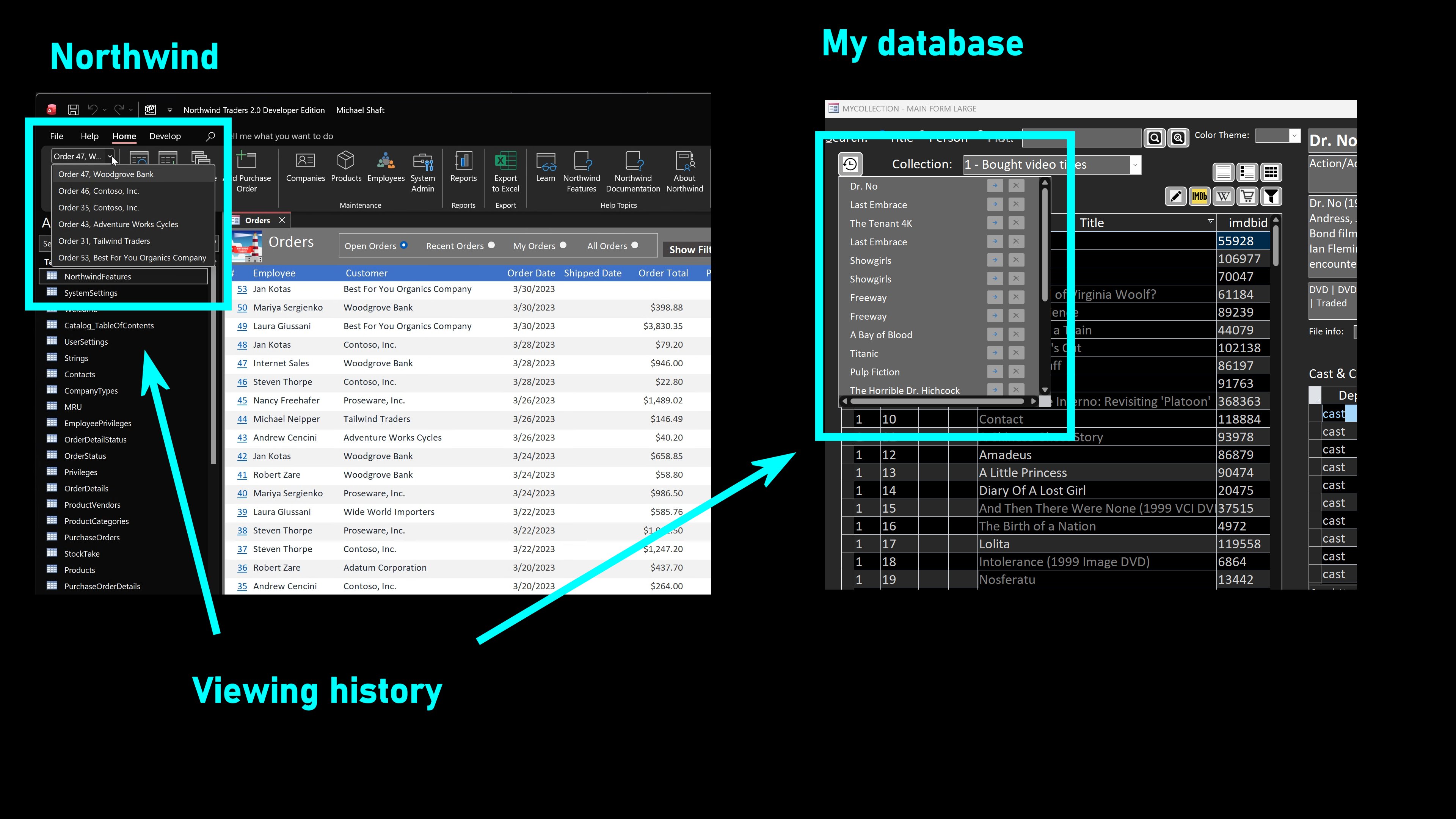
In the Northwind database, there is nifty little feature on the top left corner of the ribbon bar: a drop-down viewing history that lets you instantly access records you have visited (pictured left below).  This is not a "little" feature at all, as it involves complicated XML and VBA coding of the custom ribbon bar.  I find the ribbon to be an inconvenient location of this feature.  Also, it can only tracks activities on one form, the Orders form.  

So I set out to build my own (picture right below), which can track viewing history for multiple forms.  It is also placed on the form itself, which I find to be a better location.  It also lets me remove unwanted history items, which Northwind can't do.  The drop-down list is a subform/continuous form which can be hidden and shown.  The history list is sorted by the date and time an item was last visited.  The most recently visited items are at the top.  If an item on the history list is visited again, it is moved to the top, in real time.  The history list is refreshed every time an item is visited.  One tricky thing is deciding how long the user has to stay on an item before it is placed on the history list.  If the user looks at a record, doesn't see what he wants, and quickly moves to another record (say, within 1-2 seconds), then the record should not be placed in the history.

Someone in this forum actually asked about something like this.  He asked if a form could open up a previously viewed record directly.  Ironically, I said there was no need for that at the time, as a search function was all that was needed.  I have to take back what I said.  It is actually quite useful to have instant access to previously viewed records, because you can't beat instant.

I'm still working on some issues of this feature.  For instance, if you are on the order form, and you open up the history to access something on the customer form, this feature has to "take you" from one form to the other.  That may be simple in some scenarios, but it may not be in others.  What if your current form is modal and can't lose focus?  What if you're entering data in your current form?  It has to "clean up" whatever you're doing in your current form and move you to the other form that has the history item.  That may entail some complicated coding.

Richard, if you haven't done anything like this for your site, you may want to consider tackling this.
Kevin Yip OP  @Reply  
     
4 hours ago

Thomas Gonder  @Reply  
       
3 hours ago
I like it! I use search forms extensively. That's great, but I often forget, after a few more forms or records, exactly what I was looking at a moment ago, before going down the rabbit hole.
Kevin Yip OP  @Reply  
     
3 hours ago
It's definitely a helpful feature in many situations.  But in my all years with database UI, I had never done anything like this.  Nowadays, viewing history is a common thing. Web browsers have your complete, detailed viewing history sorted by sites, dates, etc.  Productivity software like Word, Excel, code editors, etc., all have your most recently used items (MRU).  As I said, it's not an easy thing to create, especially for desktop apps.  Web apps can at least rely on the web browser's viewing history.
Add a Reply Upload an Image
Next Unseen


What's This?


The following is a paid advertisement
Computer Learning Zone is not responsible for any content shown or offers made by these ads.
 

Learn
 
Access - index
Excel - index
Word - index
Windows - index
PowerPoint - index
Photoshop - index
Visual Basic - index
ASP - index
Seminars
More...
Customers
 
Login
My Account
My Courses
Lost Password
Memberships
Student Databases
Change Email
Info
 
Latest News
New Releases
User Forums
Topic Glossary
Tips & Tricks
Search The Site
Code Vault
Collapse Menus
Help
 
Customer Support
Web Site Tour
FAQs
TechHelp
Consulting Services
About
 
Background
Testimonials
Jobs
Affiliate Program
Richard Rost
Free Lessons
Mailing List
PCResale.NET
Order
 
Video Tutorials
Handbooks
Memberships
Learning Connection
Idiot's Guide to Excel
Volume Discounts
Payment Info
Shipping
Terms of Sale
Contact
 
Contact Info
Support Policy
Mailing Address
Phone Number
Fax Number
Course Survey
Email Richard
[email protected]
Blog RSS Feed    YouTube Channel

LinkedIn
Copyright 2026 by Computer Learning Zone, Amicron, and Richard Rost. All Rights Reserved. Current Time: 10/12/2026 10:31:04 PM. PLT: 1s