Free Lessons
Courses
Seminars
TechHelp
Fast Tips
Templates
Topic Index
Forum
ABCD
 
Home   Courses   TechHelp   Help   Contact   Merch   Join   Order   Logon   Forums   
 
Back to Customer Reports    Comments List
Upload Images | @Reply | Bookmark | Link | Email | Next Unseen |
CustomerID Parameter in Report Query
Paul Jack Higginbotham 
     
12 hours ago
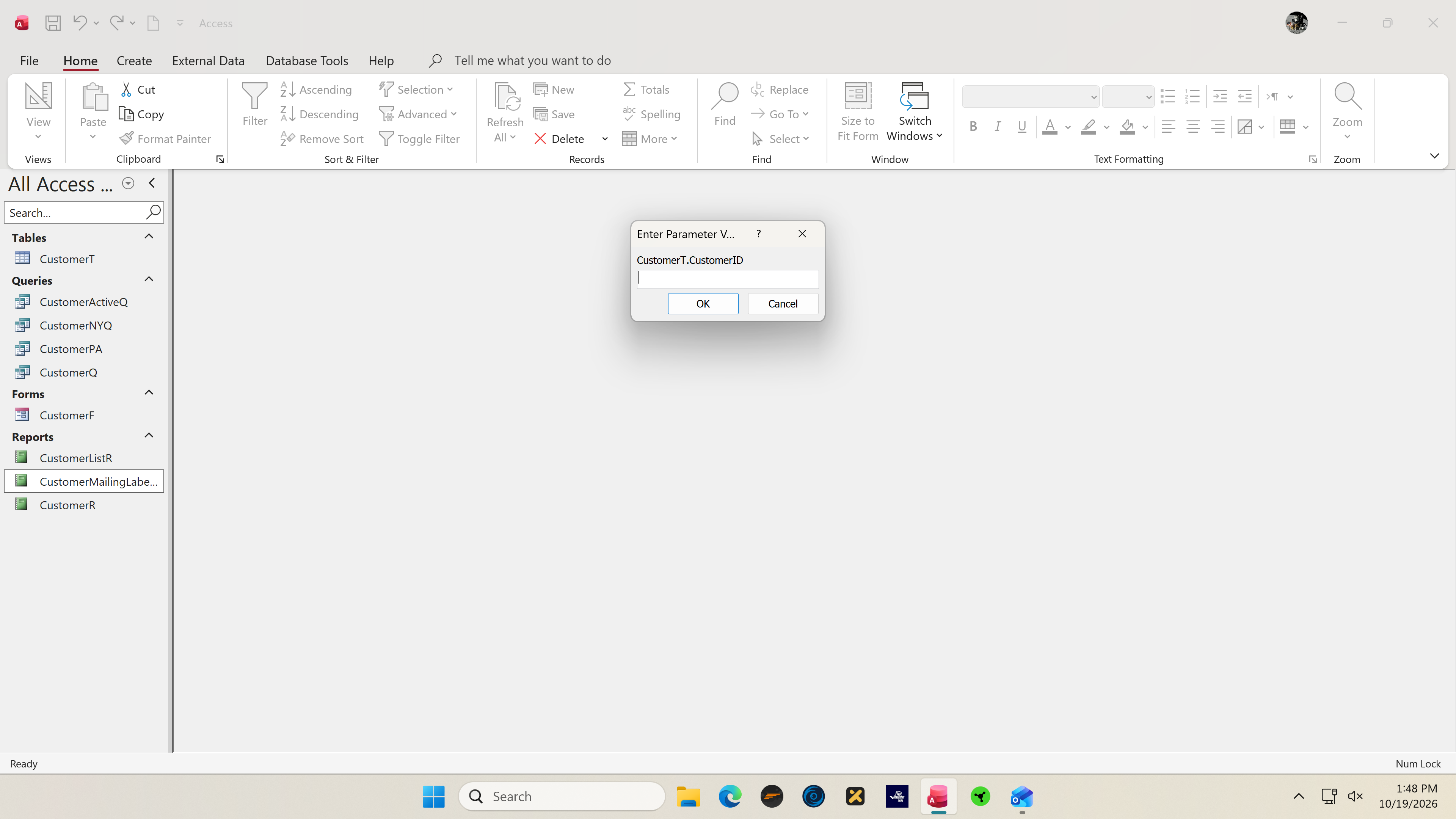
Hi Richard, I'm following along with your videos and keep getting an error. I've tried this three times, pausing the video a lot and carefully following every step.
At 22:30 in the B1, Lesson 12, I get the error. It's an Enter Parameter error.
Paul Jack Higginbotham OP  @Reply  
     
12 hours ago

Alex Hedley  @Reply  
           
12 hours ago
Is this in the sample db you can download or one you built from scratch?
Paul Jack Higginbotham OP  @Reply  
     
12 hours ago
Alex Hi Alex, it was the one he told me to download.
Kevin Robertson  @Reply  
          
12 hours ago
Paul Jack The Report is based on CustomerActiveQ and neither the Query nor the Report should contain CustomerID. You need to determine where the ID is being referred to - either in the Query or Report.

I downloaded the database files for the class and it works as intended.
Richard Rost  @Reply  
          
10 hours ago
Hi Paul. Thanks for the screenshot, and thanks Alex and Kevin for helping. The clue is the exact name in that box: CustomerT.CustomerID. Access is looking for a field reference it cannot resolve. You shouldn't need to type a customer number to print these mailing labels.

Let's narrow it down before rebuilding anything. Cancel the prompt, then open CustomerActiveQ by itself. Does it show the customer records, or does the same prompt appear? If it appears there, post a screenshot of that query in Design View, including the whole bottom grid.

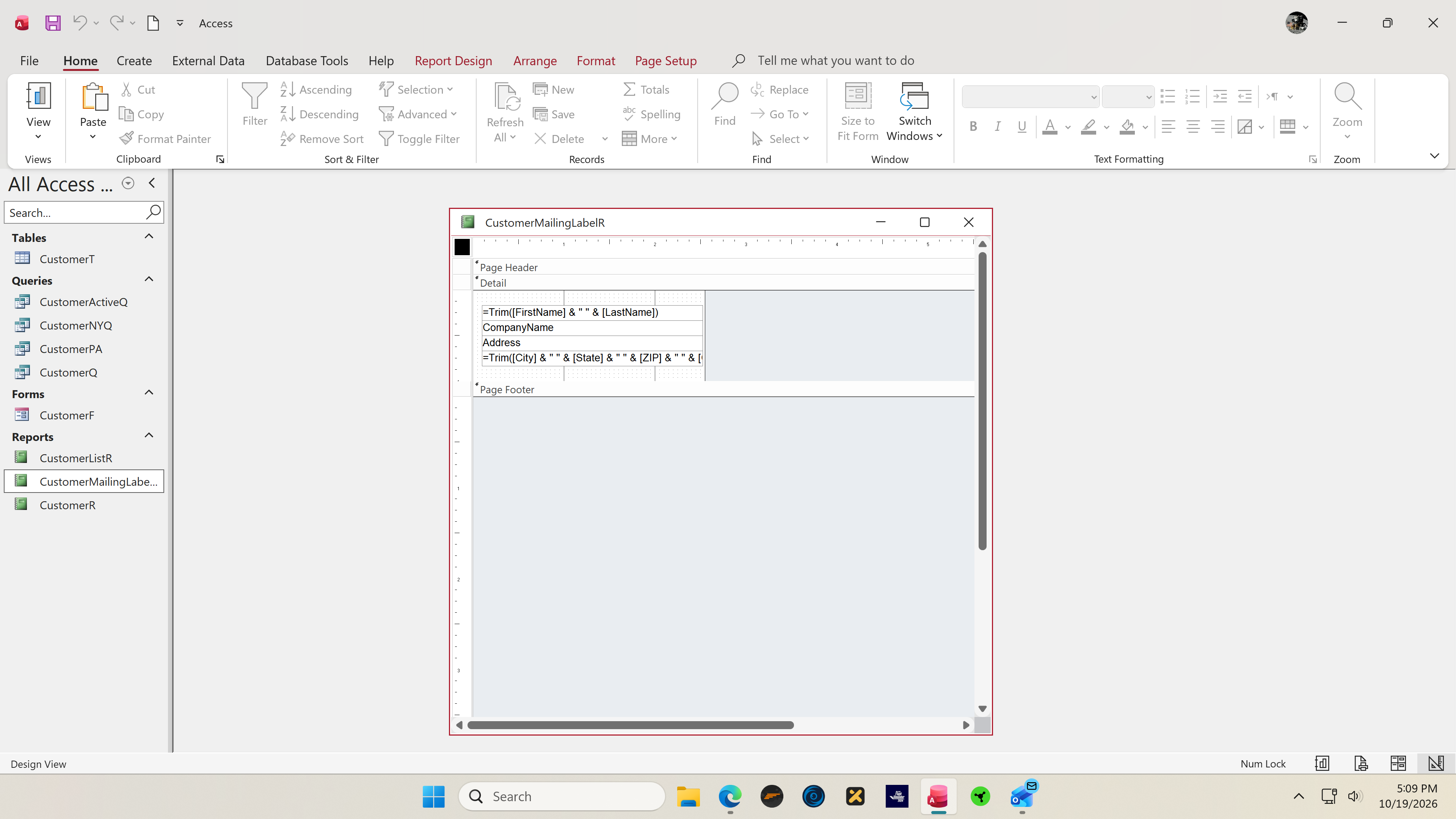
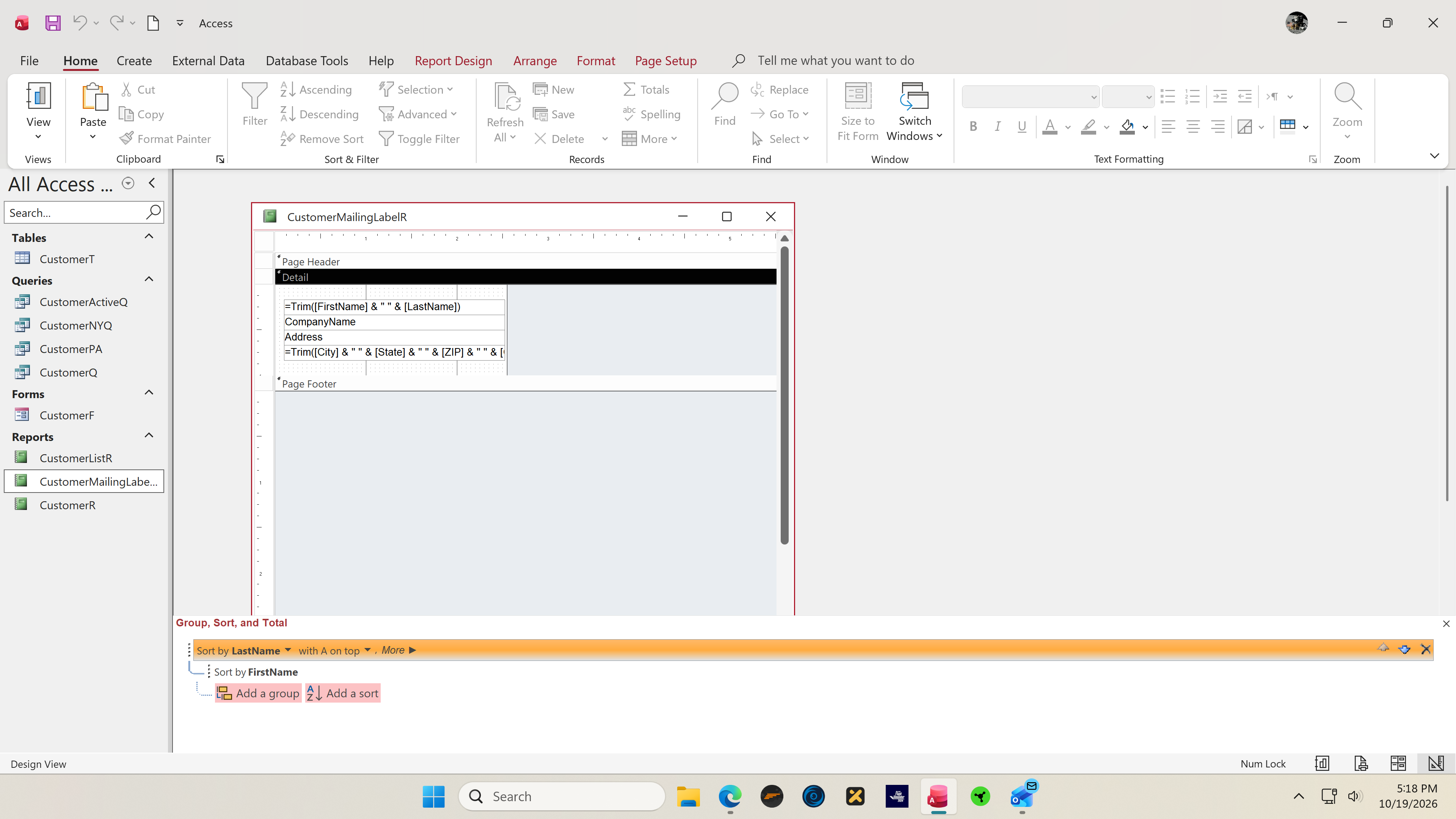
If the query opens normally, check the mailing-label report in Design View. Its Record Source should be CustomerActiveQ. Look in Group & Sort for a CustomerID reference. In this part of the lesson, the labels are sorted by LastName and then FirstName. A reference can also be in a text box's Control Source, so don't delete CustomerID from the table itself.

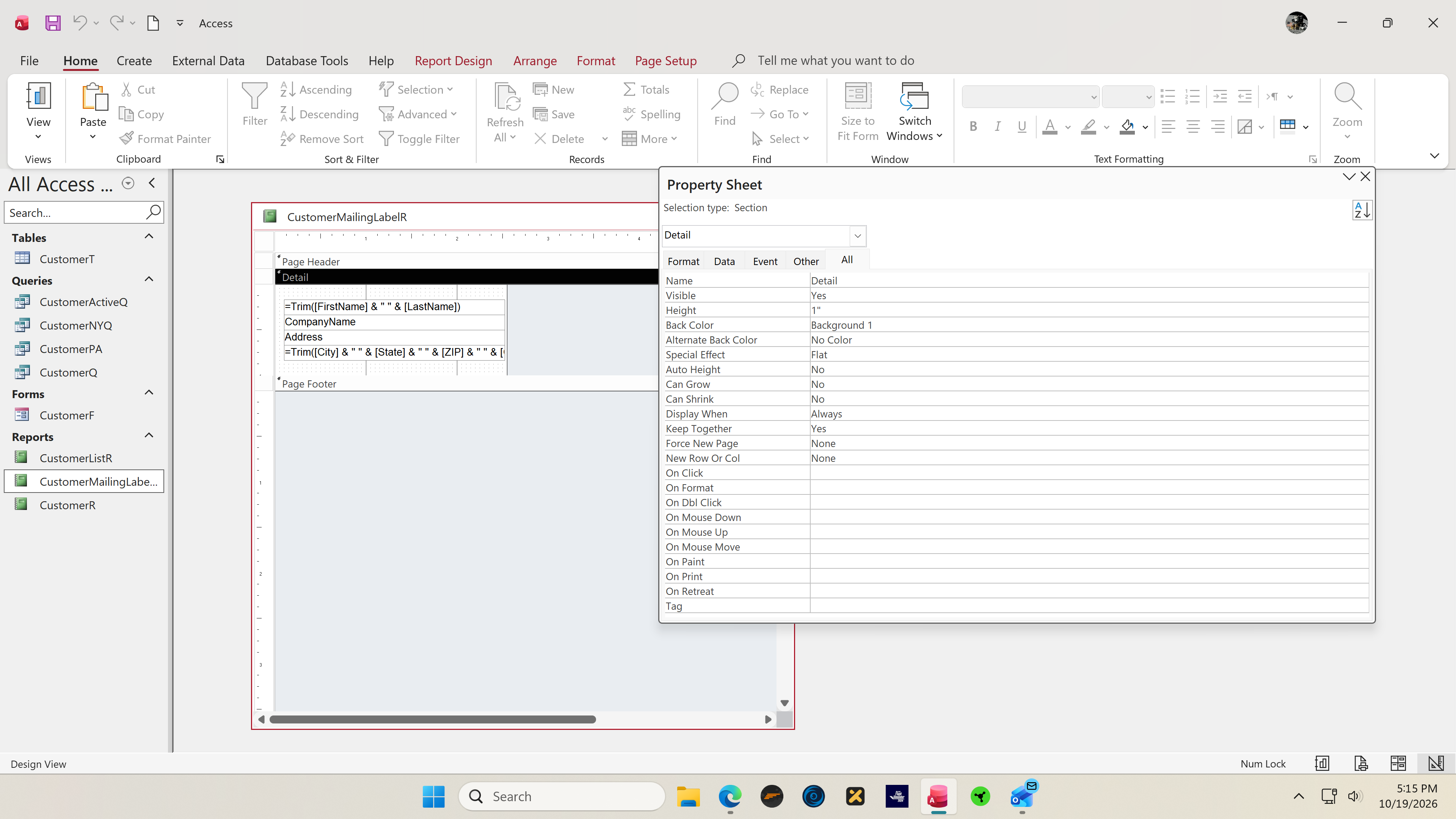
At 22:30 in this lesson I'm adjusting the label report's width. Your parameter prompt is a different issue from the horizontal-space warning shown just before that. If you don't spot the reference, post the report in Design View with its Property Sheet and Group & Sort pane visible. That will help us locate it without guessing.
Paul Jack Higginbotham OP  @Reply  
     
9 hours ago
When opening CustomerActiveQ I do not get the prompt, I get the records.

Yes, at 22:30 you click on it in Print Preview view mode and that's when I get the parameter box.

How do I get to Group & Sort? I don't see a Properties sheet choice anywhere.

Paul Jack Higginbotham OP  @Reply  
     
9 hours ago

Paul Jack Higginbotham OP  @Reply  
     
9 hours ago

Paul Jack Higginbotham OP  @Reply  
     
9 hours ago

Paul Jack Higginbotham OP  @Reply  
     
9 hours ago

Paul Jack Higginbotham OP  @Reply  
     
9 hours ago
Paul Jack My bad, right click.
Richard Rost  @Reply  
          
9 hours ago
For mailing labels, you normally wouldn't set up any grouping levels at all. Grouping and sorting are more for regular printed reports. A label report has to be formatted very specifically to line up with the physical label sheet, and grouping sections would usually throw that layout off.

The Labels Wizard already handles the sorting step. If you want the labels alphabetized, use LastName and FirstName on the wizard's sorting screen. You shouldn't need CustomerID anywhere in this label report.

Also, sorting and grouping are beyond Beginner Level 1. Don't worry if that part doesn't make sense yet. Once you get to those lessons, it'll make a lot more sense.
Kevin Robertson  @Reply  
          
9 hours ago


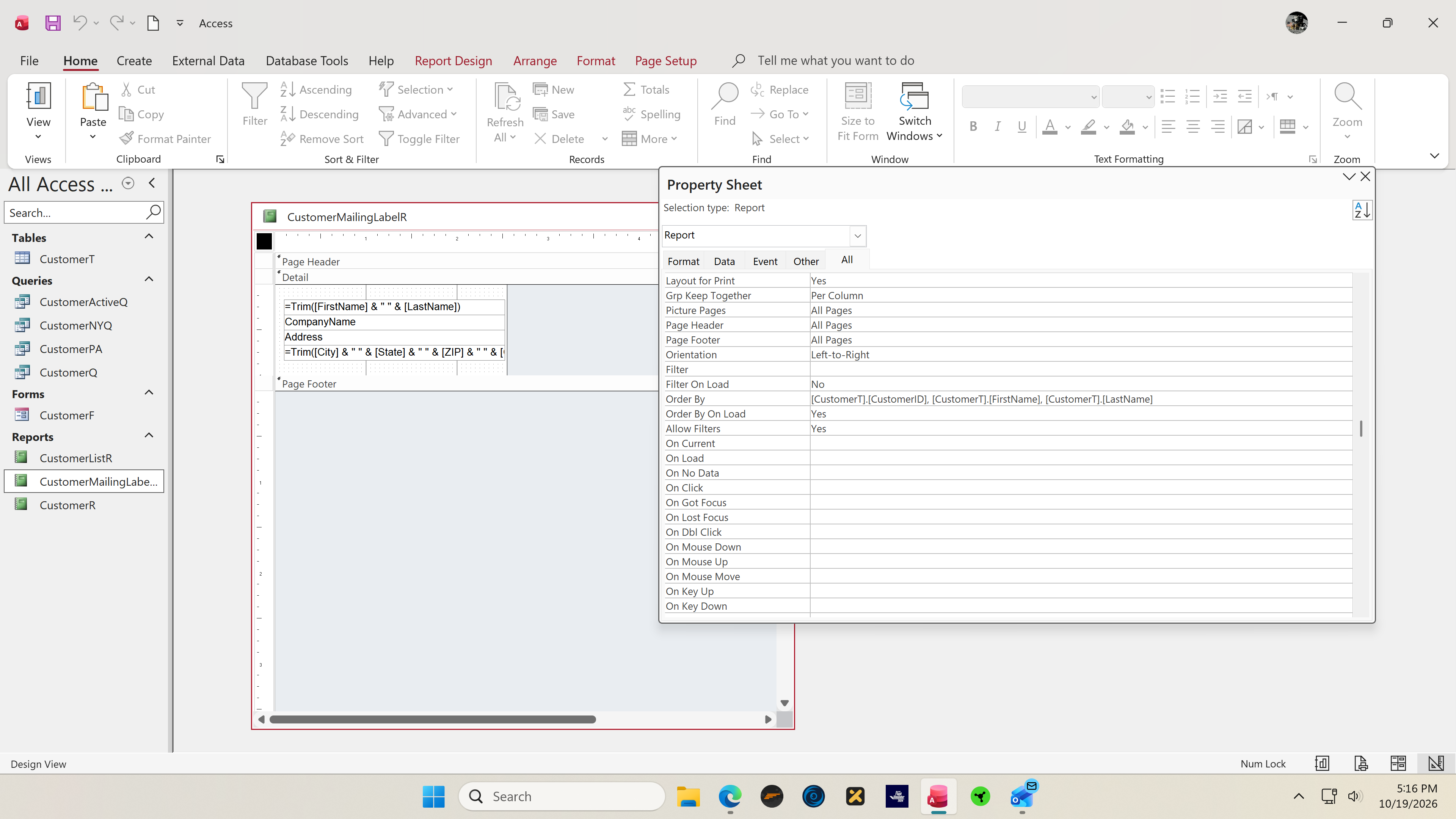
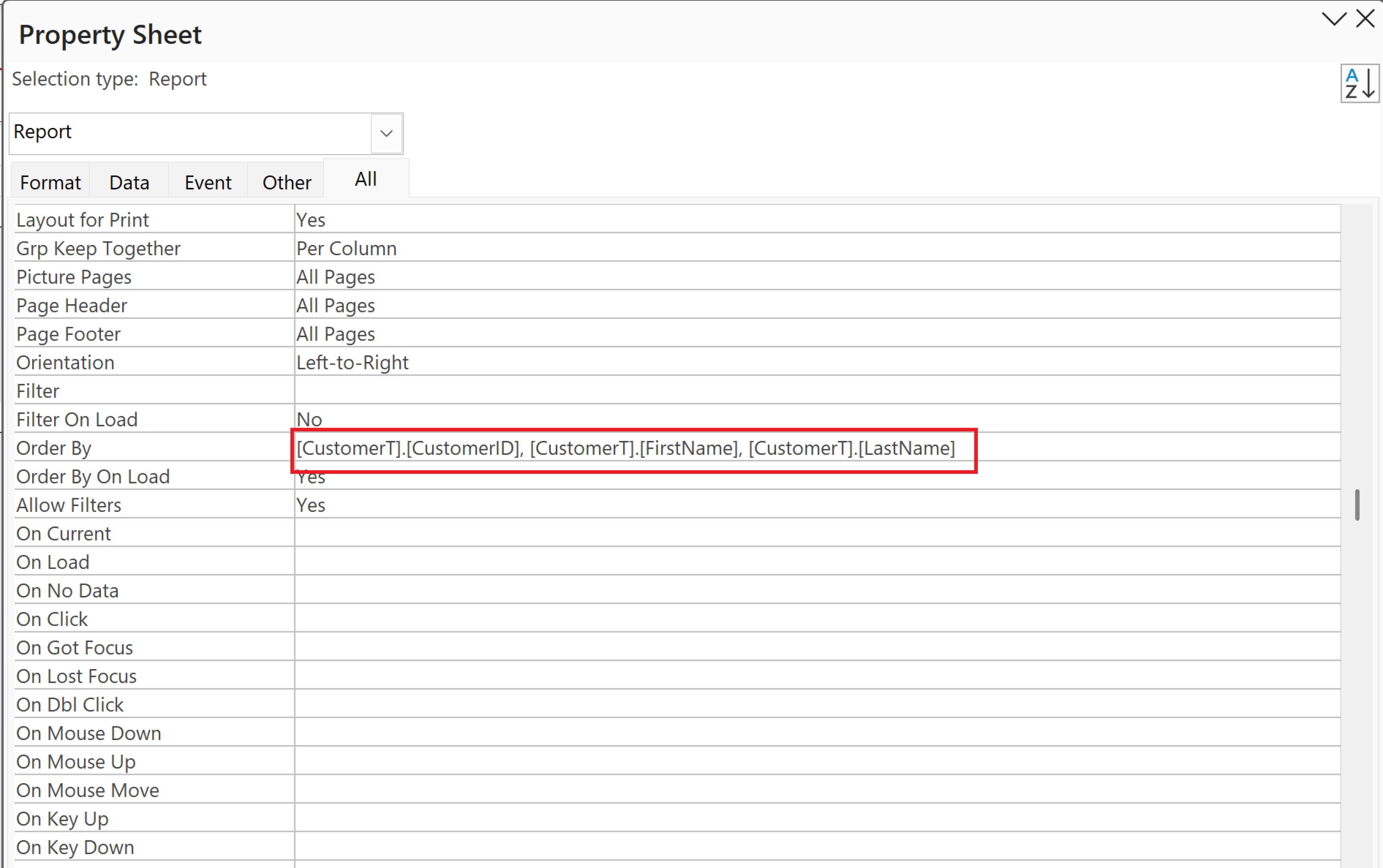
This is the reason for the Enter Parameter dialog

Paul Jack Higginbotham OP  @Reply  
     
9 hours ago
Richard Kevin But I followed along each step precisely, several times. What needs to be changed? Do I delete the [CustomerT].[CustomerID] section?
Paul Jack Higginbotham OP  @Reply  
     
9 hours ago
Kevin Ok, as a test I deleted that section and it now works, but how in the world did it get there in the first place? I have my ipad running the tutorial as I run Access on the PC and followed along very very carefully.
Richard Rost  @Reply  
          
6 hours ago
Glad that fixed it, and thanks to Kevin for spotting the exact setting. The reference was in the report's Order By property. Your other screenshot shows the LastName and FirstName sorting levels from the lesson, so you had that part right.

Access can save sorting settings with an object, so a value there doesn't necessarily mean you typed it into the Property Sheet yourself. I can't tell from these screenshots exactly when or how that CustomerID reference got there, and I don't want to guess.

Removing that invalid reference was the right fix. Save the report, close it, and reopen it in Print Preview to make sure the change sticks. No need to start the lesson over now that you've tracked it down.
Paul Jack Higginbotham OP  @Reply  
     
4 hours ago
Richard Thanks, Richard, it worked perfectly. Continuing the lessons. But fixin’ to watch some TNG.
Add a Reply Upload an Image
Next Unseen


What's This?


The following is a paid advertisement
Computer Learning Zone is not responsible for any content shown or offers made by these ads.
 

Learn
 
Access - index
Excel - index
Word - index
Windows - index
PowerPoint - index
Photoshop - index
Visual Basic - index
ASP - index
Seminars
More...
Customers
 
Login
My Account
My Courses
Lost Password
Memberships
Student Databases
Change Email
Info
 
Latest News
New Releases
User Forums
Topic Glossary
Tips & Tricks
Search The Site
Code Vault
Collapse Menus
Help
 
Customer Support
Web Site Tour
FAQs
TechHelp
Consulting Services
About
 
Background
Testimonials
Jobs
Affiliate Program
Richard Rost
Free Lessons
Mailing List
PCResale.NET
Order
 
Video Tutorials
Handbooks
Memberships
Learning Connection
Idiot's Guide to Excel
Volume Discounts
Payment Info
Shipping
Terms of Sale
Contact
 
Contact Info
Support Policy
Mailing Address
Phone Number
Fax Number
Course Survey
Email Richard
[email protected]
Blog RSS Feed    YouTube Channel

LinkedIn
Copyright 2026 by Computer Learning Zone, Amicron, and Richard Rost. All Rights Reserved. Current Time: 10/20/2026 2:14:52 AM. PLT: 1s