Free Lessons
Courses
Seminars
TechHelp
Fast Tips
Templates
Topic Index
Forum
ABCD
 
Home   Courses   TechHelp   Help   Contact   Merch   Join   Order   Logon   Forums   
 
Back to Access Forum    Comments List
Upload Images | @Reply | Bookmark | Link | Email | Next Unseen |
How to Build Photo Album
David Clement 
      
9 hours ago
Hello Richard and others,
I know I have talked a lot about adding images to a database in the past several days. What I have built works and runs well with a bunch of help from you all here.
But they are so basic looking.
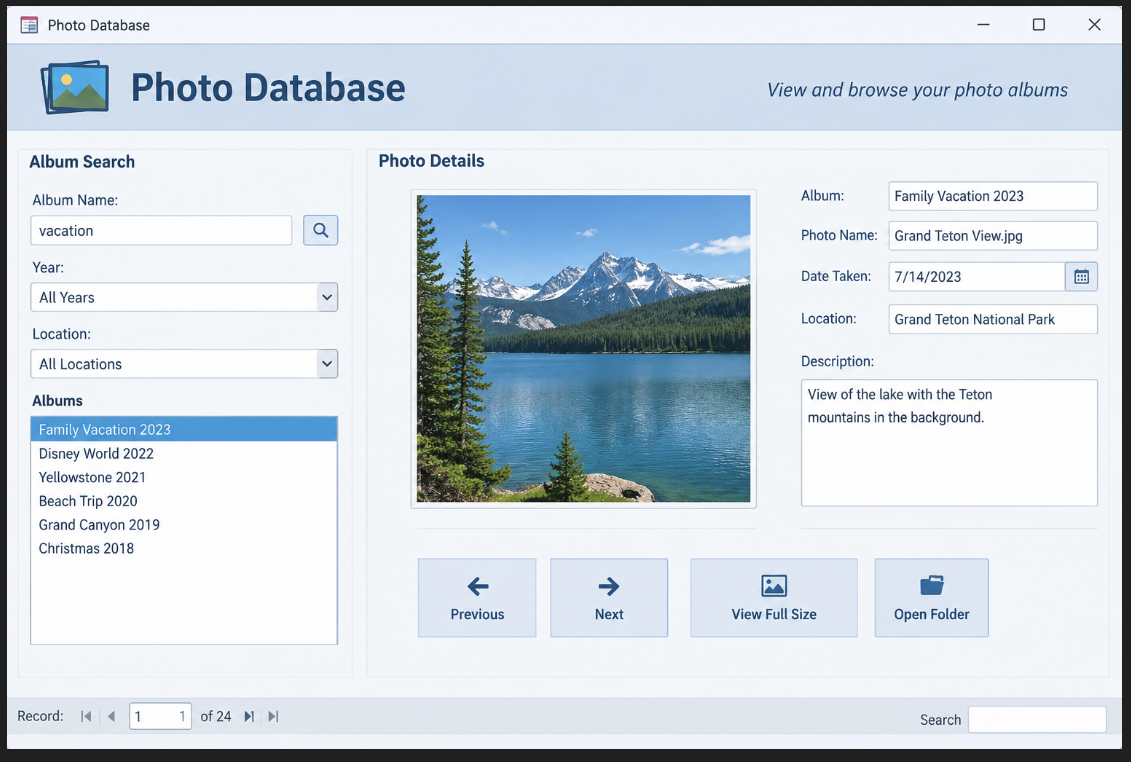
My question now is, has anyone ever built an actual Photo Album Database? I would like to build something similar to the sample Mock Up Image that ChatGPT created.
I am just not exactly sure how to start one, and have it look as nice as the sample.
Maybe a demo?
Thank you!
David Clement OP  @Reply  
      
9 hours ago

David Clement OP  @Reply  
      
9 hours ago
I get some of it, but not all of it. I still get hung up on the image files.

"Don't let them promote you, don't let them transfer you, don't let them do anything that takes you off the bridge of that ship, because while you're there, you can make a difference".

James T. Kirk, Star Trek Generations
Richard Rost  @Reply  
          
8 hours ago
David, that mockup is a reasonable goal for an Access form. You already have the basic image database working, so I would build on that rather than start over. Separate getting the photos to display reliably from making the form look like the mockup.

Start with just a few photos. Keep the image files in a stable folder outside the database, store each full path and filename in a Short Text field, and set an image control's Control Source to that field. My Images video demonstrates that part. The free video covers displaying the image; the Extended Cut adds a browse button for choosing the file.

For albums, if each photo belongs to one album, use an AlbumT and put its AlbumID in PhotoT. If a photo can belong to several albums, that needs a junction table instead. Once the photo display works, add the album selector, then the search options and buttons. Leave the colors and layout until last. One working piece at a time.
Add a Reply Upload an Image
Next Unseen


What's This?


The following is a paid advertisement
Computer Learning Zone is not responsible for any content shown or offers made by these ads.
 

Learn
 
Access - index
Excel - index
Word - index
Windows - index
PowerPoint - index
Photoshop - index
Visual Basic - index
ASP - index
Seminars
More...
Customers
 
Login
My Account
My Courses
Lost Password
Memberships
Student Databases
Change Email
Info
 
Latest News
New Releases
User Forums
Topic Glossary
Tips & Tricks
Search The Site
Code Vault
Collapse Menus
Help
 
Customer Support
Web Site Tour
FAQs
TechHelp
Consulting Services
About
 
Background
Testimonials
Jobs
Affiliate Program
Richard Rost
Free Lessons
Mailing List
PCResale.NET
Order
 
Video Tutorials
Handbooks
Memberships
Learning Connection
Idiot's Guide to Excel
Volume Discounts
Payment Info
Shipping
Terms of Sale
Contact
 
Contact Info
Support Policy
Mailing Address
Phone Number
Fax Number
Course Survey
Email Richard
[email protected]
Blog RSS Feed    YouTube Channel

LinkedIn
Copyright 2026 by Computer Learning Zone, Amicron, and Richard Rost. All Rights Reserved. Current Time: 10/26/2026 4:46:13 AM. PLT: 1s