Free Lessons
Courses
Seminars
TechHelp
Fast Tips
Templates
Topic Index
Forum
ABCD
 
Home   Courses   TechHelp   Help   Contact   Merch   Join   Order   Logon   Forums   
 
Home > TechHelp > Directory > Access > Large Check Box > Missing FormatToggleButtons Procedure by Luke Shockley >
Back to Large Check Box    Comments List
Upload Images | @Reply | Bookmark | Link | Email | Next Unseen |
Missing FormatToggleButtons Procedure
Luke Shockley 
       
4 days ago
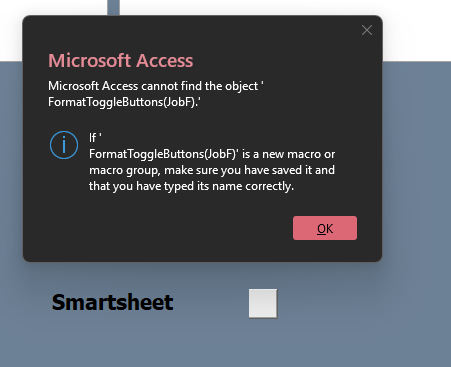
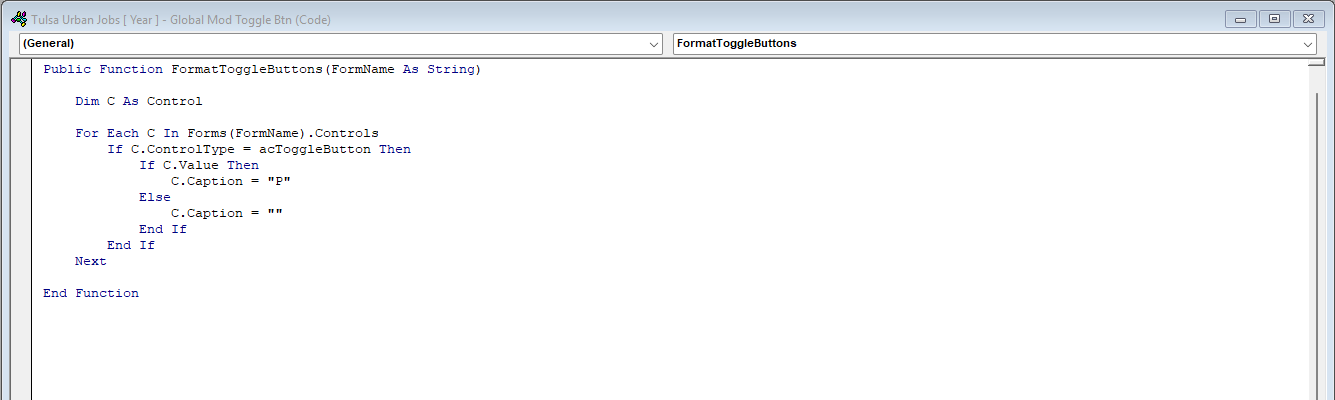
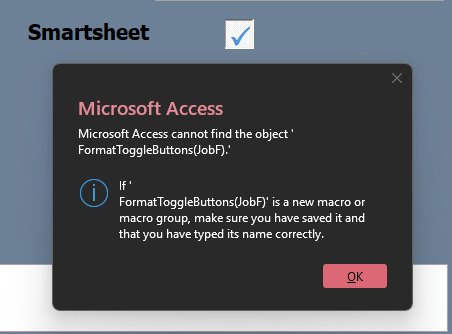
I've followed Richard's video to a tee ( I thought ) . But i am getting a "Access cannot find FormatToggleButtons" error
Luke Shockley OP  @Reply  
       
4 days ago

Luke Shockley OP  @Reply  
       
4 days ago

Luke Shockley OP  @Reply  
       
4 days ago

Luke Shockley OP  @Reply  
       
4 days ago

Richard Rost  @Reply  
          
4 days ago
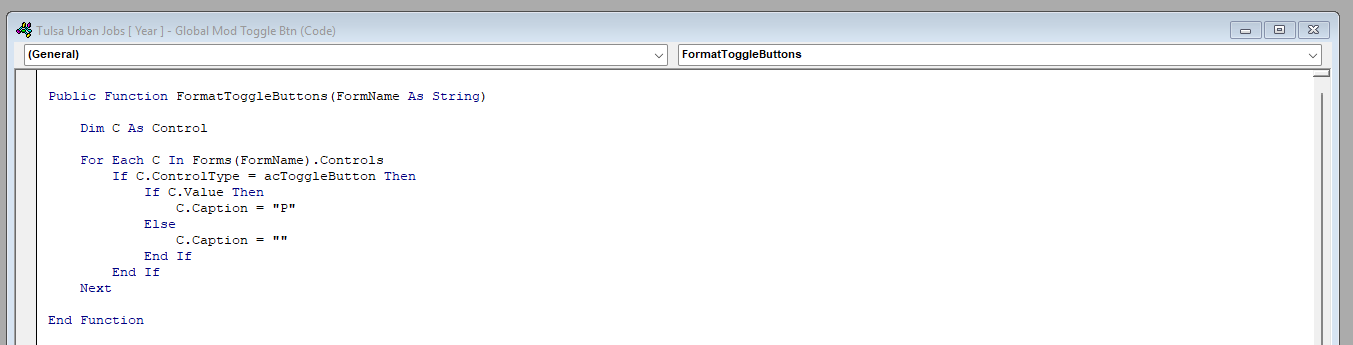
Luke, your screenshots show that the function is there. That particular error indicates Access is looking for a macro, so check the event property that calls it.

In Design View, select the toggle button and set its After Update property to =FormatToggleButtons("JobF"). Include the leading equals sign and the quotes around JobF. That's the function-handler syntax used in the Extended Cut.

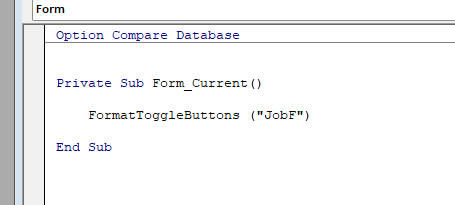
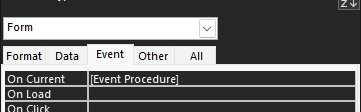
For the form's On Current property, select [Event Procedure], since you already have the call inside Form_Current. Keep that VBA call without a leading equals sign. Save, close, and reopen the form. If it still complains, post a screenshot of the toggle button's Event tab and the form's On Current property so we can check exactly what's entered there.
Luke Shockley OP  @Reply  
       
4 days ago
Thanks, Richard. I've looked at it again still don't see it.
Here are the screenshots you asked for. Thanks for you help
Luke Shockley OP  @Reply  
       
4 days ago

Luke Shockley OP  @Reply  
       
4 days ago

Luke Shockley OP  @Reply  
       
4 days ago

Luke Shockley OP  @Reply  
       
4 days ago

Luke Shockley OP  @Reply  
       
4 days ago
It's working on another form so I'm sure it's something I did. I even copy & paste and changed the form name to the correct one still nothing.
Richard Rost  @Reply  
          
4 days ago
Thanks, Luke. These new screenshots show the expected function call in After Update, [Event Procedure] in On Current, and the call inside Form_Current. I don't see a typo in those entries.

Next, in the VBA editor, choose Debug, then Compile. If it reports an error, post the exact message and the line it highlights. If it compiles, reopen the form and tell us whether the error appears when the form opens or only when you click a particular toggle button. Please include a screenshot of the current error message, since it may have changed. That will help us narrow down the next step rather than changing code that already looks right.
Donald Blackwell  @Reply  
        
4 days ago
If you're still getting the [same] error after following Richard's last instructions, I would look to verify that there are no other events that are running either that function or a macro in the form, or detail section.

If you continue to get the same error you first showed, the one thing I'm noticing is that in your call to FormatToggleButtons in that error message, JobF is not in quotes so wherever it is being called from is looking for an object or control called JobF instead of the string "JobF"
Luke Shockley OP  @Reply  
       
4 days ago
Richard,
Did the debug, everything was good clicked on the ONLY toggle button ( Smartsheet ) on the form. and got the same error message again. Closed Access down and opened the form everything was good then I clicked the toggle button check box and got the same message.

Donald, I noticed that also but looked at everything I have related to this form and code. I just dunno.
Luke Shockley OP  @Reply  
       
4 days ago

Kevin Robertson  @Reply  
          
4 days ago
I would try deleting the Toggle Button, then re-add it. The problem may be with the control itself.
Do a Global search for FormatToggleButtons(JobF)

Also add Option Explicit to each of your code modules.
Kevin Robertson  @Reply  
          
4 days ago
You could also try performing a Compact & Repair.
Luke Shockley OP  @Reply  
       
4 days ago
Richard,
I don't know what it was but, I deleted the it and created a new on and it works like a charm..
Thank both of you for your help in this issue.
And Richard Keep Making those videos.
They are helpful and I don't have to keep posting in the forum asking stupid question.
And also sorry for your loss.
Luke Shockley OP  @Reply  
       
4 days ago
Kevin,
Thank you for your comment I didn't see it and just posted that I deleted it.
Richard Rost  @Reply  
          
4 days ago
Glad you got it working, Luke. Sometimes a control just gets itself into a weird state, and recreating it is the quickest fix.

And don't worry about asking questions. That's what the forum is for. Thanks for the kind words.
Add a Reply Upload an Image
Next Unseen


What's This?


The following is a paid advertisement
Computer Learning Zone is not responsible for any content shown or offers made by these ads.
 

Learn
 
Access - index
Excel - index
Word - index
Windows - index
PowerPoint - index
Photoshop - index
Visual Basic - index
ASP - index
Seminars
More...
Customers
 
Login
My Account
My Courses
Lost Password
Memberships
Student Databases
Change Email
Info
 
Latest News
New Releases
User Forums
Topic Glossary
Tips & Tricks
Search The Site
Code Vault
Collapse Menus
Help
 
Customer Support
Web Site Tour
FAQs
TechHelp
Consulting Services
About
 
Background
Testimonials
Jobs
Affiliate Program
Richard Rost
Free Lessons
Mailing List
PCResale.NET
Order
 
Video Tutorials
Handbooks
Memberships
Learning Connection
Idiot's Guide to Excel
Volume Discounts
Payment Info
Shipping
Terms of Sale
Contact
 
Contact Info
Support Policy
Mailing Address
Phone Number
Fax Number
Course Survey
Email Richard
[email protected]
Blog RSS Feed    YouTube Channel

LinkedIn
Copyright 2026 by Computer Learning Zone, Amicron, and Richard Rost. All Rights Reserved. Current Time: 11/5/2026 12:30:18 AM. PLT: 1s