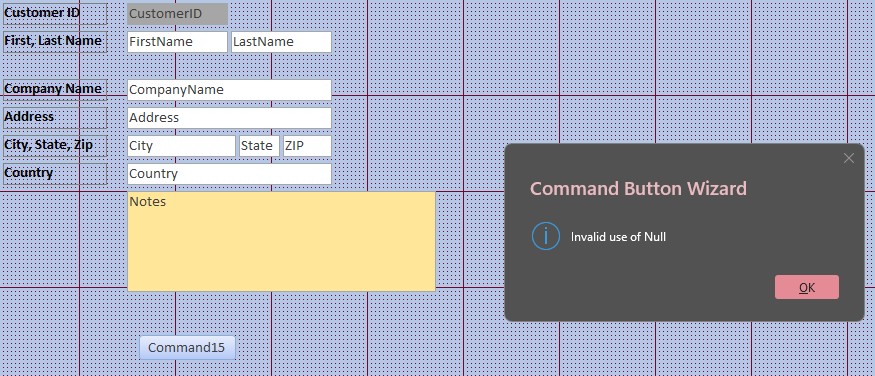
I am in Level 2 Videos, Appointment Forms. When I get to adding a Command Button to the CustomerF form I get an error message (Command Button Wizard - Invalid use of Null). Up to now everything has worked properly while following your lessons. What did I do wrong?
That sounds like a wizard issue, not necessarily something you did wrong. Work through the troubleshooting steps here and let me know what you've tried:
Also, does the error happen as soon as you click the Command Button tool, or after you place the button on the form and the wizard starts? A screenshot of the error and the exact steps leading up to it would help narrow it down.
Thanks for the screenshot, Steven. That is the Command Button Wizard displaying "Invalid use of Null" while your form is in Design View. It doesn't look like normal behavior, and it doesn't necessarily mean you did anything wrong in the lesson.
Start with the simple checks from the troubleshooter: close and reopen Access, and if that doesn't help, restart Windows using Restart. Sometimes a good reboot is all it takes.
If it still happens, try adding a command button to a simple form in a new blank database. If the wizard works there, that points us back toward this database or form. If it fails there too, we're looking at a more general Access/wizard problem. Let me know which test fails and whether the message appears immediately after placing the button or after making a selection in the wizard.
Sorry, only students may add comments.
Click here for more
information on how you can set up an account.
If you are a Visitor, go ahead and post your reply as a
new comment, and we'll move it here for you
once it's approved. Be sure to use the same name and email address.