Free Lessons
Courses
Seminars
TechHelp
Fast Tips
Templates
Topic Index
Forum
ABCD
 
Home   Courses   TechHelp   Help   Contact   Merch   Join   Order   Logon   Forums   
 
Back to Access Forum    Comments List
Upload Images | @Reply | Bookmark | Link | Email | Next Unseen |
Copy Message Box Text to Clipboard
John Davy 
         
2 days ago
Microsoft let us copy info from a message box.  I don't see any harm being done if they would do that for us. John
Alex Hedley  @Reply  
           
2 days ago
Some windows messages boxes will do that, it doesn't have a copy button but if you try a Ctrl+ C it will go into your clipboard.
Alex Hedley  @Reply  
           
2 days ago
Kevin Yip  @Reply  
     
2 days ago
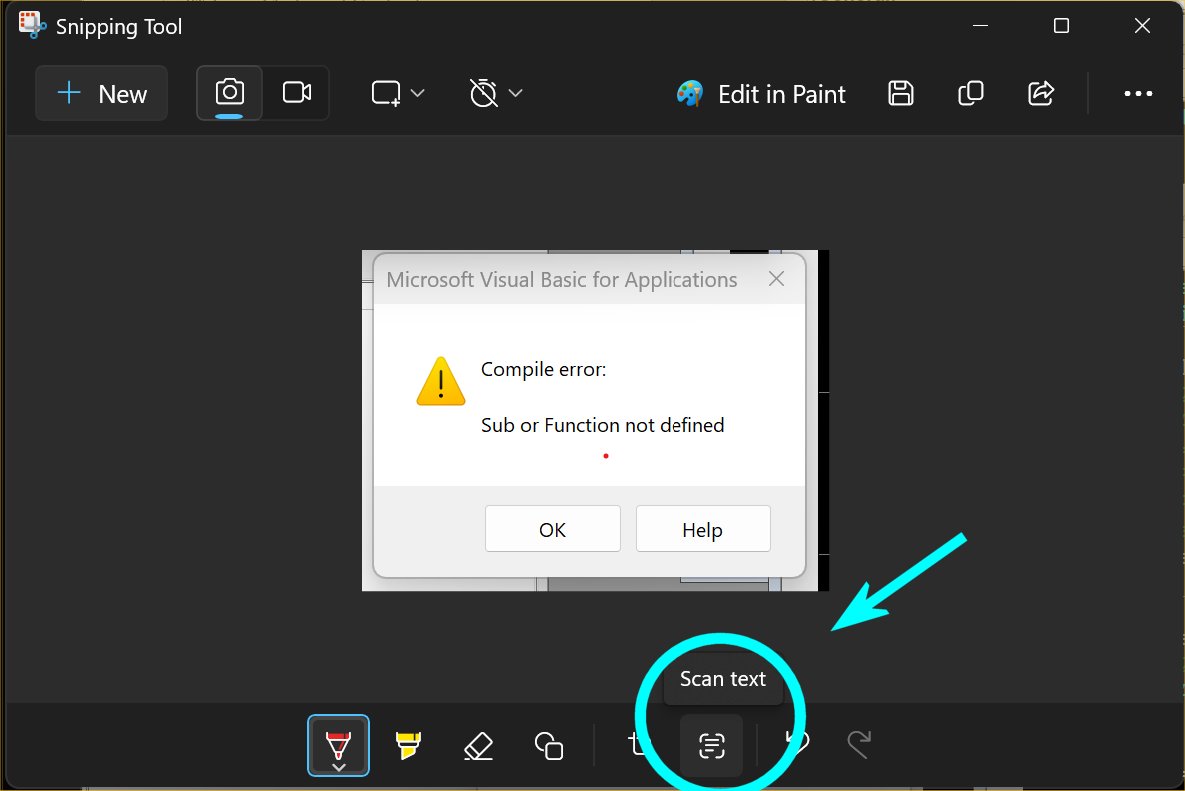
You can use screen capture to save the image of the error.  If you need text recognition, Windows 11 has a built-in Snipping Tool that has a "Scan text" feature that does that (pictured below).  Today's smartphones can recognize text from images too, so you can also take a photo of your monitor with your phone to do the same thing.

Kevin Yip  @Reply  
     
2 days ago

Kevin Yip  @Reply  
     
2 days ago
Ideally, we should write VBA that automatically saves an error message to our database, together with all contextual info such as which line the error occurred in, what values were in variables X and Y, etc., in order to have the best error-handling.  But creating such a system is a daunting task.  Screenshots are nice, but they don't have the contextual info.
Richard Rost  @Reply  
           
2 days ago
John, Ctrl+C is worth a try while the message box is active. Paste into Notepad to see whether it copied the text. If it doesn't, Kevin's Snipping Tool suggestion can get you the text if it's a box you don't control. As Kevin points out, that still won't tell you what led up to the error.

If it's a message in your own database and people need to copy it regularly, my Custom MsgBox lesson shows how to build a dialog form. Put the message in a locked text box so people can select and copy it without editing it.
Richard Rost  @Reply  
           
2 days ago
One other option, John: If it's your own VBA message box, put the message in a string, copy that string to the clipboard, and then display it with MsgBox. That way the text is already there to paste. The Extended Cut of my Write to Clipboard lesson shows how to write a string directly to the Windows clipboard. The Code Vault example shows the related method for copying text from a form field. I'd use automatic copying only when users expect it, since it replaces whatever they already copied.
John Davy OP  @Reply  
         
2 days ago
I do a workaround as many of you do. My point is why should we have to do that. It is not as though we are going to breach security with text from a message that is not easy to copy.  John
Kevin Yip  @Reply  
     
2 days ago
John  With the Snipping Tool, you only need 3 clicks to copy the text, which should be convenient enough.  And if you need to do this so often that you need a near hands-off solution and/or you need it long-term, consider an error-handling system with VBA like I mentioned.  Access is a development tool, so that's why "we have to do it," because Access doesn't come with a lot of ready-made solutions.  Most of the solutions are supposed to be developed by us with the tools Access provides.

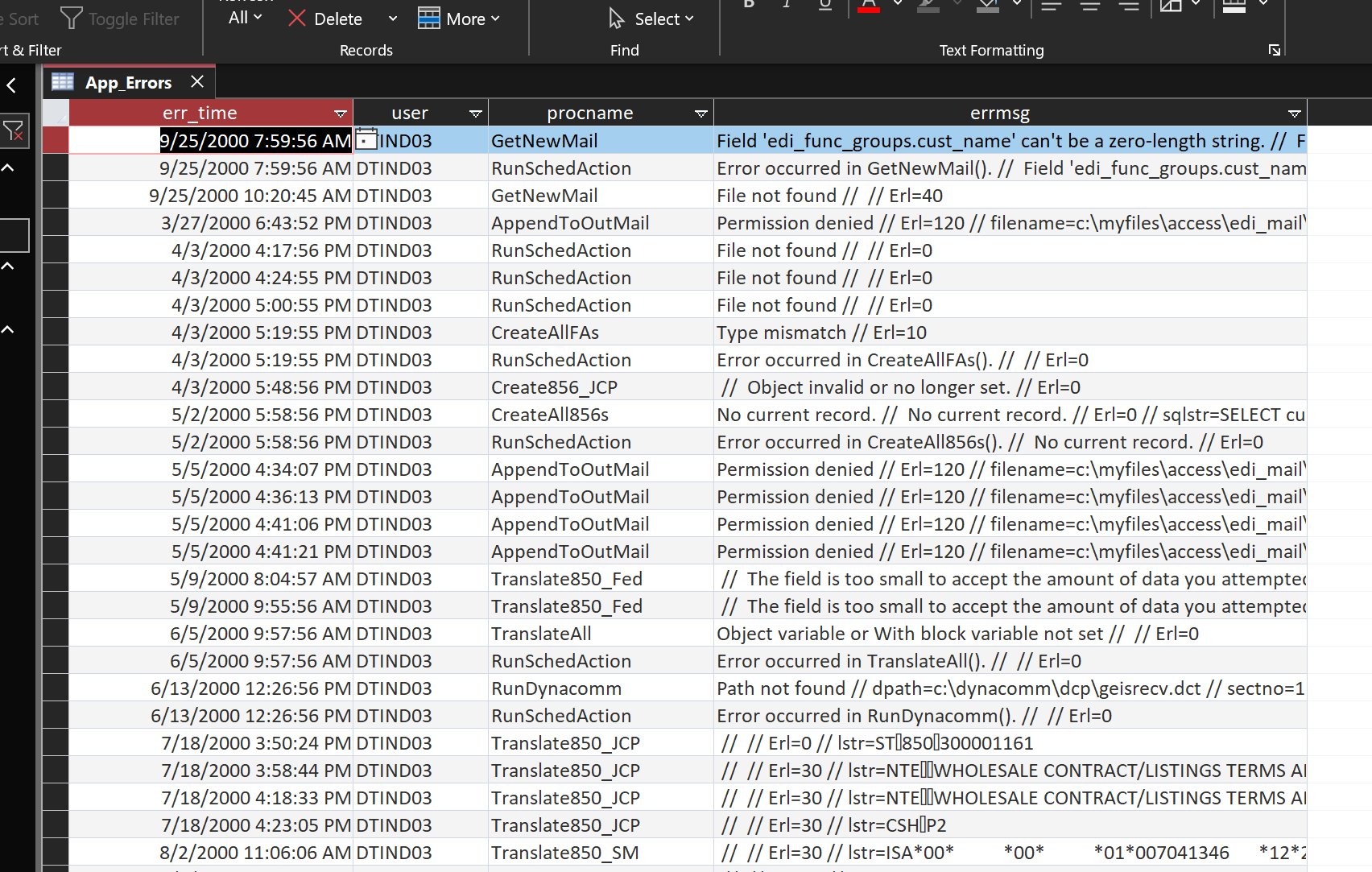
I don't know if Richard has a course on error handlers.  As I mentioned, it's a daunting task, but a few videos from Richard should at least show what is involved.  A system like that would be truly hands-off: any errors that occur would be automatically logged straight into your database without halting execution.  During down time, you could then review the logs and troubleshoot.  I did something like that in my old job, pictured below.  When an error occurred, the date, time, procedure name, and all the contextual info were all collected.  Screenshots help little, because you need to know so much more about an error: which procedure did it occur in, which line had the error, under what conditions did it occur, etc.
Kevin Yip  @Reply  
     
2 days ago

Richard Rost  @Reply  
           
2 days ago
Fair point, John. You were asking for a built-in Copy button, not another workaround. I'd like to see that too, especially when someone needs to paste the exact wording into a support post.

Kevin, thanks for bringing up error logging. That's a separate but useful point: for an app you maintain, the error number, description, and procedure name can tell you more than the message alone. My Error Handling video covers how to trap errors in VBA, which is the starting point for a log like that.
Add a Reply Upload an Image
Next Unseen


What's This?


The following is a paid advertisement
Computer Learning Zone is not responsible for any content shown or offers made by these ads.
 

Learn
 
Access - index
Excel - index
Word - index
Windows - index
PowerPoint - index
Photoshop - index
Visual Basic - index
ASP - index
Seminars
More...
Customers
 
Login
My Account
My Courses
Lost Password
Memberships
Student Databases
Change Email
Info
 
Latest News
New Releases
User Forums
Topic Glossary
Tips & Tricks
Search The Site
Code Vault
Collapse Menus
Help
 
Customer Support
Web Site Tour
FAQs
TechHelp
Consulting Services
About
 
Background
Testimonials
Jobs
Affiliate Program
Richard Rost
Free Lessons
Mailing List
PCResale.NET
Order
 
Video Tutorials
Handbooks
Memberships
Learning Connection
Idiot's Guide to Excel
Volume Discounts
Payment Info
Shipping
Terms of Sale
Contact
 
Contact Info
Support Policy
Mailing Address
Phone Number
Fax Number
Course Survey
Email Richard
[email protected]
Blog RSS Feed    YouTube Channel

LinkedIn
Copyright 2026 by Computer Learning Zone, Amicron, and Richard Rost. All Rights Reserved. Current Time: 11/27/2026 12:56:56 AM. PLT: 0s