Free Lessons
Courses
Seminars
TechHelp
Fast Tips
Templates
Topic Index
Forum
ABCD
 
Home   Courses   TechHelp   Forums   Help   Contact   Merch   Join   Order   Logon  
 
Back to Access Forum    Comments List
Upload Images   @Reply   Bookmark    Link   Email   Next Unseen 
Products not sorting correctly
Michelle Seidelin 
    
5 years ago
Hello Richard

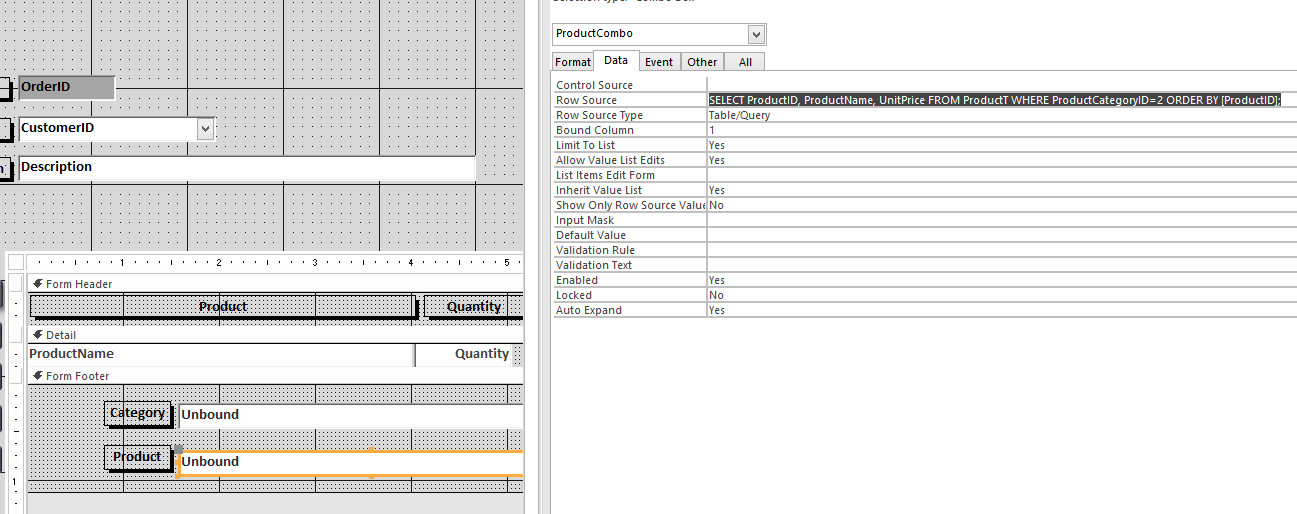
I have discovered a problem with my products is not sorting correctly here is the information from the sort order

SELECT ProductID, ProductName, UnitPrice FROM ProductT WHERE ProductCategoryID=2 ORDER BY [ProductID];

As you can see I am trying to sort it by product ID but it will not sort

Michelle
Alex Hedley  @Reply  
           
5 years ago
Where is it not sorting correctly?
A Form, a Report, a Control like a dropdown?
If you run this as just a Query in the editor is it correct?

Does it appear to be sorting in an particular order?
Richard Rost  @Reply  
          
5 years ago
Remember a sort in a report or a form will override the underlying query
Michelle Seidelin OP  @Reply  
    
5 years ago
Hello Richard and Alex

I thought I had said it was in a combo box not sorting properly as you can see I have it set to sort by in the product ID in the combo box but it seems to be sorting still alphabetically I have checked the table and it is correct as far as the items are in order that I wanted it to be but for some reason it is not displaying it correctly in the combo drop down this is after had it built and level 22 in the experts series
Richard Rost  @Reply  
          
5 years ago
The order of the records in the table is meaningless. If that is indeed the SQL in the combo box then your data should sort by ID.
Michelle Seidelin OP  @Reply  
    
5 years ago
Hello Richard

It is being told to sort by product ID but it is not doing it as you will see in my original message I have order by product ID
Alex Hedley  @Reply  
           
5 years ago
If you save that query and an object in your db does it sort correctly?
Then could you try setting the Combo to that object instead of a SQL string.
Richard Rost  @Reply  
          
5 years ago
I understand what you're saying. What I'm saying is that the SQL you wrote above is correct. That will sort by ProductID. However, something else AFTER that might be changing it. If you put a bunch of records in a table, they're not sorted. If you make a QUERY and then sort by ProductID, then your list will be sorted by ProductID. Now if you use that query in a COMBO BOX or a REPORT and you specify another sort in either of those, your list will now be sorted by THE LATEST CRITERIA. The combo box SQL or the report SQL will override the query settings.
Michelle Seidelin OP  @Reply  
    
5 years ago
Good morning Richard it is 3:30 am and I have found where the problem lies with this problem I'm having with the cascading combo boxes if I change the sort order in products in the product combo box it works correctly but as soon as I I selected an item in the categories the problem is back in the only way of getting it to resort is to close the database completely down and restart and go to the product combo box again and they sort is back the way I wanted by products please let me know when you're ready for more information and I will email you with more details of what order things should show up in

Michelle
Richard Rost  @Reply  
          
5 years ago
Glad you figured it out.
Michelle Seidelin OP  @Reply  
    
5 years ago
Can you sort items in product table by product ID this was originally built in developer 6I do not want to sort it by product name as it does not keep it in the correct order in the combo box after selecting the category
Alex Hedley  @Reply  
           
5 years ago
I thought you'd got this working?
You mentioned Cascading Combo in the original title, which combo isn't sorting?
You select a Product and that filters a second combo with what items?
Michelle Seidelin OP  @Reply  
    
5 years ago
Hello Alex

Richard has been working on this it looks like what I was trying to do is not possible sorted by product ID well that's what Richard said and a private email today I just thought there may be another way around it by putting another column in or something to sort by which would keep their products in order
Alex Hedley  @Reply  
           
5 years ago
A QUERY should sort by the ORDER BY you have set, not knowing the full ins/outs I can only offer help with the info provided.
You could add a Sort column then use that in your ORDER BY but if the above isn't working I'm not sure why this column would over your other.

Do you have a simple example of what you are trying to do and what isn't working.
Michelle Seidelin OP  @Reply  
    
5 years ago
Hello Alex I can send you a link to a video in my one drive showing you what the problem is if you think that would help but I would prefer not to send it in the open forum but will if necessary then you would be able to have a look at the whole query I have got this was built with developer 6 listen 3I think
Michelle Seidelin OP  @Reply  
    
5 years ago
Any help you can give me would be gratefully appreciated and I need to get this up and running properly before having to payout a lot of money for a hip replacement
Alex Hedley  @Reply  
           
5 years ago
Unfortunately I don't have time to look at anything atm, maybe a fellow Developer could take a look if you post your question in the AccessDev.NET
Michelle Seidelin OP  @Reply  
    
5 years ago
Thank you Alex I had posted something on that website you pointed me towards just hope someone can help maybe with this problem thank you Michelle
Richard Rost  @Reply  
          
5 years ago
I explained this to you in an email. All you have to do is change the RowSource property of the combo box so that it says "ORDER BY ProductID" instead of "ORDER BY ProductName".
Richard Rost  @Reply  
          
5 years ago

Michelle Seidelin OP  @Reply  
    
5 years ago
Problem solved thank you Richard
Richard Rost  @Reply  
          
5 years ago
You are very welcome.

This thread is now CLOSED. If you wish to comment, start a NEW discussion in Access Forum.
 

Next Unseen

 
New Feature: Comment Live View


The following is a paid advertisement
Computer Learning Zone is not responsible for any content shown or offers made by these ads.
 

Learn
 
Access - index
Excel - index
Word - index
Windows - index
PowerPoint - index
Photoshop - index
Visual Basic - index
ASP - index
Seminars
More...
Customers
 
Login
My Account
My Courses
Lost Password
Memberships
Student Databases
Change Email
Info
 
Latest News
New Releases
User Forums
Topic Glossary
Tips & Tricks
Search The Site
Code Vault
Collapse Menus
Help
 
Customer Support
Web Site Tour
FAQs
TechHelp
Consulting Services
About
 
Background
Testimonials
Jobs
Affiliate Program
Richard Rost
Free Lessons
Mailing List
PCResale.NET
Order
 
Video Tutorials
Handbooks
Memberships
Learning Connection
Idiot's Guide to Excel
Volume Discounts
Payment Info
Shipping
Terms of Sale
Contact
 
Contact Info
Support Policy
Mailing Address
Phone Number
Fax Number
Course Survey
Email Richard
[email protected]
Blog RSS Feed    YouTube Channel

LinkedIn
Copyright 2026 by Computer Learning Zone, Amicron, and Richard Rost. All Rights Reserved. Current Time: 5/6/2026 5:41:19 AM. PLT: 1s