Free Lessons
Courses
Seminars
TechHelp
Fast Tips
Templates
Topic Index
Forum
ABCD
 
Home   Courses   TechHelp   Forums   Help   Contact   Merch   Join   Order   Logon  
 
Back to Access Forum    Comments List
Upload Images   @Reply   Bookmark    Link   Email   Next Unseen 
Navigation Pane
Joseph Messina 
    
5 years ago
Hi Richard

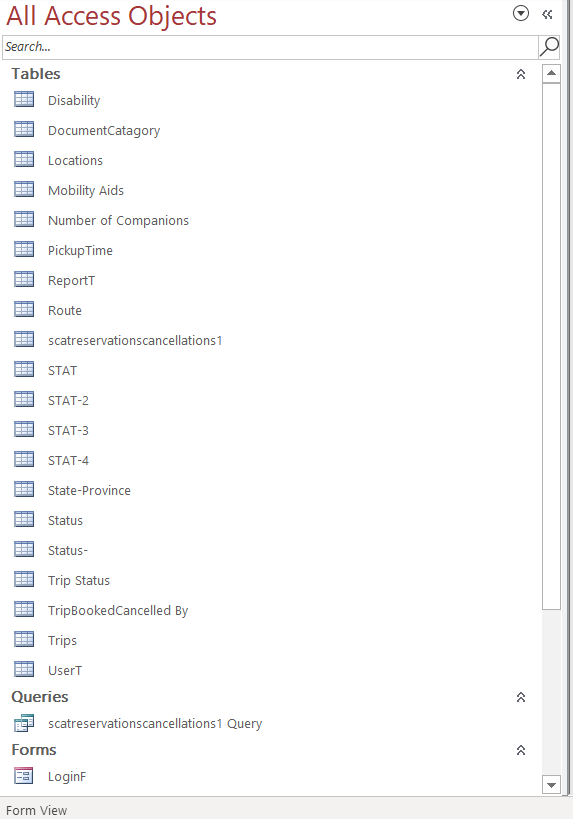
    How can I fix the navigation pane in Access database?  Everytime I go into a database on my laptop the navigation pane is where i cannot see all the tsbles, queries, forms and reports etc.  It is almost like that is calapsed.  I hsve to keep on moving it back where i can see everythibg.  When i'm ina database in Access on my dedktop it is fine.  Just on my laptop having the problem. Can you please help me fix this?
Alex Hedley  @Reply  
           
5 years ago
So the Navigation Pane is showing but it's been filtered by a particular object type?
There's a dropdown at the top where you can say TABLES/FORMS/etc have you selected one of those?
Joseph Messina OP  @Reply  
    
5 years ago
Hi Alex

     Thank you for letting me know.  I know sbout the dropdown where I can see a) tge tsbles queries formans reports etc.  What I'm saying is everytime I open a database on my laptop i have to keep resizing the navigation pane to see everything.  Not staying where I can see everything.  Like it keeps on calapsing or shrinks.  I want it able to stsy do zi don't have to keep on resizing it.  If you want I can send you a screen shot of what is happening?  How would I send a screen shot in this comment box or can I send you an email as a attachmemt.  Can you please let me know?
Alex Hedley  @Reply  
           
5 years ago
There's a button on your first post, see Blog post:Upload Images
Joseph Messina OP  @Reply  
    
5 years ago

Joseph Messina OP  @Reply  
    
5 years ago
Hi Alex

Please see image i uploaded.  This is what happening.  gets like this and hav to keep on resizing the navigation pane,
Richard Rost  @Reply  
           
5 years ago
Hi Joseph. I emailed you about this already. Does this happen in EVERY database, or just one specific database? In other words, might there be some VBA code in ONE specific database causing the problem? Create a new blank database, or download one of my templates and see. If it's just that database, you've got some crazy code in there. Also run down the Troubleshooter.
Joseph Messina OP  @Reply  
    
5 years ago
Hi Richard

It happens in all on my databases on my laptop.  Just on my laptop it happens.  When i have databases open on my desktop it is fine.  I don't have the problem on my desktop computer.
Joseph Messina OP  @Reply  
    
5 years ago

Joseph Messina OP  @Reply  
    
5 years ago
HI Richard

I downloaded database template and I can see everything, but it is this size on my laptop even when i'min my databases on my laptop.  Even my SCATA database it is this size and cannot see full names of objects in the pane I hacve keep resizing the pane
Alex Hedley  @Reply  
           
5 years ago
Have you tried resizing, saving, closing, reopening?
Joseph Messina OP  @Reply  
    
5 years ago
I will try that
Richard Rost  @Reply  
           
5 years ago
Access may be resizing it automatically if you have a low resolution for your screen.
Joseph Messina OP  @Reply  
    
5 years ago

Joseph Messina OP  @Reply  
    
5 years ago
what do you mean by low resolution screen.  It is an ASUS laprtop i got in 2019
Joseph Messina OP  @Reply  
    
5 years ago
nNow when i tried fixing it on my laptop and saved it and closed it and o-pened it again my laptop as wher i wanted it an d now I just opened it on my desktop and now got wider I don't want it wider just want it where I can see everything and plsu also when it gets wider like the image just uploaded moves the form and can't see everything on the form.
Joseph Messina OP  @Reply  
    
5 years ago
Hi Richard

I don't think it my databases.  I downloaded a template from your website and saved it to my dropbox folder so i have it on my desktop and laptop to check and opened the custoner template on my laptop and the navigation pane is the same like I told you first cannot fully see the navigation pane perfect with all the tables queries forms and reports etc and when i opened the database on my desktop it was way wider and was cutting off the form to had to refix the navigation pane to see the form perfectly and resize the navigation pane to see everything okay.

This thread is now CLOSED. If you wish to comment, start a NEW discussion in Access Forum.
 

Next Unseen

 
New Feature: Comment Live View


The following is a paid advertisement
Computer Learning Zone is not responsible for any content shown or offers made by these ads.
 

Learn
 
Access - index
Excel - index
Word - index
Windows - index
PowerPoint - index
Photoshop - index
Visual Basic - index
ASP - index
Seminars
More...
Customers
 
Login
My Account
My Courses
Lost Password
Memberships
Student Databases
Change Email
Info
 
Latest News
New Releases
User Forums
Topic Glossary
Tips & Tricks
Search The Site
Code Vault
Collapse Menus
Help
 
Customer Support
Web Site Tour
FAQs
TechHelp
Consulting Services
About
 
Background
Testimonials
Jobs
Affiliate Program
Richard Rost
Free Lessons
Mailing List
PCResale.NET
Order
 
Video Tutorials
Handbooks
Memberships
Learning Connection
Idiot's Guide to Excel
Volume Discounts
Payment Info
Shipping
Terms of Sale
Contact
 
Contact Info
Support Policy
Mailing Address
Phone Number
Fax Number
Course Survey
Email Richard
[email protected]
Blog RSS Feed    YouTube Channel

LinkedIn
Copyright 2026 by Computer Learning Zone, Amicron, and Richard Rost. All Rights Reserved. Current Time: 5/7/2026 1:16:56 PM. PLT: 0s