Free Lessons
Courses
Seminars
TechHelp
Fast Tips
Templates
Topic Index
Forum
ABCD
 
Home   Courses   TechHelp   Forums   Help   Contact   Merch   Join   Order   Logon  
 
Back to Access Developer 3    Comments List
Upload Images   @Reply   Bookmark    Link   Email   Next Unseen 
Variable Returns Always 0
Abraham Breuer 
     
5 years ago
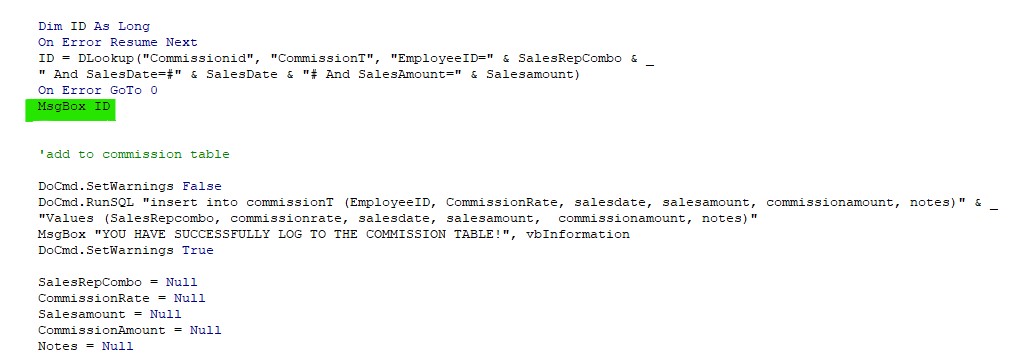
When I wrote this code (Dev.3 lesson 1) it always returns a null, and as an outcome, it DOES save duplicates to the commissionT
What's wrong with this code?

Abraham Breuer OP  @Reply  
     
5 years ago

Abraham Breuer OP  @Reply  
     
5 years ago
btw   I tried to paste the whole code into the forms and GoDaddy didn't let me do it, Blocked reason "you're running a SQL statement"...
Richard Rost  @Reply  
          
5 years ago
Your code looks fine. Check your spelling. Make sure all of your fields are spelled correctly - in the code and in your table. Obviously this code is 4 years old and THOUSANDS of other students have taken it, so I know it works properly. Check the data in your tables. Try REMOVING one parameter at a time and see what happens. And yes, if you try to upload any SQL in the Forums, you'll get blocked by the firewall. Use screen shots.
Abraham Breuer OP  @Reply  
     
5 years ago
Got the problem
I just needed to close and open the form to refresh...
Abraham Breuer OP  @Reply  
     
5 years ago
I don't understand why for such silly details I need to waste 2 hours in the day :-(
You might ask the same...
Abraham Breuer OP  @Reply  
     
5 years ago
getting crazy again........
I was wrong that was not the problem
when I take out this from the code it works
AND SalesDate=#" & SalesDate & "#
y should this cause probs?
Richard Rost  @Reply  
          
5 years ago
Always, always, ALWAYS, check the Troubleshooter before wasting 2 hours trying to figure something out, wasting time Googling stuff, or posting a question. What's the first item on the list (after backing up your database)? Restart Access. That would have fixed your problem right there and saved you 2 hours. Consider it a teaching moment, which is why I don't consider this a waste of my time, because that's my job: to TEACH you. :)
Richard Rost  @Reply  
          
5 years ago
Whenever I see someone in another country having issues with date fields, I always suspect it's a regional date problem. How are your dates stored / formatted?
Abraham Breuer OP  @Reply  
     
5 years ago
What do mean in my pc or in this database?
Abraham Breuer OP  @Reply  
     
5 years ago
no format at all in the form
the default value in the SalesDate is =Date()
no format in the commissionT for SalesDate
Richard Rost  @Reply  
          
5 years ago
Do all of your records have dates? Null values will cause a problem.
Abraham Breuer OP  @Reply  
     
5 years ago
Yes, in the commissionT they are all filled with dates
Richard Rost  @Reply  
          
5 years ago
What does it say if you remove the On Error Resume Next?
Abraham Breuer OP  @Reply  
     
5 years ago
ERROR 94
Richard Rost  @Reply  
          
5 years ago
Yeah, that's just invalid use of null. Not sure. I'm stumped with this one. I still think it's a regional setting since you can remove that date and it works fine. And like I said, this course is 4 years old and NOBODY else has had a problem with it. I can verify that the code works as shown on my system. Has to be something on your PC.
Alex Hedley  @Reply  
           
5 years ago
I spent ages with a Date issue a few years back, try formatting the date as dd/mm or mm/dd
Alex Hedley  @Reply  
           
5 years ago
Also build the WHERE clause in the DLOOKUP as a variable and do a DEBUG.PRINT to see what its sending
Then test that in the immediate window and try it in a SQL statement instead.
Abraham Breuer OP  @Reply  
     
5 years ago
Thank you all for giving your time to my errors, I really appreciate it
Alex- I am really sorry to ask but can you please explain this, your speaking like an expert I am just to dev.3
hope you get me...
Alex Hedley  @Reply  
           
5 years ago
ID = DLookup("CommissionID", "CommissionT", "EmployeeID=" & SalesRepCombo & " AND SalesDate=#" & SalesDate & "# AND SalesAmount=" & SalesAmount)

=DLOOKUP (Field, Domain, Criteria)

I want to see what the Criteria is so

Dim criteria As String
criteria = "EmployeeID=" & SalesRepCombo & " AND SalesDate=#" & SalesDate & "# AND SalesAmount=" & SalesAmount

So now you have CRITERIA you can do stuff with like
DEBUG.PRINT criteria
Or
MsgBox criteria
Etc

Abraham Breuer OP  @Reply  
     
5 years ago
Thanks
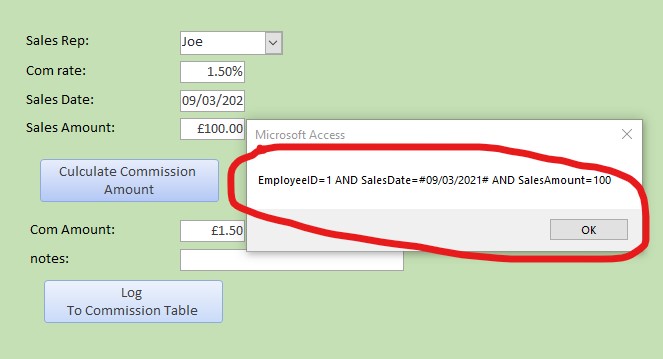
it works out that msgbox criteria are good, but somehow it returns a null by the full lookup statement
Abraham Breuer OP  @Reply  
     
5 years ago

Alex Hedley  @Reply  
           
5 years ago
Can you try converting that to a SQL Query and running it and see if you get a result.
Abraham Breuer OP  @Reply  
     
5 years ago
how
Alex Hedley  @Reply  
           
5 years ago
You know how to create a Query that has criteria?
Richard Rost  @Reply  
          
5 years ago
Go and review Access Expert 3, Lesson 1. It covers basic SQL.

Also, check and make sure Joe is really EmployeeID 1.

This thread is now CLOSED. If you wish to comment, start a NEW discussion in Access Developer 3.
 

Next Unseen

 
New Feature: Comment Live View


The following is a paid advertisement
Computer Learning Zone is not responsible for any content shown or offers made by these ads.
 

Learn
 
Access - index
Excel - index
Word - index
Windows - index
PowerPoint - index
Photoshop - index
Visual Basic - index
ASP - index
Seminars
More...
Customers
 
Login
My Account
My Courses
Lost Password
Memberships
Student Databases
Change Email
Info
 
Latest News
New Releases
User Forums
Topic Glossary
Tips & Tricks
Search The Site
Code Vault
Collapse Menus
Help
 
Customer Support
Web Site Tour
FAQs
TechHelp
Consulting Services
About
 
Background
Testimonials
Jobs
Affiliate Program
Richard Rost
Free Lessons
Mailing List
PCResale.NET
Order
 
Video Tutorials
Handbooks
Memberships
Learning Connection
Idiot's Guide to Excel
Volume Discounts
Payment Info
Shipping
Terms of Sale
Contact
 
Contact Info
Support Policy
Mailing Address
Phone Number
Fax Number
Course Survey
Email Richard
[email protected]
Blog RSS Feed    YouTube Channel

LinkedIn
Copyright 2026 by Computer Learning Zone, Amicron, and Richard Rost. All Rights Reserved. Current Time: 6/22/2026 9:42:43 PM. PLT: 0s