Free Lessons
Courses
Seminars
TechHelp
Fast Tips
Templates
Topic Index
Forum
ABCD
 
Home   Courses   TechHelp   Forums   Help   Contact   Merch   Join   Order   Logon  
 
Back to Access Forum    Comments List
Upload Images   @Reply   Bookmark    Link   Email   Next Unseen 
Helper Data
Joseph Messina 
    
5 years ago
Hi Richard:

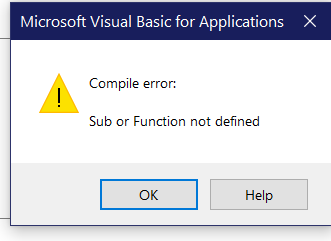
    I know I told you that i created a attachment table and form in my databases.  I added a combo box to the form i created for the documents and I have the subform in my main contacF form and I have the combo box for document type in the subform and I'm going to do the code for the combo box to double to open the helper form and I get an error message

Compile errors
Sub or function not defined

Can you please help me.  

If you want me to I can send you screen shot of the attachment form I created.
Richard Rost  @Reply  
           
5 years ago
Sounds like you're missing a sub/function or something is spelled wrong.
Joseph Messina OP  @Reply  
    
5 years ago

Joseph Messina OP  @Reply  
    
5 years ago

Joseph Messina OP  @Reply  
    
5 years ago
Hi Richard"

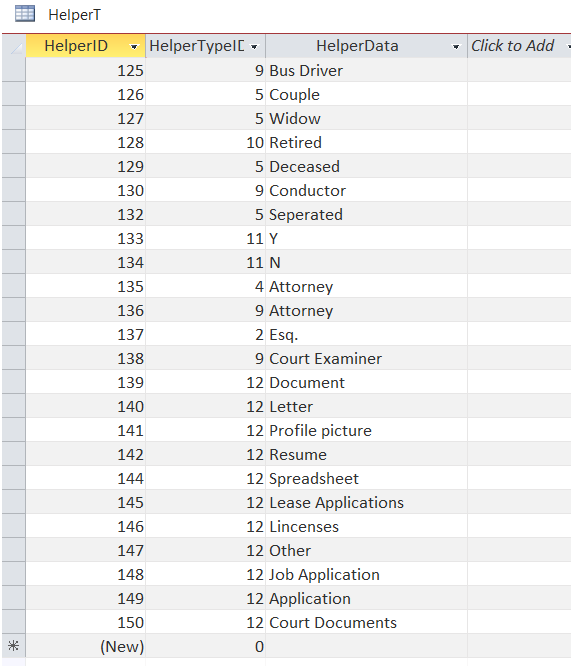
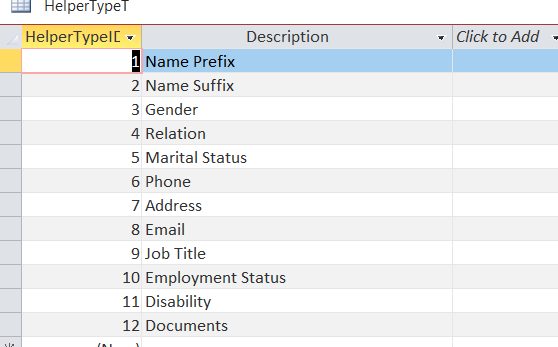
please see attached screen shots.  I added Document catagory to the helpertypeT and then added the items to the HelperT and I did right click on the Documenttype combo Box I created and went to the on double click event and typed in openhelper 12 which the number of the catagory field in the helpertypeT.  I want this combo box in my attachment subform and want to able to double click on the combo box so if I need to add anymore items to the list i can.
Alex Hedley  @Reply  
           
5 years ago
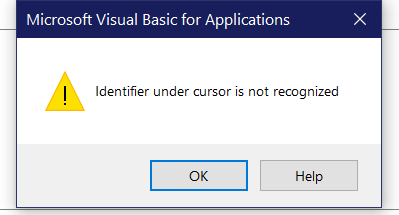
Right Click on OpenHelper and click Definition, what happens?
Joseph Messina OP  @Reply  
    
5 years ago

Joseph Messina OP  @Reply  
    
5 years ago
hi Alex:

   I sent you the screen shot.
Alex Hedley  @Reply  
           
5 years ago
And why do you think that is?

What is OpenHelper?
Joseph Messina OP  @Reply  
    
5 years ago
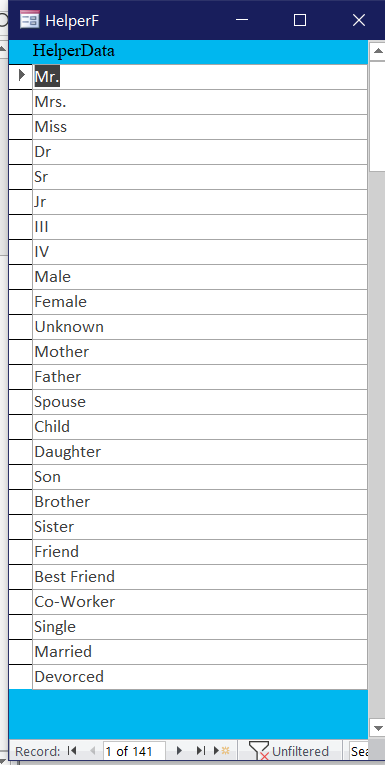
I created a Helper Data Table like what Richard does inn the helper data video
Joseph Messina OP  @Reply  
    
5 years ago
I was creating a helper table like what Richard shows in the helper data video and when created the combo box in the my attachment subform I did right clickm on the combo box and he shows in the video to clickon dopuble click event and type in OpenHelper and what ever the number is of the Helper catagory in the Helpertype table i created the HwelpertypeID that is.
Joseph Messina OP  @Reply  
    
5 years ago
Want me to send you the llink to the video so you can see what io'm talking about
Alex Hedley  @Reply  
           
5 years ago
That's ok, I know how it works, I'm just trying to help you work out why it isn't working in yours.

You've got the Tables etc but you are missing some code.
Joseph Messina OP  @Reply  
    
5 years ago
If you don't mind can i send you my database as a zip file to take a look to see what is going on.  I will tell Richard I will send him a payment for you to llok at it for me.  Would it be easier fi I send you the database as a zfile?  I can email it it to you if you want me to email it to you.
Alex Hedley  @Reply  
           
5 years ago
Sorry I don't have time to look at it, you could always ask in the AccessDev.NET forum.

But don't give up yet, I know you haven't done much VBA but what do you think OpenHelper 12 does and how does it do it?
Joseph Messina OP  @Reply  
    
5 years ago
Cause in my helpertypeID Table I have the different types of catagories.  And the last catagory I added in the HelpType Table was documents and that number is 12 and in the code I have to put OPenHelper and then number which is 12
Alex Hedley  @Reply  
           
5 years ago
Ok, so you have the Table setup and you have the correct ID of 12 but OpenHelper is a Sub with one argument, the ID, that exists where?
Joseph Messina OP  @Reply  
    
5 years ago
So you are saying just do OpenHelper don't put the number
Joseph Messina OP  @Reply  
    
5 years ago
I'm making sure that ispelling everything right.
Alex Hedley  @Reply  
           
5 years ago
Why would you not need a number? Without a number how would it know what to open?

What is OpenHelper in VBA?
You've already tried to find the Definition and it can't find it.
Why can't it find it? Because it probably doesn't exist in your database?
Why doesn't it exist? Did you add that to your database from the ABCD or wherever you've seen it used.
Joseph Messina OP  @Reply  
    
5 years ago
Yes I hav e the table setup and the correct ID is 12
Joseph Messina OP  @Reply  
    
5 years ago
I will send yhou screen shots of the table and the helper form
Joseph Messina OP  @Reply  
    
5 years ago

Joseph Messina OP  @Reply  
    
5 years ago

Joseph Messina OP  @Reply  
    
5 years ago

Alex Hedley  @Reply  
           
5 years ago
Thanks for confirming the data in the Tables but you'd already told me that and I'm not asking for information about that.

The problem is in your CODE.

What do you think writing OpenHelper 12 does?


Is OpenHelper something that lives in every Access db or just this one?
Joseph Messina OP  @Reply  
    
5 years ago

Joseph Messina OP  @Reply  
    
5 years ago
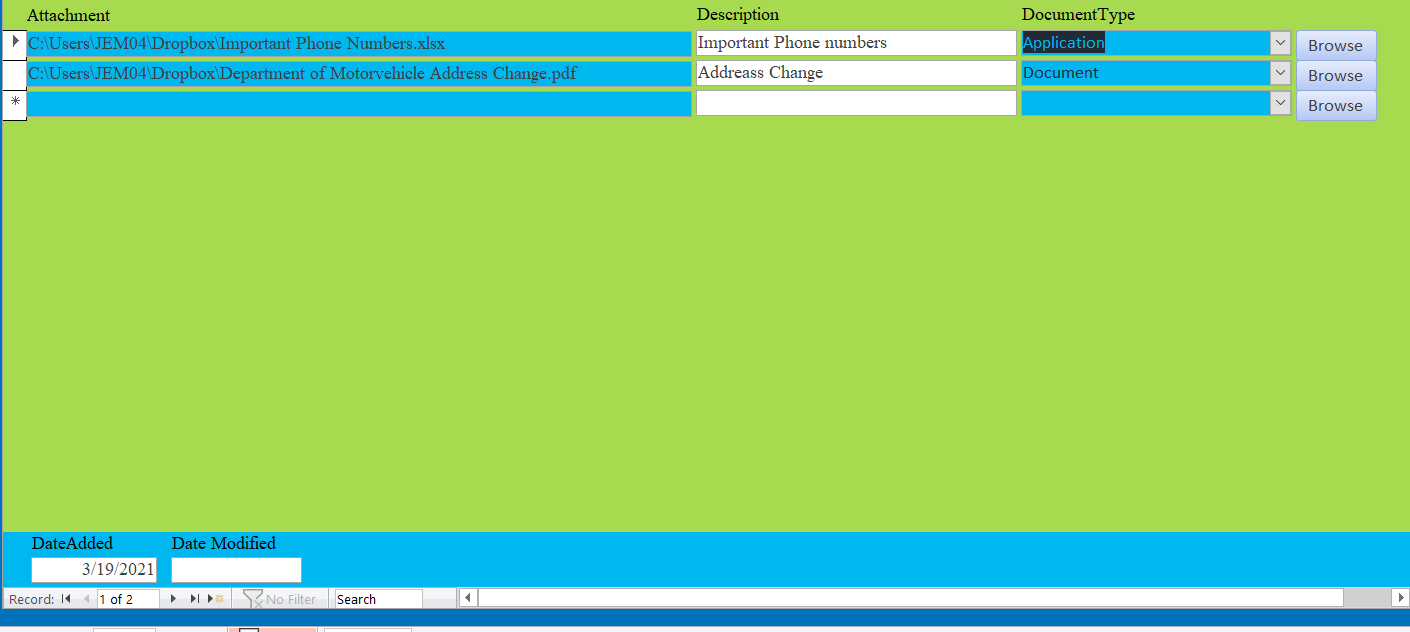
Here is the Form that i have in my main contact Form
Alex Hedley  @Reply  
           
5 years ago
And that has a combo called DocumentTypeCombo which you have added the DblClick event to?
Joseph Messina OP  @Reply  
    
5 years ago
That what Richard shows in the Helper Data video in the code on the on double click even
To put

OpenHelper and ever what the number is
Joseph Messina OP  @Reply  
    
5 years ago
Yes it is called DoucmentTypeCombo
Alex Hedley  @Reply  
           
5 years ago
He does, but you also need some extra code you're missing

Private Sub OpenHelper(...
    ...
End Sub
Joseph Messina OP  @Reply  
    
5 years ago
so in my codde I have to do a private subinsteadh of on double click in event
Alex Hedley  @Reply  
           
5 years ago
No, you have an event attached to your combo box that you would like to do something when you double click it, that looks correct.

The dblclick event is then calling another Sub called OpenHelper which you are hoping will Open your Helper Form.
The problem is the OpenHelper Sub doesn't exist in YOUR database.
Where is it?
Joseph Messina OP  @Reply  
    
5 years ago
I'I know i'm still learning and know some VBA.  Can you send me exactly how to put it in the code please with the on double click event and private sub you were saying
Alex Hedley  @Reply  
           
5 years ago
Is that not in the video?
Joseph Messina OP  @Reply  
    
5 years ago
He just does the on double click event.  Doesn't show the Private Sub OpenHelper
Alex Hedley  @Reply  
           
5 years ago
Which video are you watching, one in Core 5?

I think Core 2 was when the Helper stuff was first introduced and is used by multiple Forms so was prob explained much earlier on and just reused throughout
Joseph Messina OP  @Reply  
    
5 years ago
I'm going to watch core 2 see if it helps me what i want to do
Joseph Messina OP  @Reply  
    
5 years ago
Hi Richard:

I know i was telling you that i was getting an error message when i went to do the on double click event for my document type combo box and i know i'm spelling everything right.  I never give up trying.  but, for now I created a button to open the helper form.  Is there way I can refresh the doucment type combo box or requery after i enter a new item in the helper form I don't have to keep on closing my main contact form when i'm in a contact entering data.  Or what can i do to do the double click.  I'm trying everything and I know i'm not giving up on learning.  It is just fustrating that I'm trying to do the on double click event for the document type combo and not working.  I have the document type combo box in my attachment subform that i told you about that I can add files instead of havnig the attachment field which I deleted and I created an attach table and form and have the subform in my main contact form.  Can you please help me?
Alex Hedley  @Reply  
           
5 years ago
Doesn't it do that in the form that is opening it by setting which form you are opening it from and the control so it can requery on close, or was that in another database?

[Edit] From the page description:

"In lessons 1 and 2 we build the HelperF form. This allows the user to double-click on any of the combo boxes using Helper data to open a form that lets them edit or add items quickly. Then that form will update the underlying combo box and send the value back to it when closed."
Joseph Messina OP  @Reply  
    
5 years ago
U talking about lessons 1 and in the core 2 of the ABCS database?
Joseph Messina OP  @Reply  
    
5 years ago
I'm going to look at those and still not giving up on this to get it to work..  I know I'm still learning and defnitely will continue to learn dn still on expert l;evel.  I love Access and love learning everyrthing in Access, also love learning the lessons that Richard does.
Joseph Messina OP  @Reply  
    
5 years ago
Hi Alex:

I'm in my main concact database form and in my contact database for i hsve the subform thst i created for the attachment to add files and documents and that where i have the combo box that is lsbled document rype.  I want yo do the on double click to open the helper form
Joseph Messina OP  @Reply  
    
5 years ago
Hi Richard:

   I know I was telling you the problem with my combo box and I get an error message when I go to do double click on the combo box to add an item to the list.  I watched the video on the helper data to do the combo boxes and do the double click on the combo box.  I just don't understand why it is not working when i have the combo box in my attachment subform .  The attachment subform in my main contactF.  I know i;'m still learning and and will continue to learn and watch the lessons i get every week.  I;'m trying my bes to figure out the problem why when I double click on the combo box  in my attachment subform and not working.  I will never give up.  I have some combo boxes in the main contactF and do the double click on the combo box and it works with no porlbme.  It is in the attachment subform i created not working.
Joseph Messina OP  @Reply  
    
5 years ago
HI Richard:

   I have news for you. I told you I wasn't giving up.  I went intot the code for the documentType combo box and

DoCmd.OpenForm "HelperF"

The only is it is showing everything in the helperF form.  I just want to see the helperdata just for 1 helpertype.  I know in the helper data video you show in the code OpenHelper and ever what the number is of the helper type ID is.  How can I do that in the code so when I double click on the combo box that just shows the helpeer type for my document catagory that i have in the helper type T?
Alex Hedley  @Reply  
           
5 years ago
Joseph, where did you find the code
DoCmd.OpenForm "HelperF"
To add to that sub?
Joseph Messina OP  @Reply  
    
5 years ago
I went to on double click event and took out OpenHelper 12 what i had and I did

DoCmd.OpenForm "HelperF"
I doubled clicked on the combo box and the helpeF form opened.  burt showing all the helper data.  I will send you screen shot what i did
Joseph Messina OP  @Reply  
    
5 years ago

Joseph Messina OP  @Reply  
    
5 years ago

Alex Hedley  @Reply  
           
5 years ago
I know what you did, as you told me.

I'm asking WHY.

I'm trying to get you to explain your reasoning.

Why do you think ALL the data is showing?
Joseph Messina OP  @Reply  
    
5 years ago
I don't why it worked that way when i did

DoCmd.OpenForm "HelperF".  And didnt work the other way.  It wierd.
Alex Hedley  @Reply  
           
5 years ago
OpenHelper is a custom piece of code Rich created himself for ABCD.
It doesn't work in YOUR db because you didn't add it to the db.

DoCmd.OpenForm is code that exists in EVERY Access db.
Joseph Messina OP  @Reply  
    
5 years ago
What do u mean I did"mt add it to my db?
Joseph Messina OP  @Reply  
    
5 years ago
I have the helper table snd the helper form
Joseph Messina OP  @Reply  
    
5 years ago
Is there any way I can do to fix it to do openhelper instead of DoCmd.OpenForm?
Joseph Messina OP  @Reply  
    
5 years ago
That was the only way I was to grt the Helper form to open on the on double click.  Can you tell me if there is a way that I can do to fix it to do OpenHelper instead of Docmd.OpenForm?
Adam Schwanz  @Reply  
           
5 years ago
I would strongly suggest continuing in the lessons. Once you get to the start of VBA coding you'll understand right away. You don't have the VBA function setup for openhelper that rick made, so access doesn't know what openhelper is as Alex said. Openhelper is not a universal access function and needs to be created in your database, not the form or the table, but the code.
Alex Hedley  @Reply  
           
5 years ago
Might be worth watching IntroVBA
Kevin Robertson  @Reply  
           
5 years ago
Is your OpenHelper function on the same form as your combo box?
Joseph Messina OP  @Reply  
    
5 years ago
Hi Kevin:

I have main contactF Form and in that form i hsve subform for attachments and in the attactments subform i have conbo box labeled document catagory
Joseph Messina OP  @Reply  
    
5 years ago
Hi Kevin:

   Ifg you want don't giving me your email address i can send you my database to take a look at it.  I created the ehlper table and helper form and the on doulb click works great qwhen i did the code OpenHelper and ever what number it is works and also did the on got focus event and that works too.  I I have an attachment table and subform for my attachments and files that i have for each record and in the subform i have a combo box labeled Document Type and it is notn working with that in the subform.  It only works whenn i do

DoCmd.OpenForm "HelperF"

Also when that worked and i double clicked on the combo box the helperF came up but showing everything in the helpf just not showing what types i have for the document type combo box.
Joseph Messina OP  @Reply  
    
5 years ago
HI Kevin:

   I meant to tell you that I started with the Access courses and still learning.   I'm o the expert level already.  I know some VBA.  I was able to do the helper data a long with the helper data video that Richard did.  I just don't understand why on double click event is not working with the Document Type Combo Box i have in the attachment subform I have created.
Kevin Robertson  @Reply  
           
5 years ago
Sure, I will take a look. Send to: [email protected]
Joseph Messina OP  @Reply  
    
5 years ago
Hi Kevin:

I emailed my database to you.
Kevin Robertson  @Reply  
           
5 years ago
Had a look and got it working. Simply move the OpenHelper Sub Routine from ContactF to your Module and change it from Private to Public.

If you want me to send you the fixed DB I will, but have a go yourself first and let me know.
Joseph Messina OP  @Reply  
    
5 years ago
yes can you send it back to me what you did.  I will try it myself o my database have in front of me please?  Can you email me thesteps what i have to do so I have the print out of the directions in front of me please?   I really appreciate it you helping me.  So I have create module?
Richard Rost  @Reply  
           
5 years ago
Joseph, remember this is a VERY advanced concept. You have a LOT of learning to do before you should be trying to tackle the Helper Data forms.
Joseph Messina OP  @Reply  
    
5 years ago
HI Adam:

   I understand what you are saying.  I'm continuing to watch the lessons every day and I will never give up watching the lessons and love learning.  I know a little VBA.  I just didn't understand why it wasn't working for me.  You are right I will learn as I'm going on with the lessons.!.  I been getting the courses from Richard every week.
Joseph Messina OP  @Reply  
    
5 years ago
Hi Richard:

   I'm sorry.  I understand.  I know i have a lot to learn before i try to do tackle the helper Data form.  I got the helper data to work in my main form.  Just didn't understand why it wasn't working in my subform in my main contactF form.  Sorry again.  I PRMISE I will continue to learn and i know I will definitely get up there what i want to do.
Joseph Messina OP  @Reply  
    
5 years ago
HI Richard:

    Just want to say.  Sorry again.  I will remember what you said to continue to learn and not to run and jump so fast into things.  I truly understand.  I KNOW I will definitely, definitely get up there what i want to do with VBA and everything else I  want to learn in Access.
Joseph Messina OP  @Reply  
    
5 years ago
Hi Alex:

      I just want yo say to what I said to Richard.  Sorry that I was bothering you with the helper data.  I know i'm still on expert level and still hsve a lot yo learn.  I said to Richard I will still continue to learn the lessons and I know I will there what I want yo do with VBA and other things I want to do in Access.  I love Access.  It is my fsvorite database program.  I PROMISE and PROMISE to Rochard will continue to learn before I want yo do something that I need to learn nefore I do it.
Alex Hedley  @Reply  
           
5 years ago
Joseph, it's no bother at all, you're here to learn.
I just didn't want to give you the answer as it doesn't help. I wanted you to figure it out yourself.
Joseph Messina OP  @Reply  
    
5 years ago
Hi Alex:

I understand what you are saying.  I'm here to learn and I should  figure it out myself before i ask.  You are right.  If I need help then I will ask.

This thread is now CLOSED. If you wish to comment, start a NEW discussion in Access Forum.
 

Next Unseen

 
New Feature: Comment Live View


The following is a paid advertisement
Computer Learning Zone is not responsible for any content shown or offers made by these ads.
 

Learn
 
Access - index
Excel - index
Word - index
Windows - index
PowerPoint - index
Photoshop - index
Visual Basic - index
ASP - index
Seminars
More...
Customers
 
Login
My Account
My Courses
Lost Password
Memberships
Student Databases
Change Email
Info
 
Latest News
New Releases
User Forums
Topic Glossary
Tips & Tricks
Search The Site
Code Vault
Collapse Menus
Help
 
Customer Support
Web Site Tour
FAQs
TechHelp
Consulting Services
About
 
Background
Testimonials
Jobs
Affiliate Program
Richard Rost
Free Lessons
Mailing List
PCResale.NET
Order
 
Video Tutorials
Handbooks
Memberships
Learning Connection
Idiot's Guide to Excel
Volume Discounts
Payment Info
Shipping
Terms of Sale
Contact
 
Contact Info
Support Policy
Mailing Address
Phone Number
Fax Number
Course Survey
Email Richard
[email protected]
Blog RSS Feed    YouTube Channel

LinkedIn
Copyright 2026 by Computer Learning Zone, Amicron, and Richard Rost. All Rights Reserved. Current Time: 5/6/2026 9:13:28 PM. PLT: 1s