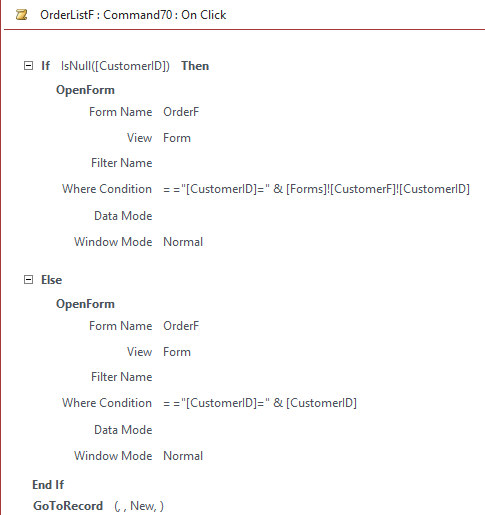
Having trouble getting the New Order button to work from the Order List Form when the customer form is not open. It'll open the order form and prepare it for a new order entry. However, it is not pulling a Customer ID over to the order form. There are orders in the Order List form, the order list forms record source is the OrderListQ which does contain the CustomerID. I have double and triple checked my spelling.
Any ideas?
Keith StantonOP
@Reply 5 years ago
Kevin Robertson
@Reply 5 years ago
The first Where Condition can be removed as there will be no CustomerID if you are on a new customer record. For the Order Form to get the current CustomerID, set the Default Value in the Property Sheet.
Keith StantonOP
@Reply 5 years ago
I'm trying to make it work the way it was shown in Advanced 2 lesson 2 class. It should be able to pull the Customer ID from the order list as that value is in the OrderListQ. I tried adding the customer ID to the order list form also, but that didn't work either.
Sorry, only students may add comments.
Click here for more
information on how you can set up an account.
If you are a Visitor, go ahead and post your reply as a
new comment, and we'll move it here for you
once it's approved. Be sure to use the same name and email address.
This thread is now CLOSED. If you wish to comment, start a NEW discussion in
Access Advanced 3.