Hi ya, I have a very odd thing happening I have created a button placed over the records in my list, and set its properties to transparent. But when I click to view that customer, some records display and others are blank? even though there is information based on that customer. When i view the customer form on its own, the information for all customers is there??? very weired.
Scott Axton
@Reply 5 years ago
Was there a question here? (literally and figuratively)
Remember - computer programs are "black or white" so to speak. No shades of gray. They can only do what we ask it to do. Point is: What question did you ask for the program to do (in your button)?
That may give you an idea of what to look for in determining why the action results are not as expected.
Continuous forms are kind of a different critter also. They have different quirks of their own.
Check out the video Show/Hide Buttons . It may help you figure out your issue.
Austin Ritner
@Reply 5 years ago
Exactly what Scott said... what is your button doing? And can you give an example of your fields and what they are (or aren't) showing?
Austin Ritner
@Reply 5 years ago
My suggestion would be to make your autonumber field a link to open the customer form based on that customer's ID.
So in the OnClick property in the VBA editor, try DoCmd.OpenForm "FormName",,, "CustomerID=" & [CustomerID]
Mark ParsonsOP
@Reply 5 years ago
Hi the button I have linked to my customer form, and the master and child properties are linked together. But I will try using the VBA instead, thanks for all your advice. Im still learning
Adam Schwanz
@Reply 5 years ago
If some records come up properly and some come up blank, something is missing. Either you're using a manual ID instead of the auto number and don't have it filled in, or there is a missing child or parent. The new records come up when there is no match found.
VBA may be a little advanced for you at the expert level. Care to share an image of your table/form properties? You can use the Upload Images button at the top right of your first post.
Mark ParsonsOP
@Reply 5 years ago
Hi Adam, yes I can do I will send this through tomorrow morning when Im back at work. Ive following along with Richards video, and all seemed fine at the beginning. Now it seems it has a mind of its own lol
Scott Axton
@Reply 5 years ago
Mark -
Just in case run down Richards trouble shooter list.
Hi Mark. This is one of those cases where your question is just so vague, it's difficult for us to get a grasp on exactly what you're trying to do. More specifics would help.
Mark ParsonsOP
@Reply 5 years ago
Mark ParsonsOP
@Reply 5 years ago
Mark ParsonsOP
@Reply 5 years ago
Hi Scott/Richard
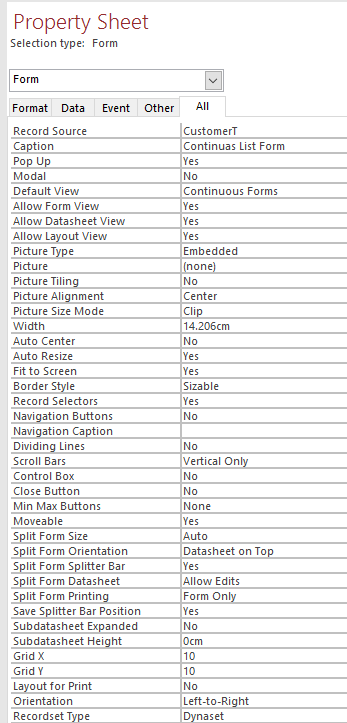
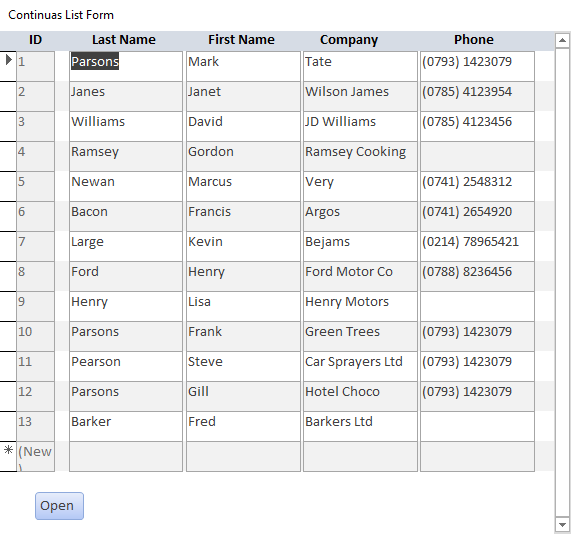
Here is a copy of my continuas list form with dummy data, all the records you see here are in my CustomerT. You can also see from my settings that this form points to the right location for record source. But when I select customer from this list and then click the button, I get blank records appear? I even tried the VBA route to see if that would work, and got the same result.
Scott Axton
@Reply 5 years ago
Mark -
Closer, but still not enough information. Can you show us your Open button event / code?
Also please describe exactly what you are wanting to do.
Check your spelling to. I notice you have "continuas" in your form caption should be continuous.
Maybe you have a typo else where.
Scott is correct. Need to see what's in that Button. VBA? Macro?
Mark ParsonsOP
@Reply 5 years ago
Hi Scott/Richard
The aim of this button is to open that selected customer record, I will send through a image of the VBA and embedded macro.
Mark ParsonsOP
@Reply 5 years ago
Mark ParsonsOP
@Reply 5 years ago
Mark ParsonsOP
@Reply 5 years ago
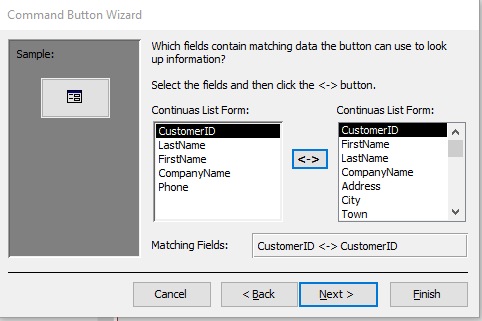
Hi Scott/Richard, i have included two images of both ways i have tried to do this. The first one is the code i placed into the event procedure for the button and the second is when i related the forms together. Both of these don`t seem to work, as the records within the list form sometimes returns blank records. Even though they are located in the Table for Customers.
Scott Axton
@Reply 5 years ago
OK first photo. I see several things that could be issues.
1. Your command line you say "CustomerF" it appears the real form name (on the left) says "Form_ContactF"
so you need to put the "ContactF" instead of CustomerF. FYI - Access adds the Form_ in the code window
2. Spelling mentioned above. (Not critical to the program - just not correct) You would have to spell in incorrectly every where it's used. Engish spelling like Color vs Colour?
3. You have spaces in your form name = Continuas List Form. As is taught in the classes, spaces in FieldNames and form / report names will cause you major headaches in the future. You can use it but you have to remember to always enclose them in square brackets when referring to them. So... [Continuas List Form]
Is that OPEN button in your form footer the only button? Remember whatever RECORD is currently selected is the one that's going to be opened. So you need to click on the record, then click on the open button.
Sorry, only students may add comments.
Click here for more
information on how you can set up an account.
If you are a Visitor, go ahead and post your reply as a
new comment, and we'll move it here for you
once it's approved. Be sure to use the same name and email address.
This thread is now CLOSED. If you wish to comment, start a NEW discussion in
Access Expert 4.