Free Lessons
Courses
Seminars
TechHelp
Fast Tips
Templates
Topic Index
Forum
ABCD
 
Home   Courses   TechHelp   Forums   Help   Contact   Merch   Join   Order   Logon  
 
Back to Access Forum    Comments List
Upload Images   @Reply   Bookmark    Link   Email   Next Unseen 
Filter combo box by another
Walter Hamilton 
    
5 years ago
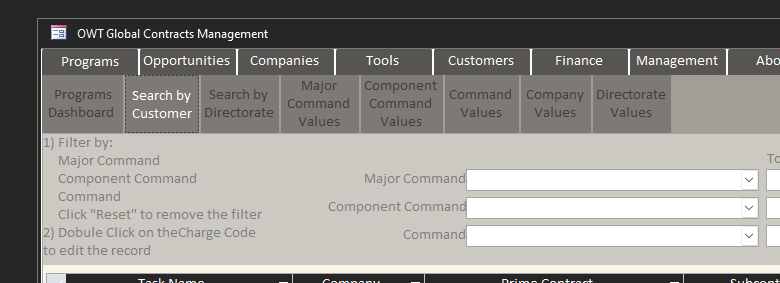
I have three combo boxes on a form that filter an embedded subform.  Everything was working but now I get an error.  I have the row source query for the subsequent combo box built with the Record_ID of the previous combo box.  This was working but it doesn't anymore.  The main form is embedded into a Navigation form so the current expression is:

[Forms]![frm_Navigation]![NavigationSubform].[Form]![MajorCommand_ID]

The combo box name for the first combo box is:  MajorCommand_ID

I've deleted everything and started over several times but I can't seem to get it to work again.
Richard Rost  @Reply  
          
5 years ago
What's the exact error message? Post some screen shots so we can see what you've got going on. :)
Walter Hamilton OP  @Reply  
    
5 years ago

Walter Hamilton OP  @Reply  
    
5 years ago

Walter Hamilton OP  @Reply  
    
5 years ago

Walter Hamilton OP  @Reply  
    
5 years ago

Richard Rost  @Reply  
          
5 years ago
I guarantee something is spelled wrong. Check the spelling of your subform and combo box.
Richard Rost  @Reply  
          
5 years ago
Scott Axton  @Reply  
        
5 years ago
Walter
In your query window I'm noting that you have a space in your table name.  That could be giving you grief. You might have to enclose it in brackets [] to  get it to work.
tbl_Component Commands would have to be [tbl_Component Commands]
Walter Hamilton OP  @Reply  
    
5 years ago
I've checked everything and it's all correct.

I opened the form by itself and updated the code to not reflect it being embedded in the Navigation form and it works correctly.  The code I'm using is:

[Forms]![frm_Active Programs_Sort_Customer]![MajorCommand_ID]

Do I need to call out the form name when it's embedded in a Navigation form?


Scott Axton  @Reply  
        
5 years ago
Walter -
It just clicked for me that you said you are using a Navigation form.  This is one of the drawbacks of that type of form.  The complexity of the form syntax is why I almost never use it.
This article on the Microsoft site may give you some incite as to what you need to do.
I'm sure Richard can probably rattle it off from the top of his head but I'm at a loss at the moment.

Path to Navagation Subform
Walter Hamilton OP  @Reply  
    
5 years ago
Scott -

That's what's weird.  I have an older version using the following syntax that works:

[Forms]![frm_Navigation]![NavigationSubform].[Form]![MajorCommand_ID]

The latest version which doesn't work is using the following syntax:

[Forms]![frm_Navigation]![NavigationSubform].[Form]![MajorCommand_ID]

I'm lost.

Scott Axton  @Reply  
        
5 years ago
Meant to say insight not INCITE darn auto correct.
Walter Hamilton OP  @Reply  
    
5 years ago
The only thing different is I've split the database and hung the tables on SharePoint.  I've went back into the query builder to update it off the current table that is hung on SharePoint but it just doesn't work.

When I open the form by itself and change the syntax to use the organic form it all works correctly.
Richard Rost  @Reply  
          
5 years ago
Ah yes... it didn't even click that you were using a Nav Form. I hate Nav forms with a passion. I prefer making menu forms that just have buttons to open other forms as you've seen in many of my videos like the TechHelp Template. Nav Forms essentially create buttons that open other forms as subforms inside of the Nav Form which makes nomenclature like this needlessly tedious. If I can talk you into getting rid of the Nav Form, that's my first suggestion. Otherwise, the syntax that you have there SHOULD work. It's:

Forms!ParentForm!SubformName.Form!FieldName

It looks like your syntax is correct. Without seeing the database, I really can't tell what's wrong. Have you run down the Troubleshooter?
Walter Hamilton OP  @Reply  
    
5 years ago
Richard -

Once again, your rock.  Importing everything into a fresh file worked.

I'd like to do single forms but people have spoken and I need to accommodate.  I really appreciate all the assistance.
Scott Axton  @Reply  
        
5 years ago
Walter -
I get it.  The powers that be can sometimes be a pain once they get something in mind.
You might consider this alternative:  ABCD Core Part 2

Richard shows how to basically do the same thing with a much better control over your forms and data.  It also gets rid of the complex forms naming convention.

This thread is now CLOSED. If you wish to comment, start a NEW discussion in Access Forum.
 

Next Unseen

 
New Feature: Comment Live View


The following is a paid advertisement
Computer Learning Zone is not responsible for any content shown or offers made by these ads.
 

Learn
 
Access - index
Excel - index
Word - index
Windows - index
PowerPoint - index
Photoshop - index
Visual Basic - index
ASP - index
Seminars
More...
Customers
 
Login
My Account
My Courses
Lost Password
Memberships
Student Databases
Change Email
Info
 
Latest News
New Releases
User Forums
Topic Glossary
Tips & Tricks
Search The Site
Code Vault
Collapse Menus
Help
 
Customer Support
Web Site Tour
FAQs
TechHelp
Consulting Services
About
 
Background
Testimonials
Jobs
Affiliate Program
Richard Rost
Free Lessons
Mailing List
PCResale.NET
Order
 
Video Tutorials
Handbooks
Memberships
Learning Connection
Idiot's Guide to Excel
Volume Discounts
Payment Info
Shipping
Terms of Sale
Contact
 
Contact Info
Support Policy
Mailing Address
Phone Number
Fax Number
Course Survey
Email Richard
[email protected]
Blog RSS Feed    YouTube Channel

LinkedIn
Copyright 2026 by Computer Learning Zone, Amicron, and Richard Rost. All Rights Reserved. Current Time: 4/30/2026 3:20:31 PM. PLT: 0s