Free Lessons
Courses
Seminars
TechHelp
Fast Tips
Templates
Topic Index
Forum
ABCD
 
Home   Courses   TechHelp   Forums   Help   Contact   Merch   Join   Order   Logon  
 
Back to Access Developer Forum    Comments List
Upload Images   @Reply   Bookmark    Link   Email   Next Unseen 
Recordset Loop Error
John Davy 
         
4 years ago
Hi, My code process all the data but crashes on a movenext
at the last record  (no data) Help is welcome! Thanks  John

Private Sub DoLoopBtn_Click()
Dim db As DAO.Database
Dim rs1 As DAO.Recordset
Dim Ctr As Integer
  Set db = CurrentDb()
  Set rs1 = db.OpenRecordset("PersonT")
  'If rs1.RecordCount = 0 Then Exit Sub
  rs1.MoveFirst
   Do Until rs1.EOF
         TempVars!FID = rs1!FID.Value
         MsgBox "TempVars!FID: " & TempVars!FID
         Ctr = 1
         Do While TempVars!FID.Value = rs1!FID
            Debug.Print "FID : " & rs1!FID & " " & rs1!Firstname & " " & rs1!Lastname
               rs1.MoveNext '-------gets the next FID
               Ctr = Ctr + 1
         Loop
        Debug.Print "------------------" 'We have all people in the Family
   Loop
   rs1.Close
   Set rs1 = Nothing
   Set db = Nothing
End Sub

Kevin Robertson  @Reply  
          
4 years ago
John,

Try this:

    Dim db As Database
    Dim rs1 As Recordset
    Dim Ctr As Integer
    Set db = CurrentDb()
    Set rs1 = db.OpenRecordset("PersonT")
    While Not rs1.EOF
        TempVars!FID = rs1!FID.Value
        MsgBox "TempVars!FID: " & TempVars!FID
        Ctr = 1
        Debug.Print "FID : " & rs1!FID & " " & rs1!FirstName & " " & rs1!LastName
        rs1.MoveNext '-------gets the next FID
        Ctr = Ctr + 1
        Debug.Print "------------------" 'We have all people in the Family
    Wend
    rs1.Close
    Set rs1 = Nothing
    Set db = Nothing
Kevin Robertson  @Reply  
          
4 years ago
Also, just noticed, Ctr = 1 should be outside the loop otherwise your it will be set at 1 with every iteration of the loop and won't increment.
John Davy OP  @Reply  
         
4 years ago
Hi Kevin, Thanks for the response.  Your code works properly but note that I have 2 loops, grouping people by the FID number.
John
Kevin Robertson  @Reply  
          
4 years ago
John,

I figured it out now that I realise what you were trying to do. You'll need to ensure that the FIDs are grouped, otherwise it won't work.

    Dim db As Database
    Dim rs1 As Recordset
    Dim Ctr As Integer

    Set db = CurrentDb()
    Set rs1 = db.OpenRecordset("SELECT * FROM PersonT ORDER BY FID")
    If rs1.RecordCount = 0 Then Exit Sub
    
    rs1.MoveFirst
    Do Until rs1.EOF
        TempVars!FID = rs1!FID.Value
        MsgBox "TempVars!FID: " & TempVars!FID
        Ctr = 1
        Do While TempVars!FID.Value = rs1!FID
            Debug.Print "FID : " & rs1!FID & " " & rs1!FirstName & " " & rs1!LastName
            rs1.MoveNext '-------gets the next FID
            Ctr = Ctr + 1
            If rs1.EOF Then Exit Do
        Loop
        Debug.Print "------------------" 'We have all people in the Family
    Loop
    
    rs1.Close
    db.Close
    Set rs1 = Nothing
    Set db = Nothing
Richard Rost  @Reply  
          
4 years ago
I can tell you didn't get that code from me. LOL. I never use Do Until loops. You don't NEED to use DAO. unless you are also using ADO in the same database. I'm a While guy. And why the TempVars? Wouldn't a regular variable do here? I only use TempVars for things that need to stay persistent between forms or function calls. MoveFirst is often not NEEDED as that's the default place you start. If FID is a family ID, then I would make sure you SORT by that or else they may be in any random order and not consecutive. You have no MoveNext if you hit the next person outside of the family. What to do then?

Richard Rost  @Reply  
          
4 years ago
BUT... more importantly... why would you use multiple loops to do what some simple SQL could handle?

    Dim rs As Recordset
    Set rs = CurrentDb.OpenRecordset("SELECT FID, LastName, Count(FID) AS FIDCount " & _
        "FROM PersonT GROUP BY FID, LastName")

    While Not rs.EOF
        Status "FID " & rs!FID & " (" & rs!LastName & ") Count: " & rs!FIDCount
        rs.MoveNext
    Wend
    
    rs.Close
    Set rs = Nothing


Richard Rost  @Reply  
          
4 years ago
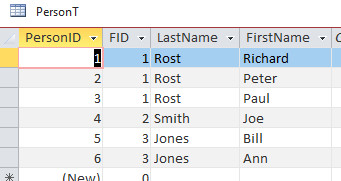
Group the family members together in a query WITH a count of how many there are, then all you have to do if you want to iterate through the families in a loop, it's a much simpler recordset.
Richard Rost  @Reply  
          
4 years ago

Richard Rost  @Reply  
          
4 years ago
FID 3 (Jones) Count: 2
FID 2 (Smith) Count: 1
FID 1 (Rost) Count: 3
Richard Rost  @Reply  
          
4 years ago
Oh, and my SQL above assumes that FID and LastName are always the same. If not, remove LastName from the loop and DLookup one (the first one, whatever) or assign a FamilyName.

This thread is now CLOSED. If you wish to comment, start a NEW discussion in Access Developer Forum.
 

Next Unseen

 
New Feature: Comment Live View


The following is a paid advertisement
Computer Learning Zone is not responsible for any content shown or offers made by these ads.
 

Learn
 
Access - index
Excel - index
Word - index
Windows - index
PowerPoint - index
Photoshop - index
Visual Basic - index
ASP - index
Seminars
More...
Customers
 
Login
My Account
My Courses
Lost Password
Memberships
Student Databases
Change Email
Info
 
Latest News
New Releases
User Forums
Topic Glossary
Tips & Tricks
Search The Site
Code Vault
Collapse Menus
Help
 
Customer Support
Web Site Tour
FAQs
TechHelp
Consulting Services
About
 
Background
Testimonials
Jobs
Affiliate Program
Richard Rost
Free Lessons
Mailing List
PCResale.NET
Order
 
Video Tutorials
Handbooks
Memberships
Learning Connection
Idiot's Guide to Excel
Volume Discounts
Payment Info
Shipping
Terms of Sale
Contact
 
Contact Info
Support Policy
Mailing Address
Phone Number
Fax Number
Course Survey
Email Richard
[email protected]
Blog RSS Feed    YouTube Channel

LinkedIn
Copyright 2026 by Computer Learning Zone, Amicron, and Richard Rost. All Rights Reserved. Current Time: 6/22/2026 1:09:38 PM. PLT: 1s