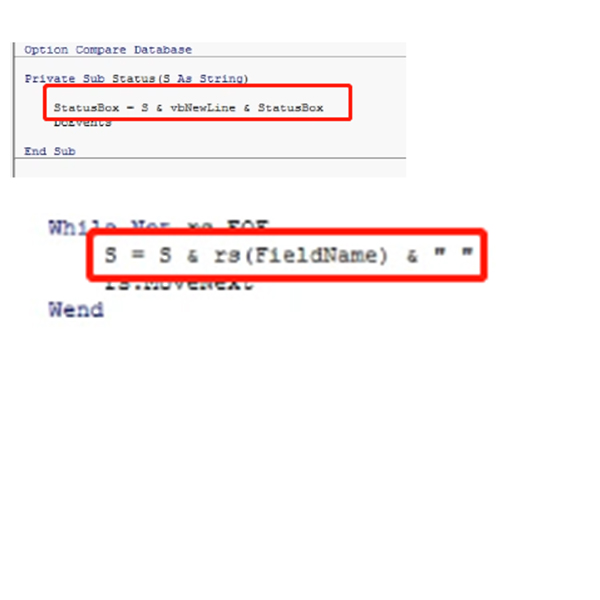
i can't understand why StatusBox=something + StatusBox or S=S & something. Who can explain to me? or which lessons i can get the meaning. that seems like one equil one plus another number.
Alexis CaoOP
@Reply 4 years ago
Adam Schwanz
@Reply 4 years ago
So work out what it's doing there in your head. We see Statusbox = S & vbnewline & Statusbox, so first thing we should do is find out what S is so we can understand what it's doing.
S we can see is S & a field name and a blank space, lets say that field name was FirstName, so using your name we can turn it into S = S & Alexis & " " (a blank space)
For the first loop, this turns into S = (nothing yet) & Alexis & a blank space
For the next loop, lets say my name comes next in the record set, now we have
S = Alexis and a space and Adam and a space, so S=Alexis" "Adam" "
I can't see the rest of the code, but I'm assuming we are sending S to that Status Function during the while loop
So basically this makes Statusbox = S & vbnewline & Statusbox say add the name we got from the loop, go to a new line, and then put whatever was in the box previously
Alexis
Adam
etc.
Adam Schwanz
@Reply 4 years ago
Try this video, I know there's a loop in there with X = X & something, it's similar in to recordset. For Next Loops
Think of it as the difference between arithmetic ( + ) and inclusion ( & ).
I can add numbers 1 + 3 = 4. But if I "include" the numbers, 1 & 3 = 1, 3.
The symbol " = " should be read as the "result of", not as a comparison of value or "equality".
Alexis CaoOP
@Reply 4 years ago
thank you for everyone, and i also watch the For Next Loops and Concatenation video, a little understand, but not more. Dear Teacher Richard, Could you tell me what point i don't catch it. in my head, i can't accept or understand "one equil one plus another number" Help!!!!
Alexis CaoOP
@Reply 4 years ago
StatusBox=something + StatusBox or S=S & something, why it happens like this.
Alexis CaoOP
@Reply 4 years ago
in my head, in the VBA, if i dim x as number, and i understand x=x1+x2 (x1,x2 also the number type), it likes to do the some
thing in the query filed, like: X:x1+x2. but i can't make a new filed in the query like: X=X+x1, right? or we can't write another new filed x1=x1+x2, the x1 is already there. i don't know everyone can get what i explain or my puzzle point
Alexis, the StatusBox is a text box to display a message so you don't have to keep MsgBox'ing things.
Status "Hi there"
will put the words "Hi there" in the StatusBox. Status is a sub.
The reason why it says
StatusBox = S & vbNewline & StatusBox
means: "in the StatusBox put the value of S, which is whatever you send to the sub, AND ADD a NewLine character, AND ADD whatever was in the StatusBox before."
Go back and watch Developer 15, Lesson 3. HERE is a bookmark for you.
Alexis CaoOP
@Reply 4 years ago
Thanks Dear Richard. a little understanding. maybe i don't get the complete meaning of the parameters subroutine. expect the deveploer 2.2 has the explaining example, still have other lessons i missed for the parameters subroutine, Mr. Richard? lots of lessons i can't remember accurately. and i did't complete to watch a complete lesson video briefly for all yet, so don't know this point lesson, it will be very thankful if you help me to point out
Scott Axton
@Reply 4 years ago
Alexis -
Here is some Fatherly advice for you. Take a small break from learning Access. I can feel your frustration coming through in the messages. Go out into the nature and take a deep breath. 1 day, 2, 1 week. I don't know but get totally away from Access and rest your mind for a while. Do anything - EXCEPT Access.
I'm not telling you to give up! You are a very focused person I can tell. We have discussed this before, but I will say it again - You also have the challenge of the teaching not being in Chinese. You are going from Chinese to English to Access then backward again.
Now - once your mind is cleared. Start at the very beginning with lesson 1. Watch and listen to it only. Don't do any thing. Then, start over again at the beginning of lesson 1. Start and stop the video as you need to, but build the actual database that Richard is building.
Scott Axton
@Reply 4 years ago
Part of the reason Richard is so effective in his teaching is you can go back and watch the videos as many times as you need to.
DONT RUSH - Take time to understand.
You have admitted that you skipped some things and have already forgotten others.
You started this journey only a few short months ago. You are trying to fill your mind with the lessons that have taken
some of us years to learn.
The second piece of advice I can give you is don't try to spend to much time each day learning Access. 1 hour, maybe a little more, of
GOOD learning is better than many hours at a time of poor or mediocre learning.
You need time in between to let your brain process what you just learned.
That is why Richard's lessons are broken up in smaller time segments.
You can do this! I know you can and we will be here to help.
Scott Axton
@Reply 4 years ago
Alexis CaoOP
@Reply 4 years ago
Thanks, Scott. like you said i take lots of time to learn Teacher Richard Lessons everyday, haha. thank you for your advises, thank you for your help, maybe you are right, i will take a slow for lessoning, let my brain process. thanks. you are the wisedom and kind person, thanks all the best for you
If you are a Visitor, go ahead and post your reply as a
new comment, and we'll move it here for you
once it's approved. Be sure to use the same name and email address.
This thread is now CLOSED. If you wish to comment, start a NEW discussion in
Access Developer 16.