Free Lessons
Courses
Seminars
TechHelp
Fast Tips
Templates
Topic Index
Forum
ABCD
 
Home   Courses   TechHelp   Help   Contact   Merch   Join   Order   Logon   Forums   
 
Home > Forums > Access Developers > Find Last Payment by Edward Mastoloni
Back to Access Developers    Comments List
Upload Images | @Reply | Bookmark | Link | Email | Next Unseen |
Find Last Payment
Edward Mastoloni 
     
4 years ago
I have a customer form (data source customer table). I have another table called customer ledger entries which contains entries like invoices, credit memos, finance charges and payments.  I want to place two fields on the Customer form called last payment date and last payment amount.  How do I query the customer lender entry table to find this information and display it on the customer form?
Alex Hedley  @Reply  
           
4 years ago
Edward Mastoloni OP  @Reply  
     
4 years ago
Is there a video that shows how I can do this or something very similar?
Alex Hedley  @Reply  
           
4 years ago
Did you watch any of the video of the links I provided in my first reply?
Edward Mastoloni OP  @Reply  
     
4 years ago
Thanks Alex.  I have now, this is exactly what I needed. I am going to attempt using the DMAX function to find the most recent payment date however, I will need to a query instead of a table and use multiple criteria which will probably give a little grief with the concatenation, but I will rewatch Richard's video on that as well.
Edward Mastoloni OP  @Reply  
     
4 years ago
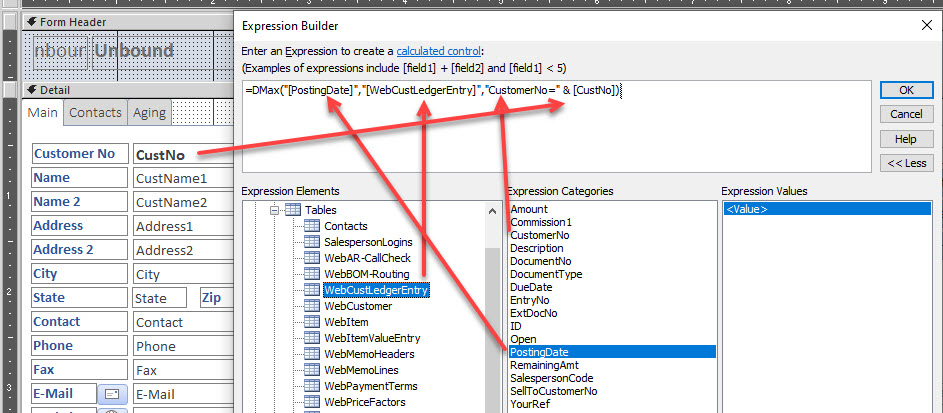
I added a text box to the form to show the last payment date and placed this in the control source:
=DMax("[PostingDate]","[WebCustLedgerEntry]","CustomerNo=" & [CustNo])
It didn't work.  Any ideas?
Edward Mastoloni OP  @Reply  
     
4 years ago

Edward Mastoloni OP  @Reply  
     
4 years ago
I'm sorry I forgot I had to have multiple criteria.  Here is what I have now as the control source but this too doesn't seem to work either.

=DMax("PostingDate","WebCustLedgerEntry","CustomerNo=" & [CustNo] And "DocumentType=""Payment""")
Alex Hedley  @Reply  
           
4 years ago
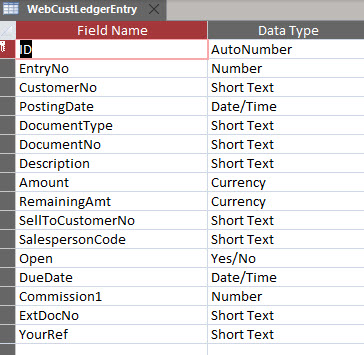
Is CustomerNo an actual number in the Field Type?
Edward Mastoloni OP  @Reply  
     
4 years ago
Hi Alex.  Look at the image.  It's name of field in the WebCustLedgerEntry table.  Also, with what I put into my last message this seems to now find just the latest entry in the table but not the latest payment entry.
Alex Hedley  @Reply  
           
4 years ago
The image doesn't give the data type of the field
Edward Mastoloni OP  @Reply  
     
4 years ago

Alex Hedley  @Reply  
           
4 years ago
You need to treat the parameter as a string so wrap it in quotes.
Edward Mastoloni OP  @Reply  
     
4 years ago
No matter how I try to wrap the criteria in quotes I keep getting an error.

=DMax("PostingDate","WebCustLedgerEntry","CustomerNo=" & [CustNo] And "DocumentType=""Payment""")

Please help with sytax for wrapping the criteria in quotes" by changing my current dmax statement
Alex Hedley  @Reply  
           
4 years ago
Edward Mastoloni OP  @Reply  
     
4 years ago
Thanks for trying Alex.  I guess I'm just not getting it.  Could someone else please just copy my sytax and paste it with the correct syntax?
Kevin Robertson  @Reply  
          
4 years ago
Double Double Quotes was also covered in:
Access Expert 10
Access Expert 29

Go back and review these classes.
Edward Mastoloni OP  @Reply  
     
4 years ago
I've watched both a few times and also still just can't seem to get it to work.  Thanks for trying to help.  I guess I will wait until someone can paste the proper sytax.
Adam Schwanz  @Reply  
           
4 years ago
Try Concatenation that's also a problem you have currently. Maybe you can figure out the double quotes once you fix that. The problem is here [CustNo] And "
Adam Schwanz  @Reply  
           
4 years ago
Once you've watched that video if you still can't get it I'll give you the answer, but that's a pretty important part of making criteria so make sure you watch it.
Edward Mastoloni OP  @Reply  
     
4 years ago
I've tried it over a few dozen ways.  This was my last attempt and still no joy.
=DMax("PostingDate","WebCustLedgerEntry","CustomerNo=""" & [CustNo] &""" And "DocumentType=""Payment""")
Edward Mastoloni OP  @Reply  
     
4 years ago
I've spent over 3hrs on this.
Adam Schwanz  @Reply  
           
4 years ago
Try =dmax("postingdate",webcustledgerentry","customerno=""" & custno & """ and documenttype="

Is payment a field or a word?
Adam Schwanz  @Reply  
           
4 years ago
Documenttype=""payment""")

Or if field

Documenttype=""" & payment & """")
Edward Mastoloni OP  @Reply  
     
4 years ago
Thanks so much. I will try it again tomorrow when i get back to the office. Yes Payment is a word not a field.
Alex Hedley  @Reply  
           
4 years ago
Also you started with
=DMax("[PostingDate]","[WebCustLedgerEntry]","CustomerNo=" & [CustNo])

Before trying with a dynamic value try hard coding.

=DMax("[PostingDate]","[WebCustLedgerEntry]","CustomerNo='1'")

Replace 1 with an actual number.

Then when that's working, try adding a second criteria.
Then when that's working try substituting the 1 for a dynamic value.
Edward Mastoloni OP  @Reply  
     
4 years ago
Thanks Adam. That worked.  I can see my mistake.  It was the concatenation of the first criteria.  I thought I had firm grasp on concatenation until yesterday...  Alex, thank you very much as well. The syntax that you both helped me with and actually worked wasn't covered in any of the videos I could find.  

Just one more question, when using DMAX, DSUM, DMIN, DLOOKUP, etc... will that concatenation syntax hold true for the criteria portion of all these functions?
Adam Schwanz  @Reply  
           
4 years ago
Yes it is the same syntax for all those functions.
Richard Rost  @Reply  
           
4 years ago
Study that concatenation! :)

This thread is now CLOSED. If you wish to comment, start a NEW discussion in Access Developers.
 

Next Unseen


What's This?


The following is a paid advertisement
Computer Learning Zone is not responsible for any content shown or offers made by these ads.
 

Learn
 
Access - index
Excel - index
Word - index
Windows - index
PowerPoint - index
Photoshop - index
Visual Basic - index
ASP - index
Seminars
More...
Customers
 
Login
My Account
My Courses
Lost Password
Memberships
Student Databases
Change Email
Info
 
Latest News
New Releases
User Forums
Topic Glossary
Tips & Tricks
Search The Site
Code Vault
Collapse Menus
Help
 
Customer Support
Web Site Tour
FAQs
TechHelp
Consulting Services
About
 
Background
Testimonials
Jobs
Affiliate Program
Richard Rost
Free Lessons
Mailing List
PCResale.NET
Order
 
Video Tutorials
Handbooks
Memberships
Learning Connection
Idiot's Guide to Excel
Volume Discounts
Payment Info
Shipping
Terms of Sale
Contact
 
Contact Info
Support Policy
Mailing Address
Phone Number
Fax Number
Course Survey
Email Richard
[email protected]
Blog RSS Feed    YouTube Channel

LinkedIn
Copyright 2026 by Computer Learning Zone, Amicron, and Richard Rost. All Rights Reserved. Current Time: 11/8/2026 6:58:22 PM. PLT: 1s