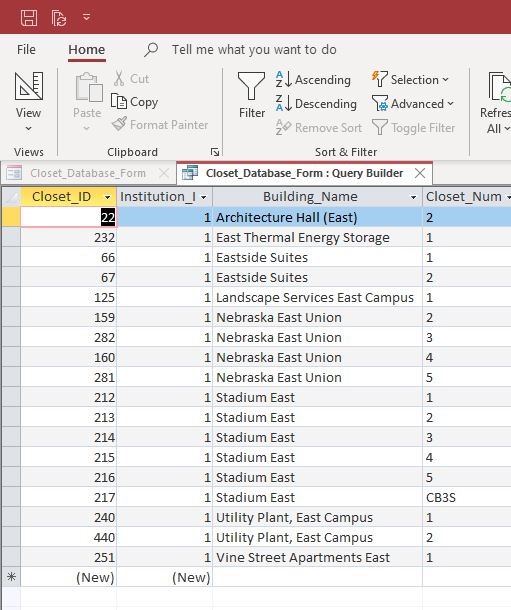
I have an unbound combo box sorted alphabetically by building name. I would like the dropdown box to filter as you type in the combo box. so if i type "East" only the buildings with the word "East" in them (at the end, beginning, or middle of the full building name) to be displayed in the drop down.
Scott Axton
@Reply 4 years ago
Jason -
Please don't double post. Once is plenty. I deleted the other one.
You should be able to just click in the combo and start typing. Depending on how your combo is sorted.
If you want more control over the filtering see the Search Form 2.0 video.
Jason ShovlainOP
@Reply 4 years ago
Sorry, i wasnt sure if it would get more views in the general forum. the combo box filters by default but it has to be an exact match... what i want is to be able type the word "East" into the combo box and have the drop down display all of the buildings that have "east" anywhere in them, whether it appears at the beginning middle OR end.
Scott Axton
@Reply 4 years ago
No problem.
Yeah the combo will just go from the first letter and progress along. It wont catch the beginning, middle, end that you describe.
Search as you type is pretty complex and wold involve a great deal of VBA. Just based on your course level I would say you probably aren't there but I don't know your experience level either.
Definitely watch the Search 2.0 that I linked above. That will give you the best 'quick' results.
Jason ShovlainOP
@Reply 4 years ago
Jason ShovlainOP
@Reply 4 years ago
Jason ShovlainOP
@Reply 4 years ago
Jason ShovlainOP
@Reply 4 years ago
Jason ShovlainOP
@Reply 4 years ago
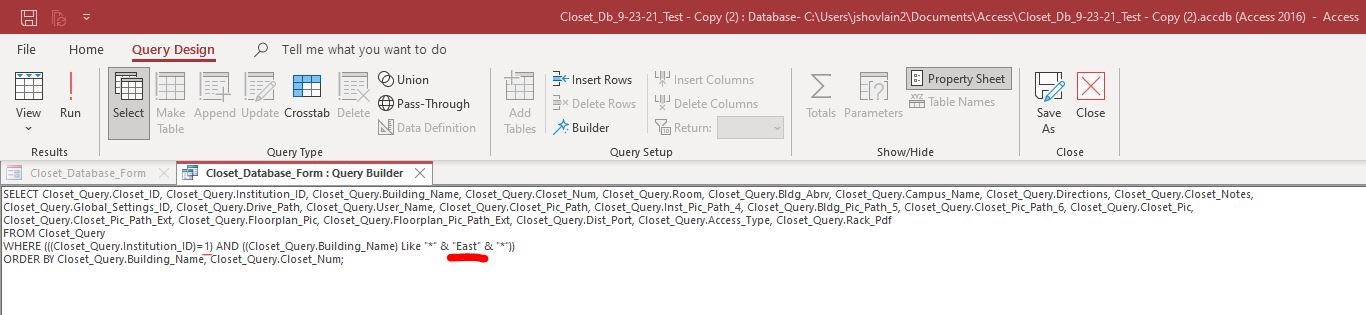
Using the principles described in the video you suggested, i have entered the wild card criteria in the building name column and from the sql view i have manipulated the code (by replacing the controls with the text "1" and "East", underlined in red) from there i can get the data sheet to display what is needed. I just don't understand how to get the drop down list to filter accordingly.
Scott Axton
@Reply 4 years ago
I understand what you are telling me, but you can't do that in a Combo Box like you asked or like you can in a Query.
The combo box has to get it's record sourced first.
If you are a Visitor, go ahead and post your reply as a
new comment, and we'll move it here for you
once it's approved. Be sure to use the same name and email address.
This thread is now CLOSED. If you wish to comment, start a NEW discussion in
Access Beginner 8.