Free Lessons
Courses
Seminars
TechHelp
Fast Tips
Templates
Topic Index
Forum
ABCD
 
Home   Courses   TechHelp   Forums   Help   Contact   Merch   Join   Order   Logon  
 
Back to Access Developer Forum    Comments List
Upload Images   @Reply   Bookmark    Link   Email   Next Unseen 
Clear fields Subtable
Klaas van Eijkern 

4 years ago
Hi all,

Can you help me with the following.
I followed the video "Invoicing" and the Extended Cut Video.
In my database I have created a Tasks table, with many fields needed to log task data.
In the Tasks-table I have placed the OrderDetailF Subform (as taught in the videos). So far so good.
I've created a button to clear the fields in the Tasks maintable when a new tasks is created. I would also like to clear the OrderDetailF Subtable at the same time.
How do I do this?

Gr. Klaas
Adam Schwanz  @Reply  
           
4 years ago
Hey Klaas, I need more information. I haven't seen the video in ages so you'll have to explain a little more. So you have a task form, with an order detail subform on it. Then you have a button that does what? Goes to a new record or does it set all the values to ""? What is the code in your button?

Then you want the order detail subform to also be blank when you push the button, right?
Klaas van Eijkern OP  @Reply  

4 years ago
Hi Adam,

Everything is in Dutch, sorry for that.

Image 1 is the Task form, which contains the fields and the sub form called PartsOrderDetailF

Image 2 is the New Task Button.
With this button I want to clear all fields in both the Task form and the Sub form, so that a new Task and newly used parts can be added.

I like to hear from you.
Gr. Klaas
Klaas van Eijkern OP  @Reply  

4 years ago

Klaas van Eijkern OP  @Reply  

4 years ago

Adam Schwanz  @Reply  
           
4 years ago
OK, does it go to a new record though or is it just clearing out the fields? I assume it's going to a new record and not just deleting everything, if you select your subform in design view you should see in the Data Tab Link Master Fields and Link Child Fields, are there any values in those?
Adam Schwanz  @Reply  
           
4 years ago
OK you are going to a new record then yes, I assume you have some kind of relationship between the tasks and the order details? That ID field should be put into the Master/Child fields I mentioned previously.
Klaas van Eijkern OP  @Reply  

4 years ago

Klaas van Eijkern OP  @Reply  

4 years ago

Klaas van Eijkern OP  @Reply  

4 years ago
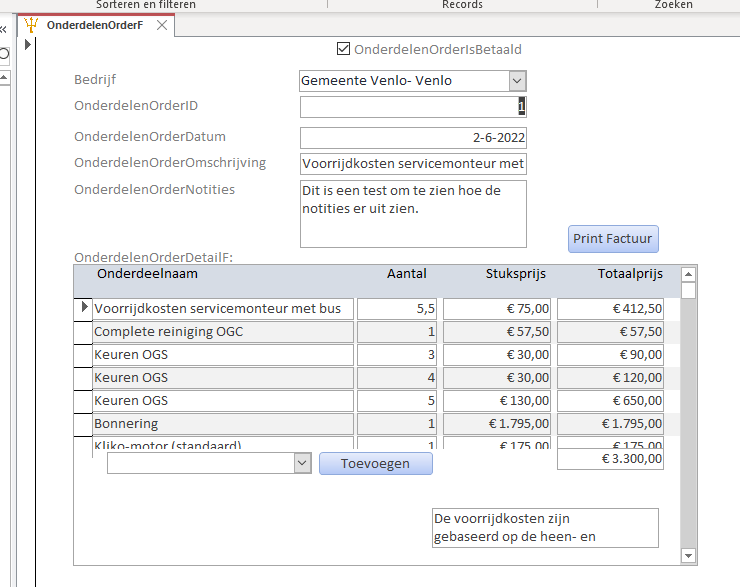
The last Image is from the Video's.
So now I want to have the OrderDetailF Form in my Taskform.
Adam Schwanz  @Reply  
           
4 years ago
So what happens when you push your button and go to a new record? If the subform is linked it should clear out and be linked to the new blank record. Does it show the last records information still in the order details?

Should also be fine with just
DoCmd.GoToRecord ,,acnewrec
Klaas van Eijkern OP  @Reply  

4 years ago
When I push the Button, only the Mainform is cleared. Not the Subform. So I can not check if the records remain in the Order Details.

Adam Schwanz  @Reply  
           
4 years ago
Sorry, I'm having a hard time understanding what is actually happening. Can you take a screenshot of a record how it should be, and then a screenshot of that same record after you push the new record button? Where the main form has cleared out but the bottom form has done nothing?

What happens if you do either of these? (Replace ParentFormName and SubFormname with your actual form names)
DoCmd.GoToRecord ,,acnewrec
Forms!ParentFormName!SubFormName.Form.Refresh
or
DoCmd.GoToRecord ,,acnewrec
Forms!ParentFormName!SubFormName.Form.Requery
Klaas van Eijkern OP  @Reply  

4 years ago
Sorry for the bad explanation.
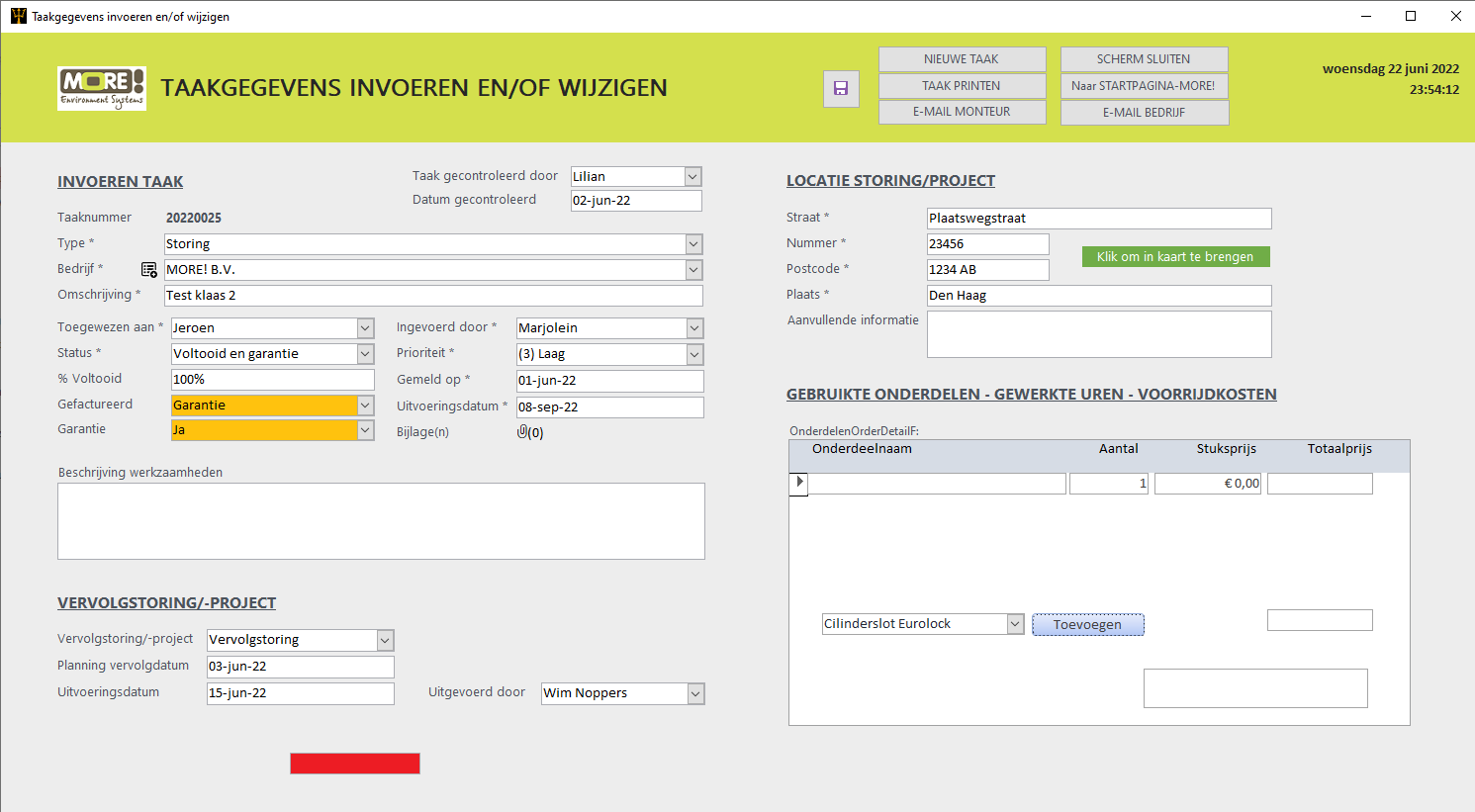
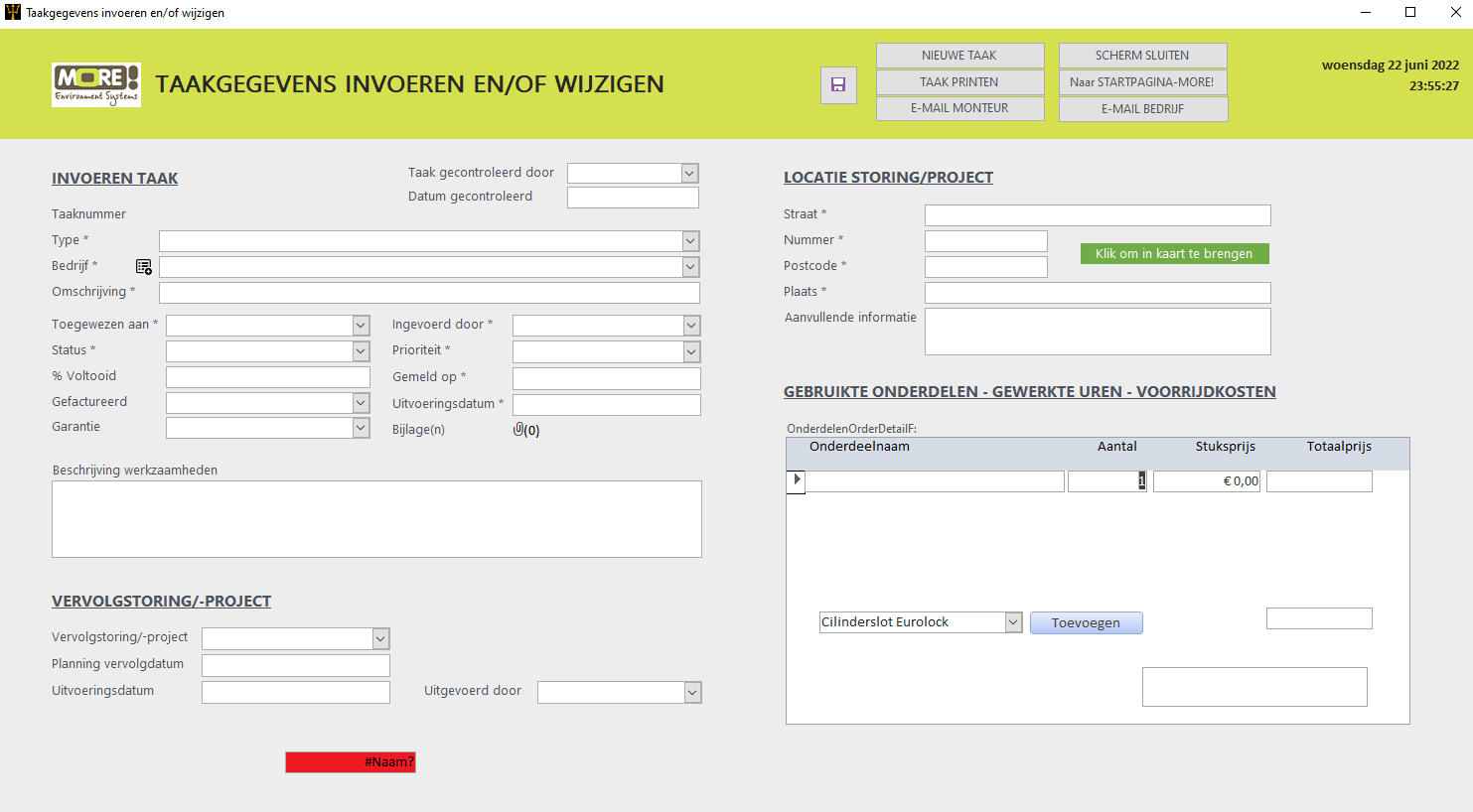
Underneath are Screenshot 5 and 6.
Screenshot 5 is the Task Form filled with data. Screenshot 6 is the Task Form with all the cleared fields. This data is Stored in the Task Table. So far so good.

The Subform named: OnderdelenOrderDetailF, This Subtable needs also to be cleared together with the Task Form and the data stored in the OnderdelenOrderT (Table).

If both Forms are cleared, The data from the Task is stored in the Task Table. And the data from the OnderdelenOrderDetailF is stored in the OnderdelenOrderT.
But if I reopen the previous Task, I see the data from the Task Table but not from the OnderdelenOrderT (Table).

Does this explanation makes more sence?
Klaas van Eijkern OP  @Reply  

4 years ago

Klaas van Eijkern OP  @Reply  

4 years ago

Klaas van Eijkern OP  @Reply  

4 years ago
I've placed the code:
DoCmd.GoToRecord ,,acnewrec
Forms!ParentFormName!SubFormName.Form.Requery
Into the Button.

But it will not clear the Subform OnderdelenOrderDetailF
Klaas van Eijkern OP  @Reply  

4 years ago
Of course I changed the code to the right ParentForm and SubForm names.
Adam Schwanz  @Reply  
           
4 years ago
I don't think you have a relationship then, if you can enter records in that subform and then when you leave the record and come back and they aren't there. It's either the child/master fields which you already showed appear to be correct, or the OnderdelenOrderID isn't being created in the subform records when you add stuff in there. You could try going into the subform and changing the default value of the OnderdelenOrderID to Forms!ParentForm!OnderdelenOrderID so it would make sure it's inserted.
Klaas van Eijkern OP  @Reply  

4 years ago
Thank you Adam.
I will try changing the default value. See how it goes.

This thread is now CLOSED. If you wish to comment, start a NEW discussion in Access Developer Forum.
 

Next Unseen

 
New Feature: Comment Live View


The following is a paid advertisement
Computer Learning Zone is not responsible for any content shown or offers made by these ads.
 

Learn
 
Access - index
Excel - index
Word - index
Windows - index
PowerPoint - index
Photoshop - index
Visual Basic - index
ASP - index
Seminars
More...
Customers
 
Login
My Account
My Courses
Lost Password
Memberships
Student Databases
Change Email
Info
 
Latest News
New Releases
User Forums
Topic Glossary
Tips & Tricks
Search The Site
Code Vault
Collapse Menus
Help
 
Customer Support
Web Site Tour
FAQs
TechHelp
Consulting Services
About
 
Background
Testimonials
Jobs
Affiliate Program
Richard Rost
Free Lessons
Mailing List
PCResale.NET
Order
 
Video Tutorials
Handbooks
Memberships
Learning Connection
Idiot's Guide to Excel
Volume Discounts
Payment Info
Shipping
Terms of Sale
Contact
 
Contact Info
Support Policy
Mailing Address
Phone Number
Fax Number
Course Survey
Email Richard
[email protected]
Blog RSS Feed    YouTube Channel

LinkedIn
Copyright 2026 by Computer Learning Zone, Amicron, and Richard Rost. All Rights Reserved. Current Time: 5/2/2026 5:49:43 AM. PLT: 0s