Free Lessons
Courses
Seminars
TechHelp
Fast Tips
Templates
Topic Index
Forum
ABCD
 
Home   Courses   TechHelp   Forums   Help   Contact   Merch   Join   Order   Logon  
 
Back to Access Developer Forum    Comments List
Upload Images   @Reply   Bookmark    Link   Email   Next Unseen 
On Close Event
Marc Spragg 
     
4 years ago
Hi, I have some code the works when used in a command button but the code doesn't work in the 'on close' event. Basically i want the close event to remove any parent ID's if there are no children. (Delete OrderID if no OrderDetails) Im guessing the code doesn't work because of timing. ie the record is still dirty or hasn't been committed to the table. Refresh doesn't seem to make a difference. Can anybody help?
Marc Spragg OP  @Reply  
     
4 years ago

Abraham Breuer  @Reply  
     
4 years ago
try this: "DELETE * FROM OrderT WHERE OrderID=" & OrderID
Adam Schwanz  @Reply  
           
4 years ago
Actually, if you just want to make sure you are only making new orders that have details, you could probably remove the refresh and the statement, then just do

me.undo

Then it would revert back to blank new record and not save anything
Adam Schwanz  @Reply  
           
4 years ago
Try before update event with that if it doesn't work in close
Marc Spragg OP  @Reply  
     
4 years ago
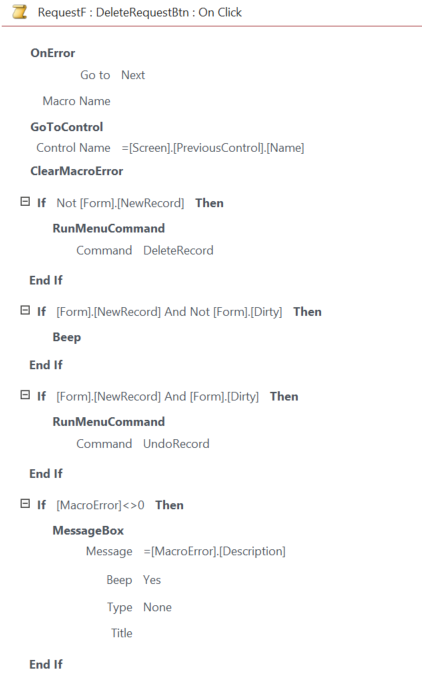
Thanks Abraham and Adam. Unfortunately neither of these worked. Im still thinking it has something to do with timing or maybe not even achievable in the onclose. The me.undo worked in the beforeupdate event but the problem there was it didn't then let me add the order details, just run the undo lol. I managed to get a delete command button (Wizard Macro)  to delete the record even on dirty so i tried to replicate that in the on close event but failed. I tried both Macro and converting the macro to VB but im a novice at this still so probably got it wrong.
Marc Spragg OP  @Reply  
     
4 years ago

Kevin Robertson  @Reply  
           
4 years ago
Try using the Form_Unload event instead (with your original VBA code).
Abraham Breuer  @Reply  
     
4 years ago
First, check out if you get prompt by the Msg box
if you are not getting the msg it's the count that doesn't work.
Marc Spragg OP  @Reply  
     
4 years ago
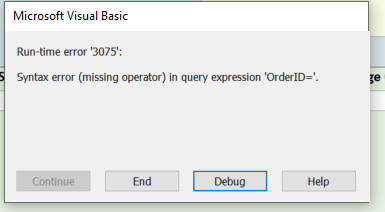
Thanks Kevin & Abraham, The code worked in the form unload event.  But then presented another issue. If the user exits the form before entering any data then the form as it closes loads up and displays the first record before closing the window. (I have the orderID created as soon as the form loads) So i removed the code so when the form loads OrderID starts off as NEW but then the Dcount errors because there is no ID "Run-time error 3075". Im now wondering if a better approach would be to capture the orders with no details as a separate operation and not actually delete a record but instead mark it as deleted with a check box.
I heard that storing Boolean values in the Tables is not a good idea - would it be then better to not use check boxes for this and use a status table with PK 'Cancelled' and a PK 'Active' and use this in the order Table and orderdetail table.
Marc Spragg OP  @Reply  
     
4 years ago

Marc Spragg OP  @Reply  
     
4 years ago

Kevin Robertson  @Reply  
           
4 years ago
You could add this to only run the code if there is an OrderID:

If Not IsNull(OrderID) Then
        ' add other code here
End If
Marc Spragg OP  @Reply  
     
4 years ago
BOOM! Thanks Kevin

This thread is now CLOSED. If you wish to comment, start a NEW discussion in Access Developer Forum.
 

Next Unseen

 
New Feature: Comment Live View


The following is a paid advertisement
Computer Learning Zone is not responsible for any content shown or offers made by these ads.
 

Learn
 
Access - index
Excel - index
Word - index
Windows - index
PowerPoint - index
Photoshop - index
Visual Basic - index
ASP - index
Seminars
More...
Customers
 
Login
My Account
My Courses
Lost Password
Memberships
Student Databases
Change Email
Info
 
Latest News
New Releases
User Forums
Topic Glossary
Tips & Tricks
Search The Site
Code Vault
Collapse Menus
Help
 
Customer Support
Web Site Tour
FAQs
TechHelp
Consulting Services
About
 
Background
Testimonials
Jobs
Affiliate Program
Richard Rost
Free Lessons
Mailing List
PCResale.NET
Order
 
Video Tutorials
Handbooks
Memberships
Learning Connection
Idiot's Guide to Excel
Volume Discounts
Payment Info
Shipping
Terms of Sale
Contact
 
Contact Info
Support Policy
Mailing Address
Phone Number
Fax Number
Course Survey
Email Richard
[email protected]
Blog RSS Feed    YouTube Channel

LinkedIn
Copyright 2026 by Computer Learning Zone, Amicron, and Richard Rost. All Rights Reserved. Current Time: 5/6/2026 1:14:36 PM. PLT: 1s