Free Lessons
Courses
Seminars
TechHelp
Fast Tips
Templates
Topic Index
Forum
ABCD
 
Home   Courses   TechHelp   Forums   Help   Contact   Merch   Join   Order   Logon  
 
Back to Access Developer Forum    Comments List
Upload Images   @Reply   Bookmark    Link   Email   Next Unseen 
If Then Else
Marc Spragg 
     
4 years ago
Hi,
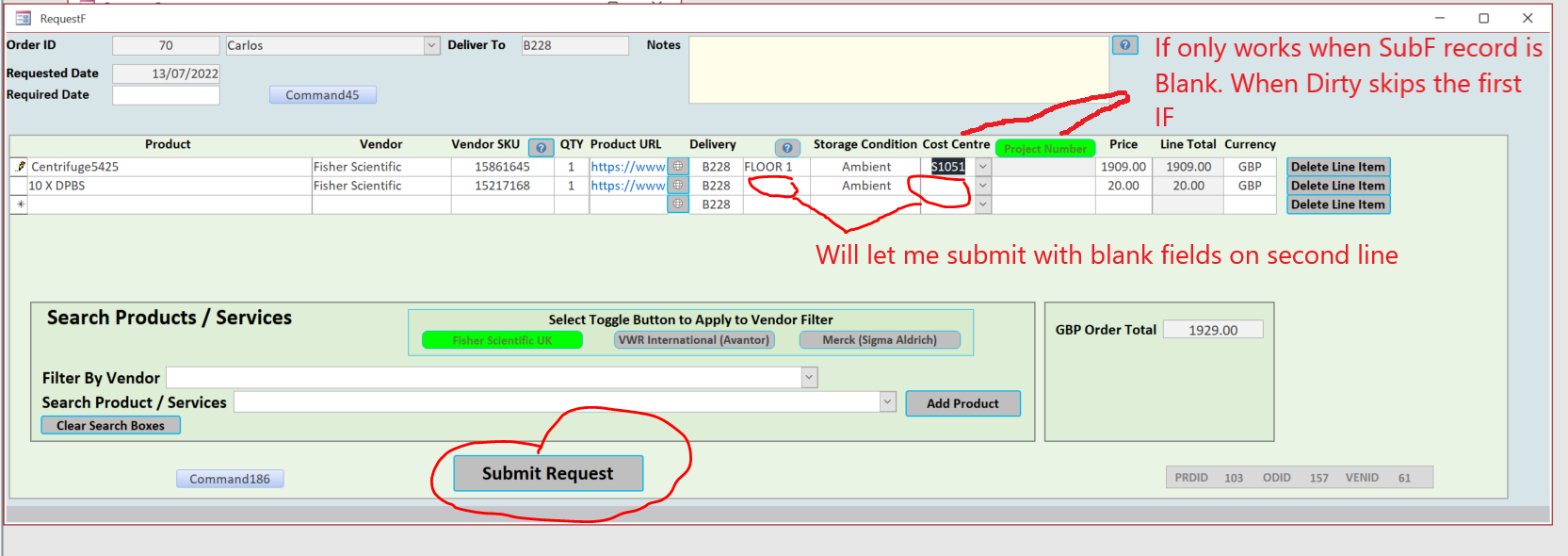
I can't seem to get my if statement to be consistent in my continuous orderdetail subF.
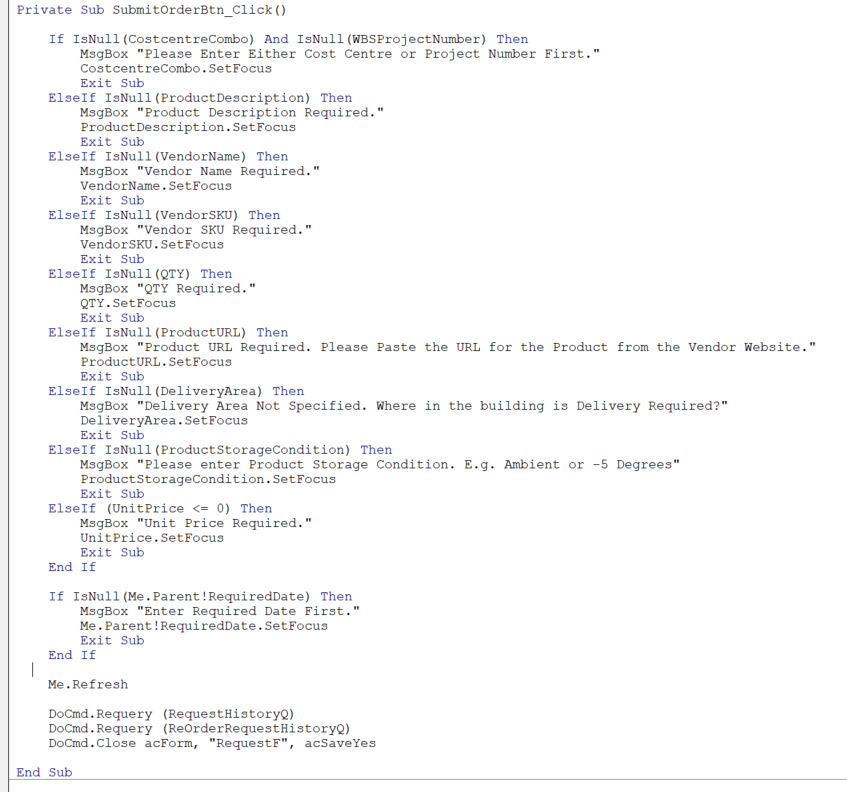
I use a command button (Submit Request) to check to make sure fields have not been left blank. However the If statement only seems to work on the first record in the continuous form and also the first part of the IF statement only works if all the fields in the if statement are blank to begin with on the form. So once you populate one of the fields on the form the if statement skips the first IF. Anybody have any ideas whats going on?
Marc Spragg OP  @Reply  
     
4 years ago

Marc Spragg OP  @Reply  
     
4 years ago

Adam Schwanz  @Reply  
            
4 years ago
Your first if statement is probably because it's AND, i think you want it to be OR.

If that doesn't help, sometimes they're picky, try doing
IsNull(Combo) or Combo="" for all of them

If you want to cycle through multiple records and check for no blanks, you will need to use a loop or a recordset.
Marc Spragg OP  @Reply  
     
4 years ago
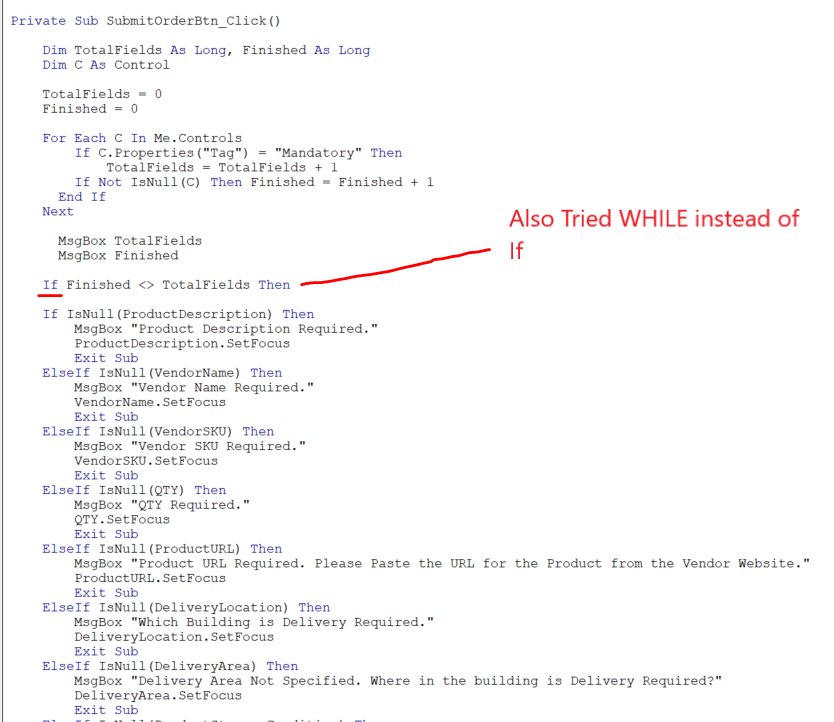
Thanks Adam, the OR seem to do the trick with that. I trying to figure the best way to loop like you suggested. I've excluded the OR statement from the attempt on loop for now. I watched the TechHelp on the progress bar and tried the Tag method but it doesn't capture multiple records in the subf again. I switched the IF to While thinking that may help but the result was the same.
This is probably straight forward but im not sure how to do this.
Marc Spragg OP  @Reply  
     
4 years ago

Alex Hedley  @Reply  
           
4 years ago
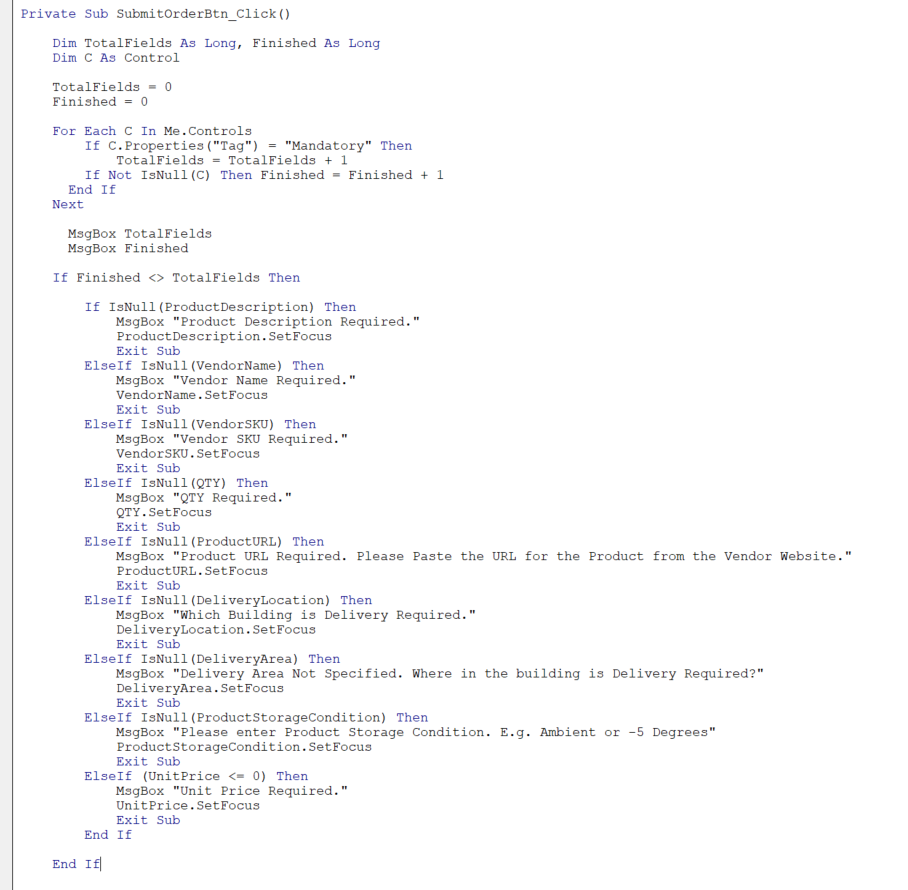
The red highlighted line, is there an End If we don't see at the bottom

Maybe worth indenting the below Ifs
Marc Spragg OP  @Reply  
     
4 years ago
Thanks Alex, yes there is an end if - i couldn't fit all the code in the screenshot. The IF statement is the same as the screenshot up the thread. Minus the first IF AND statement. I'll add the complete screenshot with the indenting.
Marc Spragg OP  @Reply  
     
4 years ago

Adam Schwanz  @Reply  
            
4 years ago
I would use a recordset limited to the OrderID. If you want to use the set focus you're going to have to stop it when you reach one that doesn't have a value though as well.
Adam Schwanz  @Reply  
            
4 years ago
Assuming you don't have any orders made with no details, something like this, I haven't used set focus in a loop or recordset before so might need to toy with it

Dim RSStop As Boolean
RSStop=False
Dim db as database
dim rs as recordset
set db=currentdb
set rs=db.openrecordset("Select * From OrderDetailsT Where OrderID=" & OrderID)

while not rs.eof and rsstop=false
If IsNull(rs!ProductDescription) Then
'Msgbox
'Focus
RSStop=True
ElseIf ..... etc
End If
rs.movenext
wend
rs.close
db.close
set rs=nothing
set db=nothing
Marc Spragg OP  @Reply  
     
4 years ago
Thank you Adam for the code. It did the Job. Much appreciated. You was right with the Setfocus. If the order contains more than 1 order detail the focus always gets set on the first record not the record where the field is null. I've left out the setfocus for now.

This thread is now CLOSED. If you wish to comment, start a NEW discussion in Access Developer Forum.
 

Next Unseen

 
New Feature: Comment Live View


The following is a paid advertisement
Computer Learning Zone is not responsible for any content shown or offers made by these ads.
 

Learn
 
Access - index
Excel - index
Word - index
Windows - index
PowerPoint - index
Photoshop - index
Visual Basic - index
ASP - index
Seminars
More...
Customers
 
Login
My Account
My Courses
Lost Password
Memberships
Student Databases
Change Email
Info
 
Latest News
New Releases
User Forums
Topic Glossary
Tips & Tricks
Search The Site
Code Vault
Collapse Menus
Help
 
Customer Support
Web Site Tour
FAQs
TechHelp
Consulting Services
About
 
Background
Testimonials
Jobs
Affiliate Program
Richard Rost
Free Lessons
Mailing List
PCResale.NET
Order
 
Video Tutorials
Handbooks
Memberships
Learning Connection
Idiot's Guide to Excel
Volume Discounts
Payment Info
Shipping
Terms of Sale
Contact
 
Contact Info
Support Policy
Mailing Address
Phone Number
Fax Number
Course Survey
Email Richard
[email protected]
Blog RSS Feed    YouTube Channel

LinkedIn
Copyright 2026 by Computer Learning Zone, Amicron, and Richard Rost. All Rights Reserved. Current Time: 5/6/2026 10:55:04 AM. PLT: 1s