Free Lessons
Courses
Seminars
TechHelp
Fast Tips
Templates
Topic Index
Forum
ABCD
 
Home   Courses   TechHelp   Help   Contact   Merch   Join   Order   Logon   Forums   
 
Back to Limit Long Text    Comments List
Upload Images   @Reply   Bookmark    Link   Email   Next Unseen 
Add to a Long Text Field
Garry Smith 
    
4 years ago
I want to add to a LongText field in a table PersonNoteT(One to One relationship with a PersonT table) with a query.
I have previously created a record in the PersonNoteT with a query and inserted some text into it. Now with another query I would like to add additional text to the end of the existing text in the PersonNoteT LongText field.
When trying to do this with a query I get a error message that all of the records have validation problems.
Any ideas on how to solve this with a query?
Scott Axton  @Reply  
      
4 years ago
Garry please show us your work.  (I knew I should have taken Richards mind reading class - LOL)

This should be pretty straight forward.
How are you pulling up the query?
Is it one at a time per ID or an add on for all, etc.

Pretty much you should be able to do something along the lines of
PersonNoteT = PersonNoteT & vbNewline & "New Text to add on"

Probably have to wrap it in a If statement to test for ID.

Typing  on phone so not exact.  See what you come up with.
Garry Smith OP  @Reply  
    
4 years ago
OK, problem solved, dumb mistake on my part.
One other ask, when using update to in a query to update a LongText field, How can I start a new line for the additional information that is being appended to the LongText field?
I have tried vbNewLine and CRLF but Access insist on changing to a string.
Then I tried creating a function to return vbNewLine as a Variant but no luck.
Kevin Robertson  @Reply  
          
4 years ago
Use Chr(10)

Example:

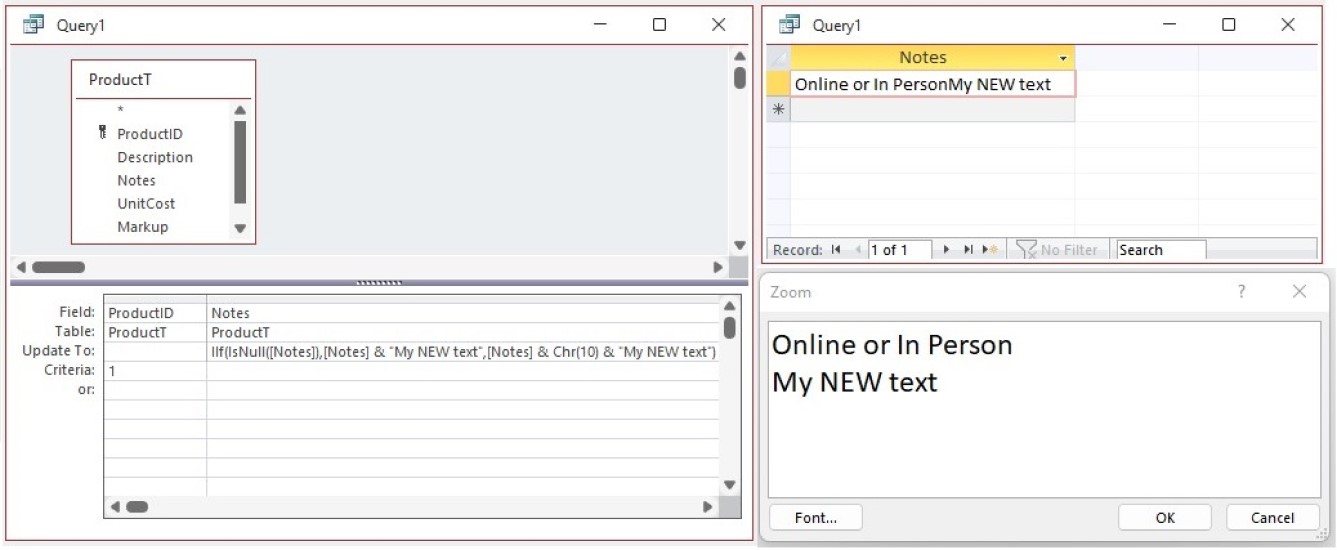
IIf(IsNull([Notes]),[Notes] & "My NEW text",[Notes] & Chr(10) & "My NEW text")
Garry Smith OP  @Reply  
    
4 years ago
Thanks Kevin.
I just tried Chr(10) with no results.
Any other suggestions?
Kevin Robertson  @Reply  
          
4 years ago
Did you zoom in to the field (Shift + F2)?
For some reason the new line doesn't show up in Datasheet view even though it is there.
Kevin Robertson  @Reply  
          
4 years ago

Scott Axton  @Reply  
      
4 years ago
Richard pointed out in another thread just recently that if the notes filed is set to Rich Text type that you have to treat it differently.  I believe it was to use a break character  
Scott Axton  @Reply  
      
4 years ago
html is getting removed above <_br_>  
Take out the underscore
Garry Smith OP  @Reply  
    
4 years ago
Thanks Scott. The "<br>" worked. I forgot about that video.

This thread is now CLOSED. If you wish to comment, start a NEW discussion in Limit Long Text.
 

Next Unseen

 
New Feature: Comment Live View


The following is a paid advertisement
Computer Learning Zone is not responsible for any content shown or offers made by these ads.
 

Learn
 
Access - index
Excel - index
Word - index
Windows - index
PowerPoint - index
Photoshop - index
Visual Basic - index
ASP - index
Seminars
More...
Customers
 
Login
My Account
My Courses
Lost Password
Memberships
Student Databases
Change Email
Info
 
Latest News
New Releases
User Forums
Topic Glossary
Tips & Tricks
Search The Site
Code Vault
Collapse Menus
Help
 
Customer Support
Web Site Tour
FAQs
TechHelp
Consulting Services
About
 
Background
Testimonials
Jobs
Affiliate Program
Richard Rost
Free Lessons
Mailing List
PCResale.NET
Order
 
Video Tutorials
Handbooks
Memberships
Learning Connection
Idiot's Guide to Excel
Volume Discounts
Payment Info
Shipping
Terms of Sale
Contact
 
Contact Info
Support Policy
Mailing Address
Phone Number
Fax Number
Course Survey
Email Richard
[email protected]
Blog RSS Feed    YouTube Channel

LinkedIn
Copyright 2026 by Computer Learning Zone, Amicron, and Richard Rost. All Rights Reserved. Current Time: 8/17/2026 6:54:20 PM. PLT: 0s