Free Lessons
Courses
Seminars
TechHelp
Fast Tips
Templates
Topic Index
Forum
ABCD
 
Home   Courses   Templates   Seminars   TechHelp   Forums   Help   Contact   Join   Order   Logon  
 
Home > TechHelp > Directory > Access > Requery Subform < Button Shortcut Keys | Check Box Color >
Back to Requery Subform    Comments List
Upload Images   @Reply   Bookmark    Link   Email   Next Unseen 
Thanks for this Fast Tip
Richard Vaneveld  
      
3 years ago
Hi Richard,

Thanks for this very useful Fast Tip (as always).

By coincidence I was working on this subject a few weeks ago myself, it took me a few days but I figured it out myself.
I used the BETWEEN operator in my query because I dont have times stored in my date field.
But I hadn't thought about converting my query to SQL statement yet, thanks for that.

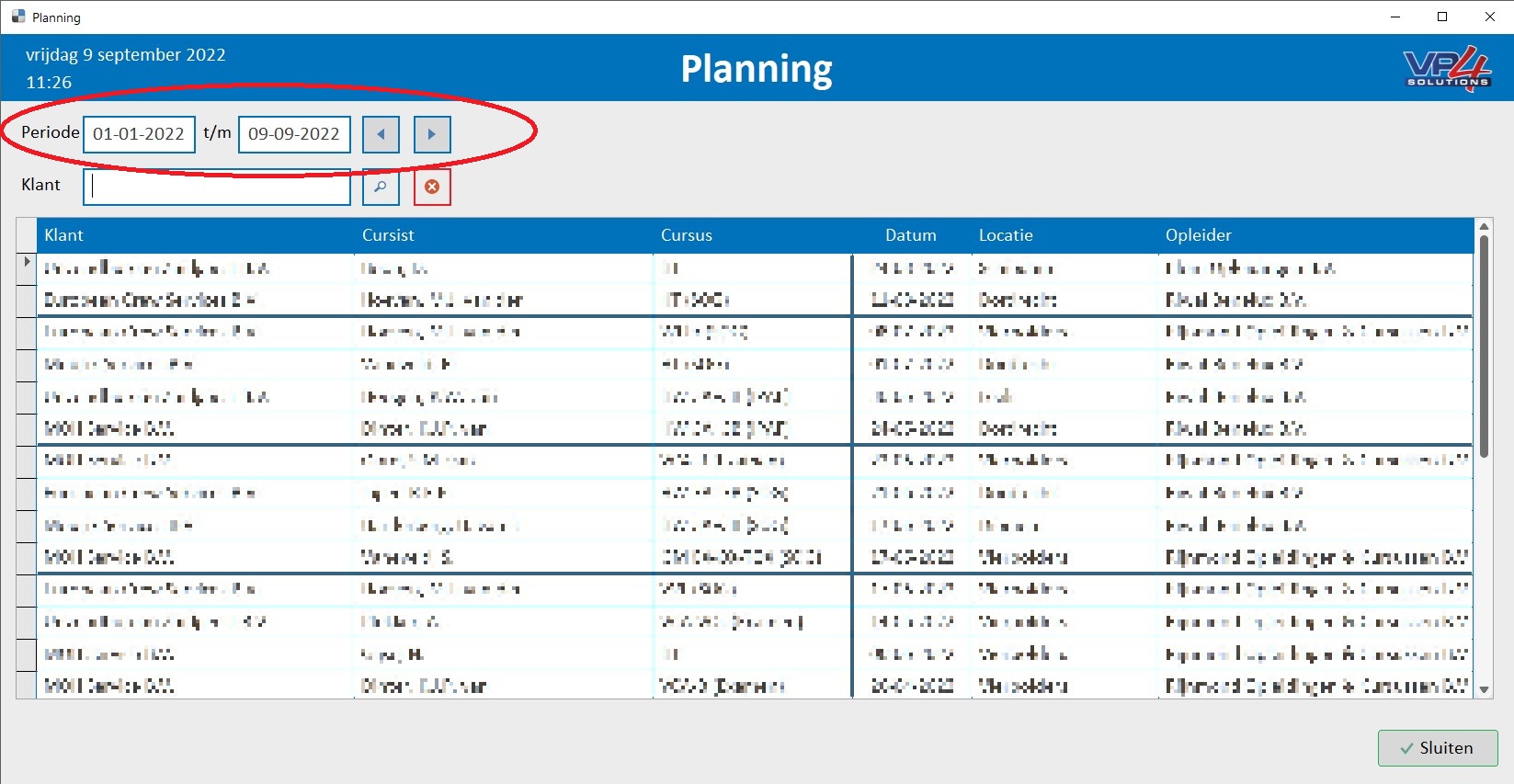
One question: is it also possible when I open up the form it selects the current week?
For example when I open the form on 2022-09-09 it has to automatically selects the range from 2022-09-05 to 2022-09-11 (Monday till Friday).
Now I have to do this manually every time I open this form.

Maybe this can be a topic for a new TechHelp or Fast Tip video?

Kind regards from the Netherlands
Richard Vaneveld OP  @Reply  
      
3 years ago

Scott Axton  @Reply  
          
3 years ago
First go watch the Weekday video.
Also:  DatePart

Here is how I figured out the formulas needed.  
Given that Sunday = 1, Monday = 2 ... Friday= 6 Saturday = 7
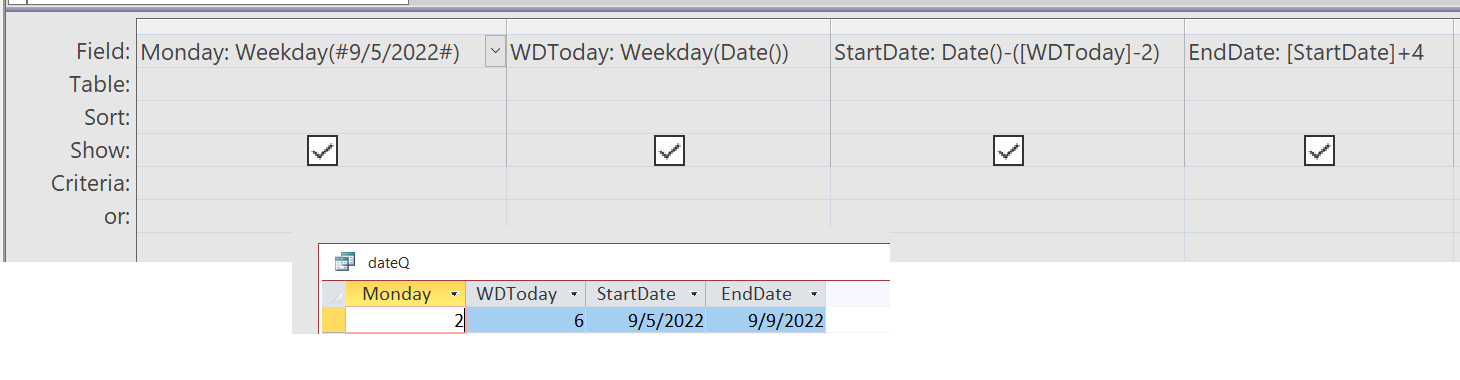
The best way for me to figure this out was with a query.

You can put the following formula into the query to test this out.
If we take a known Monday, say 2022-09-05, that would be Monday: Weekday(#9/5/2022#) and would return a 2.
To find out the week day number of today, 2022-09-09 currently - Today: Weekday(Date()) would return a 6
Scott Axton  @Reply  
          
3 years ago

Scott Axton  @Reply  
          
3 years ago
So if you're following along with that...
We can use  WDToday: Weekday(Date()) for the Weekday of today's date.
So the StartDate would be:
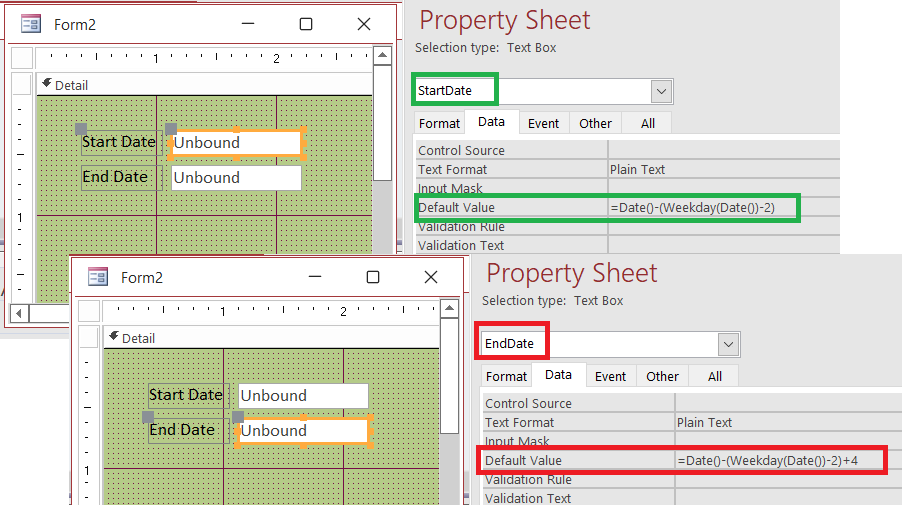
StartDate: Date()-([WDToday]-2) ( Monday )
To figure the EndDate (Friday) you just have to add 4 days to Monday
EndDate:  StartDate + 4  or Date()-([WDToday]-2)+4

Now that we have the formulas you can plug those into your default values for the respective text boxes in your form.
Scott Axton  @Reply  
          
3 years ago

Richard Vaneveld OP  @Reply  
      
3 years ago
Thank you so much Scott.

This works perfectly.
Scott Axton  @Reply  
          
3 years ago
I'm glad it helped!

If you really want to delve deep into working with dates check out the Access DateTime Seminar

----
Richard Rost  This post is fair game if you feel it would be useful and want to use it in a video.
-S
Richard Rost  @Reply  
          
3 years ago
This is covered in Access Expert 28, almost exactly what you've got there. First Day of Week

And yes, this is on my list of topics to cover in a TH video. The list is pretty long. LOL
Scott Axton  @Reply  
          
3 years ago
Well something must have sunk in.  Sure wasn't my search skills.  I guess I should go back and review the older courses to see what I forgot.  LOL

This thread is now CLOSED. If you wish to comment, start a NEW discussion in Requery Subform.
 

Next Unseen


The following is a paid advertisement
Computer Learning Zone is not responsible for any content shown or offers made by these ads.
 

Learn
 
Access - index
Excel - index
Word - index
Windows - index
PowerPoint - index
Photoshop - index
Visual Basic - index
ASP - index
Seminars
More...
Customers
 
Login
My Account
My Courses
Lost Password
Memberships
Student Databases
Change Email
Info
 
Latest News
New Releases
User Forums
Topic Glossary
Tips & Tricks
Search The Site
Code Vault
Collapse Menus
Help
 
Customer Support
Web Site Tour
FAQs
TechHelp
Consulting Services
About
 
Background
Testimonials
Jobs
Affiliate Program
Richard Rost
Free Lessons
Mailing List
PCResale.NET
Order
 
Video Tutorials
Handbooks
Memberships
Learning Connection
Idiot's Guide to Excel
Volume Discounts
Payment Info
Shipping
Terms of Sale
Contact
 
Contact Info
Support Policy
Mailing Address
Phone Number
Fax Number
Course Survey
Email Richard
[email protected]
Blog RSS Feed    YouTube Channel

LinkedIn
Copyright 2025 by Computer Learning Zone, Amicron, and Richard Rost. All Rights Reserved. Current Time: 12/10/2025 1:52:15 AM. PLT: 2s