Free Lessons
Courses
Seminars
TechHelp
Fast Tips
Templates
Topic Index
Forum
ABCD
 
Home   Courses   TechHelp   Forums   Help   Contact   Merch   Join   Order   Logon  
 
Back to Access Developer Forum    Comments List
Upload Images   @Reply   Bookmark    Link   Email   Next Unseen 
Im totally stuck
Klaas van Eijkern 

4 years ago
Hi Team,

Unfortunately, at the beginning of building the database in Access that I'm still working on, I didn't know Richard Rost.
Fortunately, I came into contact while building in Access.
After following many videos, I have gained a lot of knowledge. But now I'm still running into a problem that I can't solve on my own anymore.

I've searched the forum for help, but I haven't been able to find a solution.

Is it possible that one of the professionals is watching with me?
What option is there?

I would like to hear from you.
Sincerely, Klaas
Kevin Robertson  @Reply  
          
4 years ago
What is it you are having problems with? You need to be specific.
Klaas van Eijkern OP  @Reply  

4 years ago
Hi Kevin,

A few days ago I made a post with the same question. I got answers, which unfortunately I can't get any further with, It's my lack of knowledge.

Based on the TechHelp videos Invoicing, Order Entry System and Invoicing I have the following question.

In my Database I have created a TaskForm. In the TaskForm I have a TaskNumber.
This TaskNumber is copied into the OrderForm (based on the TechHelp videos Invoicing, Order Entry System and Invoicing)
However, as soon as I enter a new part, from SubForm OrderDetailForm, the Job number is removed and set to Null.
How can I solve this?

Because I have a TaskForm, OrderForm and PartsForm, I can send you all the VBA code and screenprints. But what do you need to have a look at it?
Dan Jackson  @Reply  
            
4 years ago
Rick doesn't offer consultations anymore, just the videos and the forums you are using. These are your options in order of recommendation:

1. Go through the course. Depending on how serious you are about using access, you might only need the beginner levels and Expert 1 and 2. Start with Access Beginner 1 - Its over 4 hours long and completely free. Access Beginner 2 is $1. This will help you going forward and not rely on others to assist.

2. There is an access.dev forum where you can pay for a consultant but they usually build a database to your specification rather than train (Though that'll depend on the individual consultant). you'll probably end up spending more than if you take the time to learn with the course but you can guarantee a good quality database because all the consultants are approved by Rick.

3. Wait to hear from one of the other guys who are knowledgable than myself as they're always happy to help where they can.
Richard Rost  @Reply  
           
4 years ago
Klaas, it's very difficult to troubleshoot a database like this remotely. We've got no idea what you've built. Feel free to post a few screen shots and maybe we can figure it out for you, but of course there are no guarantees. Since you haven't taken any of my full courses, I really can't tell what your skill level is. The Invoicing TechHelp video is at about the skill level of Access Expert 3.
Klaas van Eijkern OP  @Reply  

4 years ago
Hi Dan and Richard,

As an MS Excel expert, I eventually switched to MS Access.
I've been following a lot of videos of you, Richard. All very helpfull.

I admit that I have not taken full courses. I will definitely do this again just to be sure.
Some of Richard's comment about DON'T do, I had already done and as best I know how, I've adjusted this.

Today I will share some of my screenshots and associated VBA code.

Thank you so much.
Klaas van Eijkern OP  @Reply  

4 years ago
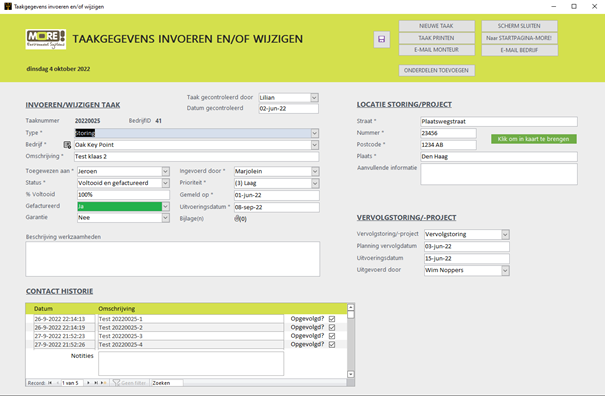
Here are screenshots of the database I created.

The first screen print is an input form with Tasks and associated contact history.

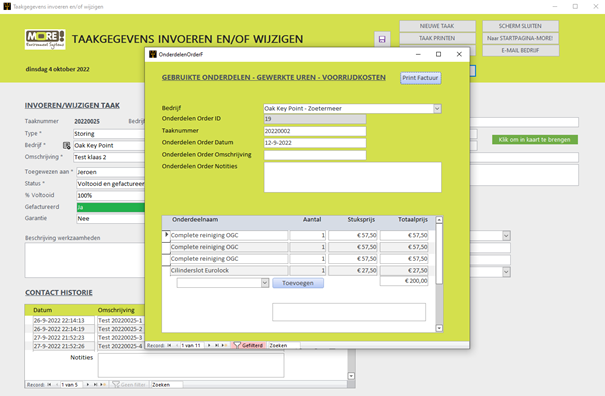
These Tasks can add Parts that were used while the Task was running.
This is the second screen print.

Based on the Invoicing Order Entry System videos, courtesy of Richard Rost, I got everything working.
I have added the Task Number field from the Tasks form (screenshot 1), to also log the used Parts per Task.

If I click on add new empty record, the Task Number from the Task Form (screenshot 1) is copied.
However, when I add Parts, the Task Number field becomes empty. The other fields remain in order.

No matter what I've tried, I can't seem to get the Task Number from the Tasks form.
I am looking for help with this.

Thanks in advance.
Klaas van Eijkern OP  @Reply  

4 years ago

Klaas van Eijkern OP  @Reply  

4 years ago

Dan Jackson  @Reply  
            
4 years ago
Klaas van Eijkern OP  @Reply  

4 years ago
Hi Dan,

I had and have followed the video Value From a Form again.

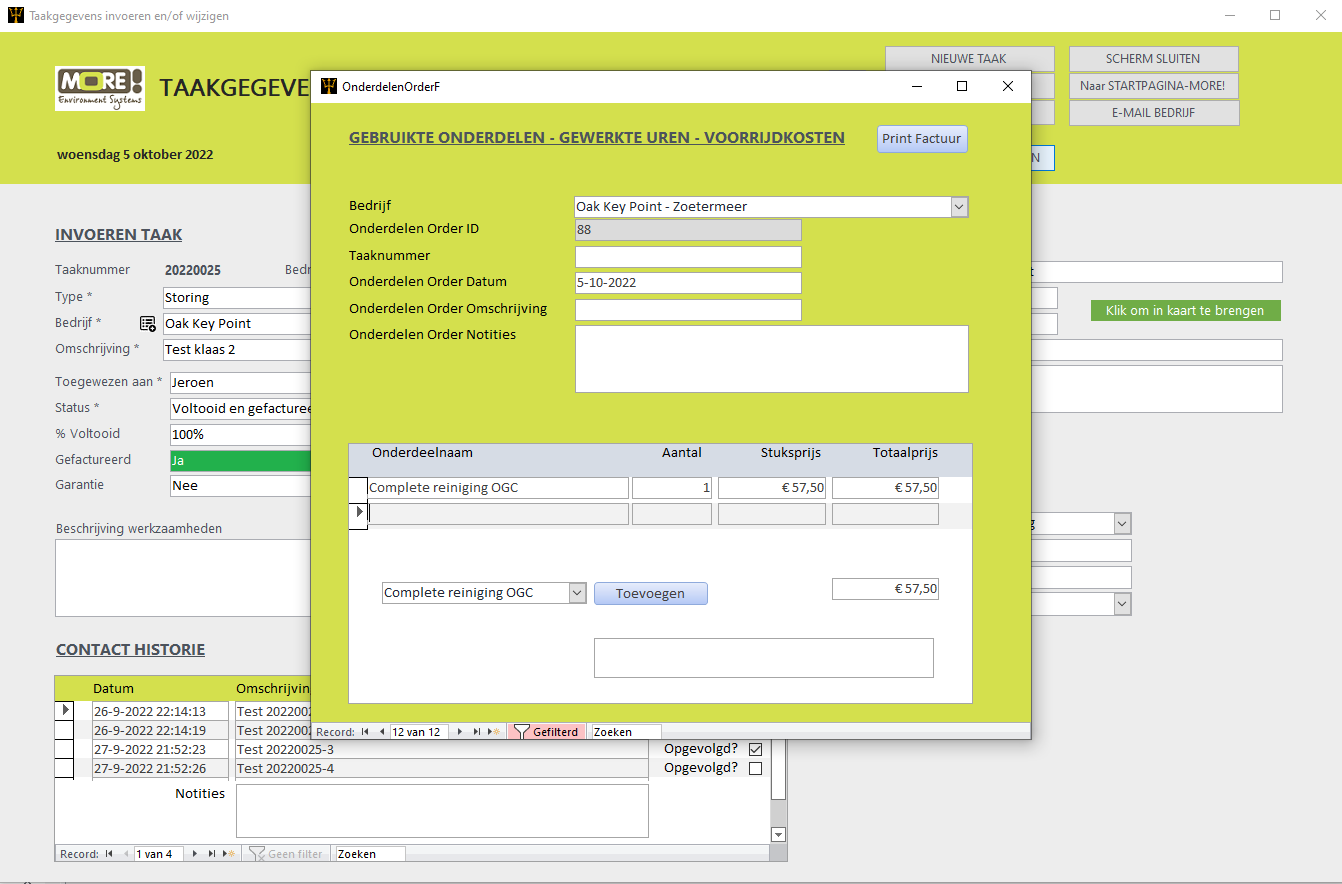
(see Screen Print 3 below)
The Task Number field is automatically filled with the Task Number of the Task Form.
Also when I create a new record, the Task Number is still in place. So far so good.

But when I select an item and click the button to add the item, the task Number is overwritten to Null.
So things are not going well here.
Could you please help me with this.

Below is the VBA code behind the button.

Option Compare Database
Option Explicit

Private Sub PartsOrderDetailNumber_AfterUpdate()

    Me.Refresh
    
End Sub

Private Sub PartsOrderDetailPrice_AfterUpdate()

    Me.Refresh

End Sub

Add Private SubComponent_Click()
  
    If IsNull(PartsListCombo) Then
        DoCmd.GoToControl "PartsOverviewCombo"
        PartsOverviewCombo.Dropdown
        Exit Sub
    End If
          
    If IsNull(Forms!PartsOrderF!PartsOrderID) Then
        Forms!PartsOrderF!PartsOrderDate = Date
        Forms!PartsOrderF.Refresh
            
    End If
        
    DoCmd.GoToRecord , , acNewRec
    PartID = PartsOverviewCombo
    PartsOrderDetailProductName = PartsOverviewCombo.Column(1)
    PartsOrderDetailPiece Price = PartsOverviewCombo.Column(2)
    PartsOrderDetailNotes = Nz(DLookup("PartsOrderDetailNotes", "PartsOverviewT", "PartID=" & "PartsOverviewCombo"), "")
    Me.Refresh
      
End Sub
Klaas van Eijkern OP  @Reply  

4 years ago

Kevin Robertson  @Reply  
          
4 years ago
I see a couple of things wrong with your code.

1. Add Private SubComponent_Click() should be Private Sub SubComponent_Click()

2. There are extra quotes in your DLookup statement. The name of the Combo Box should not be in quotes.
PartsOrderDetailNotes = Nz(DLookup("PartsOrderDetailNotes", "PartsOverviewT", "PartID=" & PartsOverviewCombo), "")

How are you getting the Task Number into the field? Is it a Default Value?
Is there a record created in the Parent form? If not, the value may be being removed when the record is created.
Klaas van Eijkern OP  @Reply  

4 years ago
Hi Kevin,

Thanks, I removed the extra quotes from the Combo Box.

A new Task Number is created in the Form Tasks when creating a new Task: (sorry, it's in Dutch)
TaakNummer = DMax("TaakNmr", "Taken") + 1

In the Form OnderdelenOrderF (see Screen Print 3) The Task Number is getting his value from:
StandardValue = [Forms]![Taakgegevens invoeren en/of wijzigen]![TaakNmr]
And from the VBA Code:

Option Compare Database
Option Explicit

Private Sub BedrijfCombobox_AfterUpdate()

    Me.Refresh

End Sub
Private Sub TaakNmr_AfterUpdate()

    Me.Refresh

End Sub

Private Sub BedrijfCombobox_BeforeUpdate(Cancel As Integer)

    If MsgBox("Hierdoor wordt de klant voor de huidige bestelling gewijzigd. Weet je het zeker?", _
        vbYesNoCancel) <> vbYes Then
            Cancel = True
            Exit Sub
    End If
    
End Sub

Private Sub Form_Current()

If Isloaded("Taakgegevens invoeren en/of wijzigen") Then
        BedrijfCombobox.DefaultValue = Forms![Taakgegevens invoeren en/of wijzigen]!BedrijfID
        TaakNmr.DefaultValue = Forms![Taakgegevens invoeren en/of wijzigen]!TaakNmr
        
    Else
        BedrijfCombobox.DefaultValue = 0
        TaakNmr.DefaultValue = 0
    End If
  
End Sub


Klaas van Eijkern OP  @Reply  

4 years ago
Still to do and I am aware:
Change Form Name with spaces to a Name without spaces, as taught in one of the videos.
Klaas van Eijkern  @Reply  
     
4 years ago
Problem is solved.
I've deleted the Task Number from all tables and Forms. After that added the Task Number to the tables and Yes it's working.
Thanks for all the help.

This thread is now CLOSED. If you wish to comment, start a NEW discussion in Access Developer Forum.
 

Next Unseen

 
New Feature: Comment Live View


The following is a paid advertisement
Computer Learning Zone is not responsible for any content shown or offers made by these ads.
 

Learn
 
Access - index
Excel - index
Word - index
Windows - index
PowerPoint - index
Photoshop - index
Visual Basic - index
ASP - index
Seminars
More...
Customers
 
Login
My Account
My Courses
Lost Password
Memberships
Student Databases
Change Email
Info
 
Latest News
New Releases
User Forums
Topic Glossary
Tips & Tricks
Search The Site
Code Vault
Collapse Menus
Help
 
Customer Support
Web Site Tour
FAQs
TechHelp
Consulting Services
About
 
Background
Testimonials
Jobs
Affiliate Program
Richard Rost
Free Lessons
Mailing List
PCResale.NET
Order
 
Video Tutorials
Handbooks
Memberships
Learning Connection
Idiot's Guide to Excel
Volume Discounts
Payment Info
Shipping
Terms of Sale
Contact
 
Contact Info
Support Policy
Mailing Address
Phone Number
Fax Number
Course Survey
Email Richard
[email protected]
Blog RSS Feed    YouTube Channel

LinkedIn
Copyright 2026 by Computer Learning Zone, Amicron, and Richard Rost. All Rights Reserved. Current Time: 6/22/2026 1:07:04 PM. PLT: 1s