Free Lessons
Courses
Seminars
TechHelp
Fast Tips
Templates
Topic Index
Forum
ABCD
 
Home   Courses   TechHelp   Help   Contact   Merch   Join   Order   Logon   Forums   
 
Home > Forums > Access Developers > Adding Times by Jenny Bisset
Back to Access Developers    Comments List
Upload Images   @Reply   Bookmark    Link   Email   Next Unseen 
Adding Times
Jenny Bisset 
    
4 years ago
Good day, I hope that everyone is doing well.
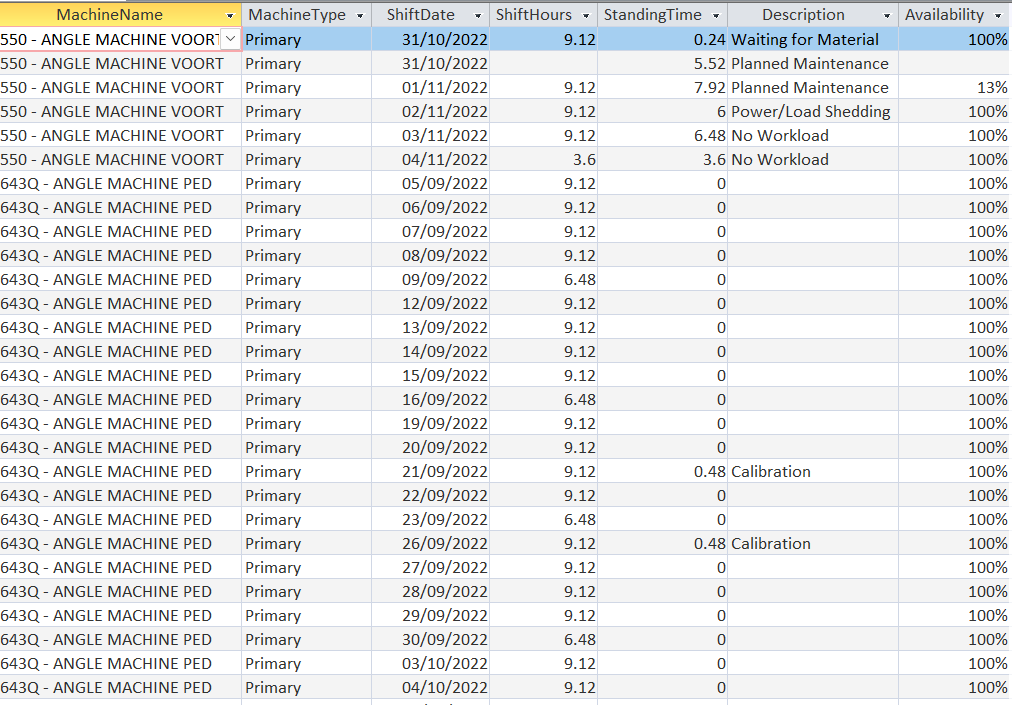
I have a database for our Automated machines. It is basically to track "Running/Standing Time" data of our machines.
Is there a way that I can add the "Standing Time" fields together for all incidents on the same day.
The reason why they are not adding together now, is because of the "Stop Code - Description field"
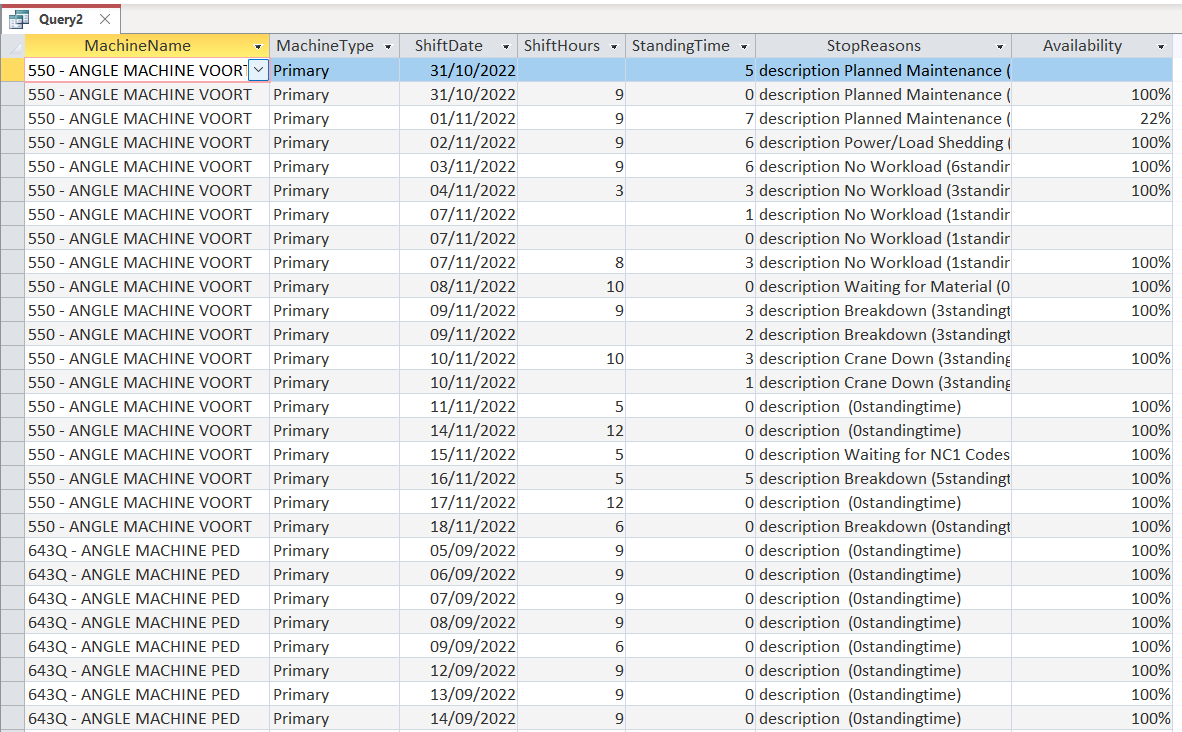
I need to calculate the availability of each machine per total shift per day (on this particular query).
However, because the machines are stopped more than once per shift for different reasons (Stop Codes) the grouping is a little messed up.
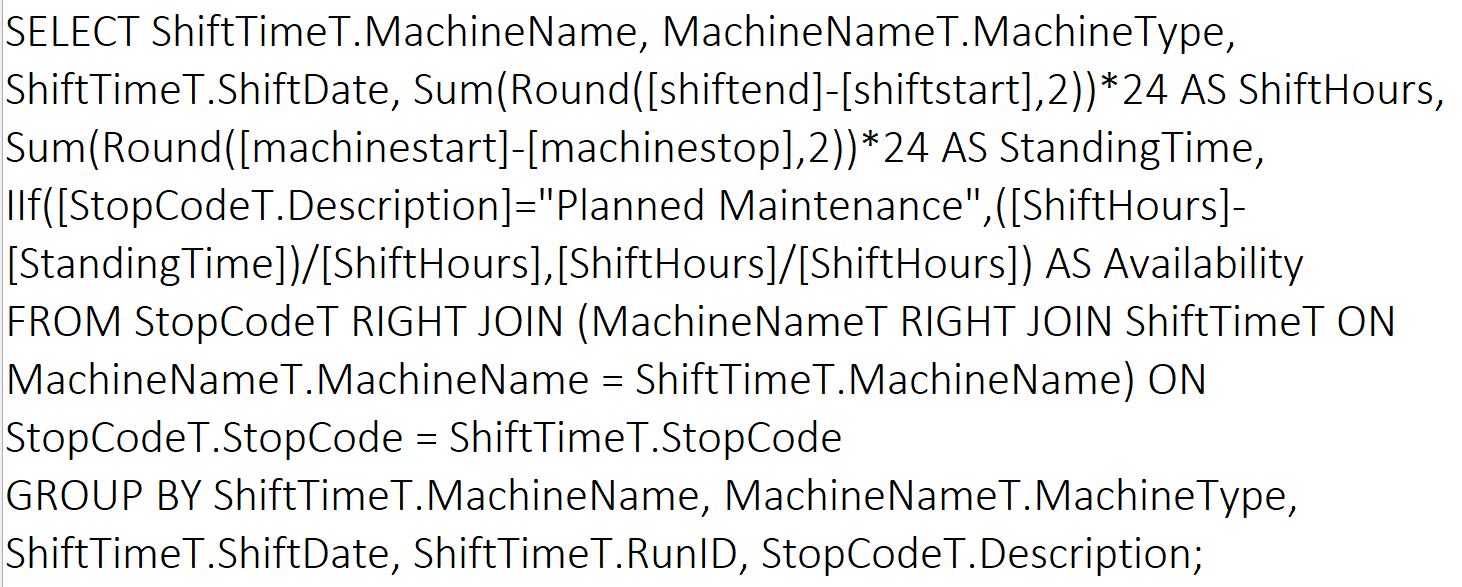
I am going to attach a picture of the SQL code too. I have to include the Stop Codes in this query - because the availability is calculated with an IIF statement.
For example - If the stop code was "Planned Maintenance" then it would mean that the machine was not available for that period of time. However, if the stop code was for "Safety Meetings" or for "No Workload" - the machine was technically still available to be used.
So, I cannot exclude the stop code from this query - but Access forces me to use it in the "Group By" statement and that causes my calculations to be inaccurate. because it won't add the TOTAL standing time for the day together.
Is there a way around this?
Jenny Bisset OP  @Reply  
    
4 years ago

Jenny Bisset OP  @Reply  
    
4 years ago

John Davy  @Reply  
         
4 years ago
Hi Jenny

I am trying to wrap my head around exactly what you are trying to do. Please explain "Stop Code - Description field". Initially, my thought is why are you trying to use one select statement to accomplish this. Have you thought about creating a temporary table and one or more queries to Append and Update the table? Speed should not be an issue and might be faster. I will try to help is you help my understand exactly what you need to do.
John
Jenny Bisset OP  @Reply  
    
4 years ago
Hi John,

Well, essentially my boss wants a few reports with the data from our machines that are logged. But the two most important ones are the "Availability" and the "Utilisation" of our machines
The Availability is the one that I am having trouble with - the other one runs 100%
So, the "Stop Code Description" field....we have a bunch of machines that have to be running and be productive. When the machines are not running, they are basically "costing us money" .
Sometimes the machines run double shifts - but they are stopped during the shifts for different reasons such as Load Shedding, Tooling Changed, Safety Meetings, Maintenance, etc.
My boss wants to know how much of the "Standing Time" was for which reasons. Basically if the machine was stopped/not running due to load shedding, then technically it was not the machine that was "unavailable" but it was circumstances out of our control. However, if the machine was shut down for 5 hours due to Safety Meetings, that is something that can be controlled.
So, when I run the query for "availability" - the idea behind it works fine - but the calculations get all messed up because it cannot add all the "Standing Times" together in one shift because the "stop code" fields are splitting them - and I cannot remove that field from my query, because my boss needs it in there.
So, is there a way that I can work around that?
Kevin Yip  @Reply  
     
4 years ago
Hi Jenny, I posted an answer about a month to this very same question.  Please see my answer here: https://599cd.com/blog/display-article.asp?ID=352&CommentID=57538#StartOfComments

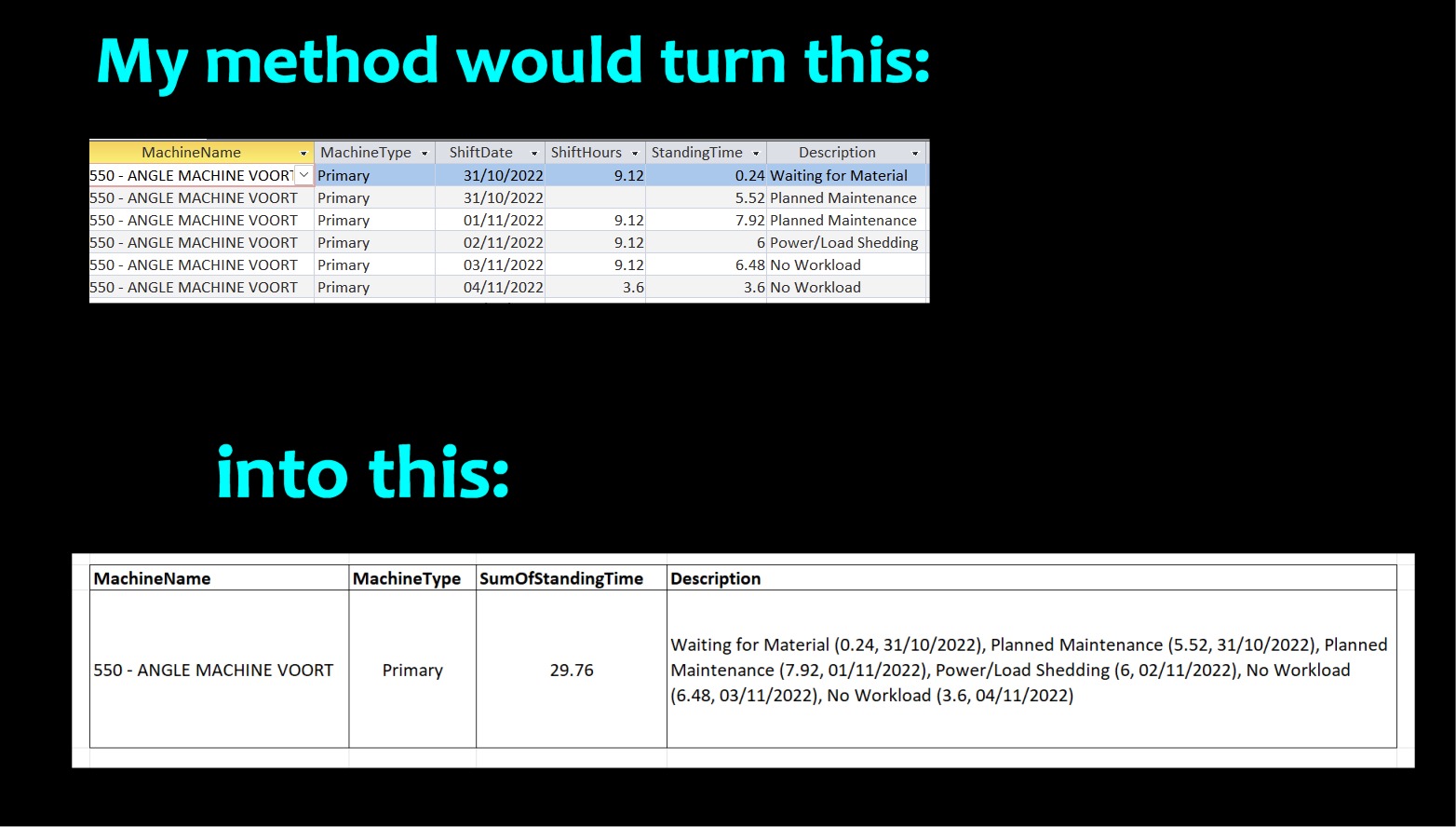
Basically, in order to retain your "Stop code describing" while still summing up your "Standing time", you need to write a custom VBA function as shown in my answer above.  See my picture below for what this would entail.
Kevin Yip  @Reply  
     
4 years ago

Jenny Bisset OP  @Reply  
    
4 years ago
Hi Kevin,

Please accept my sincere apologies - I don't know how I have missed your reply on my previous question. I have had a look at it now, and yes - that would work perfectly! That is exactly what I want to do. Only - you were right in your comment, that is a little bit above my skillset at the moment. But, I am a quick learner - so, if you could walk me through your VBA coding and explain what is happening there....then I'm sure I would be able to do it.
I just have to tell you that I have never worked with recordsets before - so, talk slow...haha! I have seen it on the developer classes and that is what I know.
But, like I said - I am a quick study and if you explain to me what is happening there, I would catch on quick.
Kevin Yip  @Reply  
     
4 years ago
Hi Jenny, Richard is a better instructor than I ever could be, so I would suggest you watch his lessons to gain all this knowledge in a systematic way.  You need to learn custom functions, recordset operations, aggregate queries, and of course VBA. There may be other prerequisite lessons as well.  I see you are on the developer series, so you should just continue with it.  If you still have questions then, I and the others can help.  Unfortunately I have no access to many of Richard's courses because I'm not and have never really been his student, so I can't help you with your learning process.  It was by accident that I started posting here.  I used to post comments on his YouTube channel, and he liked my comments and invited me here.  I try to offer my minor assistance like I just did whenever I can.  But I defer to Richard and his courses regarding the actual training of his students and how it should be done.
Jenny Bisset OP  @Reply  
    
4 years ago
Hi Kevin, I understand. And thank you so much for your help, I really do appreciate it. I am definitely going to continue the courses and complete them.
However, in the meantime, I still need my database to work - because the information that I need to provide from the database still needs to be accurate. It is actually used by my director to present to our CEO to do production planning, budgeting, etc. So, I still need the information to be correct.
So, can you just tell me where to go and maybe just give me a code that I can just copy and paste into VBA so that I can provide accurate information to my director?
I am not sure if this crosses some sort of line, and I sincerely apologise if it does. That is genuinely not my intention. But, if there is a way that you can help, I would really appreciate it.
Kevin Yip  @Reply  
     
4 years ago
Hi Jenny, I did give you the code, which you could adapt to your needs (after you've acquired the skills).  If you want the exact code, it would require me knowing the full situation at your company, its operation, not to mention, the exact configurations of your database, etc.  I couldn't write code without knowing all that, just as you wouldn't want someone to write code for you without knowing a thing about your company and situation.  This sounds like a task for a fully commissioned consultant.  You need someone to write the exact code for you (after surveying your company, of course), but also periodically maintain and fix code for you -- until your Access skills are good enough to do so on your own.  If you want to go that route, you may post at the Accessdev.net forum on this site.
Jenny Bisset OP  @Reply  
    
4 years ago
Hi Kevin, it's me again...☺
I hope that you are doing very well. Okay, so, I have made some progress...kind of....haha.
I have studied a little bit and written the custom function like you said. And it seems to be working so far....well, working-ish...
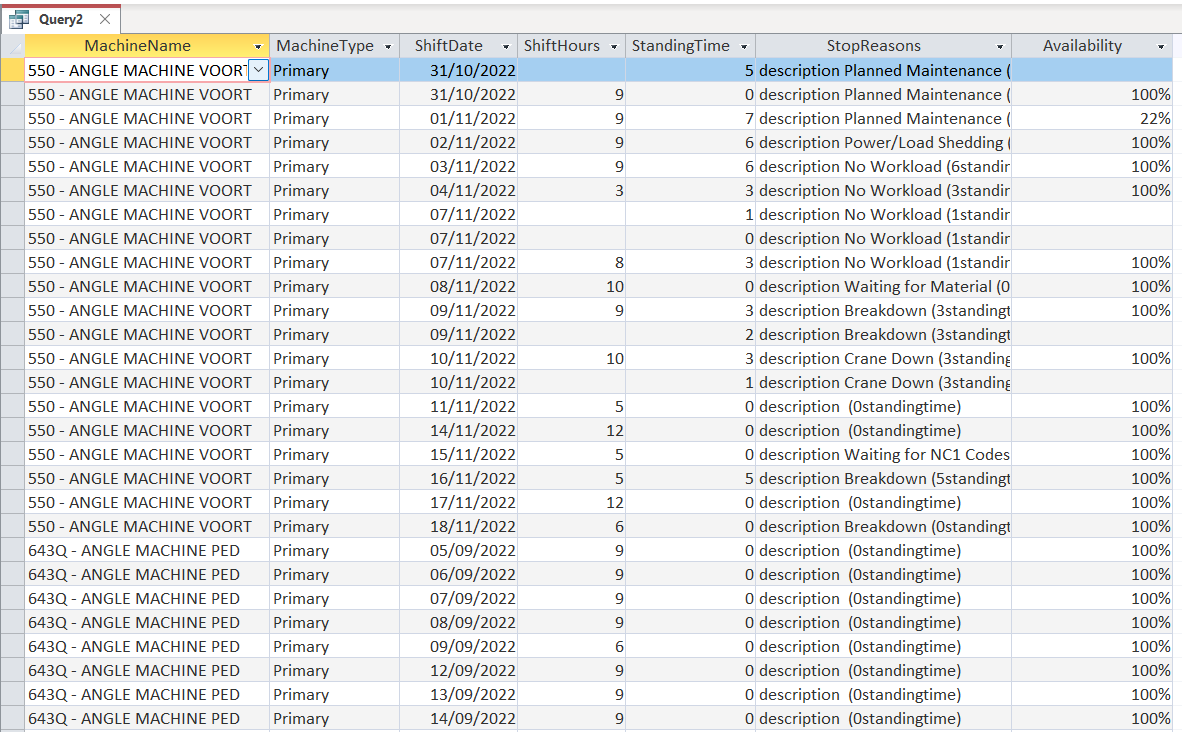
Everything seems to run just fine - until I want to aggregate my query - then I get an error "Data Type Mismatch"
I have checked the "ShiftHours" and the "StandingTime" fields - and they are numbers -so, why can't I "Sum" them? What am I missing here?
This is the last thing that I need to sort out, then ALL of the calculations will work.
If it means anything - I have done a "Test-Run" with your "GetLotInfoPerDay" first - I made a new table and everything - and that query aggregated just fine. So, please can you help me figure out what the issue is here?
Jenny Bisset OP  @Reply  
    
4 years ago

Jenny Bisset OP  @Reply  
    
4 years ago

Jenny Bisset OP  @Reply  
    
4 years ago

Jenny Bisset OP  @Reply  
    
4 years ago

Kevin Yip  @Reply  
     
4 years ago
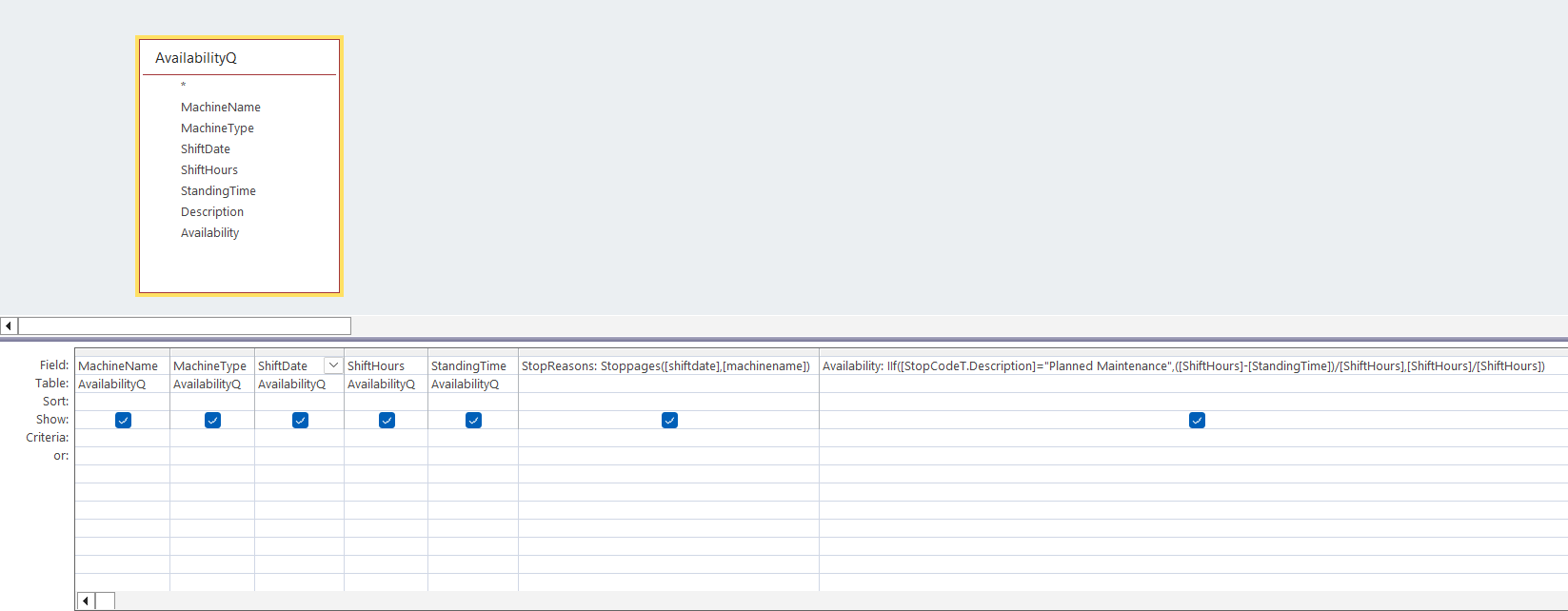
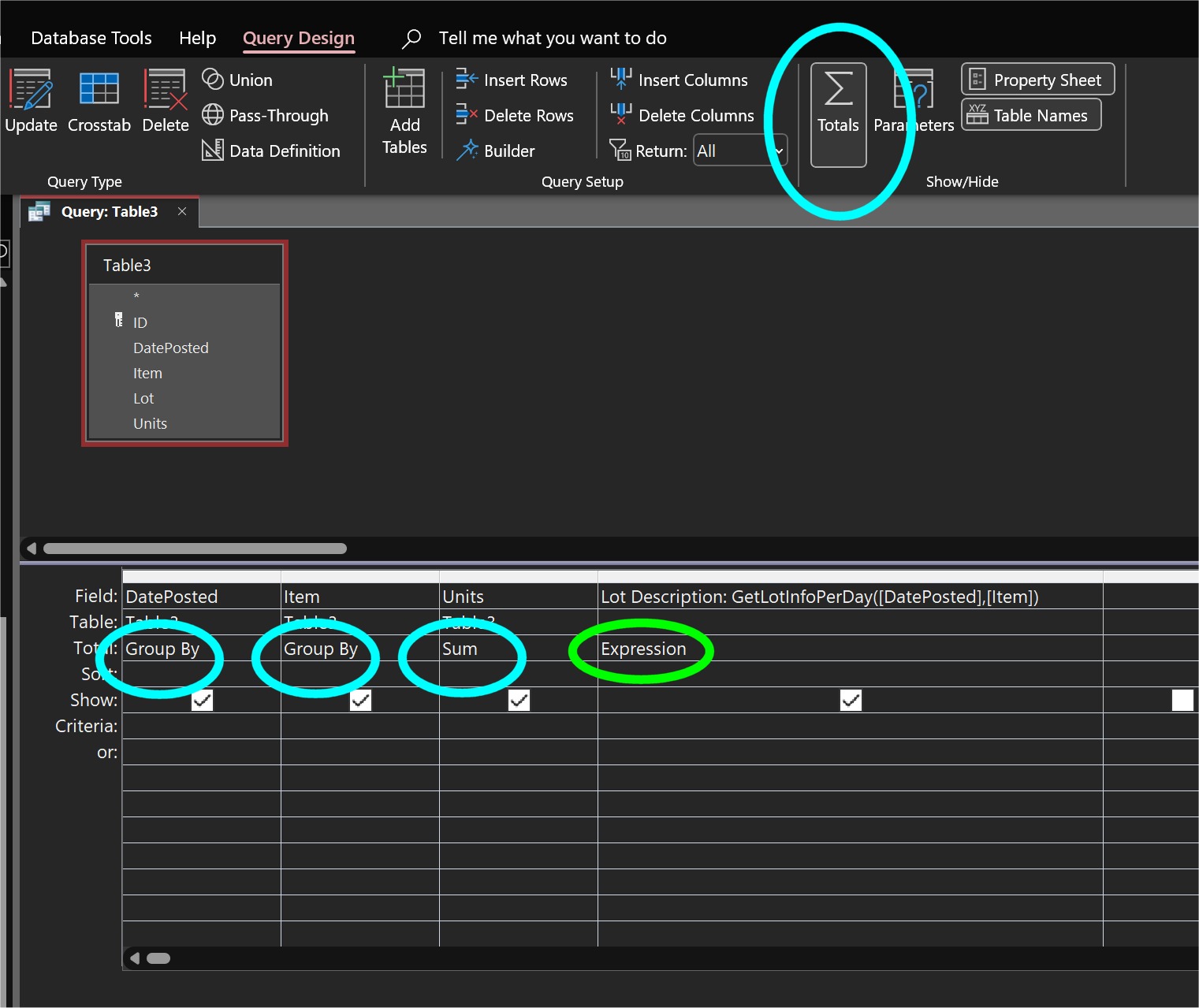
Hi Jenny, hope you are doing well too.  To create an aggregate query, you need to click the "Total" button at the top (see picture below).  A new row will appear, where you can specify "Group By" or "Sum".  

In order to use "Group By", the "group" in question must have the same values in all the rows.  Note that ShiftDate and Availability do not have the same values in all the rows in the group.  MachineName and MachineType do, but not ShiftDate and Availability.  So you must *remove* those two columns -- for the same reason you had to remove Stop Codes and create a custom function for them.

Also, in the column with your custom function (StopReasons), be sure to specify "Expression" instead of "Group By", because it is not part of the group.

Richard has several videos on aggregate queries and some are free.  You need to learn as much as you can about them: the concept behind them, and ways to execute them.  Aggregate queries are very useful, but mistakes can also be easily made.  So your query-making skills need to be razor sharp.
Kevin Yip  @Reply  
     
4 years ago

This thread is now CLOSED. If you wish to comment, start a NEW discussion in Access Developers.
 

Next Unseen


What's This?


The following is a paid advertisement
Computer Learning Zone is not responsible for any content shown or offers made by these ads.
 

Learn
 
Access - index
Excel - index
Word - index
Windows - index
PowerPoint - index
Photoshop - index
Visual Basic - index
ASP - index
Seminars
More...
Customers
 
Login
My Account
My Courses
Lost Password
Memberships
Student Databases
Change Email
Info
 
Latest News
New Releases
User Forums
Topic Glossary
Tips & Tricks
Search The Site
Code Vault
Collapse Menus
Help
 
Customer Support
Web Site Tour
FAQs
TechHelp
Consulting Services
About
 
Background
Testimonials
Jobs
Affiliate Program
Richard Rost
Free Lessons
Mailing List
PCResale.NET
Order
 
Video Tutorials
Handbooks
Memberships
Learning Connection
Idiot's Guide to Excel
Volume Discounts
Payment Info
Shipping
Terms of Sale
Contact
 
Contact Info
Support Policy
Mailing Address
Phone Number
Fax Number
Course Survey
Email Richard
[email protected]
Blog RSS Feed    YouTube Channel

LinkedIn
Copyright 2026 by Computer Learning Zone, Amicron, and Richard Rost. All Rights Reserved. Current Time: 9/22/2026 3:33:22 PM. PLT: 1s