Free Lessons
Courses
Seminars
TechHelp
Fast Tips
Templates
Topic Index
Forum
ABCD
 
Home   Courses   TechHelp   Help   Contact   Merch   Join   Order   Logon   Forums   
 
Back to Barcode Seminar Lessons    Comments List
Upload Images   @Reply   Bookmark    Link   Email   Next Unseen 
Barcode Seminar Syntax Error
Ester Grande 
    
4 years ago
Hi I have followed your seminar on Barcode, I have followed it step by step. Everything works fine until I inserted the code to check whether a product is on the list, so that it will increment quantity.

After that, add a product scanning the barcode doesn't work at all, even if the product is not already in the list.

I have checked the code ten and more times, copied your and put the name of my field, but it still doesn't work.

I really don't know what the problem is.

Can you help?
Ester Grande OP  @Reply  
    
4 years ago

Kevin Yip  @Reply  
     
4 years ago
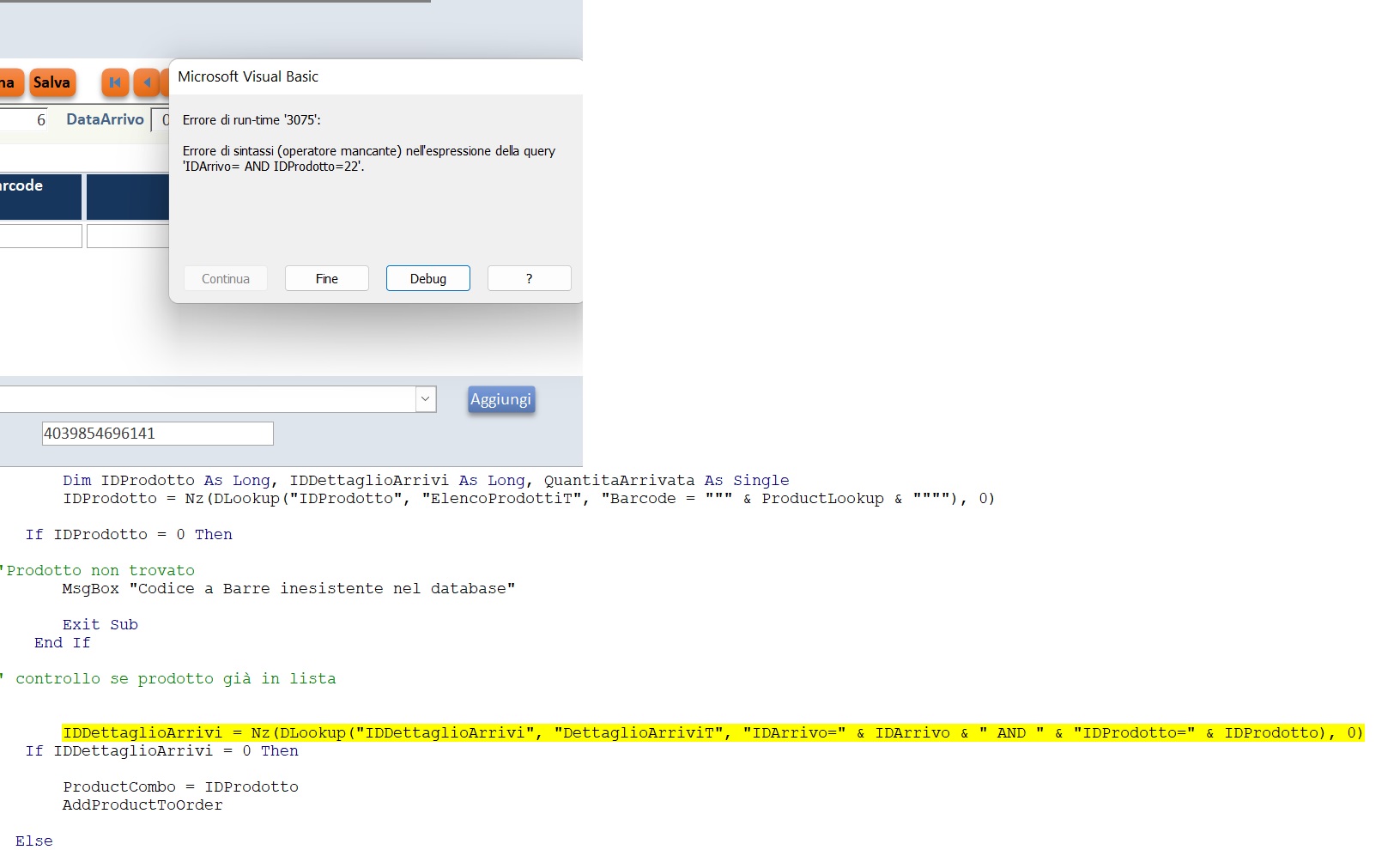
Hi Ester, that error message tells you what the problem is.  One of your criteria is missing value:

     IDArrivo=

It should look something like this:

     IDArrivo=1234

You need to find out why it is missing a value.
Ester Grande OP  @Reply  
    
4 years ago
Yes, I see that the detailed form pick the IDArrivo if I add a product with the code, but not if I scan the product. Any suggestion why it doesn't do that?

Thanks
Kevin Yip  @Reply  
     
4 years ago
Is your scanner working properly in scanning barcodes and outputting numbers in return?  That would be the first thing I check.  Open Notepad, scan a barcode, and see if any numbers are entered on the page.
Ester Grande OP  @Reply  
    
4 years ago
Yes it does work properly on all other forms.
Alex Hedley  @Reply  
           
4 years ago
In the picture there is a textbox at the bottom of the form, containing a number:403'
Is that where the scanning of the barcode is populating?
What is the name of that control? (check in the Property Sheet)
Ester Grande OP  @Reply  
    
4 years ago
Hi Alex.
Yes where you see the number starting 403 is where the scanning of the barcode put the number, the name of that control is ProductLookup (left the same name Richard gave in his seminar)
Alex Hedley  @Reply  
           
4 years ago
What and where is IDArrivo?
Ester Grande OP  @Reply  
    
4 years ago
IDArrivo is equal to ORDERID of Richard table, whilst IDDettaglioArrivi is equal to ORDERDTLID.
ArriviM = OrderF and DettaglioArriviSM = OrderDtlF

Here is all the code.


Private Sub AddBtn_Click()

    If IsNull(ProductCombo) Then
      DoCmd.GoToControl "ProductCombo"
      ProductCombo.Dropdown
      Exit Sub
    End If
    
    AddProductToOrder
    
End Sub
    
Private Sub AddProductToOrder()
    If IsNull(Forms!ArriviM!IDArrivo) Then
        Forms!ArriviM!DataArrivo = Date
        Forms!ArriviM.Refresh
      
    End If
    
    DoCmd.GoToRecord , , acNewRec
    DoCmd.GoToControl "QuantitaArrivata"
    
    IDProdotto = ProductCombo
    CodArticolo = ProductCombo.Column(1)
    Barcode = ProductCombo.Column(2)
    Descrizione = ProductCombo.Column(3)
    Variante = ProductCombo.Column(4)
    
    Me.Refresh
End Sub

Private Sub ProductLookup_AfterUpdate()
    Dim IDProdotto As Long, IDDettaglioArrivi As Long, QuantitaArrivata As Single
    IDProdotto = Nz(DLookup("IDProdotto", "ElencoProdottiT", "Barcode = """ & ProductLookup & """"), 0)
    If IDProdotto = 0 Then
        'Prodotto non trovato
        MsgBox "Codice a Barre inesistente nel database"
        
        Exit Sub
    End If
        
    ' controllo se prodotto gi' in lista
        
    ' = Nz(DLookup("IDDettaglioArrivi", "DettaglioArriviT", "IDArrivo=" & IDArrivo & "AND " & _
        "IDProdotto=" & IDProdotto), 0)
        
    IDDettaglioArrivi = Nz(DLookup("IDDettaglioArrivi", "DettaglioArriviT", "IDArrivo=" & IDArrivo & " AND " & "IDProdotto=" & IDProdotto), 0)
    If IDDettaglioArrivi = 0 Then
        ProductCombo = IDProdotto
        AddProductToOrder
    Else
        QuantitaArrivata = Nz(DLookup("QuantitaArrivata", "DettaglioArriviT", "IDDettaglioArrivi=" & IDDettaglioArrivi), 1)
        DoCmd.SetWarnings False
       DoCmd.RunSQL "UPDATE IDDettaglioArrivi SET QuantitaArrivata=" & QuantitaArrivata + 1 & " WHERE IDDettaglioArrivi=" & IDDettaglioArrivi
        DoCmd.SetWarnings True
        Me.Requery
    End If
    
    ProductLookup = ""
    ProductLookup.SetFocus
End Sub

Private Sub ProductLookup_GotFocus()
    ProductLookup = ""
End Sub

Ester Grande OP  @Reply  
    
4 years ago
Just to let you know. I started building the database all over again, and it worked. I confronted the two codes and where exactly the same, only on the second everything worked

This thread is now CLOSED. If you wish to comment, start a NEW discussion in Barcode Seminar Lessons.
 

Next Unseen

 
New Feature: Comment Live View


The following is a paid advertisement
Computer Learning Zone is not responsible for any content shown or offers made by these ads.
 

Learn
 
Access - index
Excel - index
Word - index
Windows - index
PowerPoint - index
Photoshop - index
Visual Basic - index
ASP - index
Seminars
More...
Customers
 
Login
My Account
My Courses
Lost Password
Memberships
Student Databases
Change Email
Info
 
Latest News
New Releases
User Forums
Topic Glossary
Tips & Tricks
Search The Site
Code Vault
Collapse Menus
Help
 
Customer Support
Web Site Tour
FAQs
TechHelp
Consulting Services
About
 
Background
Testimonials
Jobs
Affiliate Program
Richard Rost
Free Lessons
Mailing List
PCResale.NET
Order
 
Video Tutorials
Handbooks
Memberships
Learning Connection
Idiot's Guide to Excel
Volume Discounts
Payment Info
Shipping
Terms of Sale
Contact
 
Contact Info
Support Policy
Mailing Address
Phone Number
Fax Number
Course Survey
Email Richard
[email protected]
Blog RSS Feed    YouTube Channel

LinkedIn
Copyright 2026 by Computer Learning Zone, Amicron, and Richard Rost. All Rights Reserved. Current Time: 8/24/2026 8:26:22 AM. PLT: 1s