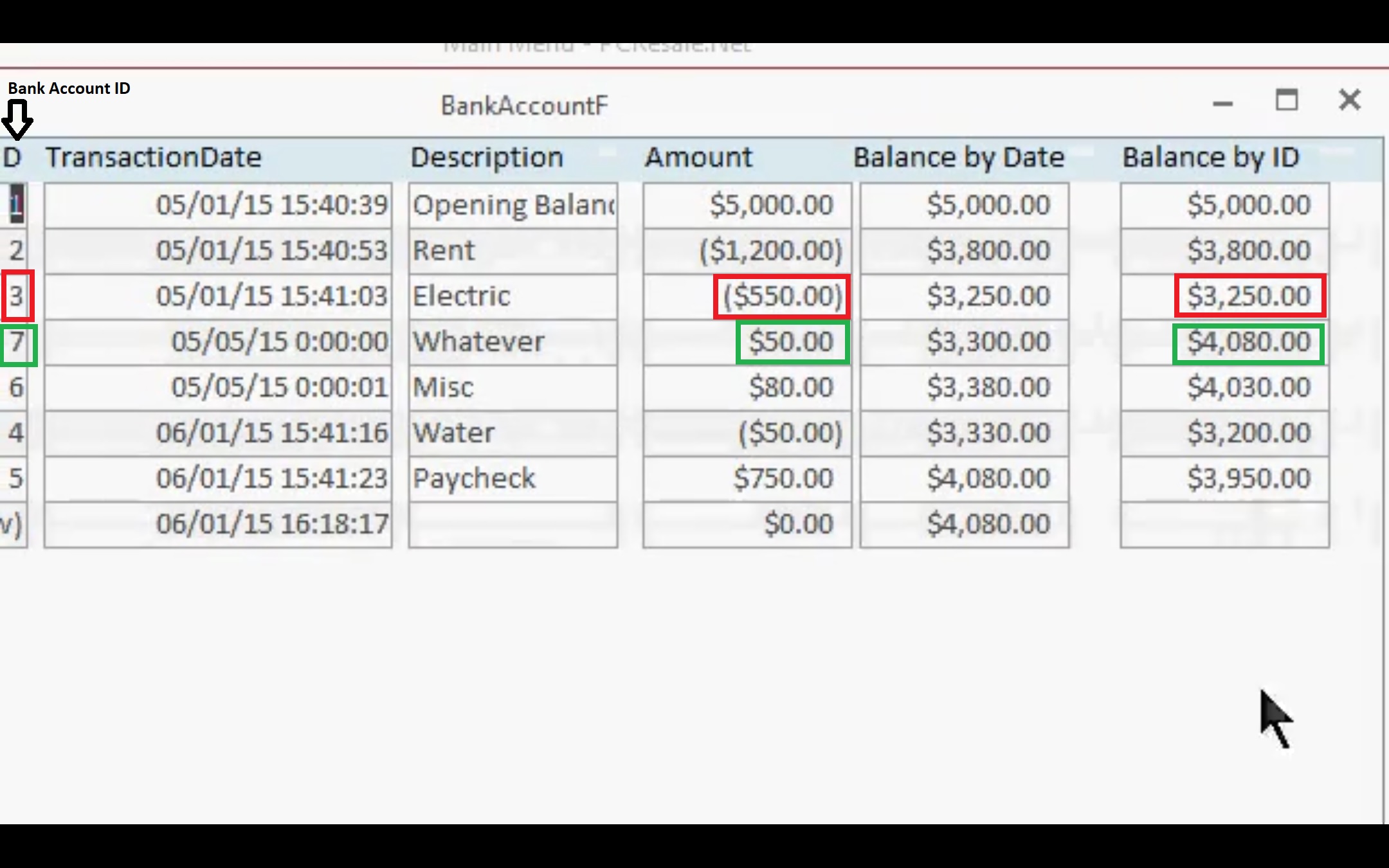
Lesson 5: 23:52 The formula for Balance by ID is DSum("Amount","BankAccountT","BankAccountID <=" & [BankAccountID])
When Balance Account ID = 3, Balance by ID = 3250. The next Record in the Form has Balance Account ID = 7. 3 is less than 7. It meets the criteria. So, why don't Access add 3250 to 50 = 3300. Instead we got 4080.
Yes, the next Balance Account ID is supposed to be 4 and not 7 but Access hasn't seen it yet. All it sees now after Balance Account ID = 3 is 7, not 4.
Hendra GunawanOP
@Reply 3 years ago
Kevin Robertson
@Reply 3 years ago
4, 5, 6 and 7 are all part of the criteria and included in the calculation.
3,250 - 50 + 750 + 80 + 50 = 4,080.
This is the correct result.
Sorry, only students may add comments.
Click here for more
information on how you can set up an account.
If you are a Visitor, go ahead and post your reply as a
new comment, and we'll move it here for you
once it's approved. Be sure to use the same name and email address.
This thread is now CLOSED. If you wish to comment, start a NEW discussion in
Access Expert 29.