Free Lessons
Courses
Seminars
TechHelp
Fast Tips
Templates
Topic Index
Forum
ABCD
 
Home   Courses   TechHelp   Forums   Help   Contact   Merch   Join   Order   Logon  
 
Back to Always Use Event Procedures    Comments List
Upload Images   @Reply   Bookmark    Link   Email   Next Unseen 
Macro Code event Addendum
John Stark 
    
3 years ago
I asked about the code Builder and how to change it but when I do as this video says I Don't get the choice after UNchecking the box and I do restart the database. they are the same result.
John Stark OP  @Reply  
    
3 years ago
When I open the Form and Right Click the Button I chose the Build event, However it is not in the Code Builder it is in Macro Design mode, I had no choice to make it Code Builder

Is there a way to change this so I get a choice?
Or auto mate it to Code Builder
Kevin Robertson  @Reply  
          
3 years ago
Was this a button created with the Wizard?
There will be an Embedded Macro behind that button.
Go to the properties of the button, click on the events tab and delete the macro the wizard created.
You should now be able to get to the Code Builder (VBA Editor).
Scott Axton  @Reply  
        
3 years ago
John
I just tried this using some older dbs an some new ones.

If you already have a macro or vba code in an event, Access will not ask you which you want to use.  It will open using the appropriate builder.

Do this for me just to test on your system.  
Create a new form. (You are not going to save it any way.)  In the property sheet click the ... for the On Current event.
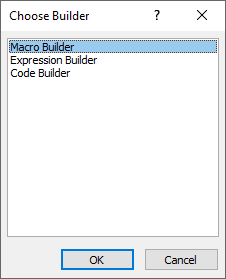
Depending on the setting you currently have, it will either take you to the Code Window directly or the Choose Builder dialog box.

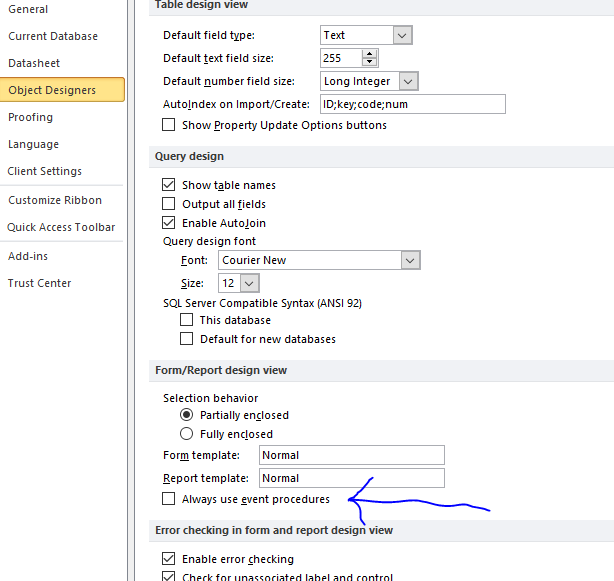
Now go to the File > Options > Object Designers  and uncheck the box that says Always Use Event Procedures.
If Access tells you you must close the db ---  It's fibbing.  You don't.
Go back to the new form that you are still editing.  Choose the ... again.
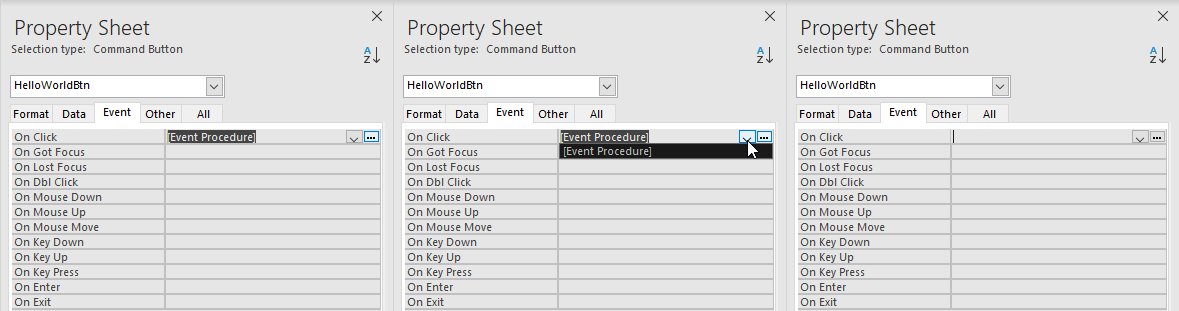
You should get the opposite effect.  If you don't and you see [Event Procedure] in the On Current click in there and delete it.  Now you should get the Choose Builder dialog box.
Scott Axton  @Reply  
        
3 years ago
I should add that if you have code in an event and delete the [Event Procedure] it doesn't delete the code fragment from your code window.  You have to do that manually to keep it clean.

On the other hand if you have [Embedded Macro] in an event and you delete that the macro is gone.
There isn't a way to get it back once you delete it other than from your back ups.

To the best of my knowledge you can't have both a macro and vba code on the same event.  It's one or the other because Access wouldn't know which to run.
Scott Axton  @Reply  
        
3 years ago
Please don't double post.
See my answer to you here:   Macro  Code event Addendum
Alex Hedley  @Reply  
           
3 years ago
Admin moved from Open New Record
John Stark OP  @Reply  
    
3 years ago
So I tried all these tips

I also put it in a different computer with access 365 and the code builder DOES come up,.
so I think it was the version of access I have on the laptop
Scott Axton  @Reply  
        
3 years ago
John
So does that mean you have it sorted out? Or are you still having issues?

Do you have an Office 365 subscription through MS?  If so did you realize you can put it on a secondary computer under your license?
Alex Hedley  @Reply  
           
3 years ago

Scott Axton  @Reply  
        
3 years ago
Alex  -
He's got that part down I believe.  The issue is he's trying to switch between the macro editor and the code window. (Correct me if I'm wrong John)

If you add a button previous to turning on the always use even procedures AND you have a macro on that button, you are always going to go to the Macro Builder.  The same is true the other way around.  If you have VBA behind a button you can't open the macro builder.  It's either one or the other to the best of my knowledge.
Alex Hedley  @Reply  
           
3 years ago
Just delete the [Event Procedure] then click the "..."
Alex Hedley  @Reply  
           
3 years ago

Alex Hedley  @Reply  
           
3 years ago

This thread is now CLOSED. If you wish to comment, start a NEW discussion in Always Use Event Procedures.
 

Next Unseen

 
New Feature: Comment Live View


The following is a paid advertisement
Computer Learning Zone is not responsible for any content shown or offers made by these ads.
 

Learn
 
Access - index
Excel - index
Word - index
Windows - index
PowerPoint - index
Photoshop - index
Visual Basic - index
ASP - index
Seminars
More...
Customers
 
Login
My Account
My Courses
Lost Password
Memberships
Student Databases
Change Email
Info
 
Latest News
New Releases
User Forums
Topic Glossary
Tips & Tricks
Search The Site
Code Vault
Collapse Menus
Help
 
Customer Support
Web Site Tour
FAQs
TechHelp
Consulting Services
About
 
Background
Testimonials
Jobs
Affiliate Program
Richard Rost
Free Lessons
Mailing List
PCResale.NET
Order
 
Video Tutorials
Handbooks
Memberships
Learning Connection
Idiot's Guide to Excel
Volume Discounts
Payment Info
Shipping
Terms of Sale
Contact
 
Contact Info
Support Policy
Mailing Address
Phone Number
Fax Number
Course Survey
Email Richard
[email protected]
Blog RSS Feed    YouTube Channel

LinkedIn
Copyright 2026 by Computer Learning Zone, Amicron, and Richard Rost. All Rights Reserved. Current Time: 4/30/2026 5:19:17 PM. PLT: 1s