Free Lessons
Courses
Seminars
TechHelp
Fast Tips
Templates
Topic Index
Forum
ABCD
 
Home   Courses   TechHelp   Forums   Help   Contact   Merch   Join   Order   Logon  
 
Back to Large Check Box    Comments List
Upload Images   @Reply   Bookmark    Link   Email   Next Unseen 
Cannot Find Referenced Form
Jeff Bartuch 
     
3 years ago
Hello

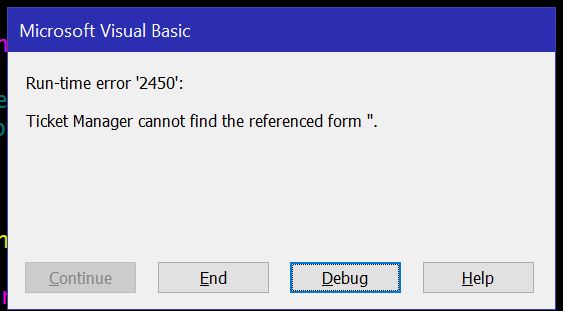
I have added these nice check boxes to a subform. I'm using the FormatToggleButtons ("PotentialIssueF") in the OnCurrent Event as well as the AfterUpdate events. PotentialIssueF is the name of my subform, but I am getting an error Run-Time error 2450 {Database Name} cannot find the referenced form 'PotentialIssueF'. Please help!!!
Scott Axton  @Reply  
        
3 years ago
First double check your spelling.
Second double check the syntax for your subform reference.  See :
Value From a Form
Value From Subform
Richard Rost  @Reply  
          
3 years ago
Let's see the code.
Jeff Bartuch OP  @Reply  
     
3 years ago
I have used these check boxes and they work great. Any help would be appreciated.

In the AfterUpdate event for these three check boxes I have:

Private Sub TriageComplete_AfterUpdate()

     FormatToggleButtons ([Name])

End Sub

I have also tried FormatToggleButtons ("TicketDetailF") which is the name of the parent form and I do not get the error any longer but the check boxes do not change value when clicked.

Since they are located on a subform I have also tried FormatToggleButtons ("Forms!TicketDetailF!PotentialIssueF") and get the not found error as well.

Name of the parent form is TicketDetailF
Name of the subform is PotentialIssueF and that is also the name of the control.

I have used your function located in its own module:

Public Function FormatToggleButtons(FormName As String)

    Dim C As Control
    
    For Each C In Forms(FormName).Controls
        If C.ControlType = acToggleButton Then
            If C.Value Then
                C.Caption = "P"
            Else
                C.Caption = ""
            End If
        End If
    Next

End Function


Jeff Bartuch OP  @Reply  
     
3 years ago

Kevin Robertson  @Reply  
          
3 years ago
I set up a Public variable in the module:

Public ParentForm As String

I initialised this variable in the Load event of the Parent form:

ParentForm = Me.Name

I then edited the first line of For Each loop:

For Each C In Forms(ParentForm)(FormName).Form.Controls
Jeff Bartuch OP  @Reply  
     
3 years ago
I must be missing something Kevin. Here is my module with the added lines of code you suggested. I also added ParentForm = Me.Name to the parent form's On load event.

Option Compare Database
Option Explicit
Public ParentForm As String

Public Function FormatToggleButtons(FormName As String)
    Dim C As Control
    
    'For Each C In Forms(FormName).Controls
    For Each C In Forms(ParentForm)(FormName).Form.Controls
        If C.ControlType = acToggleButton Then
            If C.Value Then
                C.Caption = "P"
            Else
                C.Caption = ""
            End If
        End If
    Next

End Function
Jeff Bartuch OP  @Reply  
     
3 years ago

Richard Rost  @Reply  
          
3 years ago
Which line is causing that error? It's easier if we can see it in the debugger.
Kevin Robertson  @Reply  
          
3 years ago
Ok. I found the problem. I forgot about the code in the OnCurrent event. I had it remmed out for testing.

Instead of initialising the ParentForm variable in the Load event of the parent form add the code before calling the function in the OnCurrent event of the Subform.

Private Sub Form_Current()

    ParentForm = "ParentFormName"
    FormatToggleButtons ("SubformName")
    
End Sub


The reason for the error was the function was being called BEFORE the value was set in the variable.
Event timing can be weird sometimes.
Jeff Bartuch OP  @Reply  
     
3 years ago
I'm still getting the error. The line of code that seems to be causing the error is

For Each C In Forms(ParentForm)(FormName).Form.Controls

Located in the module.
Jeff Bartuch OP  @Reply  
     
3 years ago
I'm sorry Kevin and Richard. I imagine this is frustrating for you as well. I'm trying only give you what you needs instead of just dumping a bunch of code here.
Jeff Bartuch OP  @Reply  
     
3 years ago
I've used these check boxes on other forms and they have worked perfectly. Add a subform into the mix and it all fell apart on me.

This thread is now CLOSED. If you wish to comment, start a NEW discussion in Large Check Box.
 

Next Unseen

 
New Feature: Comment Live View


The following is a paid advertisement
Computer Learning Zone is not responsible for any content shown or offers made by these ads.
 

Learn
 
Access - index
Excel - index
Word - index
Windows - index
PowerPoint - index
Photoshop - index
Visual Basic - index
ASP - index
Seminars
More...
Customers
 
Login
My Account
My Courses
Lost Password
Memberships
Student Databases
Change Email
Info
 
Latest News
New Releases
User Forums
Topic Glossary
Tips & Tricks
Search The Site
Code Vault
Collapse Menus
Help
 
Customer Support
Web Site Tour
FAQs
TechHelp
Consulting Services
About
 
Background
Testimonials
Jobs
Affiliate Program
Richard Rost
Free Lessons
Mailing List
PCResale.NET
Order
 
Video Tutorials
Handbooks
Memberships
Learning Connection
Idiot's Guide to Excel
Volume Discounts
Payment Info
Shipping
Terms of Sale
Contact
 
Contact Info
Support Policy
Mailing Address
Phone Number
Fax Number
Course Survey
Email Richard
[email protected]
Blog RSS Feed    YouTube Channel

LinkedIn
Copyright 2026 by Computer Learning Zone, Amicron, and Richard Rost. All Rights Reserved. Current Time: 5/16/2026 10:42:05 PM. PLT: 1s