Free Lessons
Courses
Seminars
TechHelp
Fast Tips
Templates
Topic Index
Forum
ABCD
 
Home   Courses   TechHelp   Forums   Help   Contact   Merch   Join   Order   Logon  
 
Back to Access Developer Forum    Comments List
Upload Images   @Reply   Bookmark    Link   Email   Next Unseen 
Saving Reports
Scott Buffington 
    
3 years ago
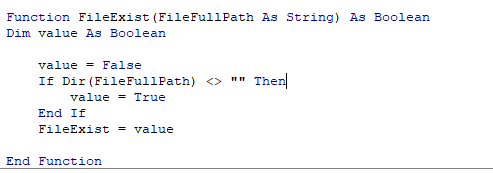
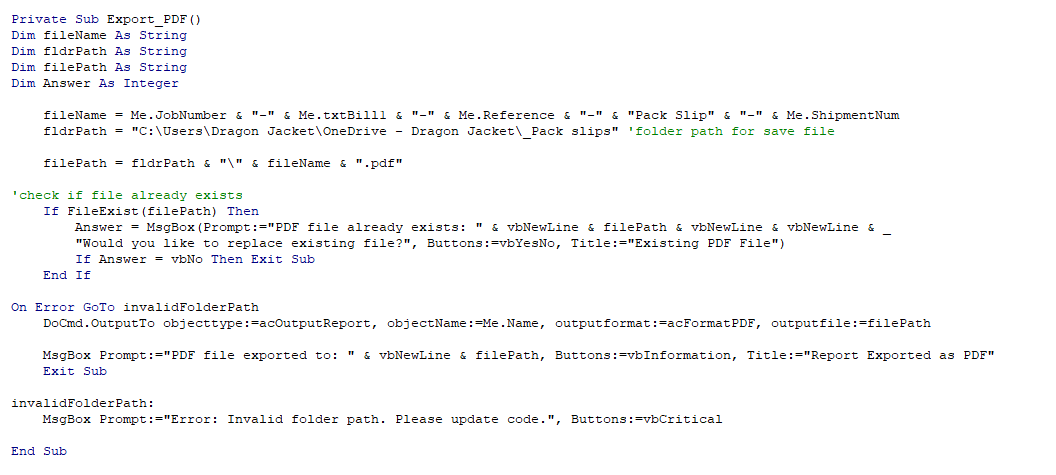
I have have a couple blocks of code on a report that had a button to export the report to a pdf on the click event and it worked fine.  Essentially the first thing the event would do is run the function to see if the file already existed.  If it didn't it would save it to a SharePoint directory (this is what my company uses for shared documents).  If it did exist then you would be prompted that the file already exists, would you like to replace it?  In an effort to streamline my process, rather than opening the report in normal view first so I can have the button on there to export it to just open it in print preview and call the export PDF from the on close event.  Now it will not save the report or if it existed it deletes the file and gives an error generated from the export sub.  The error is "Error: Invalid folder path, Please update code." I know the file path is correct because it all worked from the onclick event.  Only started doing this when I put the call to the export code on the on close event of the form.  I'm thinking that once I close the form its no longer able to make the correct strings for the file name and path.  I'm thinking it has to do with closing the report and putting the code in the on close event, what is a better way to call the export pdf code?
Scott Buffington OP  @Reply  
    
3 years ago

Scott Buffington OP  @Reply  
    
3 years ago

Kevin Yip  @Reply  
     
3 years ago
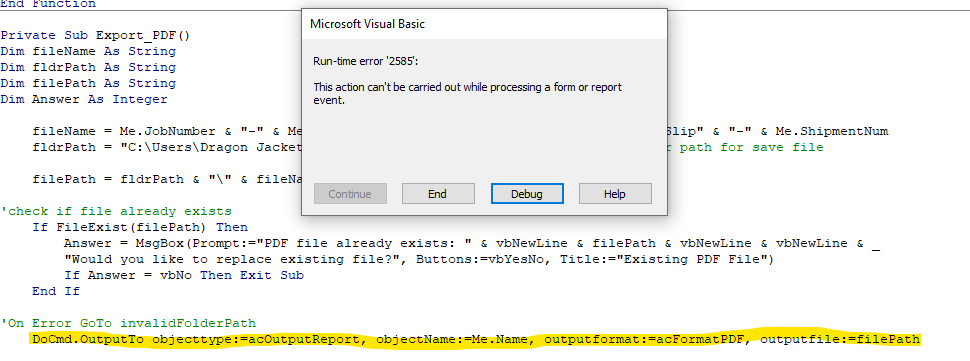
The error you got was not caused by invalid file path.  You got some other error instead.  Remove the On Error statement to see what it is.  It is something to the effect that you can't run DoCmd.OutputTo while the report is closing.  If you want to see the report's preview before printing it, run this code outside of the report:

     DoCmd.OpenReport "MyReport", acViewPreview
     Docmd.OutputTo acOutputReport, , acFormatPDF, "C:\My Documents\MyReport.pdf"

Note that the report name is *blank* in DoCmd.OutputTo.  That means the currently opened report is being printed.  This is important because the currently opened report may have different data (from a filter, for instance) from the report saved in Access, even if it is the same report.
Scott Buffington OP  @Reply  
    
3 years ago
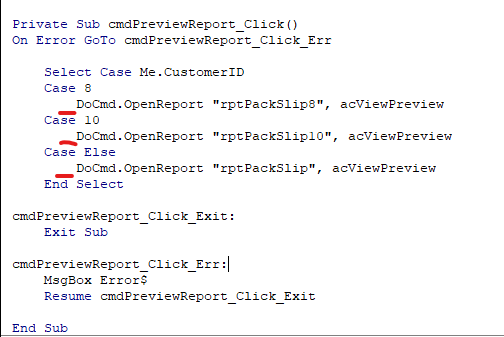
I have included my code the opens the report it is in a button click event on the calling form.  My question is, is this where I put the code "DoCmd.OutputTo"?  On the image I marked where I believe is where you want me to put this code.  I also included the image of the error access generated after I commented out the the On Error statement.  I guess I'm confused as to where I put the code to check if the file exists and where I build the file path and file name.  Thank you again for the help.
Scott Buffington OP  @Reply  
    
3 years ago

Scott Buffington OP  @Reply  
    
3 years ago

Kevin Yip  @Reply  
     
3 years ago
You can put DoCmd.OutputTo (and the code for checking valid file path) right after End Select.  If you want to pause for user confirmation before outputting the PDF, you can add a MsgBox function there too:

     If MsgBox("Do you want to print the report to PDF?", vbYesNo + vbDefaultButton2) = vbYes Then
          ' Check file path and run DoCmd.OutputTo ...
Scott Buffington OP  @Reply  
    
3 years ago
Thank you Kevin, I got it to work.  Thank you for all your help.

This thread is now CLOSED. If you wish to comment, start a NEW discussion in Access Developer Forum.
 

Next Unseen

 
New Feature: Comment Live View


The following is a paid advertisement
Computer Learning Zone is not responsible for any content shown or offers made by these ads.
 

Learn
 
Access - index
Excel - index
Word - index
Windows - index
PowerPoint - index
Photoshop - index
Visual Basic - index
ASP - index
Seminars
More...
Customers
 
Login
My Account
My Courses
Lost Password
Memberships
Student Databases
Change Email
Info
 
Latest News
New Releases
User Forums
Topic Glossary
Tips & Tricks
Search The Site
Code Vault
Collapse Menus
Help
 
Customer Support
Web Site Tour
FAQs
TechHelp
Consulting Services
About
 
Background
Testimonials
Jobs
Affiliate Program
Richard Rost
Free Lessons
Mailing List
PCResale.NET
Order
 
Video Tutorials
Handbooks
Memberships
Learning Connection
Idiot's Guide to Excel
Volume Discounts
Payment Info
Shipping
Terms of Sale
Contact
 
Contact Info
Support Policy
Mailing Address
Phone Number
Fax Number
Course Survey
Email Richard
[email protected]
Blog RSS Feed    YouTube Channel

LinkedIn
Copyright 2026 by Computer Learning Zone, Amicron, and Richard Rost. All Rights Reserved. Current Time: 5/6/2026 11:35:55 PM. PLT: 1s