Free Lessons
Courses
Seminars
TechHelp
Fast Tips
Templates
Topic Index
Forum
ABCD
 
Home   Courses   TechHelp   Help   Contact   Merch   Join   Order   Logon   Forums   
 
Home > TechHelp > Directory > Access > Limit Long Text > Field Size by Patrick Mutschler >
Back to Limit Long Text    Comments List
Upload Images   @Reply   Bookmark    Link   Email   Next Unseen 
Field Size
Patrick Mutschler 
   
3 years ago
Hey, is it possible to use the value of the field size (Feldgre in german) which can be edited at data type short text (kurzer Text in german)
This has the advantage that the max char. has not to be defined as a variable. I plan to show this value together with the value of charactre in on text field. The result should be: 45 / 200 (45 Char in the textfield and 200 char are allowed)

Thanks
Scott Axton  @Reply  
      
3 years ago
It used to be that field size was important when disk sizes and memory were small and very expensive.  
Now that is not the case.  Access now handles the fields much better than early versions so size is not a concern as before.
It doesn't waste space like it used to.  
It isn't necessary to worry about field size unless you want to limit the maximum allowed for some reason.

I'm a little confused by the last sentence of your post.  In short - regarding the field size in design of the table  - no you can't have varying size if I'm understanding correctly.  
Using code, you could restrict your field in a form to a minimum and / or maximum.
Richard Rost  @Reply  
           
3 years ago
Are you trying to get a count of the number of characters?
Patrick Mutschler OP  @Reply  
   
3 years ago
Hey guys,
thanks a lot for your answers. I'm not sure if you understand me correctly. yes I want to count the characters... but this is not the problem. I already realized this on the same way you suggested in your video.
I want realize the same/similar functionality like you in the video. The only question I thought about is if its possible to use the maimum fieldsize parameter which can be set in the table for "short Text" fields instead the Max variable that you set in the code (in your video)
But if I understand Scott coreectly it is not possible to get this parameter in the code of a form?!

Thanks Patrick
Patrick Mutschler OP  @Reply  
   
3 years ago
Hello,
I have one more questions. I want apply this way to count an restrict the characters on many fiels (more than 20 fields) . Is there an elegant way to apply this without copying an adapting the code for the other fields?
Patrick Mutschler OP  @Reply  
   
3 years ago
Hello The reason why I want to count and restrict the number of charaters is to fit the content of the input field in the output field in a report file. But the number of characters are only the half way.... another problem are carriage return and LF...
I tried:
Private Sub Ctl1_Ziel_KeyUp(KeyCode As Integer, Shift As Integer)
    If KeyCode = 13 Then
        MsgBox "Zeilenumbr'che sind nicht erlaubt und werden entfernt"
        Me.Ctl1_Ziel.Text = Replace(Me.Ctl1_Ziel.Text, vbNewLine, "")
    End If
End Sub

This works for the user input. But does not prohibit that the user copying text with LF in the textfield.
Therfore I tried :

Private Sub Ctl1_Ziel_BeforeUpdate(Cancel As Integer)
    If Len(Me.Ctl1_Ziel) > MaxLen1Ziel Then
        Cancel = True
        MsgBox "maximale Zeichenanzahl 'berschritten"
    End If

     If InStr(Me.Ctl1_Ziel.Text, vbLf) > 0 Then
        Cancel = True
        MsgBox "Zeilenumbr'che sind nicht erlaubt und m'ssen entfernt werden"
        Me.Ctl1_Ziel.Text = "1" 'Replace(Me.Ctl1_Ziel.Text, vbNewLine, " ")
    End If
    

End Sub

But this does not work (runtime error 2115). What is the reason? Isn't it possible to change the content of an text field in a before update event?

thanks for your help
Kevin Yip  @Reply  
     
3 years ago
Error 2115 occurs because you make changes to the form after the line "Cancel = True".  That is by design: "Cancel = True" prevents any form changes.  If you force the change, you cause the error.

You can only change a field's max length in the table designer.  To be able to change it dynamically on a form, you can make use of a validation rule or input mask.

An input mask "&&&&&" allows the user to type only 5 characters.  The moment the user types the 6th character, nothing will appear.

A validation rule such as Len([MyField] & "") <= 5 will allow the user to type at any length.  But it will show an error to the user if the text box has more than 5 characters when the user exits the text box.

You can use VBA to change input masks and validation rules:

     Me.MyTextbox.InputMask = "&&&&&"
     Me.MyTextbox.ValidationRule = "Len([MyField] & '') <= 5"

Patrick Mutschler OP  @Reply  
   
3 years ago
Hey Kevin,

thanks for your help with Cancel = True
Also thank you for the validation rule. I know about this an yes this is another possible solution but not the best for my situation.
I DON'T want to change the field size dynamically. I know this works only in the table designer. I only want the show an work with the value that ist set in the table designer. But anyway I realized ecactly the same way than Richard did it in the video. But the other two questins remain still open (how to do this wfor more than 20 fields and how to ensure taht the user input fits in the report textbox)
Thanks
Kevin Robertson  @Reply  
          
3 years ago
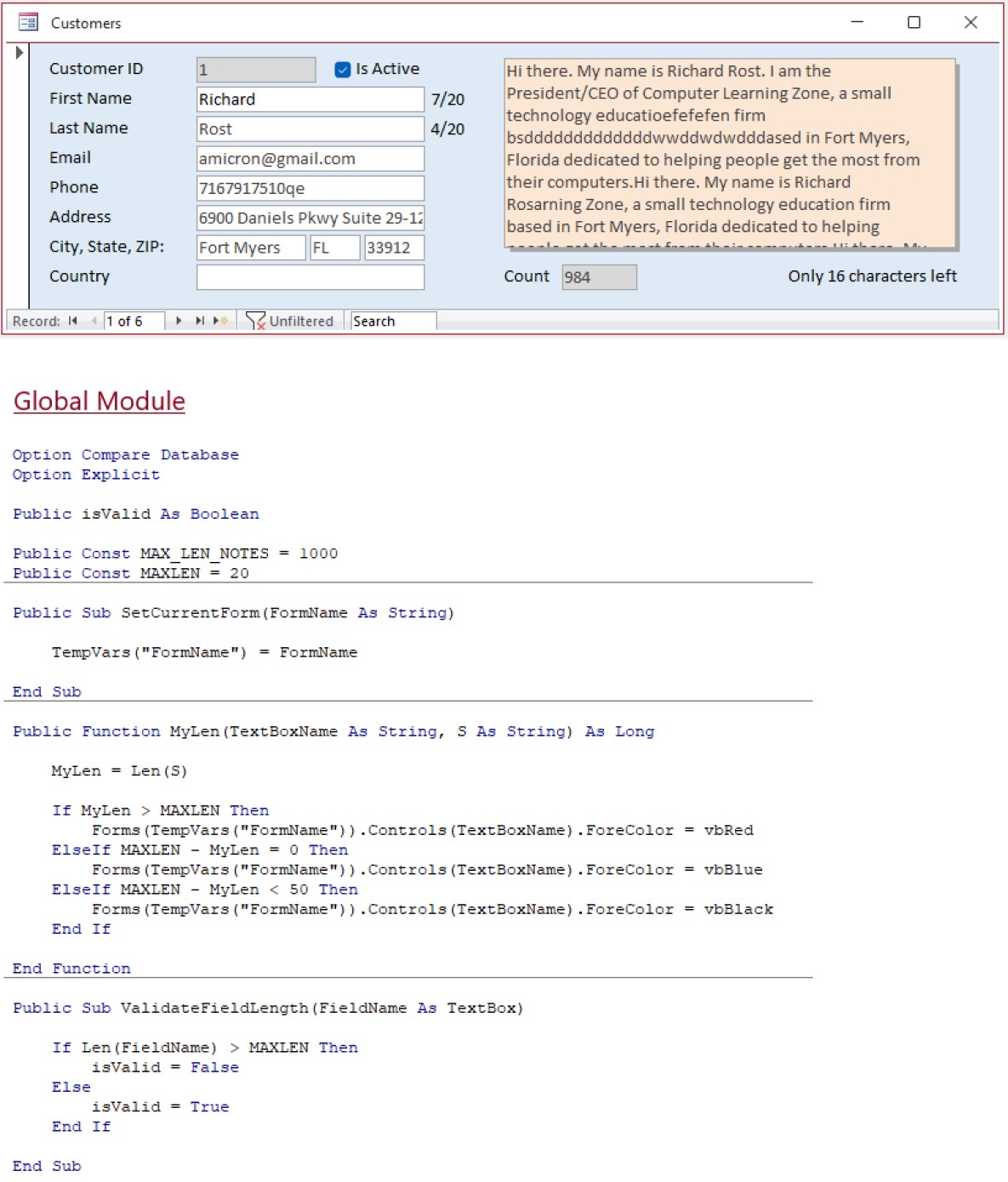
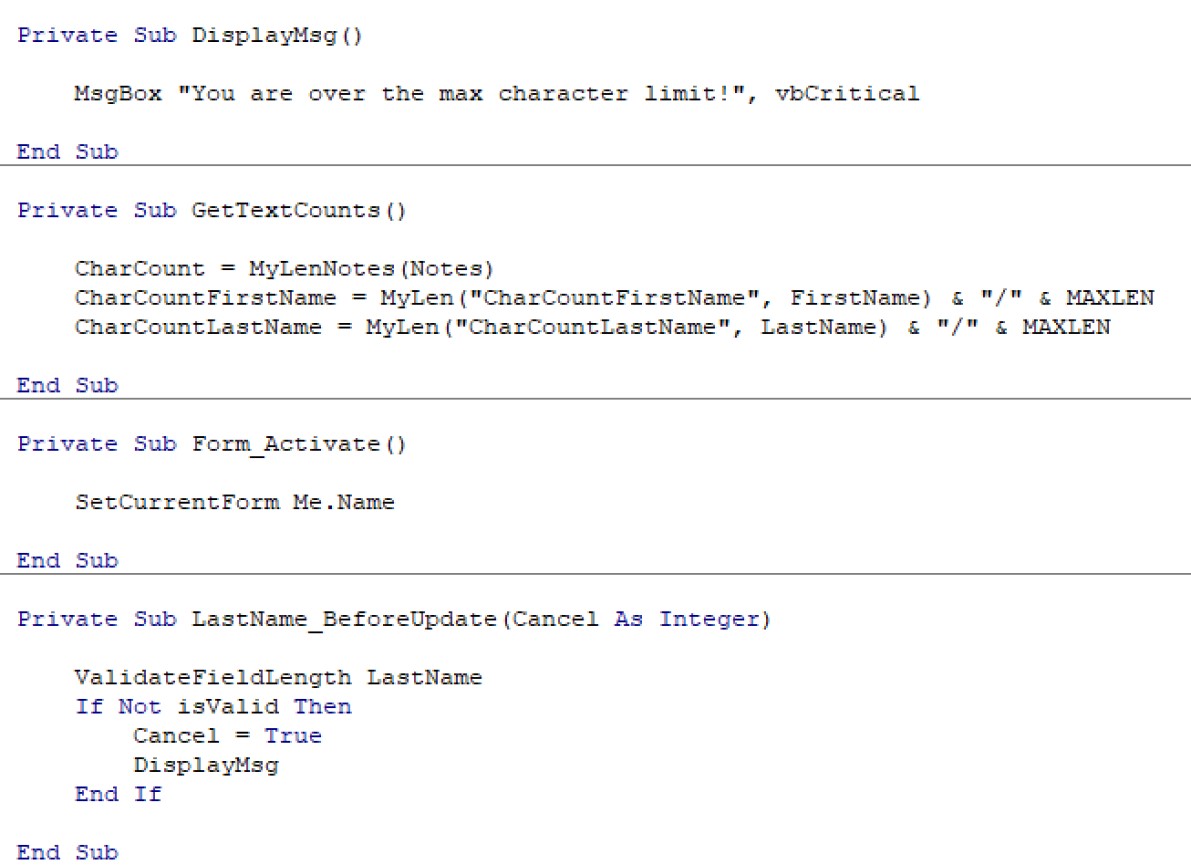
This is how I achieved what you want (I just did 2 fields as an example).

Since Short Text and Long Text need to be handled differently you will need 2 Public Functions in a Module.
In my first screenshot I show the modified version of the Function for Short Text fields. You will need to make the appropriate calls in the Form as shown in my second screenshot.
Kevin Robertson  @Reply  
          
3 years ago

Kevin Robertson  @Reply  
          
3 years ago

Patrick Mutschler OP  @Reply  
   
3 years ago
Hello Kevin, thanks for your help.
the function with the parameters works really well. Is ist correct that I need the function just once, except I want use different max length Constants.
But a few thinks of your code don`t work (on my form).
Forms(TempVars("FormName")).Controls(TextBoxName).ForeColor = vbBlack (faceColor leads to an error) Is the CharCount object an text field or a notation field (Bezeichnungsfeld in German)?

The charCount field i not filled out I have to do the calls like in Richards video

Private Sub LastName_Dirty(Cancel As Integer)
charleft_2.Caption = MyLen("charleft_2", LastName) & "////" & MaxLen1Ziel
'LastName = MyLen("LastName", LastName) & "////" & MaxLen1Ziel
End Sub

Is it correct, that there is no other way then do the calls for all events (Undo textfield , change, Undo Form and so on...) ???

Thanks again

This thread is now CLOSED. If you wish to comment, start a NEW discussion in Limit Long Text.
 

Next Unseen


What's This?


The following is a paid advertisement
Computer Learning Zone is not responsible for any content shown or offers made by these ads.
 

Learn
 
Access - index
Excel - index
Word - index
Windows - index
PowerPoint - index
Photoshop - index
Visual Basic - index
ASP - index
Seminars
More...
Customers
 
Login
My Account
My Courses
Lost Password
Memberships
Student Databases
Change Email
Info
 
Latest News
New Releases
User Forums
Topic Glossary
Tips & Tricks
Search The Site
Code Vault
Collapse Menus
Help
 
Customer Support
Web Site Tour
FAQs
TechHelp
Consulting Services
About
 
Background
Testimonials
Jobs
Affiliate Program
Richard Rost
Free Lessons
Mailing List
PCResale.NET
Order
 
Video Tutorials
Handbooks
Memberships
Learning Connection
Idiot's Guide to Excel
Volume Discounts
Payment Info
Shipping
Terms of Sale
Contact
 
Contact Info
Support Policy
Mailing Address
Phone Number
Fax Number
Course Survey
Email Richard
[email protected]
Blog RSS Feed    YouTube Channel

LinkedIn
Copyright 2026 by Computer Learning Zone, Amicron, and Richard Rost. All Rights Reserved. Current Time: 9/22/2026 10:59:31 AM. PLT: 0s