Free Lessons
Courses
Seminars
TechHelp
Fast Tips
Templates
Topic Index
Forum
ABCD
 
Home   Courses   TechHelp   Forums   Help   Contact   Merch   Join   Order   Logon  
 
Back to Access Developer Forum    Comments List
Upload Images   @Reply   Bookmark    Link   Email   Next Unseen 
vbRetryCancel if then
Bryon Relyea 
       
3 years ago
Good afternoon -

I've been playing with the VBA for search response when user input is not found. If the input is found, no issues; I proceed with actions.  If not found, I want to either have the user try again (Retry) or close the form (Cancel).

I've not found any specifics on this; and I've watched the developer Intro to VBA multiple times today.

Code:
Private Sub GoToBoM_btn_Click()
    
RestartPoint:

    Dim S As String
    

    S = InputBox("Please enter last four of BoM", "BoM Number", NPSU)
    If S = "" Then Exit Sub
  
  
    Me.Filter = "NPSU Like ""*" & S & "*"""
    Me.FilterOn = True
        'if input is found on the search, no issues with proceeding with intended action
            
    If IsNull(NPSU) Then
        MsgBox "BoM Not Found. Please verify BoM Number and try again.", vbRetryCancel, "BoM Number Not Found"
        
            If rsp = vbCancel Then
                
                DoCmd.Close acForm, "New Product Set-up_UPDATE_Frm", acSaveYes
                    'Want to close the form completely and return to previous menu
                                
                 Else
              
                GoTo RestartPoint
                    'goal is to reset the form, and open the InputBox, so user can try again
                    'Note: I'm not married to using a Restart Point if there is a better option
                    
                                    
            End If
    End If
          
End Sub


Thank you, in advance!!!


Kevin Robertson  @Reply  
          
3 years ago
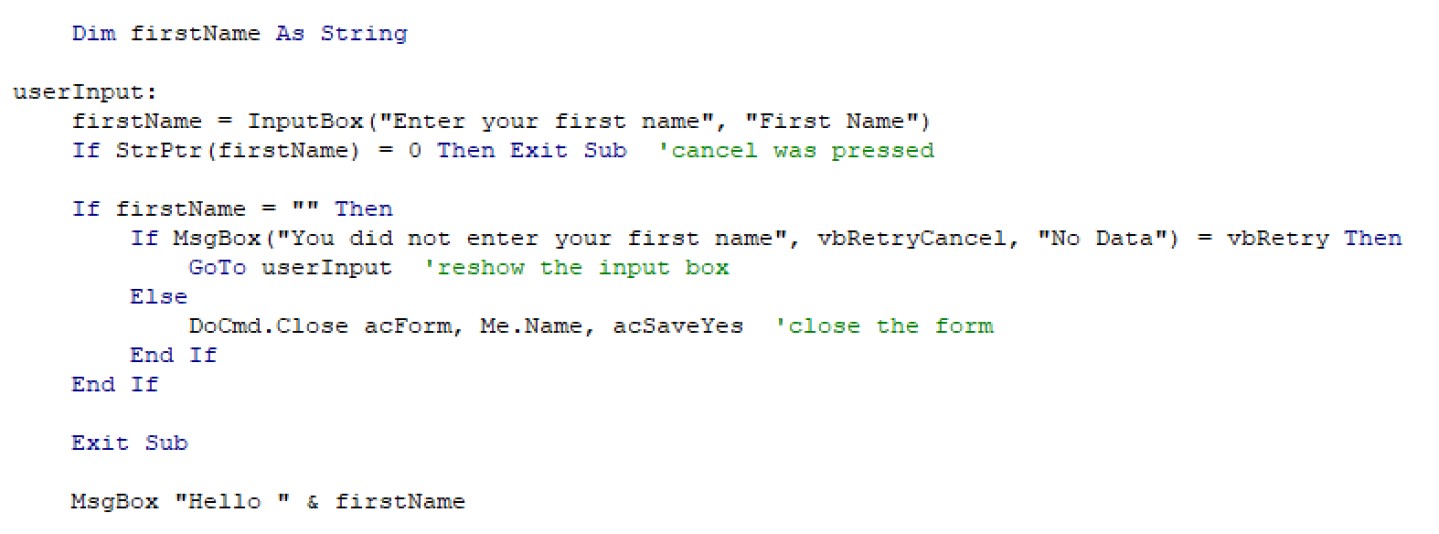
I put together a simple example for you (see screenshot).
Modify the code to suit your needs.
Kevin Robertson  @Reply  
          
3 years ago

Kevin Yip  @Reply  
     
3 years ago
Hi Bryon, your code looks fine.  If you're asking how to avoid using the "Restartpoint" label, you may consider:

Private Sub GoToBoM_btn_Click()
    Dim S As String, status As String
    status = ""

    Do
        S = InputBox("Please enter last four of BoM", "BoM Number", NPSU)
        If S = "" Then Exit Do
    
        Me.Filter = "NPSU Like ""*" & S & "*"""
        Me.FilterOn = True
                
        If IsNull(NPSU) Then
            If MsgBox("BoM Not Found. Please verify BoM Number and try again.", vbRetryCancel, "BoM Number Not Found") = vbCancel Then
                DoCmd.Close acForm, "New Product Set-up_UPDATE_Frm", acSaveYes
                status = "finished"
            End If
        
        Else
            status = "finished"
            
        End If
              
    Loop Until status = "finished"
    
End Sub

Bryon Relyea OP  @Reply  
       
3 years ago
Thank you both for your responses!  I will review them tomorrow at work, and let you know how I do.
Bryon Relyea OP  @Reply  
       
3 years ago
Good morning, Kevin and Kevin - quick question. Since the BoM Number is 10 characters with "BoM-" and 2 leading zeros, I only need the user to enter the last four digits.  How do I preface the Input line with the wildcard first?  I've tried "*", '*', "'*'" with parentheses, without parentheses, with brackets, without brackets.....how is this done?  

BomNo = InputBox Like ("'*'" & "Enter Last Four Digits of BoMNo"),"BoMNo"

Thank you!!!
Kevin Robertson  @Reply  
          
3 years ago
Here's is how I would do it:

Dim bomNo As String

userInput:
    bomNo = InputBox("Enter Last Four Digits of BoM No", "BoM No")
    If bomNo = "" Then Exit Sub
    If Not IsNumeric(bomNo) Or Len(bomNo) <> 4 Then
        MsgBox "Enter 4 numeric characters only", vbInformation, "Invalid BoM No"
        GoTo userInput
    End If
    
    bomNo = "BoM-" & Format(bomNo, "00####")
    
    MsgBox bomNo
Bryon Relyea OP  @Reply  
       
3 years ago
Thank you, Kevin.  I actually found the other wildcard ""*" & S & "*"" from Rich's Search button video and got that segment to work.  

However, the error box shows up whether or not the entered digits match an existing record.  The 'Retry' If statement works with no issue; and I can cancel from there based on the initial If S = "" code.

Otherwise, I have to hit 'Cancel' two times, and then receive a run-time error message:

Run-time error '2465':
Microsoft Access can't find the field '|1' referred to in your expression

Full Code:

Private Sub GoToBoM_btn_Click()
    
Dim S As String, Status As String
Status = ""


Userinput:
    S = InputBox("Please enter BoM Number", "BoM Number", "BoMNo")
    If S = "" Then Exit Sub
        'user hit cancel

    Me.Filter = "BoMNo Like ""*" & S & "*"""
    Me.FilterOn = True
    
        If BoMNo = "" Then
        
            If MsgBox("BoM Number not found. Please check the BoM Number and try again.", vbRetryCancel, "No Data") = vbRetry Then
                GoTo Userinput 'reshow the input box
                
                Else
                
            If MsgBox("BoM Number not found. Please check the BoM Number and try again.", vbRetryCancel, "No Data") = vbCancel Then
                
                DoCmd.Close acForm, Me.[New Product Set-up_UPDATE_Form], acSaveNo
                   'close the form
                  
            End If

        End If
    
    End If

End Sub


Again, thank you for you input.  I'm trying to learn this stuff and work out the kinks, but I'm unsure on this.
Kevin Robertson  @Reply  
          
3 years ago
You are using the MsgBox function twice. You only need it once.

If MsgBox("Your message prompt", vbRetryCancel, "Title") = vbRetry Then
    'do something
Else
    'do something else
End If
Bryon Relyea OP  @Reply  
       
3 years ago
Ok, I removed the second line; and still get error box when record matches.  But only have to hit cancel once to get run-time error.
Kevin Robertson  @Reply  
          
3 years ago
When you click Debug in the error message which line is highlighted?
Bryon Relyea OP  @Reply  
       
3 years ago
DoCmd.Close acForm, Me.[New Product Set-up_UPDATE_Form], acSaveNo
Kevin Robertson  @Reply  
          
3 years ago
You don't need the Me. if you are entering the actual name of the form.

Try:
DoCmd.Close acForm, [New Product Set-up_UPDATE_Form], acSaveNo

Or

DoCmd.Close acForm, Me.Name, acSaveNo

Also, Your form name is not great. you are using spaces, hyphens AND underscores. This may also be causing problems.
Bryon Relyea OP  @Reply  
       
3 years ago
I will definitely be updating the form name.  I'll work on that and revert in a day or so....Thanks for all your time!!!
Kevin Yip  @Reply  
     
3 years ago
Hi Bryon, to remove the run-time error "can't find the field '|1'",

Change this:   DoCmd.Close acForm, [New Product Set-up_UPDATE_Form], acSaveNo
To this:     DoCmd.Close acForm, "New Product Set-up_UPDATE_Form", acSaveNo

The form name needs to be a string, not an object.  The error message is sadly gibberish that doesn't tell you anything.  It has nothing to do with "|1" or whatever.

P.S.  I use spaces in form names too, but with caveats.  See my post here discussing this topic: https://599cd.com/blog/display-article.asp?ID=1718&CommentID=50966#StartOfComments

Bryon Relyea OP  @Reply  
       
3 years ago
Hi, Kevin (Yip) -

Ok, I've updated the form name, and changed to quotes as you advise.  The only hiccup is the error box shows even when the userinput matches an existing record.  Any idea how to correct that?
Kevin Robertson  @Reply  
          
3 years ago
Give this a go. I've used my customer table and the first name field. Change these for your needs.
I use DLookup to see if the first name exists in the table.

Private Sub btnFindFirstName_Click()

    Dim FirstName As String, S As String
    
userInput:
    FirstName = InputBox("Enter your first name", "First Name")
    If StrPtr(FirstName) = 0 Then Exit Sub  'cancel was pressed
    
    S = Nz(DLookup("FirstName", "CustomerT", "FirstName LIKE ""*" & FirstName & "*"""), "")
    
    If S = "" Then
        If MsgBox("Cannot find " & FirstName & " in the Customer Table.", vbRetryCancel, "Not Found") = vbRetry Then
            GoTo userInput  'reshow the input box
        Else
            DoCmd.Close acForm, Me.Name, acSaveYes  'close the form
        End If
    Else
        Me.Filter = "FirstName Like ""*" & S & "*"""
        Me.FilterOn = True
    End If

End Sub
Bryon Relyea OP  @Reply  
       
3 years ago
Hi, Kevin -
I'm sorry to say the above did not work.  I may have made an error transferring the code, but it didn't function at all.  So, I reverted back to the last version I had, which enabled everything to function correctly, with the exception of the error box showing when the input matched an existing record.

I really appreciate the assistance you have provided thus far.

This thread is now CLOSED. If you wish to comment, start a NEW discussion in Access Developer Forum.
 

Next Unseen

 
New Feature: Comment Live View


The following is a paid advertisement
Computer Learning Zone is not responsible for any content shown or offers made by these ads.
 

Learn
 
Access - index
Excel - index
Word - index
Windows - index
PowerPoint - index
Photoshop - index
Visual Basic - index
ASP - index
Seminars
More...
Customers
 
Login
My Account
My Courses
Lost Password
Memberships
Student Databases
Change Email
Info
 
Latest News
New Releases
User Forums
Topic Glossary
Tips & Tricks
Search The Site
Code Vault
Collapse Menus
Help
 
Customer Support
Web Site Tour
FAQs
TechHelp
Consulting Services
About
 
Background
Testimonials
Jobs
Affiliate Program
Richard Rost
Free Lessons
Mailing List
PCResale.NET
Order
 
Video Tutorials
Handbooks
Memberships
Learning Connection
Idiot's Guide to Excel
Volume Discounts
Payment Info
Shipping
Terms of Sale
Contact
 
Contact Info
Support Policy
Mailing Address
Phone Number
Fax Number
Course Survey
Email Richard
[email protected]
Blog RSS Feed    YouTube Channel

LinkedIn
Copyright 2026 by Computer Learning Zone, Amicron, and Richard Rost. All Rights Reserved. Current Time: 5/1/2026 9:49:42 PM. PLT: 1s