Free Lessons
Courses
Seminars
TechHelp
Fast Tips
Templates
Topic Index
Forum
ABCD
 
Home   Courses   TechHelp   Help   Contact   Merch   Join   Order   Logon   Forums   
 
Back to Access Developers    Comments List
Upload Images   @Reply   Bookmark    Link   Email   Next Unseen 
ComboBox and Reports
John Rutter 
       
3 years ago
Hi Guys
I have 2 comboboxes which work through Concatenation to form first name and last name on a form.  All works well.  When i open a new form everything works, but when i open a report from the form the names do not appear on the report? They do appear on existing forms/reports.
Kind regards
John
Kevin Robertson  @Reply  
           
3 years ago
Are the fields in the underlying Record Source of your report (Table / Query)?
Have you added the field(s) to the Report?
John Rutter OP  @Reply  
       
3 years ago
All the information for the report comes from my ProjectT.  The names in the Comboboxes come from ProjectManagerFLQ.  The add Existing Fields tab only allow me to use a Table and not a query, to bring in fields to the report.  i.e. show all tables at the top.
Kevin Robertson  @Reply  
           
3 years ago
You will need to build a Query to bring together the fields from ProjectT and the fields from ProjectManagerFLQ so they can be used in your Report. Base your Report off of this new Query (make it the Record Source).
John Rutter OP  @Reply  
       
3 years ago
Thanks Kevin i will give this ago, will i have to rebuild the report again using the new source? It is quite a big report (3 pages), or will it see the fields as they have the same name?

Kind regards
Kevin Robertson  @Reply  
           
3 years ago
After you have built your Query, open the Property Sheet for the Report. On the Data tab change the Record Source to the new Query.
John Rutter OP  @Reply  
       
3 years ago
Having read you last message i have realized the report source is ProjectCurrentQ, criteria [Forms]![ProjectInputF]![ProjectID], which gets its source from ProjectT.  I am not sure how i would link ProjectManagerFLQ and PrincipalDesignerFLQ to ProjectCurrentQ.  Might be easier to just delete the comboboxes?
Kevin Yip  @Reply  
     
3 years ago
You can always use DLookup() to retrieve first name and last name.  It may slow down the report, but if it's only 3 pages (not a big report at all in terms of pages), it may be okay.
John Rutter OP  @Reply  
       
3 years ago
Hi
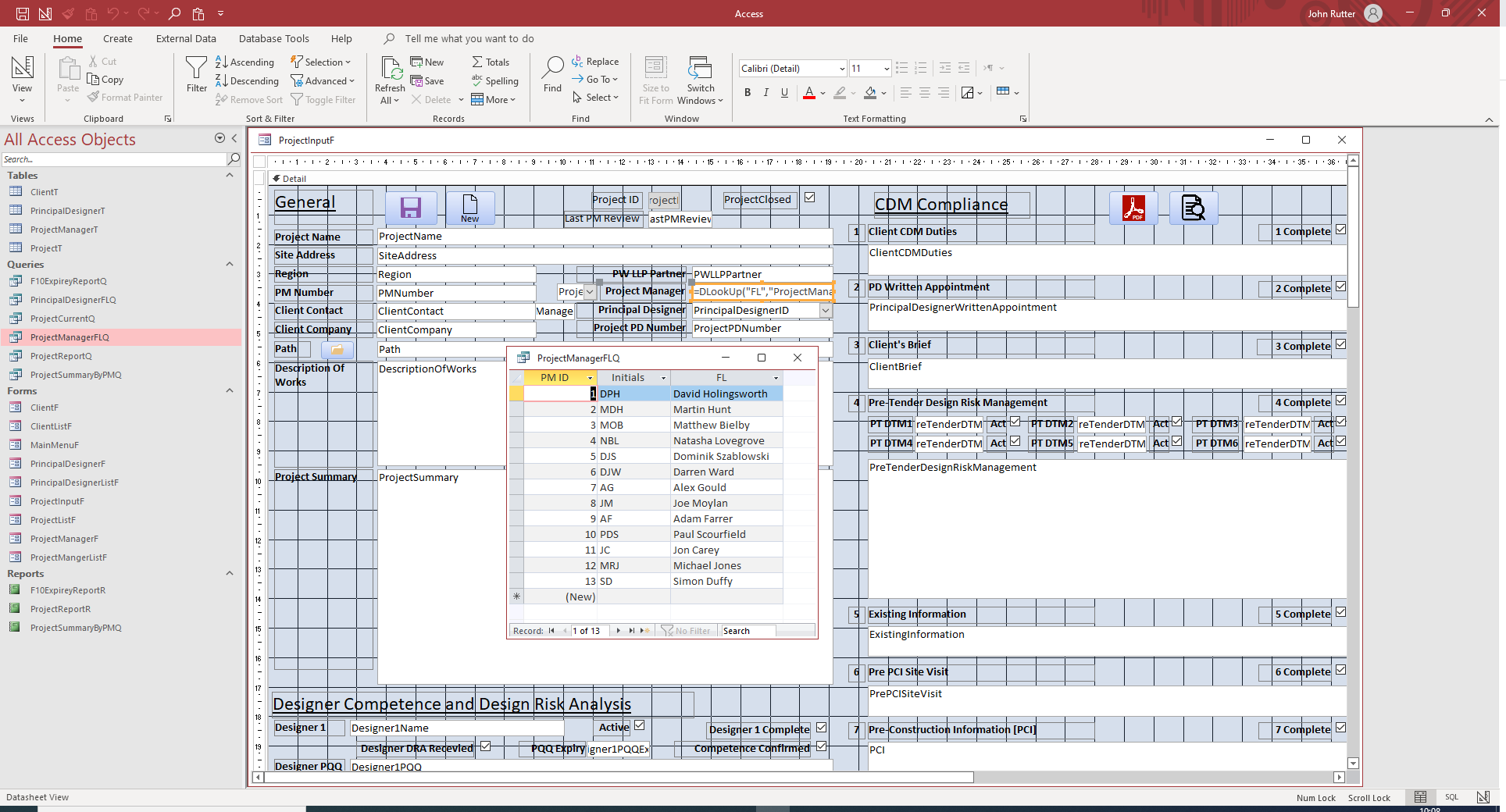
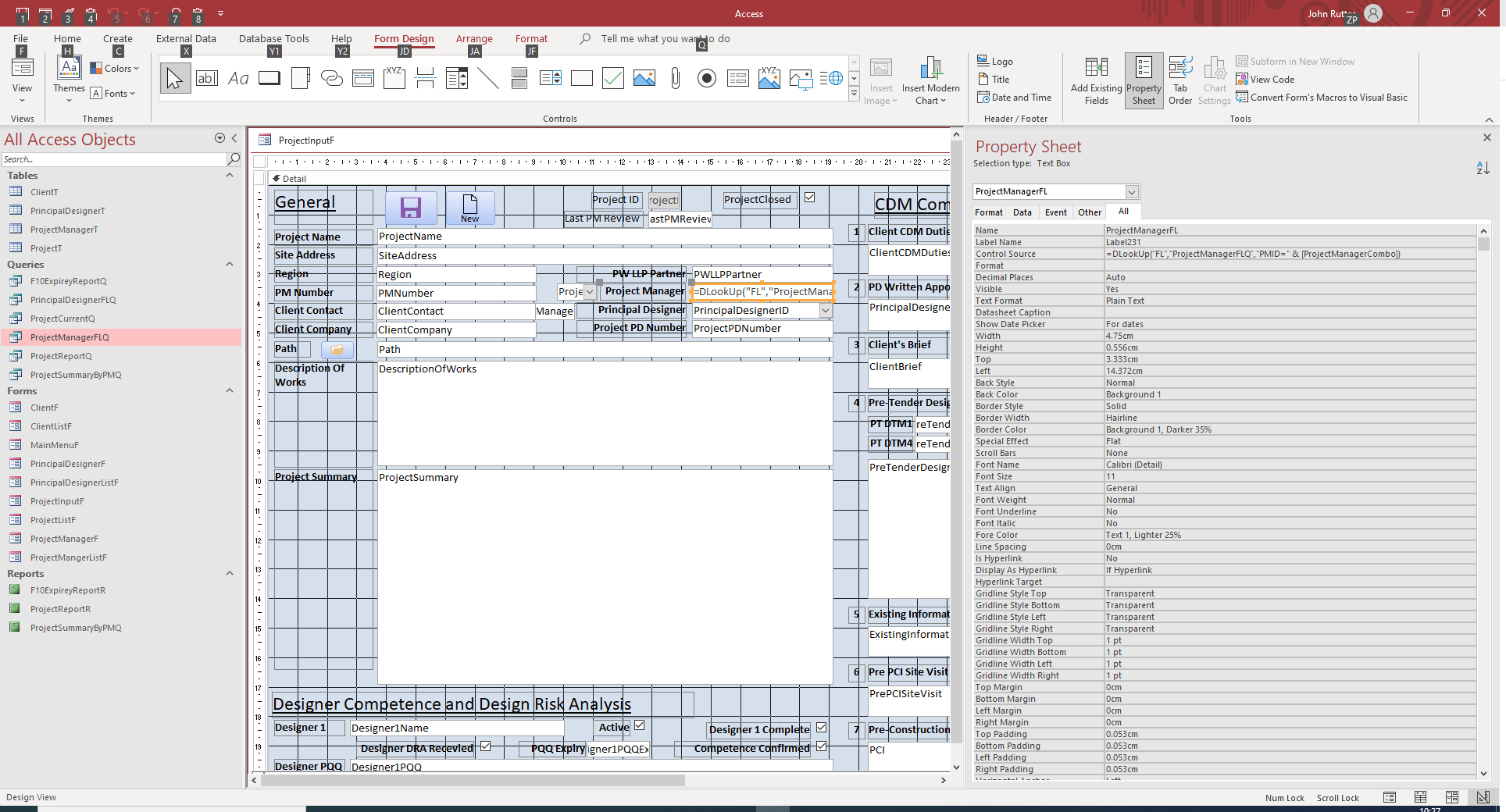
I am trying to use the DLOOKUP function and have watched the video (with the phone numbers).  I have set up the combobox which shows the initials and First Name and Last Name (concatenation), from a query ProjectMangerFLQ.  I have then set up a text box, with the following DLOOKUP to retrieve the combine name =DLOOKUP("FL","ProjectManagerFLQ","PMID=&"ProjectManagerCombo).  When run this then generates a flashing #Error in the form.
John Rutter OP  @Reply  
       
3 years ago

Kevin Robertson  @Reply  
           
3 years ago
Your ampersand (&) should be outside the quotes.

=DLOOKUP("FL","ProjectManagerFLQ","PMID=" & ProjectManagerCombo)
John Rutter OP  @Reply  
       
3 years ago
Apologies it is, i have typed it wrong.
John Rutter OP  @Reply  
       
3 years ago

Kevin Robertson  @Reply  
           
3 years ago
On closer inspection of your first image PMID appears to have a space in it. When you refer to the field in your DLookup there is no space. I would get rid of the space. It will make things easier going forward.
John Rutter OP  @Reply  
       
3 years ago
Sorted, PM ID is actually the caption, the Field name was ProjectManagerID.  I have updated and all works, thank you for the help.
John Rutter OP  @Reply  
       
3 years ago
This has now created another problem, how do i get the information from the textBox ProjectManagerFL into my report, which gets its information from ProjectCurrentQ, and then ClientT?  ProjectManager is a Field in ClientT, but ProjectManagerFL is not.
John Rutter OP  @Reply  
       
3 years ago
Hi
I have looked at this some more, and done some thinking, I have gone back to my backup and kept the original Field ProjectManager and put the DLOOKUP() in this box on the form.  The problem I have is that the Control source is now the DLOOKUP(), and so dose not save the result of the DLOOKUP() in the ProjectT in the Field ProjectManager, to then show in the report.  The DLOOKUP() result shows on the form OK.
Question how do I get the result of the DLOOKUP() to be saved in the Table, Field - ProjectManager, for that Record?
John Rutter OP  @Reply  
       
3 years ago
I have solved this with the AfterEvent function, thank you for letting me sound things out!

This thread is now CLOSED. If you wish to comment, start a NEW discussion in Access Developers.
 

Next Unseen

 
New Feature: Comment Live View


The following is a paid advertisement
Computer Learning Zone is not responsible for any content shown or offers made by these ads.
 

Learn
 
Access - index
Excel - index
Word - index
Windows - index
PowerPoint - index
Photoshop - index
Visual Basic - index
ASP - index
Seminars
More...
Customers
 
Login
My Account
My Courses
Lost Password
Memberships
Student Databases
Change Email
Info
 
Latest News
New Releases
User Forums
Topic Glossary
Tips & Tricks
Search The Site
Code Vault
Collapse Menus
Help
 
Customer Support
Web Site Tour
FAQs
TechHelp
Consulting Services
About
 
Background
Testimonials
Jobs
Affiliate Program
Richard Rost
Free Lessons
Mailing List
PCResale.NET
Order
 
Video Tutorials
Handbooks
Memberships
Learning Connection
Idiot's Guide to Excel
Volume Discounts
Payment Info
Shipping
Terms of Sale
Contact
 
Contact Info
Support Policy
Mailing Address
Phone Number
Fax Number
Course Survey
Email Richard
[email protected]
Blog RSS Feed    YouTube Channel

LinkedIn
Copyright 2026 by Computer Learning Zone, Amicron, and Richard Rost. All Rights Reserved. Current Time: 8/8/2026 2:35:19 PM. PLT: 0s