Free Lessons
Courses
Seminars
TechHelp
Fast Tips
Templates
Topic Index
Forum
ABCD
 
Home   Courses   TechHelp   Forums   Help   Contact   Merch   Join   Order   Logon  
 
Back to Access SQL Server Lessons    Comments List
Upload Images   @Reply   Bookmark    Link   Email   Next Unseen 
Connection
Eduardo Benaim 
     
3 years ago
I have a Form "EntityF" that is connected to "EntityT".
EntityT is in a Winhost SQL Server.
I created a dsn connection myConn.dsn
When I open the Form it opens Fine
When I close the form it is requesting the Password:
---------------------------------------------------
Server: 2s6.winhost.com
LoginID: DB_xxxxx_dtata_user
Password: __________________ (requested)
---------------------------------------------------
If I put the password the form Closes ok.

I have deleted and recreated the dbo Connection and the problem persist.
Why is the server asking for the Password to close the File?
How can I solve this Problem?

ps. There are other connections where this is not happening.
Kevin Yip  @Reply  
     
3 years ago
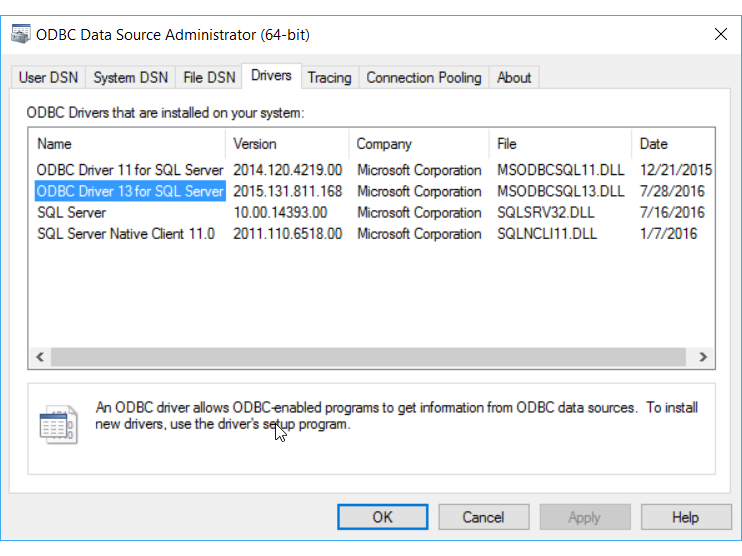
Forms don't use DSN; data do.  So check all data sources (tables, queries) for the form to see if they have the proper connections built-in.  Do you use the Windows ODBC app to set up these connections (see picture below)?  Check if the correct and up-to-date ODBC driver is used.  I've fixed many connection issues by just updating the driver.   Using the ODBC app is better than using a file DSN.  Storing passwords and credentials in a plain text file is probably not a good idea.
Kevin Yip  @Reply  
     
3 years ago

Eduardo Benaim OP  @Reply  
     
3 years ago
Thank you Kevin. I am Following Richards recommendations creating a File ODBC.  I am still using Access32Bit.
This is what I am doing
Private Sub RelinkTablesBtn_Click()

    'Status "Connecting to Server..."
    RelinkTable "EntityT", "EntityID"
    RelinkTable "ContactsT", "contactID"
    RelinkTable "DocumentT", "DocumentID"
    RelinkTable "HelperT", "HelperID"
    RelinkTable "HelperTypeT", "HelperTypeID"
    RelinkTable "SearchFieldT", "ID"
    RelinkTable "tblEmail_Attachments", "Email_Attachments_ID"
    RelinkTable "tblEmails", "Email_ID"
    RelinkTable "tblUser", "ID"
      
End Sub
'---------------------------------------------------------------------

Private Sub RelinkTable(TableName As String, IndexField As String)

    Dim db As Database
    Dim td As TableDef
    Dim SQL As String
    
    Status "Relinking " & TableName
    
    Set db = CurrentDb
    On Error Resume Next
    db.TableDefs.Delete (TableName)
    On Error GoTo 0
    
    Set td = db.CreateTableDef(TableName)
    td.Connect = TempVars("ConnectStringWithPW")
    td.SourceTableName = TableName
    db.TableDefs.Append td
    
    'Application.SetHiddenAttribute acTable, TableName, True
    
    SQL = "CREATE UNIQUE INDEX " & IndexField & "_index ON " & _
        TableName & " (" & IndexField & ")"
    db.Execute SQL

End Sub
Eduardo Benaim OP  @Reply  
     
3 years ago
This is straight out of Richards Code.  
Can anyone see something missing?
Eduardo Benaim OP  @Reply  
     
3 years ago
I found that the Problem was that a pause is needed in between the Relinks.
I added Sleep 1000 and that apparently fixed the Problem.
This makes me think also that In the Relink sub we are not clearing the variables.

Private Sub RelinkTablesBtn_Click()

    'Status "Connecting to Server..."
    RelinkTable "EntityT", "EntityID"
    Sleep 1000
    RelinkTable "ContactsT", "contactID"
    Sleep 1000
    RelinkTable "DocumentT", "DocumentID"
    Sleep 1000
    RelinkTable "HelperT", "HelperID"
    Sleep 1000
    RelinkTable "HelperTypeT", "HelperTypeID"
    Sleep 1000
    RelinkTable "SearchFieldT", "ID"
    Sleep 1000
    RelinkTable "tblEmail_Attachments", "Email_Attachments_ID"
    Sleep 1000
    RelinkTable "tblEmails", "Email_ID"
    Sleep 1000
    RelinkTable "tblUser", "ID"
      
End Sub
Eduardo Benaim OP  @Reply  
     
3 years ago
Update:  The Problem still Persist.
Richard, please take a look when you can.
Thanks
Kevin Robertson  @Reply  
          
3 years ago
Your connection string is stored in a TempVars, would it be being cleared somehow? Perhaps try using Constants instead? Just brainstorming.
Eduardo Benaim OP  @Reply  
     
3 years ago
Kevin, Thank you.
I believe you are right. Somehow the "tempvars" are getting reset.
I changed the Tempvars Connection Strings to Global variables and it is working fine for now.
I will report any changes.
Eduardo Benaim OP  @Reply  
     
3 years ago
One more thing: Do you think that
RelinkTable "tblUser", "ID"
may have a problem with the use of the index word "ID"? (Reserved?)

whare:
Private Sub RelinkTable(TableName As String, IndexField As String)

    Dim db As Database
    Dim td As TableDef
    Dim SQL As String
    
    Status "Relinking " & TableName
    
    Set db = CurrentDb
    On Error Resume Next
    db.TableDefs.Delete (TableName)
    On Error GoTo 0
    
    Set td = db.CreateTableDef(TableName)
    td.Connect = ConnectStringWithPW
    td.SourceTableName = TableName
    db.TableDefs.Append td
    
    'Application.SetHiddenAttribute acTable, TableName, True
    
    SQL = "CREATE UNIQUE INDEX " & IndexField & "_index ON " & _
        TableName & " (" & IndexField & ")"
    db.Execute SQL

End Sub

This thread is now CLOSED. If you wish to comment, start a NEW discussion in Access SQL Server Lessons.
 

Next Unseen

 
New Feature: Comment Live View


The following is a paid advertisement
Computer Learning Zone is not responsible for any content shown or offers made by these ads.
 

Learn
 
Access - index
Excel - index
Word - index
Windows - index
PowerPoint - index
Photoshop - index
Visual Basic - index
ASP - index
Seminars
More...
Customers
 
Login
My Account
My Courses
Lost Password
Memberships
Student Databases
Change Email
Info
 
Latest News
New Releases
User Forums
Topic Glossary
Tips & Tricks
Search The Site
Code Vault
Collapse Menus
Help
 
Customer Support
Web Site Tour
FAQs
TechHelp
Consulting Services
About
 
Background
Testimonials
Jobs
Affiliate Program
Richard Rost
Free Lessons
Mailing List
PCResale.NET
Order
 
Video Tutorials
Handbooks
Memberships
Learning Connection
Idiot's Guide to Excel
Volume Discounts
Payment Info
Shipping
Terms of Sale
Contact
 
Contact Info
Support Policy
Mailing Address
Phone Number
Fax Number
Course Survey
Email Richard
[email protected]
Blog RSS Feed    YouTube Channel

LinkedIn
Copyright 2026 by Computer Learning Zone, Amicron, and Richard Rost. All Rights Reserved. Current Time: 6/16/2026 11:20:46 AM. PLT: 1s