Free Lessons
Courses
Seminars
TechHelp
Fast Tips
Templates
Topic Index
Forum
ABCD
 
Home   Courses   TechHelp   Help   Contact   Merch   Join   Order   Logon   Forums   
 
Back to Access Developers    Comments List
Upload Images | @Reply | Bookmark | Link | Email | Next Unseen |
Generate Contract Version
James Hopkins 
     
3 years ago
Hey Guys,
I am trying to write an VBA Code to generate an "Contract Version Number" for each Contract. But I can not figure out how to make the Version Number Update to New Version after Editing the Contract Information? Here's what I have Drafted Up:

Function GenerateContractVersionNum() As String

    Dim curVersion As String
    Dim newVersion As String
    Dim maxVersion As Integer
    Dim frontPrefix As String
    Dim backPrefix As String
    Dim verCount As Long

    curVersion = DLookup("ContractVersionNumber", "ContractT", "ContractID=" & Forms!ContractF.ContractID)
    
    frontPrefix = "Rev."
    backPrefix = ".V"
      
    If IsNull(curVersion) Then
        ' If there is no existing Version, set the new Version as 1
        newVersion = "1"
    Else
        ' If there is an existing Version, increment it by 1
        maxVersion = Nz(DMax("ContractVersionNumber", "ContractT", "ContractID=" & Forms!ContractF.ContractID), 0)
        newVersion = frontPrefix & " " & CStr(Format(maxVersion + 1, "0.0")) & backPrefix
    End If

    GenerateContractVersionNum = newVersion

End Function
James Hopkins OP  @Reply  
     
3 years ago
Guys, Should I put the Function into the Forms and make it an "Private Sub"?
Kevin Robertson  @Reply  
          
3 years ago
First of all does the Function work without errors?

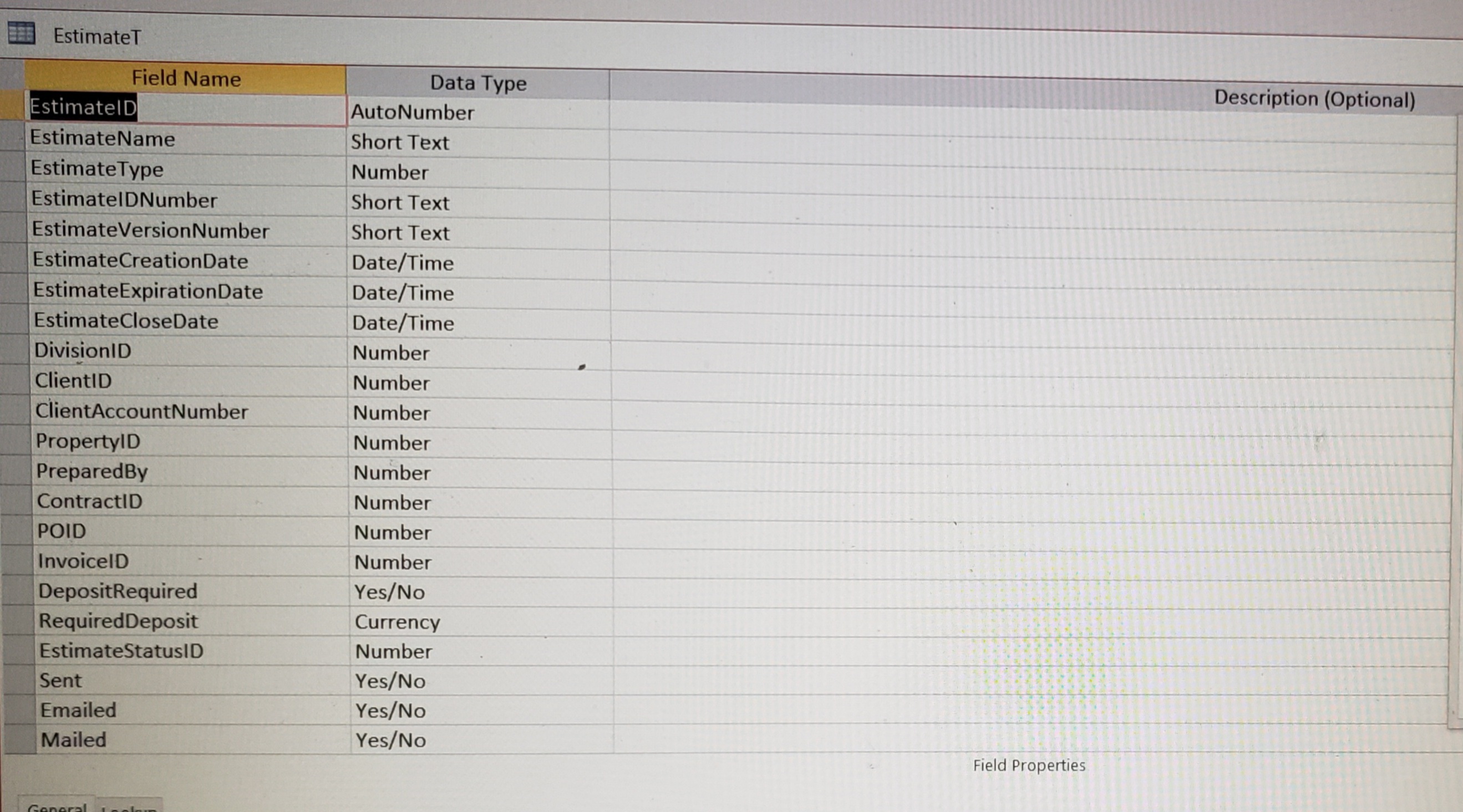
What does your table structure look like?
What are the data types of the fields in the table?
Screenshots?
James Hopkins OP  @Reply  
     
3 years ago
Hey Kelvin, I got an "Run-time Error '3075': Syntax Error (missing operator) in Query Expression 'EstimateID='.
The Contract Table's Fields: ContractID is an 'Autonumber' and Contract Version Number field is an 'Short Text Field'
James Hopkins OP  @Reply  
     
3 years ago

James Hopkins OP  @Reply  
     
3 years ago

James Hopkins OP  @Reply  
     
3 years ago
Sorry, the VBA Code for the Estimate & Contract Version Number is the Same:

Function GenerateEstimateVersionNum() As String

    Dim curVersion As String
    Dim newVersion As String
    Dim maxVersion As Integer
    Dim Prefix As String
    Dim verCount As Long
  
    Prefix = "V"
    
    curVersion = DLookup("EstimateVersionNumber", "EstimateT", "EstimateID=" & EstimateID)

    If IsNull(curVersion) Then
        newVersion = "1"
    Else
        maxVersion = Nz(DMax("EstimateVersionNumber", "EstimateT", "EstimateID=" & EstimateID), 0)
        newVersion = Prefix & " " & CStr(Format(maxVersion + 1, "0.0"))
    End If

    GenerateEstimateVersionNum = newVersion

End Function

But the I tried to create another VBA Code for the Estimate & Contract Version Number which is:

Function GetNextEstimateVersionNum() As Long

    Dim strSQL As String
    Dim rs As Recordset
    Dim nextVersion As Long
      
    Dim tableName As String
    Dim versionFieldName As String
    
    tableName = "EstimateT"
    versionFieldName = "EstimateVersionNumber"
    
    strSQL = "SELECT MAX([" & versionFieldName & "]) AS MaxVersion FROM [" & tableName & "];"
    
    Set rs = CurrentDb.OpenRecordset(strSQL)
    
    If Not rs.EOF And Not rs.BOF Then
         nextVersion = rs("MaxVersion") + 1
    Else
         nextVersion = 1
    End If
    
    rs.Close
  
    GetNextEstimateVersionNum = nextVersion

End Function


Private Sub Form_BeforeUpdate(Cancel As Integer)

    Dim rs As Recordset
    Dim contractID As Long
    Dim currentVersion As Long
    Dim newVersion As Long
    
    Set rs = CurrentDb.OpenRecordset("ContractT")
    
    contractID = Me![ContractID]
    
    rs.FindFirst "[ContractID] = " & ContractID
    Do While Not rs.NoMatch
        currentVersion = rs![ContractVersionNumber]
        rs.FindNext "[ContractID] = " & ContractID
    Loop
    
    newVersion = currentVersion + 1
    
    rs.FindFirst "[ContractID] = " & ContractID
    
    rs.Edit
    rs![ContractVersionNumber] = newVersion
    rs.Update
    
    rs.Close
    Set rs = Nothing

End Sub
Kevin Yip  @Reply  
     
3 years ago
Hi James, I suggest you create two fields in your table -- an actual version number, and a version number for display purposes.  E.g.:

ActualVers   DisplayVers
5.1          Rev. 5.1.V
20.8         Rev. 20.1.V
2            Rev. 2.0.V

Then, all you need to do is just add 1 to the ActualVers field, which can be done with a simple update query.  Make DisplayVers a calculated field (="Rev. " & Format([ActualVers], "0.0") & ".V"), or you can update its value with VBA, so the display version is automatically generated.  That way you need very little VBA, or no VBA at all.
James Hopkins OP  @Reply  
     
3 years ago
Okay Kelvin, sounds good. I will get right to it. Thanks for your help.
James Hopkins OP  @Reply  
     
3 years ago
Hey Guys, I have figure out, here's the Code I have came up with:

Private Sub Form_BeforeUpdate(Cancel As Integer)
    
    Dim curVersion As String
    Dim nextVersion As String
    Dim maxVersion As String
    Dim prefix As String
    
    prefix = "V"
    
    curVersion = Nz(DLookup("EstimateActualVersionNumber", "EstimateT", "EstimateID=" & EstimateID), 0)
    
    If IsNull(curVersion) Then
        nextVersion = curVersion + 1
    Else
        maxVersion = Nz(DMax("EstimateActualVersionNumber", "EstimateT", "EstimateID=" & EstimateID), 0)
        nextVersion = prefix & " " & CStr(Format(maxVersion + 1, "0.0"))
        CurrentDb.Execute "UPDATE EstimateT SET EstimateActualVersionNumber=" & nextVersion & " WHERE EstimateID=" & Me.EstimateID
        MsgBox "Estimate Updated to Version " & nextVersion, vbInformation, "Estimate Version Updated"
    End If
      
    EstimateActualVersionNumber = nextVersion
    
End Sub
James Hopkins OP  @Reply  
     
3 years ago
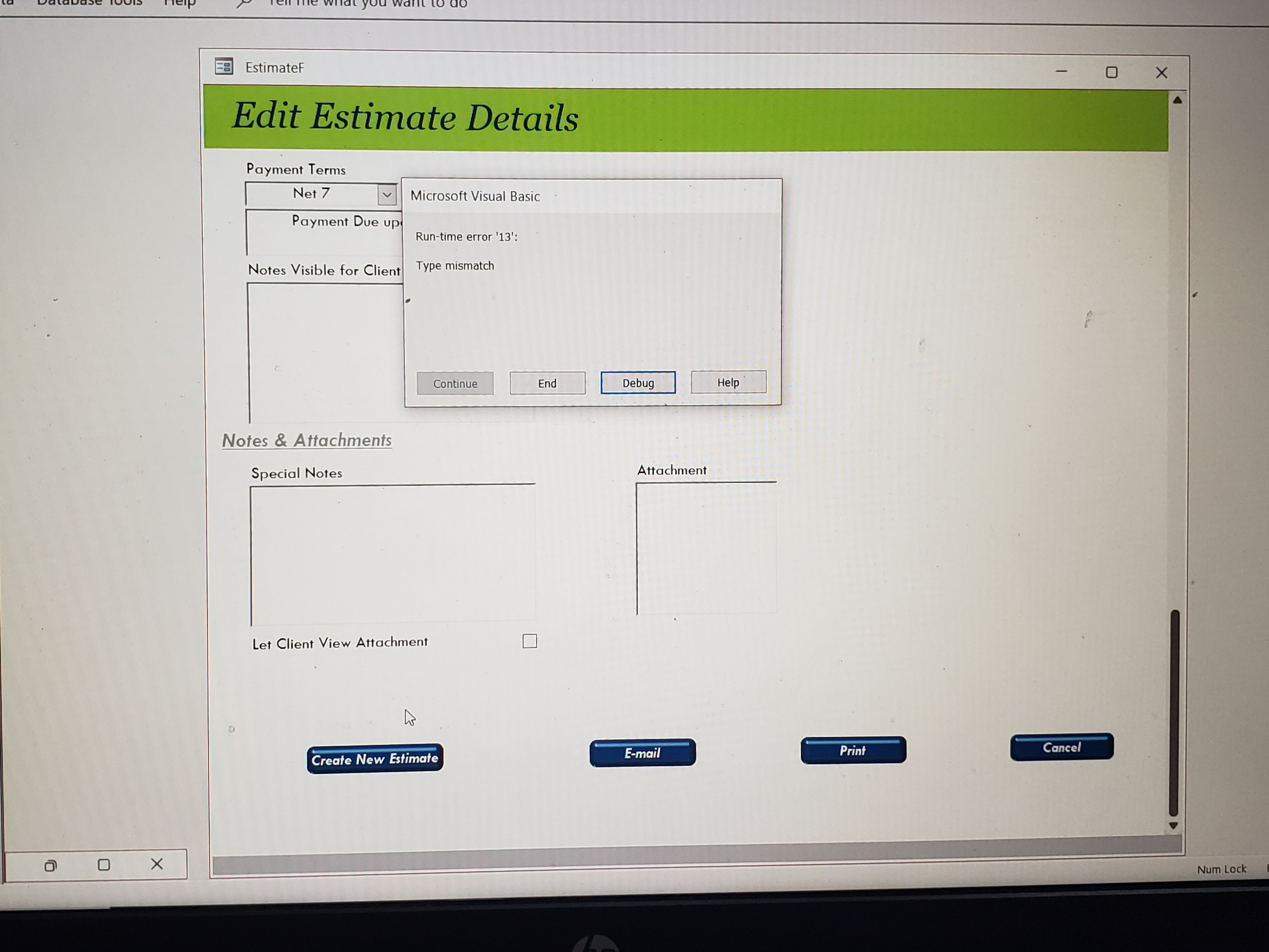
But I am getting an Error....
James Hopkins OP  @Reply  
     
3 years ago

James Hopkins OP  @Reply  
     
3 years ago

Kevin Yip  @Reply  
     
3 years ago
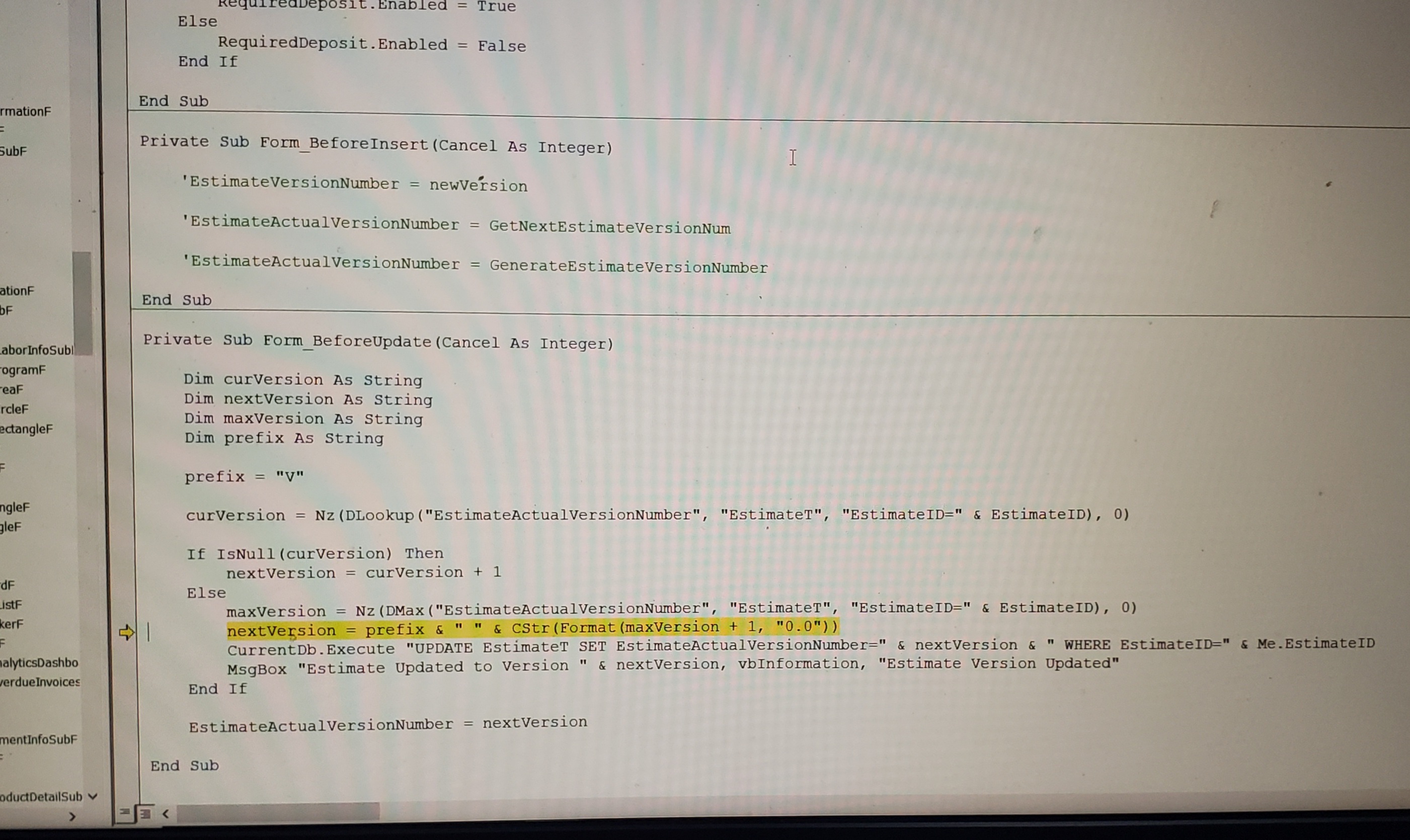
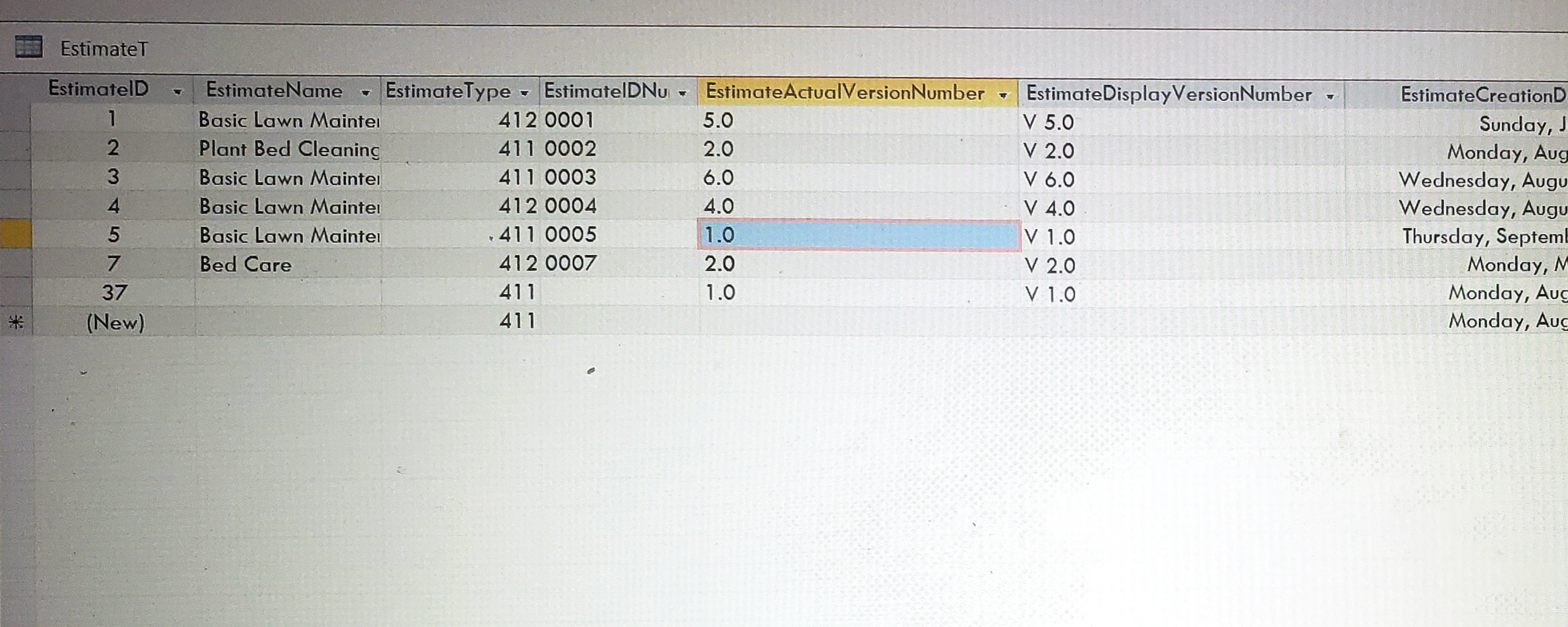
maxVersion is a string, so that's why maxVerson + 1 causes "type mismatch" error.  As I said earlier, you need a numeric field to store the version number, to make it easier to do such math calculations.
James Hopkins OP  @Reply  
     
3 years ago

James Hopkins OP  @Reply  
     
3 years ago

James Hopkins OP  @Reply  
     
3 years ago
Kelvin, this is what you was talking about..
James Hopkins OP  @Reply  
     
3 years ago

James Hopkins OP  @Reply  
     
3 years ago
I got this VBA Code that work great, but I can't figure out how to get the Code to "Update the Version Number".

Function GenerateEstimateVerNum() As String

    Dim customNumber As String
    Dim lastNumber As String
    Dim Prefix As String
    Dim verCount As Long
    
    Prefix = "V"
    
    lastNumber = Nz(DMax("EstimateVersionNumber", "EstimateT"), 0)
    verCount = DCount("EstimateVersionNumber", "EstimateT")
    
    customNumber = Prefix & " " & Format(verCount + 1, "0.0")
    
    GenerateEstimateVerNum = customNumber

End Function
Kevin Yip  @Reply  
     
3 years ago
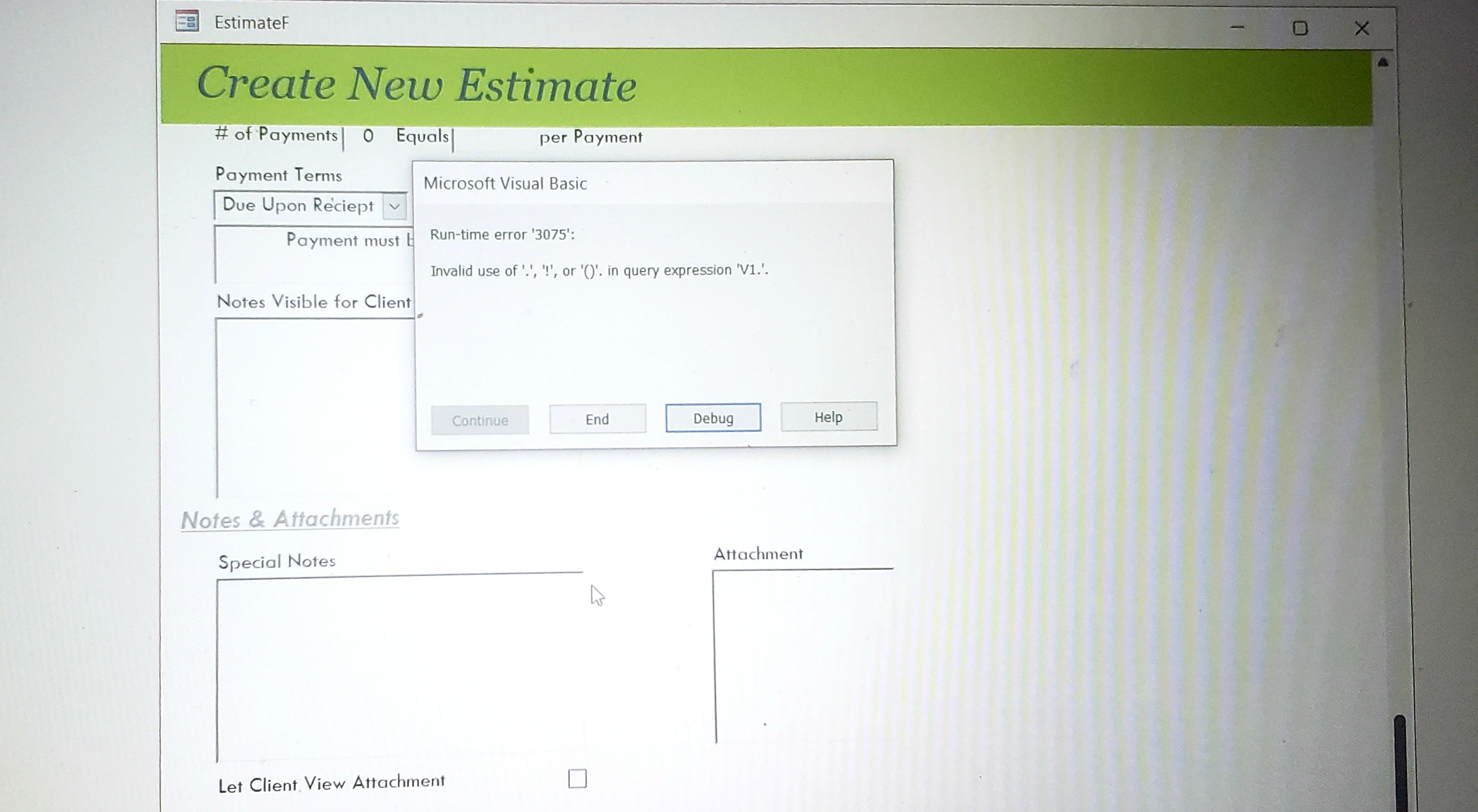
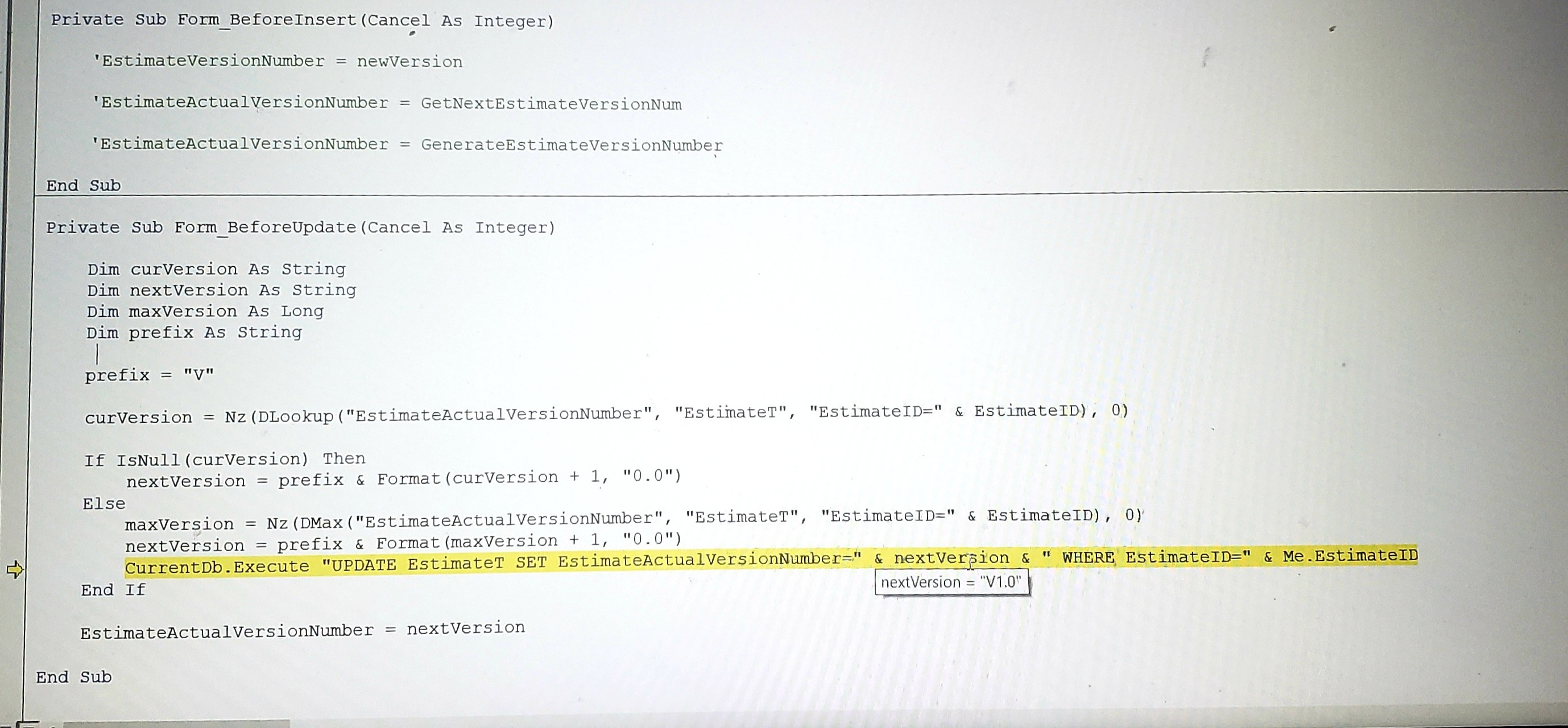
Hi James, you are still working with strings, which I've said you should avoid doing.  If version updates involve only adding 1 to the existing version, it should not take that much code, or even no code as I said.  Your last error "Invalid use of '.' ..." was also caused by "nextVersion" being a string, a non-numeric string at that.  In your second-last picture, "nextVersion" equals to "V1.0".  That was why "SET EstimateActualVersionNumber=" & nextVersion & ... caused an error, because you tried to assign a non-numeric string to a numeric field.  

James Hopkins OP  @Reply  
     
3 years ago
Kevin you were Correct... I didn't see at first...

Here's the Final Code:

Private Sub Form_BeforeUpdate(Cancel As Integer)
      
    Dim newVersion As String
    Dim customNumber As String
    Dim lastNumber As String
    Dim Prefix As String
    Dim verCount As Long
    
    Prefix = "V"
  
    lastNumber = Nz(DMax("EstimateVersionNumber", "EstimateT", "EstimateID=" & EstimateID), 0)
    verCount = DCount("EstimateVersionNumber", "EstimateT", "EstimateID=" & EstimateID)
    customNumber = Prefix & " " & Format(verCount + 1, "0.0")
  
    EstimateVersionNumber = customNumber
    
End Sub

This thread is now CLOSED. If you wish to comment, start a NEW discussion in Access Developers.
 

Next Unseen


What's This?


The following is a paid advertisement
Computer Learning Zone is not responsible for any content shown or offers made by these ads.
 

Learn
 
Access - index
Excel - index
Word - index
Windows - index
PowerPoint - index
Photoshop - index
Visual Basic - index
ASP - index
Seminars
More...
Customers
 
Login
My Account
My Courses
Lost Password
Memberships
Student Databases
Change Email
Info
 
Latest News
New Releases
User Forums
Topic Glossary
Tips & Tricks
Search The Site
Code Vault
Collapse Menus
Help
 
Customer Support
Web Site Tour
FAQs
TechHelp
Consulting Services
About
 
Background
Testimonials
Jobs
Affiliate Program
Richard Rost
Free Lessons
Mailing List
PCResale.NET
Order
 
Video Tutorials
Handbooks
Memberships
Learning Connection
Idiot's Guide to Excel
Volume Discounts
Payment Info
Shipping
Terms of Sale
Contact
 
Contact Info
Support Policy
Mailing Address
Phone Number
Fax Number
Course Survey
Email Richard
[email protected]
Blog RSS Feed    YouTube Channel

LinkedIn
Copyright 2026 by Computer Learning Zone, Amicron, and Richard Rost. All Rights Reserved. Current Time: 10/31/2026 10:53:57 PM. PLT: 1s