Free Lessons
Courses
Seminars
TechHelp
Fast Tips
Templates
Topic Index
Forum
ABCD
 
Home   Courses   TechHelp   Help   Contact   Merch   Join   Order   Logon   Forums   
 
Back to Access Developers    Comments List
Upload Images | @Reply | Bookmark | Link | Email | Next Unseen |
Contract Numbering
James Hopkins 
     
3 years ago
Hey Richard, is a way VBA Code to Generate a Custom Contract Numbering with a Prefix: "CON" and Customer Code: "NABEL". Then make the Code check to see if there an Similar "Contract  Number" exist already in the Table. If so, then make the VBA Code go to the Next Contract  Number?
Scott Axton  @Reply  
      
3 years ago
There are bunches of videos that cover custom numbering but they kind of build on each other.

Sequential Numbers
Customer Codes
Sequential Annual Coding

To see if it already exists see
Access Expert 23 Composite Key
and
Prevent Duplicates
James Hopkins OP  @Reply  
     
3 years ago
Guys, then is there a  way to make the VBA Code check to see if there an Similar "Contract  Number" exist already in the Table. If so, can it then make the New Contract Number use the "Existing Contract Number with the Same Prefix and Customer Code" go up to the Next Number?
Kevin Yip  @Reply  
      
3 years ago
Depends on what you mean by similar.  If you use a wildcard criteria like "CON*NABEL", it still requires exact matches: the first 3 letters must be CON and last 5 must be NABEL.  If by "similar," you mean "fuzzy" criteria or phrases, you are probably venturing into AI territory.  AI mimics human senses and thinking, which are often "fuzzy".  And fuzzy logic is difficult to program for, hence the need for advanced logic, like AI.  Here is a "fuzzy" example that is hard for a machine to read but should be easy for most humans to recognize:

"It deosn't mttaer in waht oredr the ltteers in a wrod are, the olny iprmoetnt tihng is taht the frist and lsat ltteer be at the rghit pclae; the rset can be a toatl mses and you can sitll raed it wouthit porbelm; tihs is bcuseae the huamn mnid deos not raed ervey lteter by istlef, but the wrod as a wlohe."

Even though it is littered with misspelled words, you are able to read the above with relative ease because, as the above sentence says, humans don't read every letter by itself.  Humans use a kind of "fuzzy" logic when they read: if a misspelled word looks SIMILAR to the correct word, no problem.  This kind of fuzzy logic is hard to program.
James Hopkins OP  @Reply  
     
3 years ago
Kevin, the Prefix is "CON" and the Customer Code would be like: "NABEL". So, I am looking for the SAME "Prefix and Customer Code that exist in the Table already, if so, add + 1 the the Number.
James Hopkins OP  @Reply  
     
3 years ago
I get this Code to generate the Contract ID Number but it won't go up to the Next Number.


Function GenerateContractNum() As String

    Dim prefix As String
    Dim clientCode As String
    Dim newContractNumber As String
    Dim existingContractNumber As String
    Dim nextNumber As String
    
    prefix = "CON"
    clientCode = DLookup("ClientIDCode", "ClientT", "ClientID=" & Forms!ContractF2!CboClient.Column(0))
    
    newContractNumber = prefix & "-" & clientCode & "-" & "01"

    existingContractNumber = Nz(DLookup("ContractIDNumber", "ContractT", "ContractIDNumber='" & newContractNumber & "'"), 0)
    
    If existingContractNumber <> "" Then
        nextNumber = Val(Mid(existingContractNumber, Len(prefix) + 2)) + 1
        newContractNumber = prefix & "-" & clientCode & "-" & Format(nextNumber + 1, "00")
    End If
    
    GenerateContractNum = newContractNumber

End Function

Private Sub Form_BeforeUpdate(Cancel As Integer)

    ContractIDNumber = GenerateContractNum()
    
End Sub
Kevin Robertson  @Reply  
          
3 years ago
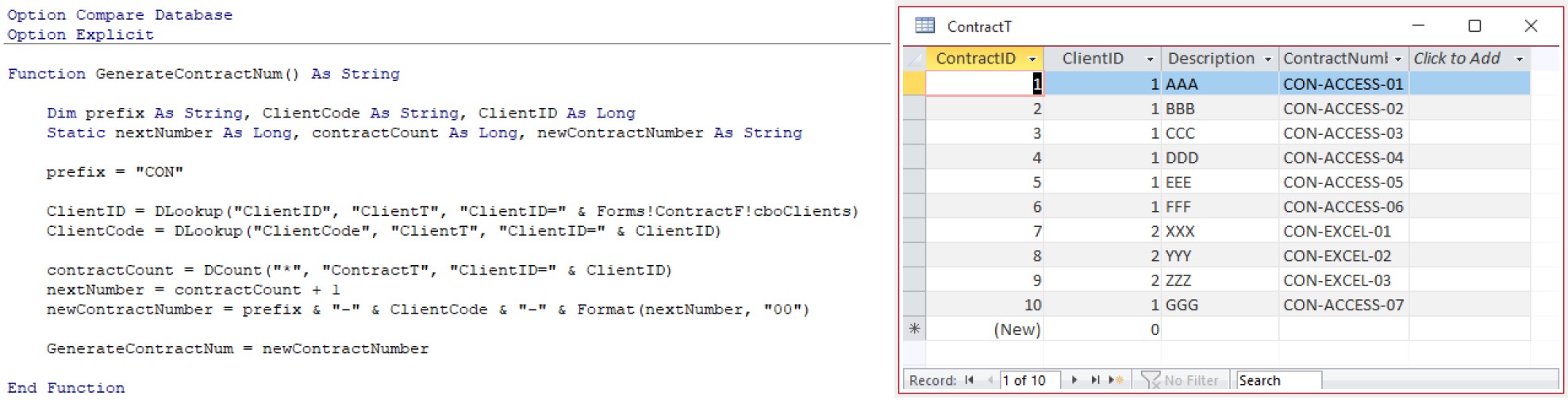
Is this the sort of functionality you are looking for (see screenshot)?
You may need to modify the code for your specific needs.
Give it a go and let us know if it's what you need.
Kevin Robertson  @Reply  
          
3 years ago

James Hopkins OP  @Reply  
     
3 years ago
Kevin, you are awesome. The code work perfectly with the examples you displayed. Thank you so much for your help.

This thread is now CLOSED. If you wish to comment, start a NEW discussion in Access Developers.
 

Next Unseen


What's This?


The following is a paid advertisement
Computer Learning Zone is not responsible for any content shown or offers made by these ads.
 

Learn
 
Access - index
Excel - index
Word - index
Windows - index
PowerPoint - index
Photoshop - index
Visual Basic - index
ASP - index
Seminars
More...
Customers
 
Login
My Account
My Courses
Lost Password
Memberships
Student Databases
Change Email
Info
 
Latest News
New Releases
User Forums
Topic Glossary
Tips & Tricks
Search The Site
Code Vault
Collapse Menus
Help
 
Customer Support
Web Site Tour
FAQs
TechHelp
Consulting Services
About
 
Background
Testimonials
Jobs
Affiliate Program
Richard Rost
Free Lessons
Mailing List
PCResale.NET
Order
 
Video Tutorials
Handbooks
Memberships
Learning Connection
Idiot's Guide to Excel
Volume Discounts
Payment Info
Shipping
Terms of Sale
Contact
 
Contact Info
Support Policy
Mailing Address
Phone Number
Fax Number
Course Survey
Email Richard
[email protected]
Blog RSS Feed    YouTube Channel

LinkedIn
Copyright 2026 by Computer Learning Zone, Amicron, and Richard Rost. All Rights Reserved. Current Time: 11/15/2026 1:27:26 AM. PLT: 1s