Free Lessons
Courses
Seminars
TechHelp
Fast Tips
Templates
Topic Index
Forum
ABCD
 
Home   Courses   TechHelp   Forums   Help   Contact   Merch   Join   Order   Logon  
 
Back to Security Seminar Lessons    Comments List
Upload Images   @Reply   Bookmark    Link   Email   Next Unseen 
ButtonClick Not working
Sami Shamma 
             
3 years ago
Hi friends
When my Application starts, I check wither the import of the external data has happened.
If it is not, I then want to do the following:
1.Close The main menu
2.Open DailyProcessing Form
3.Click on the only button on the form StartProccessing
So On Open Event of MainMenu I have the following code:
Private Sub Form_Open(Cancel As Integer)
    If Int(LastUpdate) <> Int(ReportDate) Then
         MsgBox "Run Daily Processing!", vbInformation
         DoCmd.Close acForm, "00-Main Menu"
         DoCmd.OpenForm "DailyProccessing"
         Forms!DailyProccessing.StartProccessing_Click
    End If
End Sub
When I click ok on the MsgBox "Run Daily Processing!", I get the following Error:

Run-time error 2465:
Application-defined or object-defined error

Debug highlight the line   Forms!DailyProccessing.StartProccessing_Click
The code works in opening the form if I remove the above line.
What am I doing wrong?
Thanks
Kevin Robertson  @Reply  
          
3 years ago
Does it work if you change the line to StartProccessing_Click


Personally I would create a custom Sub Routine to run the code. I hate calling an event from another event.
Kevin Yip  @Reply  
     
3 years ago
First, check if the misspelling (you have an extra "c" in "processing") causes any error.

Assuming "processing" is the intended name, then the line should be:

     Form_DailyProcessing.StartProcessing_Click

Write "Form_" instead of "Forms!".  The reason is that "StartProcessing_Click" belongs to the form's module, not the form.  So you need to reference the module's name in order to call the procedure.  If a form's name is "DailyProcessing", then the form module's name is "Form_DailyProcessing".  Access always adds "Form_" to the form's name for the module.  In the VBA editor, you see all the form modules listed on the left side have names that begin with "Form_".
Sami Shamma OP  @Reply  
             
3 years ago
Hi Kevin
if i have just StartPtoccessing_Click
I get "Sub or Object not defined.

if I use Form_DailyProcessing.StartProcessing_Click
I get:
Run-time error '424'
Object required

The bad spelling is consistent. LOL

I can place the code of daily Processing in the main menu on the correct condition. but if I do that, the user will not see the progress of the import that "DailyProccessing" form provide in a StatusBox.

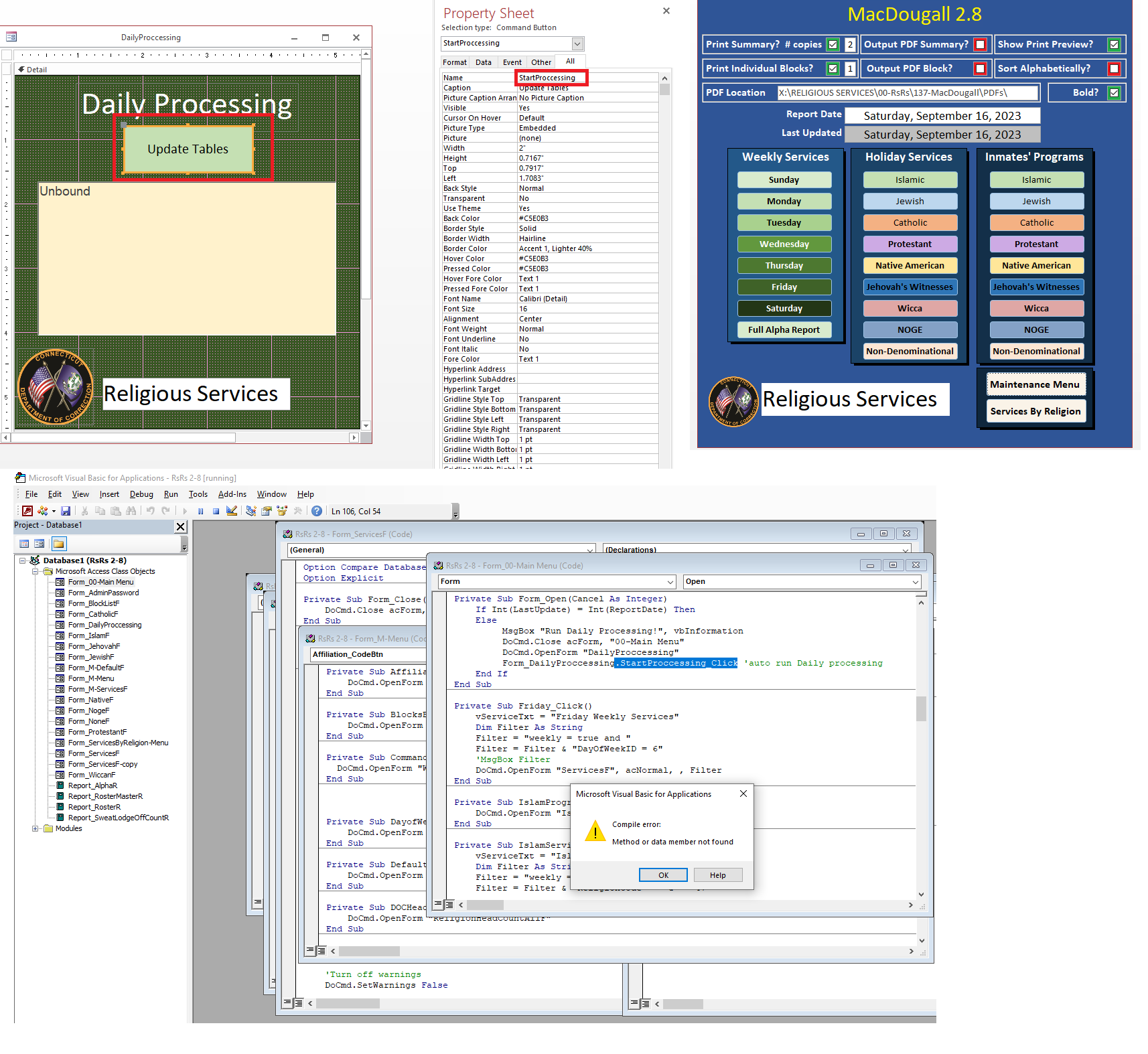
The DailyProccessing form has only two objects.

1) the "statusBox" to show progress
2) the button "StartProccessing" to run the update which I am trying to execute automatically when called from the main menu.

I cannot execute the update "OnOpen" because the user can open this form from a button on another menu.

Thank you for all your help


Kevin Robertson  @Reply  
          
3 years ago
Can you post some screenshots of your Form(s) and your actual VB code (including error messages).
Please include anything that may be relevant.
Sami Shamma OP  @Reply  
             
3 years ago

Kevin Yip  @Reply  
     
3 years ago
Hi Sami, so are the spellings in your code correct?  In your first post, you have "DailyProcessing" spelled with one "c" on one line, then with two "c"'s on another line.  So which is it?  All the errors you've got so far CAN be caused by misspellings, so please sort that out first.  Kevin's methods and mine won't help if even one letter is spelled incorrectly.
Sami Shamma OP  @Reply  
             
3 years ago
OnOpen from MainMenu

Private Sub Form_Open(Cancel As Integer)
    If Int(LastUpdate) = Int(ReportDate) Then
    Else
         MsgBox "Run Daily Processing!", vbInformation
         DoCmd.Close acForm, "00-Main Menu"
         DoCmd.OpenForm "DailyProccessing"
         Form_DailyProccessing.StartProccessing_Click
    End If
End Sub

Code from StartProccessing_Click Which is working well.

Option Compare Database
    Private Sub Status(S As String)
    StatusBox = S & "<BR>" & StatusBox
    DoEvents
    End Sub


Private Sub StartProccessing_Click()
    Dim ModifiedDate As Date
    Dim CurrentDate As Date
    Dim UpdateType As String
    Dim createdDate As Date
    Dim vFileLocation As String
    
    vFileLocation = DLookup("ImportFileLocation", "DefaultT", "DefaultID =1")
    
    ' cleare stausBox
    StatusBox = ""
    'Turn off warnings
    DoCmd.SetWarnings False
    
    ' Check to see if Daily update was done for today
    CurrentDate = DLookup("LastUpdate", "DefaultT", "DefaultID = 1")
    If Int(CurrentDate) = Int(Date) Then
        If MsgBox("Daily Processing was run today! Do you want to run" _
         & " it again", vbYesNo) = vbNo Then
         DoCmd.Close
         Exit Sub
        End If
    End If
    
    'Check if Export file is up-to-date
    ModifiedDate = ShowFileInfo(vFileLocation & "ResultsCSV.xlsx")
'MsgBox "ModifiedDate= " & Int(ModifiedDate) & "  -- Currentdate= " & Int(CurrentDate)
    If Int(CurrentDate) > Int(ModifiedDate) Then
        If MsgBox("The Export File from DocSystem is not up-to-date " _
         & "Run export first Proceed anyway?", vbYesNo) = vbNo Then
         Exit Sub
        Else
           'Contenue processing
        End If
    End If
    
    ' delete AlphaT and AlphaRawT
    Status "<font color=green>" & "1. Deleting AlphaRaw table"
    DoCmd.OpenQuery "00-DeleteAlphaRawT"

    Status "<font color=green>" & "2. Deleting AlphaT table"
    DoCmd.OpenQuery "00-DeleteAlphaT"
    
    ' Import ResyltsCSV to AlphaRawT
    Status "<font color=green>" & "3. Importing New Alpha {Results.CSV}"
    'DoCmd.RunSavedImportExport "Import-ResultsCSV"
    DoCmd.RunSavedImportExport "Import-ResultsCSV-DOC"
    ' Check AlphaRawT has more than 50 recoreds
    If DCount("*", "Alpharawt") < 50 Then
        MsgBox "You didn't select 'View All Results' " _
         & " during Import. Run Import again", , "Warning!"
        DoCmd.Close
        Exit Sub
    End If

    ' Load AlphaT from AlphaRawT & get update type
    UpdateType = DLookup("AlphaUpdateType", "DefaultT", "DefaultID = 1")
    Status "<font color=green>" & "4. Populating AlphaT table"
    DoCmd.OpenQuery UpdateType
    
    ' Prepare AlphaT to populate ProgramT
    ' test to see of inmate already exixt on ProgramT,
     'if yes set "DoNotAppend" on AlphaT to true
    Status "<font color=Green>" & "5. Prepare AlphaT to Append ProgramT"
    DoCmd.OpenQuery "00-ProgramT-Append-PrepQ"

    ' Append ProgramT table
    ' Only add records to ProgramT if "DoNotAppend" on AlphaT is False
    Status "<font color=Green>" & "6. Append ProgramT table"
    DoCmd.OpenQuery "00-ProgramT-AppendQ"
    'Copy ProgramT to Archive before purge
    Status "<font color=Green>" & "7. Copy to ProgramArchiveT from ProgramT"
    DoCmd.OpenQuery "00-AppendProgramArchive"
    ' Prep to Remove records from ProgramT that are no longer in AlphaT
    Status "<font color=Green>" & "8. Prep toDelete Old inmates from ProgramT"
    DoCmd.OpenQuery "00-ProgramT-Delete-Prep1Q"
    DoCmd.OpenQuery "00-ProgramT-Delete-Prep2Q"
    ' Remove records from ProgramT that are no longer in AlphaT
    Status "<font color=Green>" & "9. Delete Old inmates from ProgramT"
    DoCmd.OpenQuery "00-ProgramT-DeleteNotInAlphaTQ"
    ' update "files last updated"
    Status "<font color=Green>" & "10. Update 'Last Updated date' on DefaultT"
    DoCmd.OpenQuery "00-DefaltT-Update-LastUpdate"
    ' Clean up and close
    MsgBox "Daily updates are compleate", vbOKOnly, "Daily Proccessing"
    DoCmd.Close acForm, "Daily-Proccessing", acSaveYes
    DoCmd.Close acForm, "M-Menu", acSaveYes
    DoCmd.OpenForm "00-Main Menu"
    DoCmd.SetWarnings True
    
End Sub


Sami Shamma OP  @Reply  
             
3 years ago
I am going to correct all the spelling now. It does not help being severely dyslexic
Kevin Robertson  @Reply  
          
3 years ago
Like I said in my first reply create a Sub Routine for StartProccessing - since in needs to be called from a different form make it Public. You will then be able to call it from both forms.

I would say that is the problem. Your Main Menu form can't see the code because it is Private.
Sami Shamma OP  @Reply  
             
3 years ago
OK, I got it working with:
Form_DailyProcessing.StartProcessing_Click and making StartProcessing_Click public

Many thanks gentlemen

Sami Shamma OP  @Reply  
             
3 years ago
Hi Kevin Robertson

Was you who helped me with creating backup file on a different Database from VBA?
I can find that post.
Kevin Robertson  @Reply  
          
3 years ago
Not sure what post you mean.
Here is a link to the Backup video

Backup Access
Scott Axton  @Reply  
        
3 years ago
Sami Shamma OP  @Reply  
             
3 years ago
Thank you Scott, yes that one.
I will continue the conversation on that thread.

This thread is now CLOSED. If you wish to comment, start a NEW discussion in Security Seminar Lessons.
 

Next Unseen

 
New Feature: Comment Live View


The following is a paid advertisement
Computer Learning Zone is not responsible for any content shown or offers made by these ads.
 

Learn
 
Access - index
Excel - index
Word - index
Windows - index
PowerPoint - index
Photoshop - index
Visual Basic - index
ASP - index
Seminars
More...
Customers
 
Login
My Account
My Courses
Lost Password
Memberships
Student Databases
Change Email
Info
 
Latest News
New Releases
User Forums
Topic Glossary
Tips & Tricks
Search The Site
Code Vault
Collapse Menus
Help
 
Customer Support
Web Site Tour
FAQs
TechHelp
Consulting Services
About
 
Background
Testimonials
Jobs
Affiliate Program
Richard Rost
Free Lessons
Mailing List
PCResale.NET
Order
 
Video Tutorials
Handbooks
Memberships
Learning Connection
Idiot's Guide to Excel
Volume Discounts
Payment Info
Shipping
Terms of Sale
Contact
 
Contact Info
Support Policy
Mailing Address
Phone Number
Fax Number
Course Survey
Email Richard
[email protected]
Blog RSS Feed    YouTube Channel

LinkedIn
Copyright 2026 by Computer Learning Zone, Amicron, and Richard Rost. All Rights Reserved. Current Time: 4/30/2026 12:24:11 PM. PLT: 1s