Hi Richard Quick question, can a Recordset be the Record Source of a Form?
Kevin Yip
@Reply 3 years ago
The answer to that is no, because a form (or report) needs a record source to receive data. If you have a recordset and want to use it for a form, you need to make it an unbound form and feed values manually (via VBA) from the recordset to the form's controls.
Sami ShammaOP
@Reply 3 years ago
Thanks Kevin
I will give it a try.
Kevin Yip
@Reply 3 years ago
If the recordset was created from an SQL statement, then of course you can use the SQL as the form's record source. But the reason you asked this question is likely because you don't know the SQL.
You can also loop through the recordset, save every record into a table, and use the table's name as the record source. But that's cumbersome.
Sami ShammaOP
@Reply 3 years ago
Hi Keven
Thanks again. Actually I am hunting for a solution to a design problem I am having. I normalized a very old DB that was based on Excel lined tables.
I posted a conversation with the Subject "Normalizing My DB" explaining what I am trying to do.
I do know SQL, and now on developer 42, but I am trying to get a form to behave as follows:
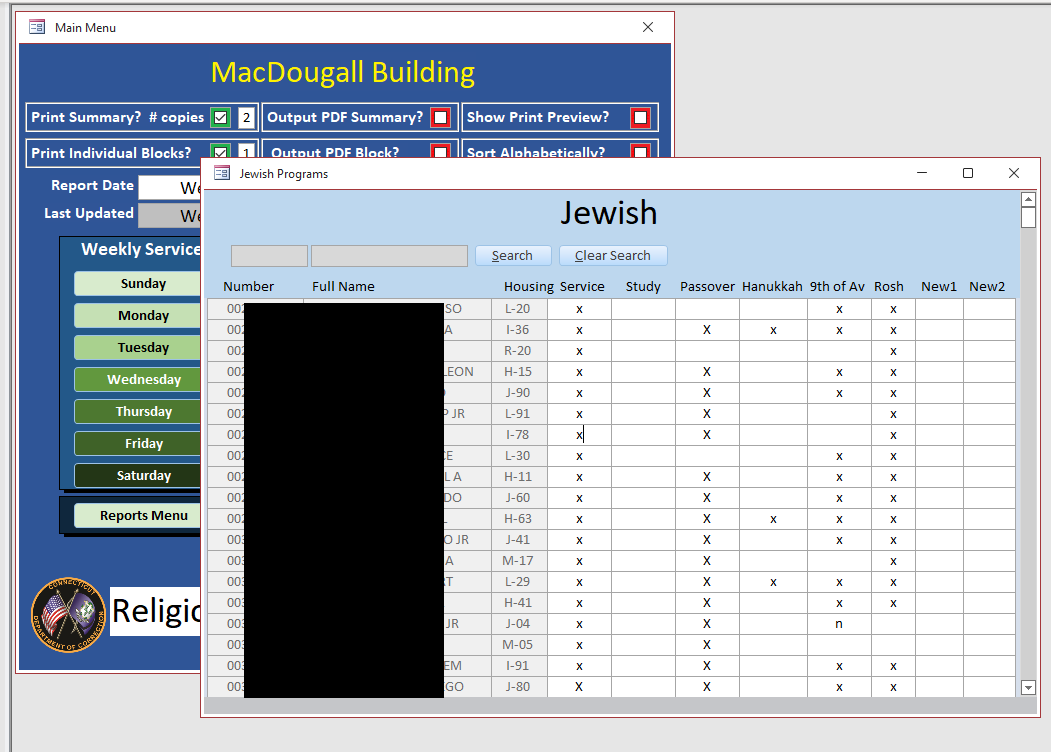
I have Many-to-Many Relationship between InmateT and ProgramT where Program T contains all the programs that inmate is signed up for. I process adding programs to the Inmates in batches. So, I want to see the inmates and the programs on one line in a continues form.
See the image below
I am stuck on how to get this to work. It is possible that there is a completely different solution to my problem, and I am blinded by how the old system worked.
I appreciate any help to get me started on a solution.
Sami ShammaOP
@Reply 3 years ago
Sami ShammaOP
@Reply 3 years ago
Hi Again Kevin
I just realized that you are also helping me with "Normalizing my DB" post.
Sami ShammaOP
@Reply 3 years ago
Please let's continue this on the other post.
Many many thanks
Sorry, only students may add comments.
Click here for more
information on how you can set up an account.
If you are a Visitor, go ahead and post your reply as a
new comment, and we'll move it here for you
once it's approved. Be sure to use the same name and email address.
This thread is now CLOSED. If you wish to comment, start a NEW discussion in
Access Developer 16.