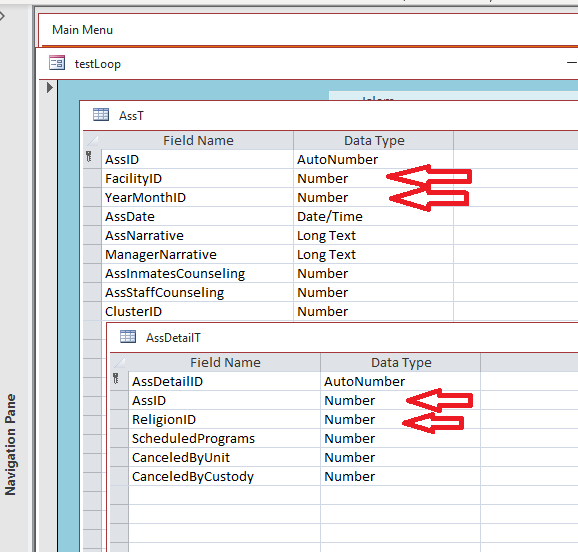
Good morning, friends I am trying to populate two tables with recordsets. A header and detail. Table structure in the image below. The records in the header table AssT are added correctly. My problem is that the key field AssID that I need for the detail table AssDetailT is not available to me. My code below does not put the correct AssID in the detail table. HELP! Many thanks DetailsPrivate Sub AssTBtn_Click()
Dim db As Database Dim rsA As Recordset 'AssT Dim rsD As Recordset 'AssDetailT Dim rsO As Recordset 'AssOutcomeT Dim rsF As Recordset 'S_FacilityT Dim rsY As Recordset 'S_YearMonthT Dim rsR As Recordset 'S_ReligionT
StatusBox = "" Set db = CurrentDb
'Set rsF = db.OpenRecordset("S_FacilityT") ------------------------------------ for final code *********** Set rsF = db.OpenRecordset("SELECT * FROM S_FacilityT WHERE FacilityID= 1") While Not rsF.EOF Status rsF!FacilityName Set rsY = db.OpenRecordset("SELECT * FROM S_YearMonthT WHERE YMYear = ""2025""") While Not rsY.EOF 'add record to AssT Set rsA = db.OpenRecordset("AssT") rsA.AddNew rsA!FacilityID = rsF!FacilityID rsA!YearMonthID = rsY!YearMonthID rsA.Update 'add record to AssDetailT Set rsR = db.OpenRecordset("SELECT * FROM S_ReligionT WHERE IsReported") While Not rsR.EOF Set rsD = db.OpenRecordset("AssDetailT") rsD.AddNew rsD!AssID = rsA!AssID rsD!ReligionID = rsR!ReligionID rsD.Update Status "==== " & rsR!ReligionName rsR.MoveNext Wend rsY.MoveNext Wend rsF.MoveNext Wend rsA.Close rsD.Close rsO.Close rsR.Close rsY.Close rsF.Close db.Close Set rsD = Nothing Set rsA = Nothing Set rsO = Nothing Set rsR = Nothing Set rsY = Nothing Set rsF = Nothing Set db = Nothing End Sub
Sami ShammaOP
@Reply 3 years ago
Sami ShammaOP
@Reply 3 years ago
I only need to add records with the fields indicated with red arrows. The rest is entered by the user.
Sami ShammaOP
@Reply 3 years ago
I found a solution by inserting this code after my rsA.update
rsA.Bookmark = rsA.LastModified
ID = rsA!AssID
Sorry, only students may add comments.
Click here for more
information on how you can set up an account.
If you are a Visitor, go ahead and post your reply as a
new comment, and we'll move it here for you
once it's approved. Be sure to use the same name and email address.
This thread is now CLOSED. If you wish to comment, start a NEW discussion in
Access Developer 20.