Free Lessons
Courses
Seminars
TechHelp
Fast Tips
Templates
Topic Index
Forum
ABCD
 
Home   Courses   TechHelp   Help   Contact   Merch   Join   Order   Logon   Forums   
 
Back to Access Developers    Comments List
Pending Approval    Upload Images   @Reply   Bookmark    Link   Email   Next Unseen 

Anonymous 
 
Adam Schwanz  @Reply  
           
2 years ago
Depends on your setup, you could do any of these depending on how you want it

CheckboxName.Locked=True
CheckboxName.Enabled=False
CheckboxName.Visible=False


Where to put it again matters on when you want it to fire. I'm assuming you want it to fire everytime the form is opened, and take out the checkboxes that aren't needed. Then I would use the on current event of the form.
Leo Rivera  @Reply  
   
2 years ago
Thank you only one think,  in event I click the check box to do the event VB code but I do no found Current Event there is: OnClick, Before Update, After Update, On Got Fucus, On Lost Focus, On Dbl Click, On Mouse Down, On Mouse Up, On Mouse Move, On Key Up, On Key Press, On Enter, On Exit.  Where would be the one?
Kevin Robertson  @Reply  
          
2 years ago
On Current is a Form event.
Leo Rivera  @Reply  
   
2 years ago
I choose OnClick and entered the code:

Private Sub Jan_Click()

    If MonthsAssigned2 = 1 Then
        Jan.Enabled = False
    Else
        Jan.Enabled = True
    End If

End Sub

However I have an error: Run Time Error '13' Type mismatch
Kevin Robertson  @Reply  
          
2 years ago
If you are disabling the Check Box, how are you enabling it?
What type of data goes into MonthsAssigned2?

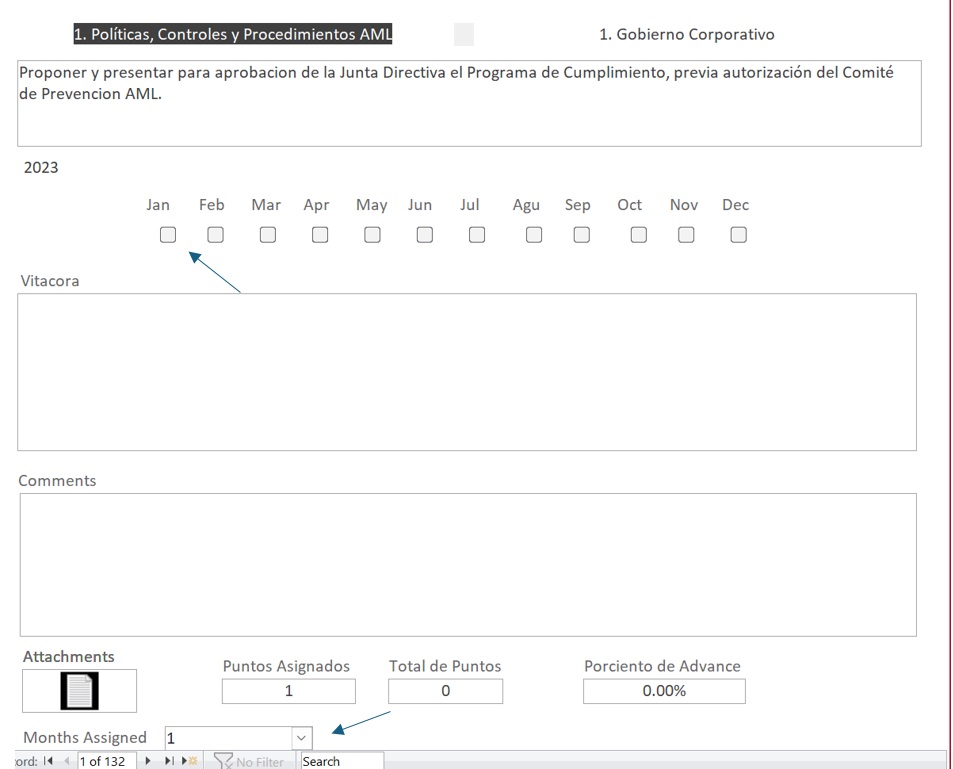
Please post some screenshots of your Form (in Design View AND Form View).
Leo Rivera  @Reply  
   
2 years ago
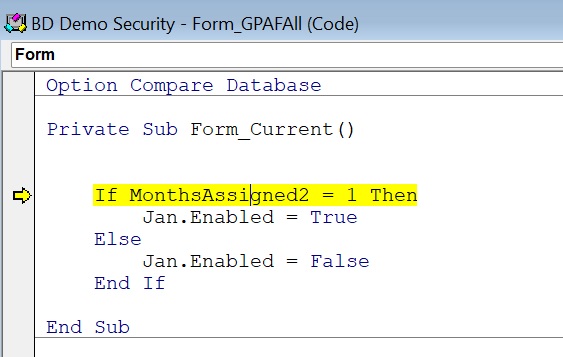
I enter the same VB code on the Form Current and have the same error. The debug highlight the:

If MonthsAssigned2 = 1 Then
Leo Rivera  @Reply  
   
2 years ago

Leo Rivera  @Reply  
   
2 years ago
I am stuck with this can somebody help me.
Kevin Yip  @Reply  
     
2 years ago
When the error occurs, and the line "If MonthsAssigned2 = 1 Then" is highlighted in yellow, hover your mouse over "MonthsAssigned2" and see what its value is.  "Type mismatch" error means the data type is wrong for the operation, such as comparing a string to a numeral:

     If "one" = 1 Then ...

The line above will give a "type mismatch" error, for instance.
Leo Rivera  @Reply  
   
2 years ago
What I understand is to hover "MonthsAssigned2" at the Debug that is highlighted in yellow.  I did that but nothing pops.
Leo Rivera  @Reply  
   
2 years ago

Kevin Robertson  @Reply  
          
2 years ago
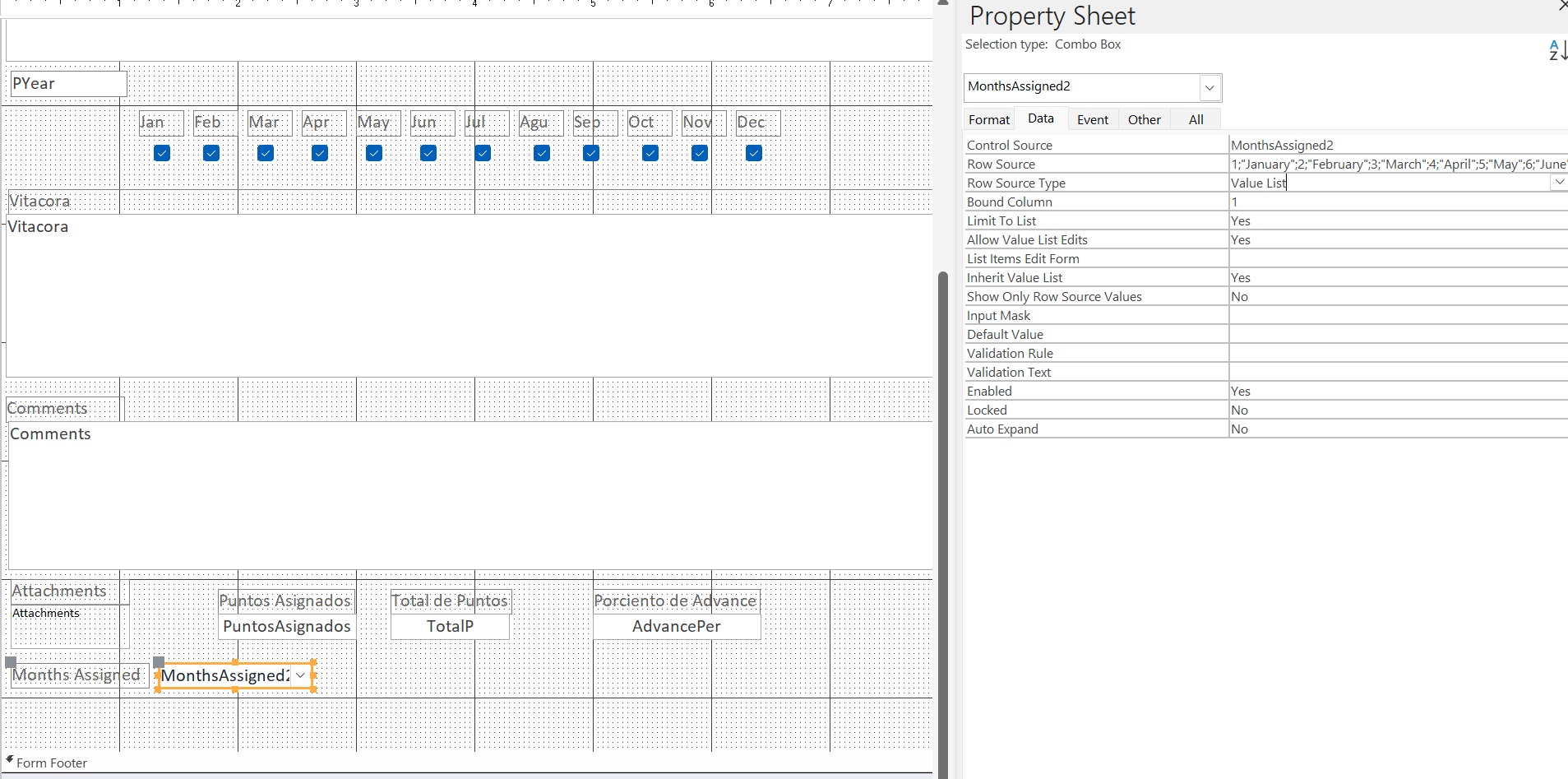
is MonthsAssigned2 the Combo Box (one of the reasons I asked for a screenshot in DESIGN VIEW)?
What is the bound column? What is the Data Type of the bound column?
Kevin Yip  @Reply  
     
2 years ago
Hi Leo, when the yellow line appears, go to the "Immediate Window" and type:

     ?MonthsAssigned2

then press Enter.  It will show you the value of MonthsAssigned2.

You can also type:

    ?IsNumeric(MonthsAssigned2)

and press Enter.  It will show "True" if MonthsAssigned2 is numeric.

If the immediate window doesn't show, press Ctrl-G on your keyboard.

Leo Rivera  @Reply  
   
2 years ago
Certainly is a combo box and de column bound is the 1. See the image.
Leo Rivera  @Reply  
   
2 years ago

Kevin Robertson  @Reply  
          
2 years ago
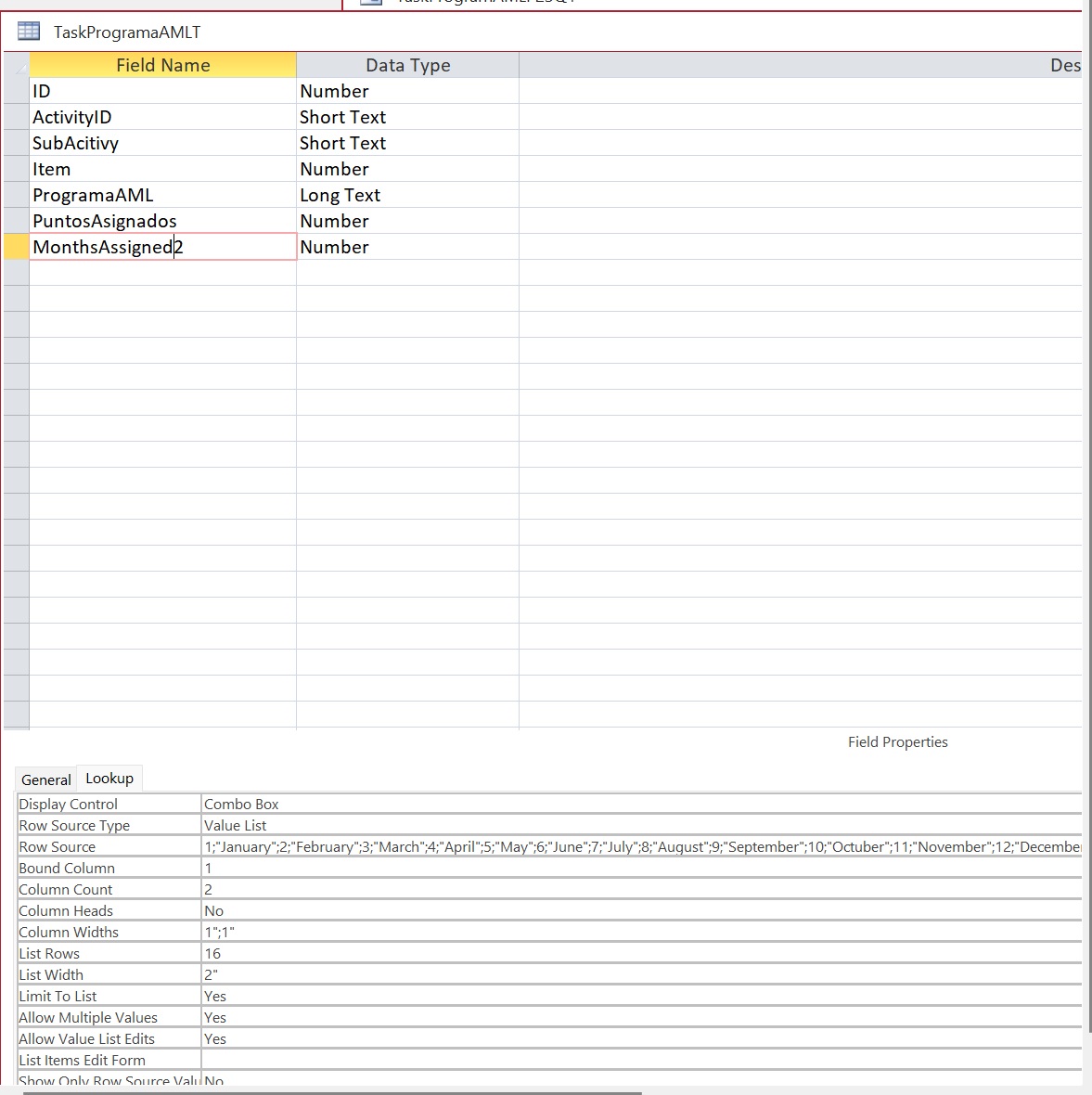
The Combo Box is bound to a field in the table called MonthsAssigned2. Is that field a Number or Short Text (check your Table)?
Leo Rivera  @Reply  
   
2 years ago
A number!
Leo Rivera  @Reply  
   
2 years ago

Adam Schwanz  @Reply  
           
2 years ago
Evil Access Stuff

Wouldn't surprise me if it's something stupid with the Lookup Value in table.

Adam Schwanz  @Reply  
           
2 years ago
Can you try changing that Display Control back to a Text Box and see if it lets you set the value?

What is the Record Source of that form, is it the TaskProgramaAMLT or a query? If it's a query could you include an image of what is inside the query?
Adam Schwanz  @Reply  
           
2 years ago
Actually I just seen you have allow multiple values on as well, do some of these have multiple values? I would get that set back to a text box and get rid of the multiple values too, setup a proper relational table for storing multiple months.
Kevin Yip  @Reply  
     
2 years ago
Hi Leo, you have set MonthsAssigned2 as a "multivalued" field by setting the "Allow Multiple Values" to Yes.  A multivalued field is a "set" of several values, which is unlike a single numeric or text value.  You cannot compare a set of values to a single value, and that is why you get the "type mismatch" error.

Once you set "Allow Multiple Values" to Yes, you cannot set it back to No.  You have to delete the field and create a new field that doesn't "Allow Multiple Values."  This is one reason (among many) why many people avoid using multivalued fields, including the experts on this site.

This thread is now CLOSED. If you wish to comment, start a NEW discussion in Access Developers.
 

Next Unseen

 
New Feature: Comment Live View


The following is a paid advertisement
Computer Learning Zone is not responsible for any content shown or offers made by these ads.
 

Learn
 
Access - index
Excel - index
Word - index
Windows - index
PowerPoint - index
Photoshop - index
Visual Basic - index
ASP - index
Seminars
More...
Customers
 
Login
My Account
My Courses
Lost Password
Memberships
Student Databases
Change Email
Info
 
Latest News
New Releases
User Forums
Topic Glossary
Tips & Tricks
Search The Site
Code Vault
Collapse Menus
Help
 
Customer Support
Web Site Tour
FAQs
TechHelp
Consulting Services
About
 
Background
Testimonials
Jobs
Affiliate Program
Richard Rost
Free Lessons
Mailing List
PCResale.NET
Order
 
Video Tutorials
Handbooks
Memberships
Learning Connection
Idiot's Guide to Excel
Volume Discounts
Payment Info
Shipping
Terms of Sale
Contact
 
Contact Info
Support Policy
Mailing Address
Phone Number
Fax Number
Course Survey
Email Richard
[email protected]
Blog RSS Feed    YouTube Channel

LinkedIn
Copyright 2026 by Computer Learning Zone, Amicron, and Richard Rost. All Rights Reserved. Current Time: 7/15/2026 6:24:36 AM. PLT: 1s