Free Lessons
Courses
Seminars
TechHelp
Fast Tips
Templates
Topic Index
Forum
ABCD
 
Home   Courses   TechHelp   Help   Contact   Merch   Join   Order   Logon   Forums   
 
Back to Access Developers    Comments List
Upload Images   @Reply   Bookmark    Link   Email   Next Unseen 
Recurring Expenses
James Hopkins 
     
2 years ago
Hey Richard and the Guys, I have created Forms that I use to create 'Expense Form' that may need to be Recurring. Trying to figure out what is best way to set up a Recurring Expenses. I have seen the Appointment and Next Appointment Tech Help Videos. Where you used a field on the Form to calculate the Next Expense Date.

DetailsOn my Schedule Form, I have a Expense Frequency Combo Box that I can select if: "Daily, Weekly, Bi-Weekly, Monthly, or Yearly". If the Frequency Selected is, 'Daily,' then use the 'Daily Interval Combo Box' to select if: 'Every Day, Every 2 Days, Every 3 Days, Every 4 Days, Every 5 Days, or Every 6 Days'. If the Frequency Selected is, 'Weekly,' then use the 'Weekly Interval Combo Box' to select if: 'Every Week, Every 2 Weeks, Every 3 Weeks, or Every 4 Weeks'. If the Frequency Selected is, 'Bi-Weekly,' then use the 'Bi-Weekly Interval Combo Box' to select if: 'Every 2 Weeks, Every 3 Weeks, or Every 4 Weeks'. If the Frequency Selected is, 'Monthly,' then select one of the Check Boxes to Enable the correct line of 'Combo Boxes'. If the 'On the Check Box' selected then, use the 'Monthly Interval Combo Box' to select if the Interval is: 'Every Month, Every 2 Months, Every 3 Months, Every 4 Months, Every 5 Months, Every 6 Months, Every 6 Months, Every 7 Months, Every 8 Months, Every 9 Months, Every 10 Months, Every 11 Months, or Every 12 Months' and use the 'Weekday Combo Box' to select if: 'Sunday, Monday, Tuesday, Wednesday, Thursday, Friday, or Saturday'. Else if, the 'Or On Check Box' selected then, use the 'On the Weekday of Month Combo Box' to select if: 'First Sunday, Second Sunday, Third Sunday, Fourth Sunday, First Sunday, Second Sunday, Third Sunday, Fourth Sunday, First Monday, Second Monday, Third Monday, Fourth Monday, First Tuesday, Second Tuesday, Third Tuesday, Fourth Tuesday, First Wednesday, Second Wednesday, Third Wednesday, Fourth Wednesday, First Thursday, Second Thursday, Third Thursday, Fourth Thursday, First Friday, Second Friday, Third Friday, Fourth Friday, First Saturday, Second Saturday, Third Saturday, Fourth Saturday' and use the 'Monthly Interval Combo Box' to select if: 'Every Month, Every 2 Months, Every 3 Months, Every 4 Months, Every 5 Months, Every 6 Months, Every 6 Months, Every 7 Months, Every 8 Months, Every 9 Months, Every 10 Months, Every 11 Months, or Every 12 Months'. If the Frequency Selected is, 'Yearly,' then select one of the Check Boxes to select to Enable the correct line of 'Combo Boxes'. If the 'On the Check Box' selected then, use the 'Month Combo Box' to select if: 'January, February, March, April, May, June, July, August, September, November, or December' and use the 'Weekday Number Combo Box' to select if: '1st, 2nd, 3rd, 4', 5th , 6th, 7th, 8th, 9th, 10th, 11th, 12th, 13th, 14th, 15th, 16th, 17th, 18th, 19th, 20th, 21th, 22th, 23th, 24th, 25th, 26th, 27th, 28th, 29th, 30th, or 31th' day. Else if, the 'Or On Check Box' selected then, use the 'Monthly Interval Combo Box' to select if: 'Every Month, Every 2 Months, Every 3 Months, Every 4 Months, Every 5 Months, Every 6 Months, Every 6 Months, Every 7 Months, Every 8 Months, Every 9 Months, Every 10 Months, Every 11 Months, or Every 12 Months' and use the 'On the Weekday of Month Combo Box' to select if: 'First Sunday, Second Sunday, Third Sunday, Fourth Sunday, First Sunday, Second Sunday, Third Sunday, Fourth Sunday, First Monday, Second Monday, Third Monday, Fourth Monday, First Tuesday, Second Tuesday, Third Tuesday, Fourth Tuesday, First Wednesday, Second Wednesday, Third Wednesday, Fourth Wednesday, First Thursday, Second Thursday, Third Thursday, Fourth Thursday, First Friday, Second Friday, Third Friday, Fourth Friday, First Saturday, Second Saturday, Third Saturday, Fourth Saturday'. After the Frequency selection and the Interval of 'Expenses' is completed, then use the number entered in the 'Count of Expenses Text Box'. I need to use that Number to generate the 'Future Expense Dates' needed to be created. Lastly after the generation of the 'Future Expense Dates', I need to insert them into the Table. I was wondering if I should create another Table for the Future Recurring Expense Dates. Is there a better way to generate the Future Recurring Expense Dates and display them in a 'Today List', "Weekly" and/or "Monthly Calendar' Forms?
Richard Rost  @Reply  
           
2 years ago
Can you please clean that up and narrow it down and distill it because it's one big block of text and it's hurting my eyes?
Kevin Yip  @Reply  
     
2 years ago
Let me try to distill it.  Basically, he needs to calculate recurring dates with the formula:

    Every A days of every B weeks of every C months of every D years, starting E.
    
For instance, if the schedule is "every day, starting 2/6/24", then you need to set A=1, B=1, C=null, D=1, and E = 2/6/24.  C can be 1, but it isn't needed, so it may be Null.  If you specify every week (B=1), you already mean every month.

If the schedule is "every week on Monday," it essentially means "every 7 days of every 1 week, on Monday."  So you need to set A=7, B=1, C=1, D=1.  And E should be set to "Monday."

If the schedule is "every month on the 7th," you can't specify A, because "every month" could mean every 30 days, every 31 days, every 28 days, etc.  So A should be set to Null, indicating an indeterminate value.  You can't specify B either, because once a month could mean every 4 weeks or every 5 weeks.  So, B = Null too.  C=1, D=1, and E=7, indicating 7th day of a month.

If the schedule is "Every month, starting on the 2nd Tuesday," then A=null, B=null, C=1, D=1, E = Tuesday.

To store multiple schedules, you can break them up into individual schedules.  For instance:

     "Every 2 years, on the 15th and 28th days of the 4th and 5th months"
    
is the same as:

     Every 2 years, on April 15th --> A=null, B=null, C=null, D=2, E=4/15/24
     Every 2 years, on April 28th --> A=null, B=null, C=null, D=2, E=4/28/24
     Every 2 years, on May 15th --> A=null, B=null, C=null, D=2, E=5/15/24
     Every 2 years, on May 28th --> A=null, B=null, C=null, D=2, E=5/28/24
    
By now, you notice the main problem is storing the value of E, because it could be a literal date, a day of a month, or a weekday of a week.  Maybe you need to add another field, F, to store the extra info.

The above is my attempt to create a "systematic" way to store scheduling info.  If requires only a few fields, A, B, C, D, E, etc.  But it still requires some tricky VBA to work.
Richard Rost  @Reply  
           
2 years ago
Man, I'm glad you understood it. 😁
Kevin Yip  @Reply  
     
2 years ago
A slight correction to what I wrote above.  To specify "every month, starting on the 2nd Tuesday," we need to set A=null, B=null, C=1, D=1, E = 2/13/24 (the second Tuesday of this month, as of this writing).   Maybe the form could open up a "calendar picker" and let the user choose the 2nd Tuesday from the monthly calendar.
Kevin Yip  @Reply  
     
2 years ago
It seems the request is to find a way to specify every possible daily, monthly, weekly, and yearly schedule.  It is definitely not impossible, or may not even be difficult, since we all use some kind of calendar apps.  And some of them do let you specify every possible schedule.  So it's definitely not a foreign concept.  The form design shouldn't be difficult either.  As I showed, you only need maybe 4 or 5 textboxes or combo boxes for the user to specify A, B, C, D, E, etc.  But the VBA coding definitely won't be trivial.
James Hopkins OP  @Reply  
     
2 years ago
Hey Guys, here's the Code it came up with so far:

DetailsPrivate Sub GenerateFutureSchedule()

    Dim db As Database
    Dim rs As Recordset
    
    Dim frequency As String
    Dim dailyInterval As String
    Dim weeklyInterval As String
    Dim weekdayName As String
    Dim weekdayNumber As Integer
    Dim weekdayOn As Integer
    Dim monthlyInterval As String
    Dim monthlyOnInterval As String
    Dim monthName As String
    Dim monthWeekdayNumber As Integer
    Dim monthWeekdayOn As Integer
    Dim yearMonth As String
    Dim startDate As Date
    Dim endDate As Date
    Dim countMeeting As Integer
    Dim scheduledDate As Date
    Dim i As Integer

    ' Get user input
    dailyInterval = CboScheduleEveryifDaily.Column(1)
    weeklyInterval = CboScheduleEveryifWeekly.Column(1)
    weekdayName = CboScheduleOnWeekday.Column(1)
    weekdayOn = CboScheduleEveryWeekdayOn.Column(1)
    weekdayNumber = CboScheduleOnWeekdayNumber.Column(1)
    monthlyInterval = CboScheduleEveryifMonthly.Column(1)
    monthlyOnInterval = CboScheduleEveryifMonthly.Column(1)
    monthName = CboScheduleOnMonth.Column(1)
    monthWeekdayNumber = CboScheduleOnMonthWeekdayNumber.Column(1)
    monthWeekdayOn = CboScheduleEveryWeekdayOn.Column(1)
    yearMonth = CboScheduleYearOnMonth.Column(1)
    startDate = ScheduleStartDate
    endDate = ScheduleEndDate
    frequency = CboHowOthen.Column(1)
    countMeeting = CountofMeetings

    If CboMeetingType.Column(1) = "Single Schedule" Then Exit Sub
    
    ' Initialize database and recordset
    Set db = CurrentDb
    Set rs = db.OpenRecordset("ScheduleT", dbOpenDynaset)

    ' Clear existing records in the table
    db.Execute "DELETE * FROM ScheduleT"

    ' Generate future scheduled dates based on frequency
    For i = 1 To countMeeting
        Select Case frequency
            Case "Daily"
                scheduledDate = DateAdd("d", (i - 1) * dailyInterval, startDate)
            Case "Weekly"
                scheduledDate = DateAdd("ww", (i - 1) * weeklyInterval, startDate)
                While weekday(scheduledDate) <> WeekdayNameToVBAWeekday(weekdayName)
                    scheduledDate = DateAdd("d", 1, scheduledDate)
                Wend
            Case "Monthly"
                If ChkOn1 = True Then
                    scheduledDate = DateAdd("m", (i - 1) * monthlyInterval, startDate)
                    scheduledDate = DateAdd("d", weekdayNumber - 1, scheduledDate)
                ElseIf ChkOn2 = True Then
                    scheduledDate = DateAdd("m", (i - 1) * monthlyOnInterval, startDate)
                    scheduledDate = DateAdd("d", weekdayOn - 1, scheduledDate)
                    scheduledDate = DateAdd("ww", (i - 1) * 4, scheduledDate)
                End If
            Case "Yearly"
                If ChkOn1 = True Then
                    scheduledDate = DateSerial(Year(startDate), MonthToVBAInteger(monthName), monthWeekdayNumber)
                ElseIf ChkOn2 = True Then
                    scheduledDate = DateSerial(Year(startDate), MonthToNumberVBAInteger(yearMonth), 1)
                    While weekday(scheduledDate) <> WeekdayNameToVBAWeekday(monthWeekdayOn)
                        scheduledDate = DateAdd("d", 1, scheduledDate)
                    Wend
                End If
        End Select

        ' Check if scheduled date is within range
        If scheduledDate >= startDate And scheduledDate <= endDate Then
            ' Insert scheduled into table
            rs.AddNew
            rs!ScheduleStartDate = scheduledDate
            rs.Update
        End If
    Next i

    ' Close recordset and database
    rs.Close
    Set rs = Nothing
    Set db = Nothing

    ' Inform user that schedule have been generated
    MsgBox countMeeting & " Future Meeting(s) have been generated and inserted into the Scheduled Table.", vbInformation

End Sub


DetailsPrivate Function WeekdayNameToVBAWeekday(ByVal weekdayName As String) As Integer

    Select Case weekdayName
        Case "Sunday"
            WeekdayNameToVBAWeekday = vbSunday
        Case "Monday"
            WeekdayNameToVBAWeekday = vbMonday
        Case "Tuesday"
            WeekdayNameToVBAWeekday = vbTuesday
        Case "Wednesday"
            WeekdayNameToVBAWeekday = vbWednesday
        Case "Thursday"
            WeekdayNameToVBAWeekday = vbThursday
        Case "Friday"
            WeekdayNameToVBAWeekday = vbFriday
        Case "Saturday"
            WeekdayNameToVBAWeekday = vbSaturday
    End Select

End Function


DetailsPrivate Function MonthToVBAInteger(ByVal monthName As String) As Integer

    Select Case monthName
        Case "January"
            MonthToVBAInteger = 1
        Case "February"
            MonthToVBAInteger = 2
        Case "March"
            MonthToVBAInteger = 3
        Case "April"
            MonthToVBAInteger = 4
        Case "May"
            MonthToVBAInteger = 5
        Case "June"
            MonthToVBAInteger = 6
        Case "July"
            MonthToVBAInteger = 7
        Case "August"
            MonthToVBAInteger = 8
        Case "September"
            MonthToVBAInteger = 9
        Case "October"
            MonthToVBAInteger = 10
        Case "November"
            MonthToVBAInteger = 11
        Case "December"
            MonthToVBAInteger = 12
    End Select

End Function


DetailsPrivate Function MonthToNumberVBAInteger(ByVal yearMonth As String) As Integer

    Select Case yearMonth
        Case "January"
            MonthToVBAInteger = 1
        Case "February"
            MonthToVBAInteger = 2
        Case "March"
            MonthToVBAInteger = 3
        Case "April"
            MonthToVBAInteger = 4
        Case "May"
            MonthToVBAInteger = 5
        Case "June"
            MonthToVBAInteger = 6
        Case "July"
            MonthToVBAInteger = 7
        Case "August"
            MonthToVBAInteger = 8
        Case "September"
            MonthToVBAInteger = 9
        Case "October"
            MonthToVBAInteger = 10
        Case "November"
            MonthToVBAInteger = 11
        Case "December"
            MonthToVBAInteger = 12
    End Select

End Function
James Hopkins OP  @Reply  
     
2 years ago
Hey Guys, this is what I am trying to create. Trying to figure out what is best way to set up a Recurring Expenses. I have seen the Appointment and Next Appointment Tech Help Videos. Where you used a field on the Form to calculate the Next Expense Date. On my Schedule Form, I have a 'Expense Frequency Combo Box' that I can select if: "Daily, Weekly, Bi-Weekly, Monthly, or Yearly".

If the Frequency Selected is, 'Daily,' then use the 'Daily Interval Combo Box' to select if: 'Every Day, Every 2 Days, Every 3 Days, Every 4 Days, Every 5 Days, or Every 6 Days'.

If the Frequency Selected is, 'Weekly,' then use the 'Weekly Interval Combo Box' to select if: 'Every Week, Every 2 Weeks, Every 3 Weeks, or Every 4 Weeks'. If the Frequency Selected is, 'Bi-Weekly,' then use the 'Bi-Weekly Interval Combo Box' to select if: 'Every 2 Weeks, Every 3 Weeks, or Every 4 Weeks'.

If the Frequency Selected is, 'Monthly,' then select one of the Check Boxes to Enable the correct line of 'Combo Boxes'. If the 'On the Check Box' selected then, use the 'Monthly Interval Combo Box' to select if the Interval is: 'Every Month, Every 2 Months, Every 3 Months, Every 4 Months, Every 5 Months, Every 6 Months, Every 6 Months, Every 7 Months, Every 8 Months, Every 9 Months, Every 10 Months, Every 11 Months, or Every 12 Months' and use the 'Weekday Combo Box' to select if: 'Sunday, Monday, Tuesday, Wednesday, Thursday, Friday, or Saturday'. Else if, the 'Or On Check Box' selected then, use the 'On the Weekday of Month Combo Box' to select if: 'First Sunday, Second Sunday, Third Sunday' through to 'Third Saturday, Fourth Saturday' and use the 'Monthly Interval Combo Box' to select if: 'Every Month, Every 2 Months, Every 3 Months, Every 4 Months, Every 5 Months, Every 6 Months, Every 6 Months, Every 7 Months, Every 8 Months, Every 9 Months, Every 10 Months, Every 11 Months, or Every 12 Months'.

If the Frequency Selected is, 'Yearly,' then select one of the Check Boxes to select to Enable the correct line of 'Combo Boxes'. If the 'On the Check Box' selected then, use the 'Month Combo Box' to select if: 'January, February, March, April, May, June, July, August, September, November, or December' and use the 'Weekday Number Combo Box' to select if: '1st, 2nd, 3rd, 4', 5th , 6th, 7th, 8th, 9th, 10th' through to '29th, 30th, or 31th' day. Else if, the 'Or On Check Box' selected then, use the 'Monthly Interval Combo Box' to select if: 'Every Month, Every 2 Months, Every 3 Months, Every 4 Months, Every 5 Months, Every 6 Months, Every 6 Months, Every 7 Months, Every 8 Months, Every 9 Months, Every 10 Months, Every 11 Months, or Every 12 Months' and use the 'On the Weekday of Month Combo Box' to select if: 'First Sunday, Second Sunday, Third Sunday, Fourth Sunday, First Sunday, Second Sunday, Third Sunday, Fourth Sunday, First Monday, Second Monday' through to 'First Saturday, Second Saturday, Third Saturday, Fourth Saturday'.

After the Frequency selection and the Interval of 'Expenses' is completed, then use the number entered in the 'Count of Expenses Text Box' to use that Number to generate the 'Future Expense Dates'
Kevin Yip  @Reply  
     
2 years ago
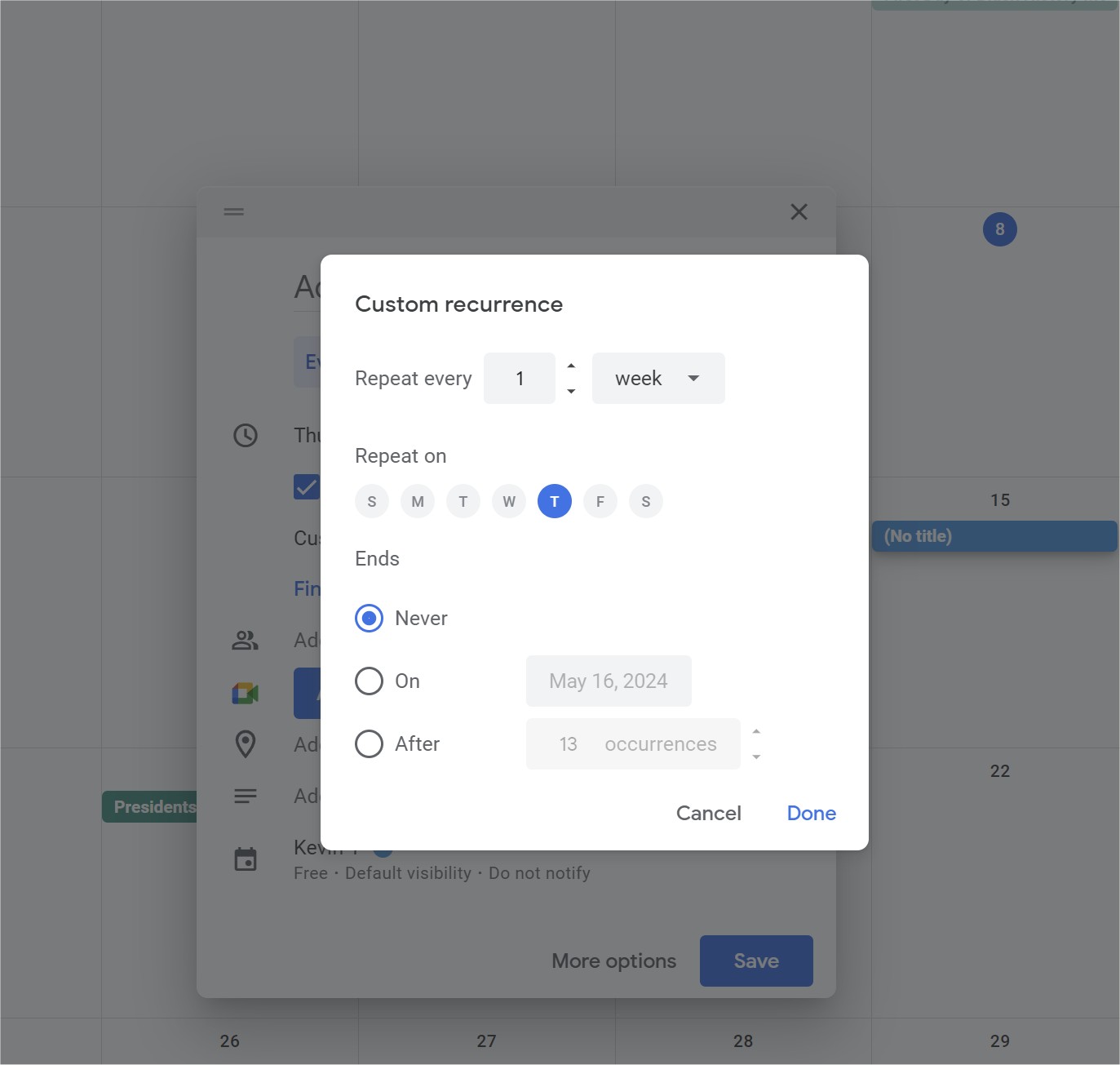
You originally asked if there was a best way to do it.  In my last post I said it would not be trivial to code this in VBA.  The code you posted above certainly showed the complexity involved.  Making a scheduler for every possible combinations would definitely not be a simple task.  The key for you is to make the user interface simple for the user, like the one for Google Calendar (see picture below).  That wouldn't be trivial either.  It's always hard to make things look easy.
Kevin Yip  @Reply  
     
2 years ago

James Hopkins OP  @Reply  
     
2 years ago
Kevin, that's what I was trying to do. I am using a Helper Table to populate the Combo Boxes. The "Daily, Weekly, and Monthly Interval" combo boxes have three Columns; "ID" in 0, "Every " in 1, and "#" in 2. Also, with the "Weekday and Month" combo boxes are setup the same way. Just the "On the Weekday of Month" combo box has only have two Columns; "ID" in 0 and "First Sunday - Last Saturday" in 1. I think I may have to separate that separate into two different Fields; combo box for the "First - Last" and combo box for the "Weekday".
Alex Hedley  @Reply  
           
2 years ago
Just in case you need the reverse you can do MonthName.
James Hopkins OP  @Reply  
     
2 years ago
Thanks Alex, also, I what correct that the "On the Weekday of Month" combo box has four Columns; "ID" in 0, "First Sunday - Last Saturday" in 1, "#" for "First to Last" in 2, and "#" for Weekday in 3. But I am in the process of creating two different combo boxes .
Richard Rost  @Reply  
           
2 years ago
I've got a lot of that scheduling logic in my Account Balances Template. I show how to setup recurring expenses that are X days (weeks), months, or years.
James Hopkins OP  @Reply  
     
2 years ago
Thank Richard, I have that Template, so I will look through it closely and I will see what I can come up with. I will let you Guys know.
James Hopkins OP  @Reply  
     
2 years ago
Hey Guy, think I finally got it. Here's what I have created:

DetailsPrivate Sub GenerateRecurringDates()

    Dim rs As DAO.Recordset
    
    Dim dailyInterval As Integer
    Dim weeklyInterval As Integer
    Dim weekdayName As String
    Dim weekdayNumber As Integer
    Dim monthlyInterval As Integer
    Dim monthlyOnInterval As Integer
    Dim onTheInterval As Integer
    Dim onTheWeekdayName As String
    Dim monthName As Integer
    Dim monthWeekdayNumber As Integer
    Dim yearMonth As Integer
    Dim countAppointments As Integer
    Dim frequency As String
    Dim startDate As Date
    Dim endDate As Date
    Dim i As Integer
    Dim futureDate As Date

    ' Get user input
    dailyInterval = CboScheduleEveryifDaily.Column(2)
    weeklyInterval = CboScheduleEveryifWeekly.Column(2)
    weekdayName = CboScheduleOnWeekday.Column(1)
    weekdayNumber = CboScheduleOnWeekdayNumber.Column(2)
    monthlyInterval = CboScheduleEveryifMonthly.Column(2)
    monthlyOnInterval = CboScheduleMonthEveryifMonthly.Column(2)
    onTheInterval = CboScheduleEveryWeekdayOn.Column(2)
    onTheWeekdayName = CboScheduleWeekday.Column(1)
    monthName = CboScheduleOnMonth.Column(2)
    monthWeekdayNumber = CboScheduleOnMonthWeekdayNumber.Column(2)
    yearMonth = CboScheduleYearOnMonth.Column(2)
    countAppointments = CountofTests
    startDate = ScheduleStartDate
    endDate = ScheduleEndDate
    frequency = CboHowOthen.Column(1)

    ' Open the appointments table
    Set rs = CurrentDb.OpenRecordset("ScheduleT")

    ' Loop through each future appointment
    For i = 1 To countAppointments
        Select Case frequency
            Case "Daily"
                futureDate = DateAdd("d", (i - 1) * dailyInterval, startDate)
            Case "Weekly"
                futureDate = GetNextWeeklyAppointment(startDate, i, weeklyInterval, weekdayName)
            Case "Monthly"
                If ChkOn1 = True Then
                    futureDate = GetNextMonthlyAppointmentChkOn1(startDate, i, weekdayNumber, monthlyInterval)
                ElseIf ChkOn2 = True Then
                    futureDate = GetNextMonthlyAppointmentChkOn2(startDate, i, onTheInterval, onTheWeekdayName, monthlyInterval)
                End If
            Case "Yearly"
                If ChkOn1 = True Then
                    futureDate = GetNextYearlyAppointmentChkOn1(startDate, i, monthName, monthWeekdayNumber)
                ElseIf ChkOn2 = True Then
                    futureDate = GetNextYearlyAppointmentChkOn2(startDate, i, yearMonth, onTheInterval, onTheWeekdayName)
                End If
        End Select

        ' Add the future appointment to the table
        rs.AddNew
        rs!ScheduleStartDate = futureDate
        rs.Update
    Next i

    ' Close the recordset rs.Close
    MsgBox "Future appointments generated successfully!", vbInformation

End Sub

Function GetNextWeeklyAppointment(startDate As Date, index As Integer, weeklyInterval As Integer, weekdayName As String) As Date

    Dim futureDate As Date
    Dim daysToAdd As Integer

    daysToAdd = (index - 1) * 7 * weeklyInterval
    futureDate = DateAdd("d", daysToAdd, startDate)

    While weekday(futureDate) <> GetWeekdayNumber(weekdayName)
        futureDate = DateAdd("d", 1, futureDate)
    Wend

    GetNextWeeklyAppointment = futureDate

End Function

Function GetNextMonthlyAppointmentChkOn1(startDate As Date, index As Integer, weekdayNumber As Integer, monthlyInterval As Integer) As Date

    Dim futureDate As Date
    Dim daysToAdd As Integer

    daysToAdd = (index - 1) * 30 * monthlyInterval
    futureDate = DateAdd("d", daysToAdd, startDate)

    While weekday(futureDate) <> weekdayNumber
        futureDate = DateAdd("d", 1, futureDate)
    Wend

    GetNextMonthlyAppointmentOnThe = futureDate

End Function

Function GetNextMonthlyAppointmentChkOn2(startDate As Date, index As Integer, onTheInterval As Integer, onTheWeekdayName As String, monthlyOnInterval As Integer) As Date

    Dim futureDate As Date
    Dim daysToAdd As Integer

    daysToAdd = (index - 1) * 30 * monthlyOnInterval
    futureDate = DateSerial(Year(startDate), onTheInterval, 1)

    While weekday(futureDate) <> GetOnTheWeekdayNumber(onTheWeekdayName)
        futureDate = DateAdd("d", 1, futureDate)
    Wend

    GetNextMonthlyAppointmentOrOn = futureDate

End Function

Function GetNextYearlyAppointmentChkOn1(startDate As Date, index As Integer, monthName As Integer, monthWeekdayNumber As Integer) As Date

    Dim futureDate As Date
    Dim daysToAdd As Integer

    daysToAdd = (index - 1) * 365
    futureDate = DateSerial(Year(startDate), monthName, 1)

    While weekday(futureDate) <> monthWeekdayNumber
        futureDate = DateAdd("d", 1, futureDate)
    Wend

    GetNextYearlyAppointmentOnThe = futureDate

End Function

Function GetNextYearlyAppointmentChkOn2(startDate As Date, index As Integer, yearMonth As Integer, onTheInterval As Integer, onTheWeekdayName As String) As Date

    Dim futureDate As Date

    futureDate = DateSerial(Year(startDate), yearMonth, onTheInterval, 1)

    While weekday(futureDate) <> GetOnTheWeekdayNumber(onTheWeekdayName)
        futureDate = DateAdd("d", 1, futureDate)
    Wend

    GetNextYearlyAppointmentOrOn = futureDate

End Function


Function GetWeekdayNumber(weekdayName As String) As Integer

    Select Case weekdayName
        Case "Sunday": GetWeekdayNumber = vbSunday
        Case "Monday": GetWeekdayNumber = vbMonday
        Case "Tuesday": GetWeekdayNumber = vbTuesday
        Case "Wednesday": GetWeekdayNumber = vbWednesday
        Case "Thursday": GetWeekdayNumber = vbThursday
        Case "Friday": GetWeekdayNumber = vbFriday
        Case "Saturday": GetWeekdayNumber = vbSaturday
    End Select

End Function

Function GetOnTheWeekdayNumber(onTheWeekdayName As String) As Integer

    Select Case onTheWeekdayName
        Case "Sunday": GetOnTheWeekdayNumber = vbSunday
        Case "Monday": GetOnTheWeekdayNumber = vbMonday
        Case "Tuesday": GetOnTheWeekdayNumber = vbTuesday
        Case "Wednesday": GetOnTheWeekdayNumber = vbWednesday
        Case "Thursday": GetOnTheWeekdayNumber = vbThursday
        Case "Friday": GetOnTheWeekdayNumber = vbFriday
        Case "Saturday": GetOnTheWeekdayNumber = vbSaturday
    End Select

End Function

Private Sub Form_Close()

    GenerateRecurringDates
    
End Sub
James Hopkins OP  @Reply  
     
2 years ago
Also, I wonder if I could Copy the Data on the Form to the New Recurring Dates? Should I define a new Recordset like:

rs2.Edit
rs2!recurringTitle = ScheduleTitle
rs2!recurringDate = ScheduleCreationDate
rs2! etc....
James Hopkins OP  @Reply  
     
2 years ago
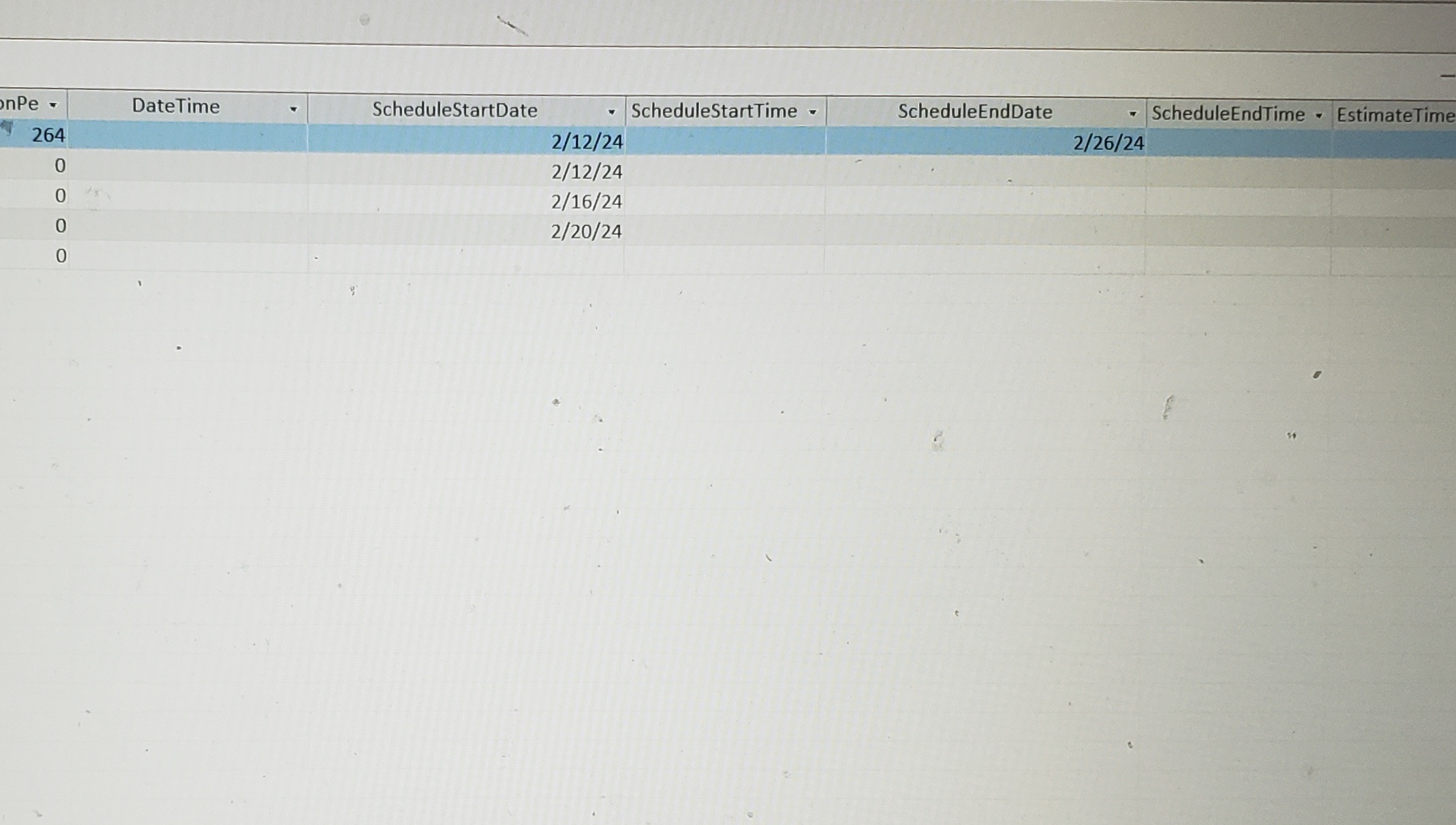
Hey Guys, I just notice that the Code is created another Start Date plus the Additional Dates needed.
James Hopkins OP  @Reply  
     
2 years ago

This thread is now CLOSED. If you wish to comment, start a NEW discussion in Access Developers.
 

Next Unseen


What's This?


The following is a paid advertisement
Computer Learning Zone is not responsible for any content shown or offers made by these ads.
 

Learn
 
Access - index
Excel - index
Word - index
Windows - index
PowerPoint - index
Photoshop - index
Visual Basic - index
ASP - index
Seminars
More...
Customers
 
Login
My Account
My Courses
Lost Password
Memberships
Student Databases
Change Email
Info
 
Latest News
New Releases
User Forums
Topic Glossary
Tips & Tricks
Search The Site
Code Vault
Collapse Menus
Help
 
Customer Support
Web Site Tour
FAQs
TechHelp
Consulting Services
About
 
Background
Testimonials
Jobs
Affiliate Program
Richard Rost
Free Lessons
Mailing List
PCResale.NET
Order
 
Video Tutorials
Handbooks
Memberships
Learning Connection
Idiot's Guide to Excel
Volume Discounts
Payment Info
Shipping
Terms of Sale
Contact
 
Contact Info
Support Policy
Mailing Address
Phone Number
Fax Number
Course Survey
Email Richard
[email protected]
Blog RSS Feed    YouTube Channel

LinkedIn
Copyright 2026 by Computer Learning Zone, Amicron, and Richard Rost. All Rights Reserved. Current Time: 9/16/2026 12:33:28 AM. PLT: 1s