Free Lessons
Courses
Seminars
TechHelp
Fast Tips
Templates
Topic Index
Forum
ABCD
 
Home   Courses   TechHelp   Help   Contact   Merch   Join   Order   Logon   Forums   
 
Back to Access Forum    Comments List
Upload Images | @Reply | Bookmark | Link | Email | Next Unseen |
Upload Access gend PDF to Web
Anne Tschider 
    
2 years ago
I currently am generating a PDF in an Access front end that needs to be posted on a web-based dashboard. I have a linked table in the front end that resides on the MySQL db that serves the dashboard. I want to save a copy of the PDF to a 'longblob' field type in that table so it's available to the dashboard. Don't know the correct method or VBA to use to get the generated PDF into that table. Can anyone help? I currently am saving the PDf to a folder and running an external script that uploads it to the server. Need to eliminate that step. Can anyone help?
Alex Hedley  @Reply  
            
2 years ago
Is there a reason you can't save it to an online file server or something like Amazon S3 and just store the path to the file in the db?
Kevin Yip  @Reply  
     
2 years ago
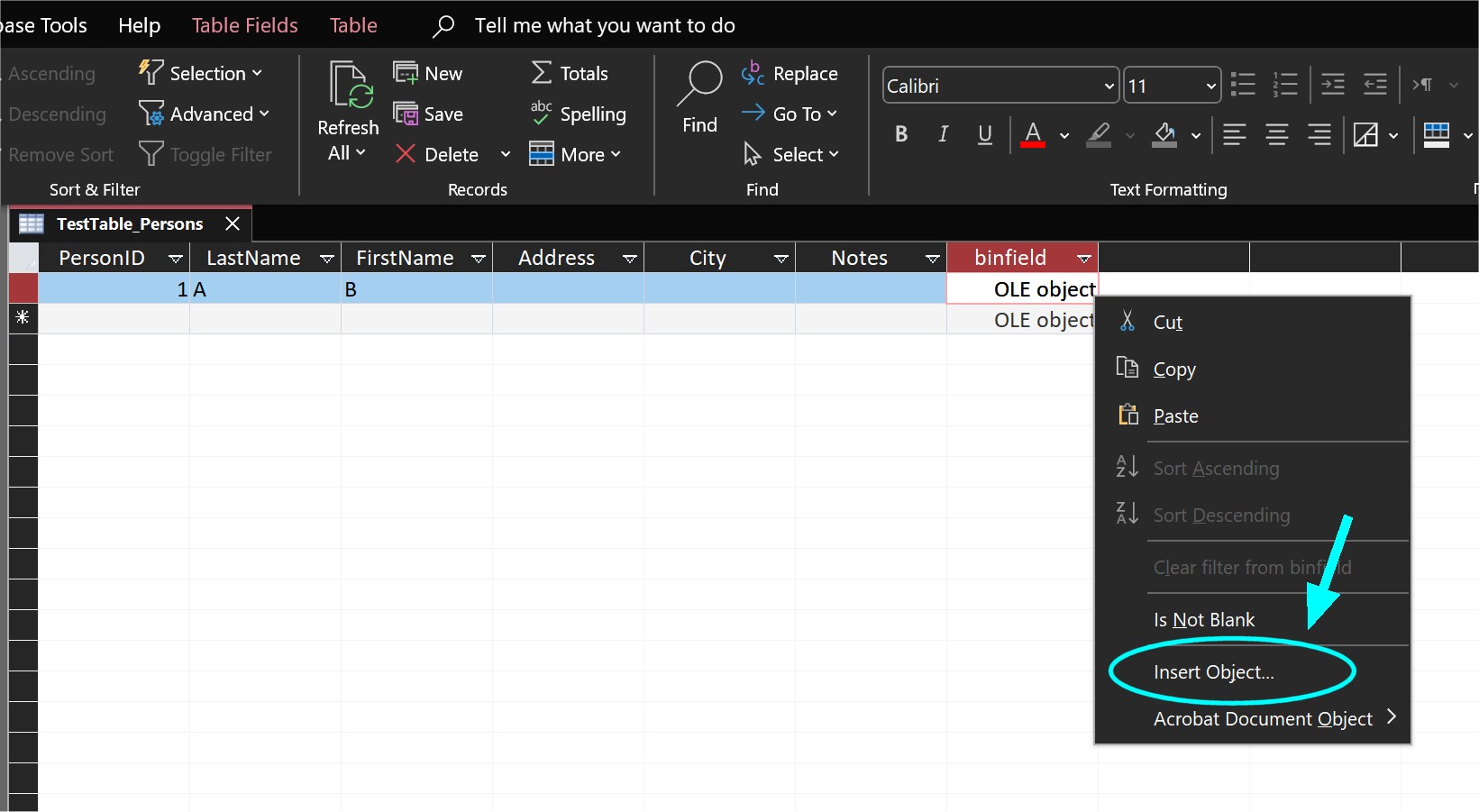
After you linked the MySQL table in Access, Access will likely show the longblob field as an "OLE Object" field.  To manually add a file, right-click on the OLE object field and select "Insert Object" (see picture below).  You can only insert one object per field.  If you need to store multiple files, put them in a zipped file first.  You can do all this via VBA too.

But as Alex alluded to, it's best to use a text field to store the path of file instead of a binary field to store the actual file, because it's generally easier to deal with text fields than binary fields.  What if you need to move the files somewhere else?  That may be impossible when the files are stuck inside the database itself.
Kevin Yip  @Reply  
     
2 years ago

Anne Tschider OP  @Reply  
    
2 years ago
Thank you for your responses. I'm aware of how to open the table in Access and insert an object as you describe. I need the VBA or method to use for doing it.
The process: Currently, field techs enter fume hood test data into an Access database. If the hood failed, they click a button that executes VBA that 1) generates/saves a PDF of the test report, 2) attaches the PDF to an email to the owner, 3) writes the letter's tracking data to a MySQL server that contains a web-based lab safety dashboard. THe owners and testing staff can view all the safety-related info about the lab there.  In step 3 of this process, I want to include the PDF in the write to the table, something like this: INSERT INTO my_table (stamp, what) VALUES (NOW(), LOAD_FILE('/tmp/my_file.txt'));. But there is no 'LOAD_FILE' equal in Access
Does that flesh-out what I'm asking better?
Thanks again for your help! We're currently manually uploading the PDFs to the server and want to get away from that.
Kevin Yip  @Reply  
     
2 years ago
If manual upload is what you want to avoid, you can automate the process.  If you use FTP to upload files, many FTP clients support command line options for file transfers.  You can use the VBA Shell() function to run such command lines from Access, and that is how you can automate file uploads with Access.  After a file is uploaded to your server, you can run a "pass-through query" in Access, which runs server-side procedures, thus allowing you to use MySQL syntax like LOAD_FILE in Access -- or, as Alex and I suggested, store the file's path in a text field.  My main point is that is if you want to avoid manual file uploads, you don't necessarily have to put files into the database itself.

If you still want to save files into a MySQL blob field using Access, you can make use of the ADODB.Stream object in VBA.  This page documents all its properties and methods, but has no examples:

     https://learn.microsoft.com/en-us/office/client-developer/access/desktop-database-reference/stream-object-ado

I will post some code examples later if you need them.
Kevin Yip  @Reply  
     
2 years ago
Hi Anne, the VBA code to do that is not with ADODB.Stream, but with the object bound frame control on a form.

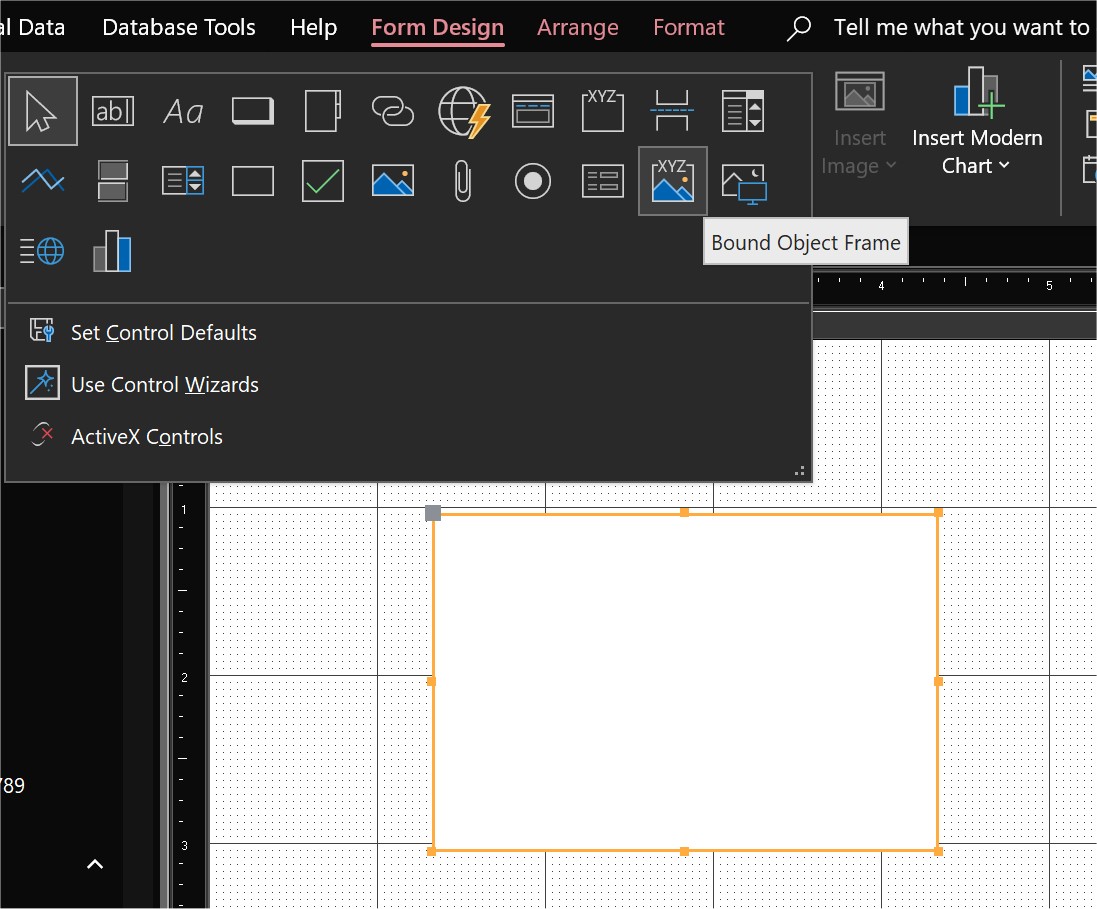
Create a form, with a record source that is the table with the OLE field.  Add an object bound frame control on the form (see picture below).  Set its control source to be the OLE field name.  Then the VBA code to save a file into the OLE field is:

    Me.[Put your OLE field name here].SourceDoc = "C:\My Documents\MyFile.pdf"
    Me.[Put your OLE field name here].Action = acOLECreateEmbed

Kevin Yip  @Reply  
     
2 years ago

Anne Tschider OP  @Reply  
    
2 years ago
Kevin, thank you. Your last suggestion sounds promising and I'm excited to try it. Note that we do currently use a sript to upload to the server using SFTP (to me, that is "manually uploading" because it is a second step that's outside of the Access database). But we are moving the dashboard to a new server that will not support that so the engineers asked me to come up with an alternative process for getting the PDFs to the server. It would be awesome if I could just upload it via the table on the server that's linked to from Access. There aren't many PDFs so not concerned about bloat. I'll post back with if this method works or not.
Anne Tschider OP  @Reply  
    
2 years ago
OK. Sounds like I also have to also determine how to 'unwrap' the blob data in the MySQL table so the PDF can be made available on the dashboard. Thanks for the heads up.
Kevin Yip  @Reply  
     
2 years ago
You're welcome, but there are some caveats.  The files saved with Access in this manner can only be opened in the Access environment, because this method puts a "wrapper" around the file that is only relevant to Access.  This is "embedded" data, not pure binary data like blob.  The "embedding" process is what puts the "wrapper" inside.  An analogy would be embedding an image inside a Word document; that image can only be opened within Word, after you open the Word document.  Same situation with Access here.  My point is that if you expect to open your PDFs in other environments -- e.g., a Mac user on a browser accessing your MySQL table and trying to view the PDF from inside the table, etc. -- you won't be able to do so.  This is another reason why Alex and I (and most experts) encourage putting files outside of the database, to ensure they are accessible anywhere and anyhow.

Regarding automated uploads of files to your server, you do not have to use the same server for that.  Internet URL can point to anywhere, so you can use any server on the Internet to store your files, and you can pick a cheap one that does support FTP.  Winhost costs only $60 a year for its cheapest plan, and I use Core FTP with it, which does support command line options:   http://www.coreftp.com/docs/web1/Command_Line_FTP.htm
Anne Tschider OP  @Reply  
    
2 years ago
I work at a university. I have to use their servers.
Kevin Yip  @Reply  
     
2 years ago
You (or whoever manages the server) can set up FTP service on that server if it hasn't been set up already.  FTP is an industry standard, so any web server (including the one built into Windows 10/11) should support it.  If you could set up FTP on your own Windows PC, you could do so on a server.
Alex Hedley  @Reply  
            
2 years ago
> Note that we do currently use a sript to upload to the server using SFTP (to me, that is "manually uploading" because it is a second step that's outside of the Access database).

You can script this in VBA:
- Access Developer 32

This thread is now CLOSED. If you wish to comment, start a NEW discussion in Access Forum.
 

Next Unseen


What's This?


The following is a paid advertisement
Computer Learning Zone is not responsible for any content shown or offers made by these ads.
 

Learn
 
Access - index
Excel - index
Word - index
Windows - index
PowerPoint - index
Photoshop - index
Visual Basic - index
ASP - index
Seminars
More...
Customers
 
Login
My Account
My Courses
Lost Password
Memberships
Student Databases
Change Email
Info
 
Latest News
New Releases
User Forums
Topic Glossary
Tips & Tricks
Search The Site
Code Vault
Collapse Menus
Help
 
Customer Support
Web Site Tour
FAQs
TechHelp
Consulting Services
About
 
Background
Testimonials
Jobs
Affiliate Program
Richard Rost
Free Lessons
Mailing List
PCResale.NET
Order
 
Video Tutorials
Handbooks
Memberships
Learning Connection
Idiot's Guide to Excel
Volume Discounts
Payment Info
Shipping
Terms of Sale
Contact
 
Contact Info
Support Policy
Mailing Address
Phone Number
Fax Number
Course Survey
Email Richard
[email protected]
Blog RSS Feed    YouTube Channel

LinkedIn
Copyright 2026 by Computer Learning Zone, Amicron, and Richard Rost. All Rights Reserved. Current Time: 9/29/2026 5:40:02 PM. PLT: 0s