Free Lessons
Courses
Seminars
TechHelp
Fast Tips
Templates
Topic Index
Forum
ABCD
 
Home   Courses   TechHelp   Forums   Help   Contact   Merch   Join   Order   Logon  
 
Back to Access Developer Forum    Comments List
Upload Images   @Reply   Bookmark    Link   Email   Next Unseen 
quick selection menu combo box
Ludwig Willems 
      
2 years ago
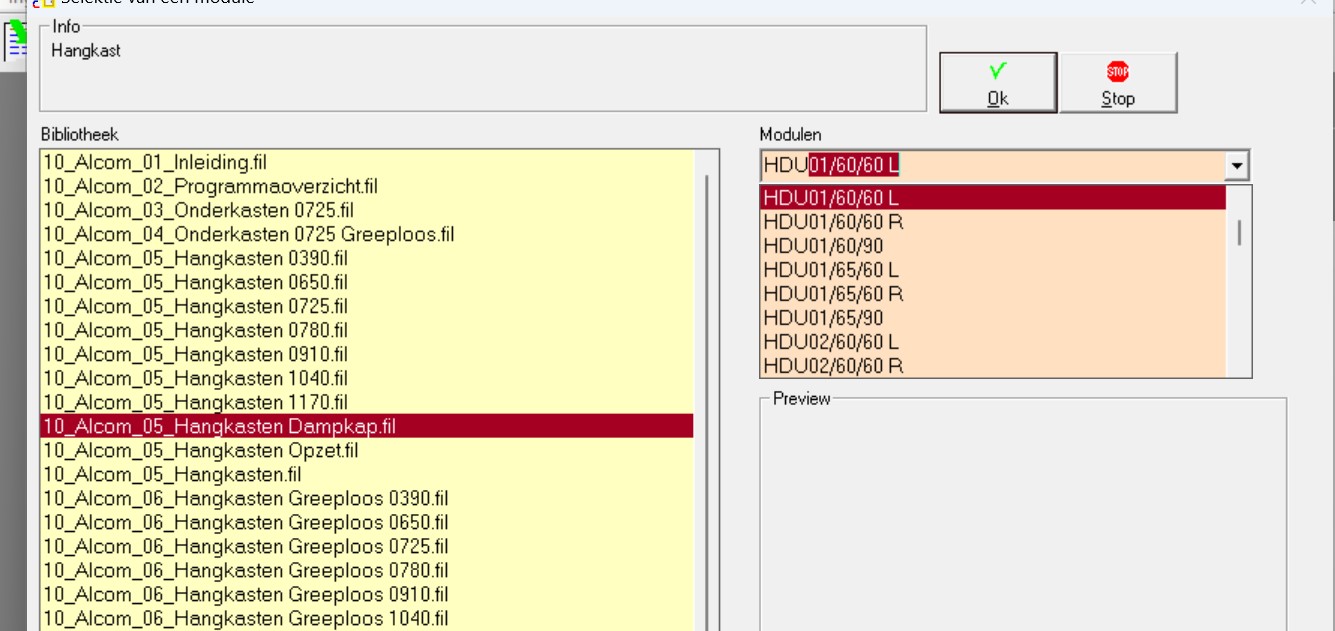
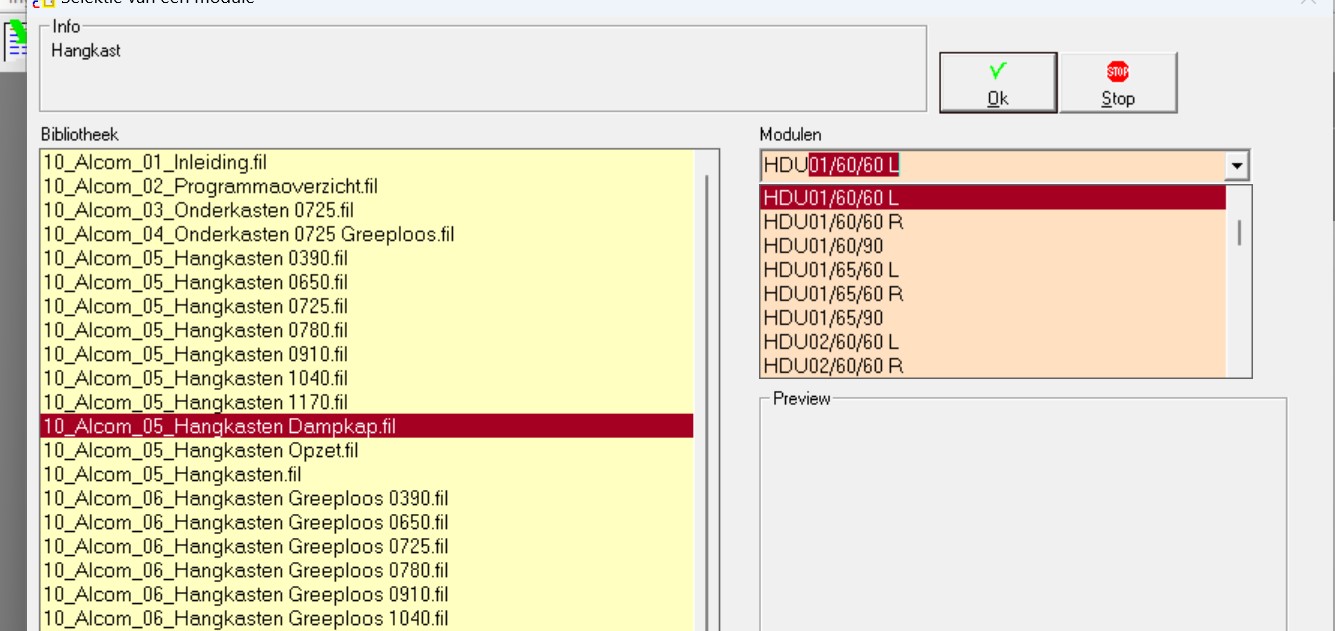
How can I create a quick selection menu in a combo box "see attachment" so that the selection continues to search as a display when typing. This attachment is from a drawing package that was apparently also made in Access, but is protected and cannot access the structure and code....
Ludwig Willems OP  @Reply  
      
2 years ago
how can I make this shortcut in a combo box, see print, drawing package was created in access but cannot access the code, it is protected :(
Ludwig Willems OP  @Reply  
      
2 years ago

Ludwig Willems OP  @Reply  
      
2 years ago

Alex Hedley  @Reply  
           
2 years ago
Do you mean being able to type in a value and it autocompleting?
Ludwig Willems OP  @Reply  
      
2 years ago
yes :)
Alex Hedley  @Reply  
           
2 years ago
Is the AutoComplete Property turned on?
Ludwig Willems OP  @Reply  
      
2 years ago
To be clear, I did not create the attachment, I want to recreate it in my database of catalog cabinets. are here  videos of how we can create that selection list
Alex Hedley  @Reply  
           
2 years ago
I meant in your db not the one you shared.
Is it the list box on the left or the combo on the right?
Ludwig Willems OP  @Reply  
      
2 years ago
combo on de right
Alex Hedley  @Reply  
           
2 years ago
So have you tried a simple form with a combo box bound to a table/query and tried to type in a known value?
Ludwig Willems OP  @Reply  
      
2 years ago
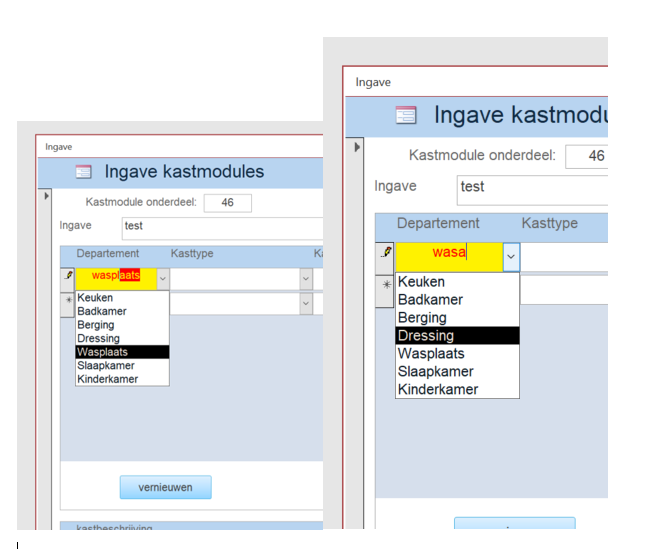
if I type text that is in the list I get the result, but if I continue typing then the text just continues regardless of whether it is not in the list, text should then become gray if at the moment the text cannot be found . I have set up a routine to catch if the text is not in the list and add it if necessary.
Ludwig Willems OP  @Reply  
      
2 years ago

Ludwig Willems OP  @Reply  
      
2 years ago
' Ludwig Willems

Private Sub DepartementCombo_NotInList(NewData As String, Response As Integer)
    ' toevoegen van nieuw ingegeven item voor in lijst conbobox van tabel DepartementT
    
    If MsgBox(NewData & " Staat niet in lijst. Wil je deze toevoegen?", vbYesNoCancel, "Alcom nieuwe item") <> vbYes Then
        ' niet toevoegen
        Response = acDataErrContinue
    Else
        'toevoegen v nieuwe waarde in tabel van de string NewData
        CurrentDb.Execute "Insert into DepartementT (Departement) values (""" & NewData & """)"
        'update de combobox
        Response = acDataErrAdded
        End If
        
End Sub
Ludwig Willems OP  @Reply  
      
2 years ago
What now follows is my next question: in the first appendix you have a list box on the left with titles on which all tables are hanging, each with many cabinets in it. If you click on one of the titles on the left, the combo box on the right becomes active with the necessary list of cabinet modules to choose from. Now how do I create this listbox with the titles of the tables, which ensures that the correct combobox is active on the right side of the combobox list.
Ludwig Willems OP  @Reply  
      
2 years ago
no one has any idea how to approach this ???????
Richard Rost  @Reply  
          
2 years ago
Cascading combo boxes?
Ludwig Willems OP  @Reply  
      
2 years ago
Richard, yep, I'm already starting with that. Also check out the Search seminar and it should work out. Thanks :)

This thread is now CLOSED. If you wish to comment, start a NEW discussion in Access Developer Forum.
 

Next Unseen

 
New Feature: Comment Live View


The following is a paid advertisement
Computer Learning Zone is not responsible for any content shown or offers made by these ads.
 

Learn
 
Access - index
Excel - index
Word - index
Windows - index
PowerPoint - index
Photoshop - index
Visual Basic - index
ASP - index
Seminars
More...
Customers
 
Login
My Account
My Courses
Lost Password
Memberships
Student Databases
Change Email
Info
 
Latest News
New Releases
User Forums
Topic Glossary
Tips & Tricks
Search The Site
Code Vault
Collapse Menus
Help
 
Customer Support
Web Site Tour
FAQs
TechHelp
Consulting Services
About
 
Background
Testimonials
Jobs
Affiliate Program
Richard Rost
Free Lessons
Mailing List
PCResale.NET
Order
 
Video Tutorials
Handbooks
Memberships
Learning Connection
Idiot's Guide to Excel
Volume Discounts
Payment Info
Shipping
Terms of Sale
Contact
 
Contact Info
Support Policy
Mailing Address
Phone Number
Fax Number
Course Survey
Email Richard
[email protected]
Blog RSS Feed    YouTube Channel

LinkedIn
Copyright 2026 by Computer Learning Zone, Amicron, and Richard Rost. All Rights Reserved. Current Time: 5/6/2026 2:01:44 AM. PLT: 0s