Free Lessons
Courses
Seminars
TechHelp
Fast Tips
Templates
Topic Index
Forum
ABCD
 
Home   Courses   TechHelp   Help   Contact   Merch   Join   Order   Logon   Forums   
 
Back to Access Developers    Comments List
Upload Images   @Reply   Bookmark    Link   Email   Next Unseen 
ProjectListF to TakePlannerF
Rose Lavoie 
  
2 years ago
Hi,
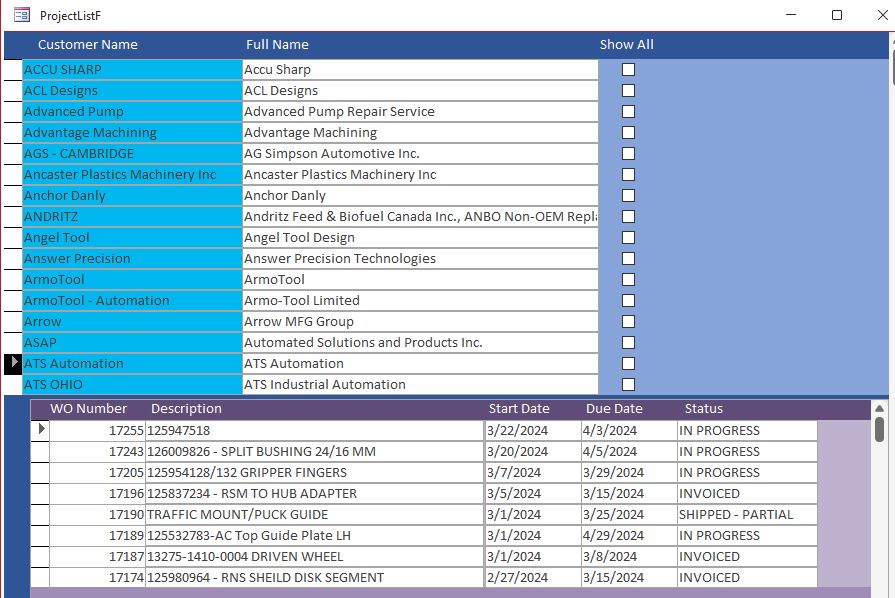
I have the Project Management Template. I am using it as a Gantt Chart for my tool & die shop job tracking. I added to the TaskT (table) the following fields: WO Number (job #s) and Status (invoiced vs. in progress). When you click on WO Number, it opens TaskPlannerF (Gantt Chart) and shows the customer's WO Number jobs. If I click on Show All, it shows all the customer's jobs.

I want to be able to show all jobs, not just the Customer chosen.

How can I manipulate the code to have a button open TaskPlannerF (form) and show all in progress jobs?

Help Please

Thank you

Rosie
Richard Rost  @Reply  
          
2 years ago
You'll have to update the record source of the form so that it shows all records and not just the customer ID in question.
John Campbell  @Reply  
     
2 years ago
Use the "openArgs" option to open the form to use a different recordsource.  You can google the code for this and is pretty simple to use.
Rose Lavoie OP  @Reply  
  
2 years ago
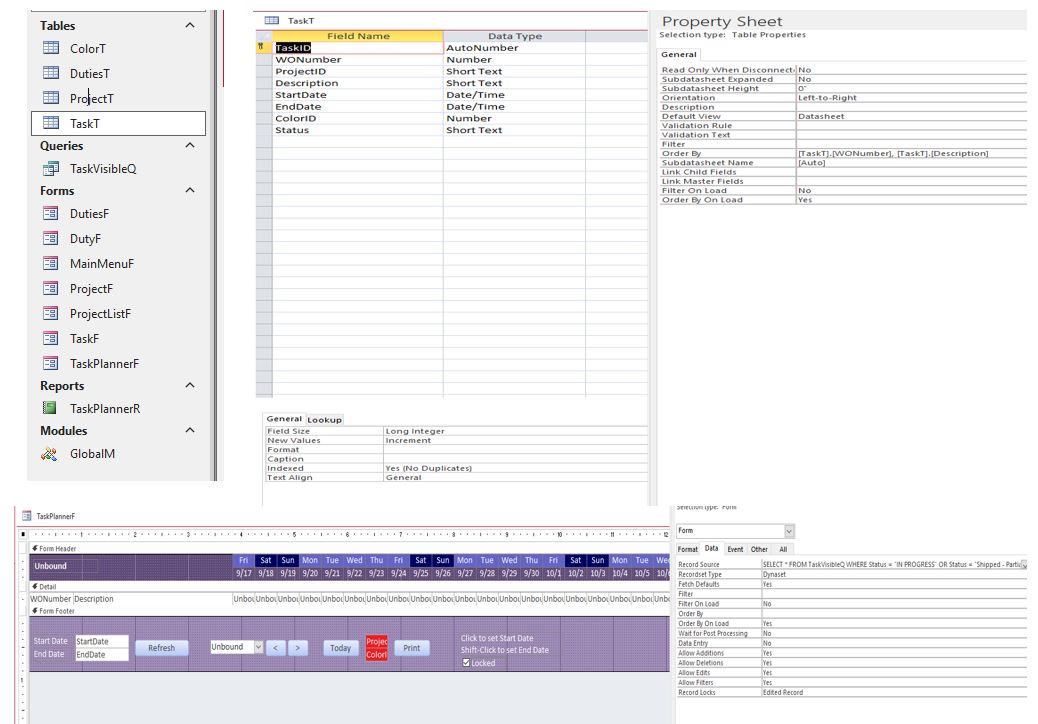
Hi Richard - the Record Source on the TaskPlannerF form is a TaskVisibleQ Query. If I change this, then the form would not work properly.
Rose Lavoie OP  @Reply  
  
2 years ago

Rose Lavoie OP  @Reply  
  
2 years ago
I would like to be able to show only the jobs that in progress or shipped - partial on the TaskPlannerF form (Gantt Chart). I want to add a button to the bottom where you can click it and show all "ACTIVE" jobs no matter what customer is selected.

I hope that helps clear up what I am hoping to achieve.

Thank you kindly
Sami Shamma  @Reply  
             
2 years ago
Change the record source to:

=SELECT * FROM TaskVisibleQ WHERE Shipped = TRUE OR InProgress = TRUE
Sami Shamma  @Reply  
             
2 years ago
it will get all the records from TaskVisibleQ where that condition is met.
Rose Lavoie OP  @Reply  
  
2 years ago
Hi Sami - I tried what you suggested and it did not work. Stated that the record source does not exist. It also makes all other fields  in an error for Source Control.

Sami Shamma  @Reply  
             
2 years ago
Remove the leading "="
and try again
Sami Shamma  @Reply  
             
2 years ago
make sure you are using you own field names for in progress and Shipped
Rose Lavoie OP  @Reply  
  
2 years ago
[In Progress] and [Shipped - Partial] are selections in the Value List within the Status field...does not change things?
Rose Lavoie OP  @Reply  
  
2 years ago
Once I get this working, my companies Database will be able to schedule incoming work more efficiently and I appreciate all your help.
Sami Shamma  @Reply  
             
2 years ago
Is the field called "Status"?
if so, the your Record Source should become:

SELECT * FROM TaskVisibleQ WHERE Status = [In Progress] OR Status = [Shipped - Partial]
Rose Lavoie OP  @Reply  
  
2 years ago
I entered the above Record Source...it comes up with a Parameter Message Box. I am wondering if I should do this via the Query button in the Record Source property field. What are your thoughts?
Sami Shamma  @Reply  
             
2 years ago
This is normally a spelling issue.

What was the parameter it asked for?
Richard Rost  @Reply  
          
2 years ago
Rose Lavoie OP  @Reply  
  
2 years ago
It is asking for IN PROGRESS, I hit enter with nothing filled in; then it asks for Shipped - Partial, I hit enter with nothing filled in. It duplicates it again. Once finished, the TaskPlannerF form opens with nothing entered. I debug and it refers to the following code:

Private Sub Form_Load()
    LoadPlanner
    Me.Requery
End Sub

When I fill in the IN PROGRESS & SHIPPED - PARTIAL into these Message Windows, the TaskPlannerF opens with only the customer selected.

If I add this Record Source to a Button and when clicked, would it open the TaskPlannerF with all jobs currently in these Status'? Table it pulls data from is TaskT

Thank you for your help

Sami Shamma  @Reply  
             
2 years ago
Show me your SELECT statement
Rose Lavoie OP  @Reply  
  
2 years ago
SELECT * FROM TaskVisibleQ WHERE Status = [IN PROGRESS] OR Status = [Shipped - Partial]; pulled right from the Record Source
Sami Shamma  @Reply  
             
2 years ago
Sorry my bad

SELECT * FROM TaskVisibleQ WHERE Status = "IN PROGRESS" OR Status = "Shipped - Partial"
Rose Lavoie OP  @Reply  
  
2 years ago
ok it works now without asking for the parameter values...however, it only shows the Customer that is selected on the PURPLE table (see above photo).

As asked, if I create a Button - named SCHEDULE - How would the code work to show all information in the TaskPlannerF form for all records in the TaskT (Table) that show IN PROGRESS or Shipped - Partial??
Sami Shamma  @Reply  
             
2 years ago
I can't imagine how your tables are structured and how they relate to each other. Can you share the Design View of the tables involved?
Rose Lavoie OP  @Reply  
  
2 years ago
Honestly it is the Project Management Template that Richard created...I did not change anything except to add the Status Column in the TaskT (Table)...

Sami Shamma  @Reply  
             
2 years ago
Ok, It will take me a while to check it out.
Rose Lavoie OP  @Reply  
  
2 years ago

Sami Shamma  @Reply  
             
2 years ago
I have not watched the Project Management Template Videos.
As I said, it will be a while.
Rose Lavoie OP  @Reply  
  
2 years ago
I know Richard has been bouncing on this thread as well, he may have input. I look forward to your response.

Thank you Sami
Sami Shamma  @Reply  
             
2 years ago
You are welcome.
Richard Rost  @Reply  
          
2 years ago
I try to keep my eye on as much as I can, but I've only been following in a cursory manner. I don't have time today to dig into this, but if I get a few free minutes I'll see if I can add anything.
Sami Shamma  @Reply  
             
2 years ago
Hi Rose

I will be watching the video today.
Rose Lavoie OP  @Reply  
  
2 years ago
Hi Sami, Any thoughts on getting all my active jobs (in progress/shipped-partial) showing up on the TaskPlannerF no matter what customer is selected? I would like to try to get it some what working by end of the week and I am struggling with this one.

Thank you
Sami Shamma  @Reply  
             
2 years ago
Hi Rose,

I did watch the TechHelp video and realized that I also need to watch the full seminar. I will endeavor to get to it soon.
Rose Lavoie OP  @Reply  
  
2 years ago
Ok thank you, in the meantime I am going to try a few things with the Planner Button at the bottom of the ProjectListF (form).
Rose Lavoie OP  @Reply  
  
2 years ago
I think I figured it out...

I copied the TaskVisibleQ (Query) - renamed it JobVisibleQ (Query) and wrote the SQL you sent me into it.
SELECT TaskT.* FROM TaskT WHERE Status = "IN PROGRESS" OR Status = "Shipped - Partial"

Then I copied the TaskPlannerF (Form) - renamed it JobPlannerF (Form).
Record Source = JobVisibleQ
Filter = ([TaskT].[EndDate] Is Null)
Order By = [JobVisibleQ].[WONumber]

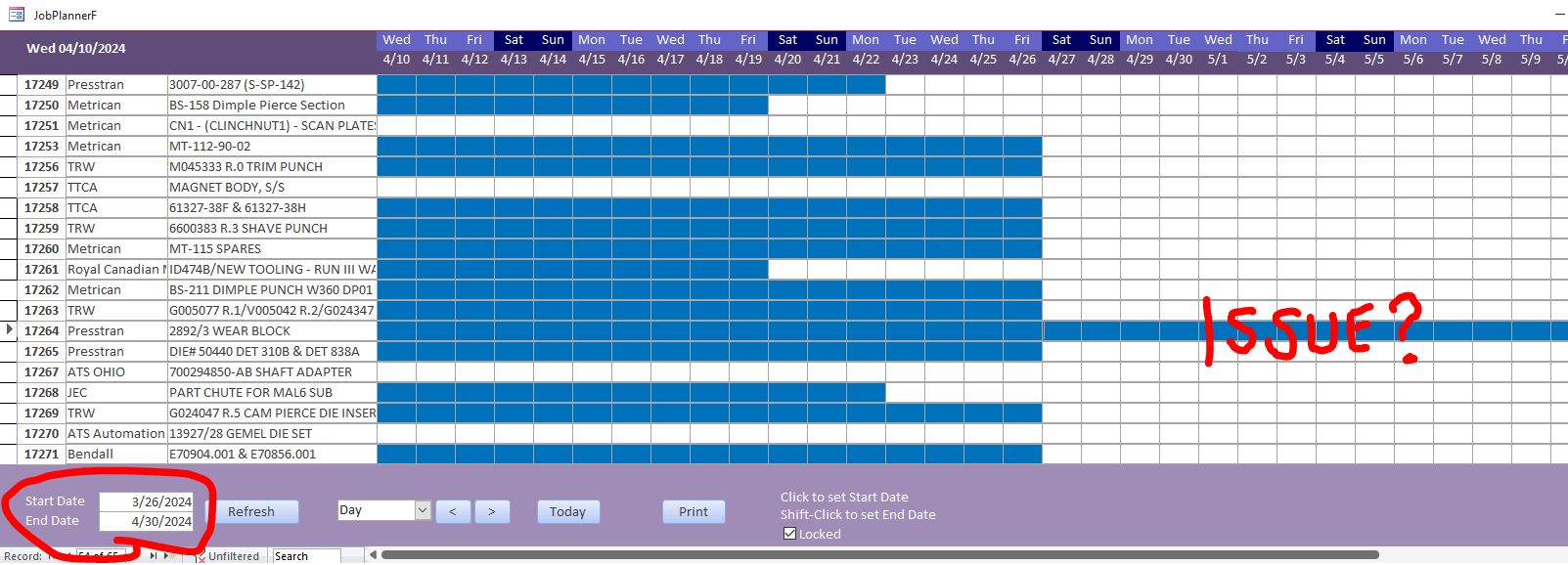
The problem I am having now, is that some of my jobs are running off the table and not stopping at the End Date written in the system.

Any thoughts, as I'm lost on this one?

Thank you

In the ProjectListF (Form), I changed the PlannerBtn Event Procedure as follows:

Private Sub PlannerBtn_Click()
    Me.Refresh
    DoCmd.OpenForm "JobPlannerF"
End Sub


Sami Shamma  @Reply  
             
2 years ago
Excellent well done
Rose Lavoie OP  @Reply  
  
2 years ago
Would you happen to know why some of the jobs are running off the table? I have one that ends 4/29 but the schedule keeps going into May and beyond.
Sami Shamma  @Reply  
             
2 years ago
Hi Rose
I really need to familiarize myself with this database before I can answer this question for you.
Rose Lavoie OP  @Reply  
  
2 years ago

Richard Rost  @Reply  
          
2 years ago
Does that issue happen in the STOCK database, or your modified version?
Rose Lavoie OP  @Reply  
  
2 years ago
It happens in the one I modified based on your template. I have not implemented this into my company database as of yet.

The other thing they want to know if possible...How would I make a job row highlight RED if it is still open (In progress or Shipped - Partial) and past its due date? So if job A was to ship March 30th, but is still showing IN PROGRESS as of April 4, can the blocks highlight RED and continue to highlight Red until it has been completed.
Would that be a possibility?
Richard Rost  @Reply  
          
2 years ago
If the problem doesn't occur in my stock database, then it has to be due to one of your modifications. Without knowing EVERYTHING you've done to it, it's tough for me to tell where the problem might be. I'd suggest starting over from the scratch database and adding back in your changes. That will show you where the problem crept in.

Sure. You could change the colors in your conditional formatting based on whatever factors you like. You just need to update the formulae accordingly. That's the whole point of the template... to give you a launching point to be as creative as you like. :)
Rose Lavoie OP  @Reply  
  
2 years ago
Perfect! Thank you I will do that just that.

This thread is now CLOSED. If you wish to comment, start a NEW discussion in Access Developers.
 

Next Unseen

 
New Feature: Comment Live View


The following is a paid advertisement
Computer Learning Zone is not responsible for any content shown or offers made by these ads.
 

Learn
 
Access - index
Excel - index
Word - index
Windows - index
PowerPoint - index
Photoshop - index
Visual Basic - index
ASP - index
Seminars
More...
Customers
 
Login
My Account
My Courses
Lost Password
Memberships
Student Databases
Change Email
Info
 
Latest News
New Releases
User Forums
Topic Glossary
Tips & Tricks
Search The Site
Code Vault
Collapse Menus
Help
 
Customer Support
Web Site Tour
FAQs
TechHelp
Consulting Services
About
 
Background
Testimonials
Jobs
Affiliate Program
Richard Rost
Free Lessons
Mailing List
PCResale.NET
Order
 
Video Tutorials
Handbooks
Memberships
Learning Connection
Idiot's Guide to Excel
Volume Discounts
Payment Info
Shipping
Terms of Sale
Contact
 
Contact Info
Support Policy
Mailing Address
Phone Number
Fax Number
Course Survey
Email Richard
[email protected]
Blog RSS Feed    YouTube Channel

LinkedIn
Copyright 2026 by Computer Learning Zone, Amicron, and Richard Rost. All Rights Reserved. Current Time: 8/17/2026 10:59:12 PM. PLT: 0s