Free Lessons
Courses
Seminars
TechHelp
Fast Tips
Templates
Topic Index
Forum
ABCD
 
Home   Courses   TechHelp   Help   Contact   Merch   Join   Order   Logon   Forums   
 
Back to Access Developers    Comments List
Upload Images   @Reply   Bookmark    Link   Email   Next Unseen 
Check Box labels turn bold
Rebekah Schrepfer 
     
2 years ago
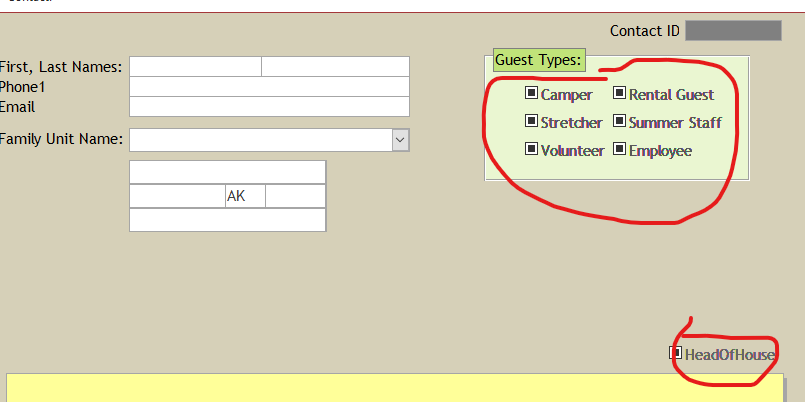
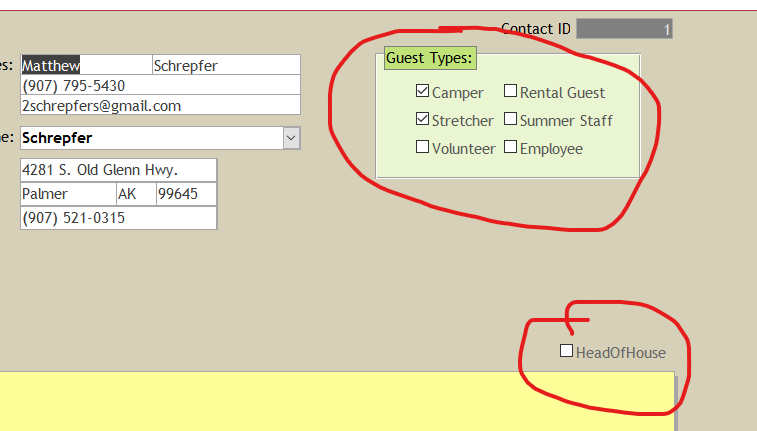
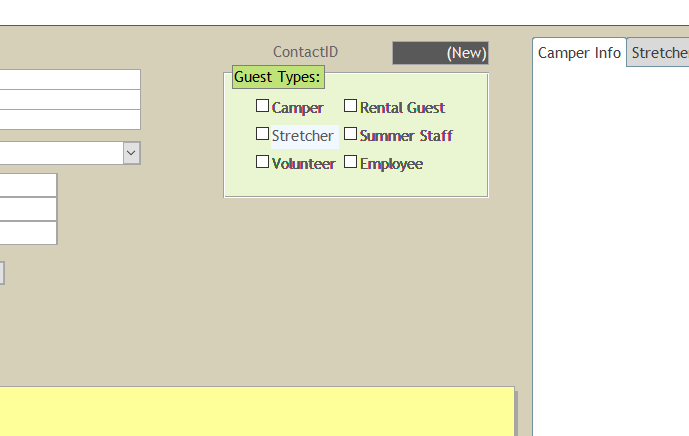
Has anyone had this happen?  Simple contact form with 6 check boxes to help categorize them. But as I click through to each record, the label on the check boxes increasingly becomes more bold. It resets back to regular type when I close and open the form again.
I can send screenshots if needed.  But it's just the labels on the check boxes.  Not any other field.
Rebekah Schrepfer OP  @Reply  
     
2 years ago

Rebekah Schrepfer OP  @Reply  
     
2 years ago

Adam Schwanz  @Reply  
           
2 years ago
That looks to be a new record in the top one? The solid black block is the checkbox "null". They show that way on new records.
Thomas Gonder  @Reply  
      
2 years ago
I'm curious, what's a Strectcher?
Maybe you want to default everyone to "no" for Guest Type so as to avoid the null?
Rebekah Schrepfer OP  @Reply  
     
2 years ago
Thomas, a Stretcher is a teenager who was in the high school camp, then "stretches" into the younger camps to help out with tasks such as kitchen duty, cleaning, mowing, etc.  They love to help and hang out longer with their friends!  :-)  They go through a vetting process before they are eligible.

Yes, I set everything as default "no".  (I'm just at the beginning stages of building this database.)  But that didn't fix the bold labels.  Adam, I meant to highlight the difference between the first record (the bottom one) and the newest record (the top one.)  When I click a new checkbox, it goes back to being not bold.  Weird.  

Since I'm only at the beginning of this, I'm tempted to just re-build this form.
Kevin Robertson  @Reply  
          
2 years ago
What is the font set to? This may be another bug in the new Aptos font. Possibly?
Thomas Gonder  @Reply  
      
2 years ago
Are you setting the "no" as a default in the table, form or with VBA code?
I'll take Adam's word for it that a Null will bold the check boxes.
I'm not clear when you are seeing and not seeing bold check boxes.
Adam Schwanz  @Reply  
           
2 years ago
I don't know if it would bold the text like that, I was looking at the checkbox itself. Have you tried another font or theme? That's about all I can think of short of needing to go down the Troubleshooter.

Does it do this on all forms or only that one? All databases or only that one?
Rebekah Schrepfer OP  @Reply  
     
2 years ago
The font is set to Trebuchet, the default.  The only thing I changed on the labels is the color.  And I set the default to no in the table, not the form.  (I took the screenshot before I set the default, no).  It's just the labels of the text box that go bold.  The bottom picture above is the first record.  The top picture is the new record, and the labels have turned bold.  When I click a checkbox, it stays bold.  Then I check a different checkbox (same record) and the previous checkbox turns back to normal.  Seems like a funny bug.  Tomorrow, I'll try making a new form and see if it does the same thing.  I don't have any other checkboxes in any other form to compare yet.
Rebekah Schrepfer OP  @Reply  
     
2 years ago

Rebekah Schrepfer OP  @Reply  
     
2 years ago

Rebekah Schrepfer OP  @Reply  
     
2 years ago
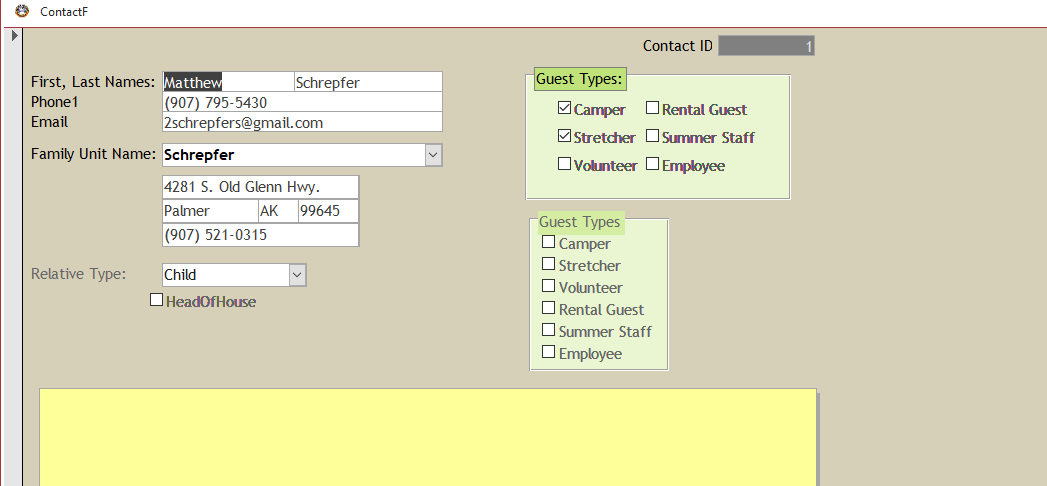
So I tried using an options group using a GuestTypeT table.  It fixed the bold label issue, but I need to be able to check more than one option for each contact.  I need the y/no field for each contact, I think....then I have a one-to-one relationship for extended info for each of those categories that go with that contact.
Thomas Gonder  @Reply  
      
2 years ago
What version of Access are you using?
Thomas Gonder  @Reply  
      
2 years ago
Sorry, I hit Submit too soon.  
Is it possible you are only seeing bold for a new record BEFORE doing any entry, hence it is null (and bold) and before the defaults of "no" are added to the new record?

Do you ever see bold for an existing record?
Do you only see bold for a new record after you start entering?
Do all the bolds go away with the first click of any check box?


If I can ask, just for my curiosity:
1) Are there other tables and forms involved?
2) Where do you get Family Unit Name? Will it grow as a drop down based upon those that are HeadOfHouse?
3) How do you get Relative Type?
4) Is this going to be a multi-user (with split) database or always just one user?
Rebekah Schrepfer OP  @Reply  
     
2 years ago
What version of Access are you using?  <B>Microsoft' Access' for Microsoft 365 MSO (Version 2402 Build 16.0.17328.20124) 32-bit </B>

Is it possible you are only seeing bold for a new record BEFORE doing any entry, hence it is null (and bold) and before the defaults of "no" are added to the new record?  <B> Yes, labels do turn bold on a new entry before entering data.  This is the case even after I have put the default value to "no".  <B>

Do you ever see bold for an existing record?  <B>Yes.  It seems normal on the first record, but as I click through each record it increasingly gets more bold.  Almost like a new "layer" of those fields is being laid on top each time I move to a new record, if that makes sense.</B>
Rebekah Schrepfer OP  @Reply  
     
2 years ago
Do you only see bold for a new record after you start entering?  <B>Hmm.  Now the bold goes away as I begin data entry into a new record.</B>

Do all the bolds go away with the first click of any check box?  <B>No.  When changing a record that's already been saved, the clicked field stays bold.  I click another checkbox, and THEN the previous checkbox goes back to normal.  It goes back to normal after about 20 seconds or if I click outside the field.  But the other bold labels are still bold as when I navigated to this record. </B>


If I can ask, just for my curiosity:
1) Are there other tables and forms involved?  Just a few so far.  

2) Where do you get Family Unit Name? Will it grow as a drop down based upon those that are HeadOfHouse?  <B>Just starting out.  Family Unit Name is a drop down which comes from FamilyUnitT.  It grows as more families are added.  The address underneath that is a subform from FamilyUnitT.  I do have a GuestTypeT, but I'm not using it yet.  (I'm a beginner working my way through the Expert lessons on this site.)  For now, I just have the Guest Types as separate Y/N fields in ContactT. HeadOfHouse is a Y/N field in ContactT.  I think I'm going to need to use the GuestTypeT as a many-to-many relationship.</B>

3) How do you get Relative Type?  <B>from RelativeTypeT.  It's a ComboBox from there.</B>

4) Is this going to be a multi-user (with split) database or always just one user?  <B>For now, it will be just for one person checking in campers as they are registered and then as they arrive.  Eventually, like next year, I'd love to learn how to make it available to any office staff.</B>
Thomas Gonder  @Reply  
      
2 years ago
That last part about "increasingly gets more bold", in your first post and now again has me really curious as to how that can be happening. I suppose a font issue is possible, but I've never seen it. Is there any VBA code in your form (or a form helper module) that could be setting any properties of the checkbox controls or their labels (like their colors, styles, weight or effects)? Is there any code to size or expand forms for different monitor resolutions?
Thomas Gonder  @Reply  
      
2 years ago
One more idea, it appears from your image of the bold check boxes in your 1st image here are tri-state. Do you need a null, or do you assume a "no" to start with? I'm going to test one of my forms with a check box to see if it happens with Trebuchet, and I'll try setting it to tri-state if possible (I have programmed defaults not based on tables or forms). I'll be back (soon).
Rebekah Schrepfer OP  @Reply  
     
2 years ago
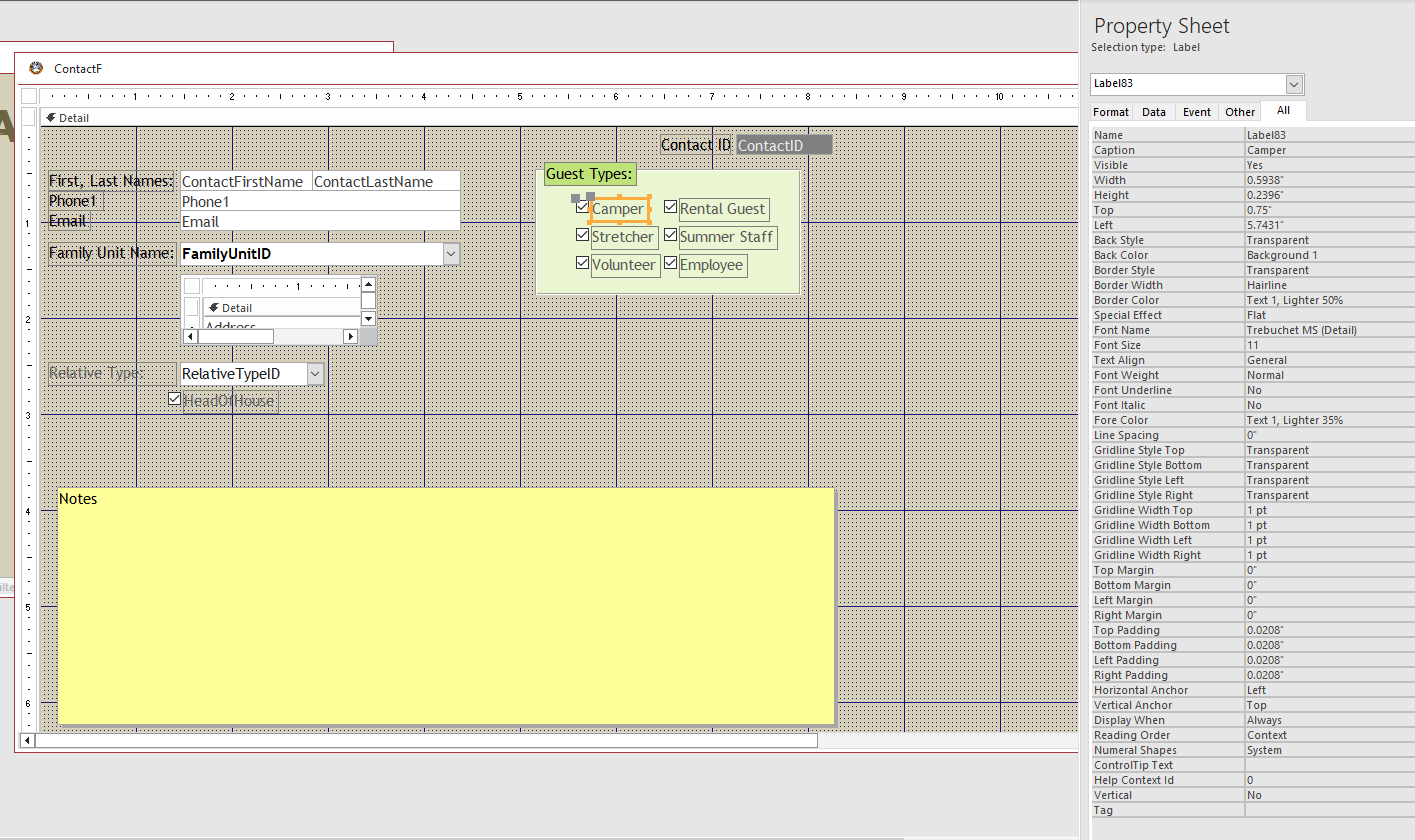
I have not added any VBA code.  I used the wizards for the combo boxes.  The Guest Types box is just a box, not an Options Group.  I am using a theme for the colors.  Is there a way to undo that other than just changing of the colors and fonts to the Standard colors?

I changed the background color to Access Theme 1 for one of them, and it's not having that issue. bummer, I liked that theme.  sigh.  I think I may just re-do this form from scratch since I'm so close to the beginning of the project.
Rebekah Schrepfer OP  @Reply  
     
2 years ago

Rebekah Schrepfer OP  @Reply  
     
2 years ago
I do not need null for the check boxes.  How did that happen?  I set the field properties in the table to Yes/No, and it gave me those null boxes.  But when I went back and set the default to "No" for all of them (in the table), the null box is no longer there.
Thomas Gonder  @Reply  
      
2 years ago
Okay Rebekah, here is what my not too extensive testing found. My form was not set to Triple State, but the form Default Value was blank, which I'll assume means null instead of no. Changing the Default Value to "no" made the little square in the check box go away for new records, to now just unchecked. As Richard has explained, null means "I don't know", but if that's not needed it can be set no or yes as a default. From what I see, yes, a null value does seem to make the check box and its label just a tiny bit darker.

I tried the font called "Trebuchet MS" for my check box label. And then I watched very, very carefully. It does seem, and minuscule so, that when a form starts the label text does seem a bit lighter and then darker. The same appears in the next record. I think the brief dim then makes it appear darker, but if you don't watch very carefully, you might think it keeps getting progressively darker. I don't think it does. The same happens with my Ariel 10 in all labels.

It's too late to test what happens with a new form, as the form I'm using won't get the default from the table. Once the form is created, you have to change the default in the form (from my experience).

I did all this testing in Access 2021.

For more on Triple State, search for Triple (state) in the TechHelp page.
Richard, it would be nice if we could tell people to serach for the article ID, as this one is 2338.
Rebekah Schrepfer OP  @Reply  
     
2 years ago
Thank you!  Interesting issue.
Thomas Gonder  @Reply  
      
2 years ago
It seems some of our messages are crossing paths.  It does look like your "bolding" is more than what I see. Richard and I both stay away from themes (I can't now find the reference for his take on that), they can cause problems and you may be seeing some gremlins from Access in using them. It's hard to "see" what's going on with a few snapshots and explanations.

I've spent three years now developing a shell for Access, and I've literally seen hundreds of "that doesn't make much sense!" You're going to have your fair share too as you continue. And one never knows what might be a "new feature" in Access as 365 gets constant subtle updates and changes.

I think you may be duplicating tables in some sense, but hard to say from just what I've seen. You may want to look at this thread: Home>Forums>Developers>Access Developers> then look down about 9 days to GetSeason by Kevin Robertson and see how to avoid a plethora of overlapping tables. Maybe some ideas there will help?

Also, Richard did a video on colors, I use a lot of his suggestions.
Home > TechHelp > Directory > Access > VBA Colors (article 2621)

Kevin Yip  @Reply  
     
2 years ago
I've seen many mysterious form glitches in my decades of using Access, and this looks like one of them.  I suggest creating new checkboxes from scratch, or using the format brush to copy the format of a working checkbox over to the bad ones.
Thomas Gonder  @Reply  
      
2 years ago
Rebekah, it is an interesting problem, as I've gone back and reviewed all the posts. It doesn't look like you are doing anything out of the ordinary that would cause this.
When you figure out what's doing or fixing it, could you please post here?
If you don't solve it soon, I'd like to write a simple form that does what you're doing and have you test it on your computer to see if it'll do it on yours (and hopefully not mine). Please let me know if you're willing to do the test before I dedicate the time to make a simple test db.

BTW, I enjoyed your posting, and thinking about your design made me think about adding a feature to my ADS.
GB
Rebekah Schrepfer OP  @Reply  
     
2 years ago
Yes, I'd be willing to do the test.  I tried changing the font to Arial, same problem.  Transparent form background, same problem.  I made the form background a standard color, same problem.  Transparent checkbox label fill color, same problem.

BUT when I made the checkbox label fill color, a standard color, THEN the bold issue went away, no matter what font it was, no matter if the form background was standard or a theme.  I made the checkbox label fill color, a theme color...no bold issue.  I guess those labels don't like to be transparent.

Glad I could find at least some way to stop the bold label from occurring.  I'm still deciding whether to orient the database around the individuals and the various camps, jobs, and family groups.  Or to center it around the events with various people participating in various ways.  I'm not sure how a summer camp administrator would do it.  Currently, I'm just trying out different ways of manipulating the data.
Thomas Gonder  @Reply  
      
2 years ago
@Rebekah, I'm really curious now, as I only use Back Style = Transparent. I've never seen that problem.
I'll create a small .accdb with just a few controls and no colors, then test it.

This thread is now CLOSED. If you wish to comment, start a NEW discussion in Access Developers.
 

Next Unseen

 
New Feature: Comment Live View


The following is a paid advertisement
Computer Learning Zone is not responsible for any content shown or offers made by these ads.
 

Learn
 
Access - index
Excel - index
Word - index
Windows - index
PowerPoint - index
Photoshop - index
Visual Basic - index
ASP - index
Seminars
More...
Customers
 
Login
My Account
My Courses
Lost Password
Memberships
Student Databases
Change Email
Info
 
Latest News
New Releases
User Forums
Topic Glossary
Tips & Tricks
Search The Site
Code Vault
Collapse Menus
Help
 
Customer Support
Web Site Tour
FAQs
TechHelp
Consulting Services
About
 
Background
Testimonials
Jobs
Affiliate Program
Richard Rost
Free Lessons
Mailing List
PCResale.NET
Order
 
Video Tutorials
Handbooks
Memberships
Learning Connection
Idiot's Guide to Excel
Volume Discounts
Payment Info
Shipping
Terms of Sale
Contact
 
Contact Info
Support Policy
Mailing Address
Phone Number
Fax Number
Course Survey
Email Richard
[email protected]
Blog RSS Feed    YouTube Channel

LinkedIn
Copyright 2026 by Computer Learning Zone, Amicron, and Richard Rost. All Rights Reserved. Current Time: 8/7/2026 10:44:21 PM. PLT: 1s