Free Lessons
Courses
Seminars
TechHelp
Fast Tips
Templates
Topic Index
Forum
ABCD
 
Home   Courses   TechHelp   Forums   Help   Contact   Merch   Join   Order   Logon  
 
Back to Access Developer Forum    Comments List
Upload Images   @Reply   Bookmark    Link   Email   Next Unseen 
Search Form Null
Simon Levesque 
     
2 years ago
I have a query for my search form as showed by Richard. I have 8 textbox that correspond to my query criterias with the syntax Like "*" & (...) & "*". Everything is working fine but 2 of my criteria, I added OR IS NULL at the end of this statement because it can be empty. The problem is I remove the IS NULL, these records won't show in my continuous form when opening it and when I keep it there, if I search for a value, I will get this value from this column + null values from this column and null values from the other column with the same statement, any ideas how to fix this.....
Sami Shamma  @Reply  
             
2 years ago
Please share your code for this search form.
Richard Rost  @Reply  
          
2 years ago
Yeah, without some screenshots or to see what you've got going on there, it's very hard to tell what the problem is. If you're following a specific video or a lesson, please give us the specifics and a time index.
Kevin Yip  @Reply  
     
2 years ago
I think I understand what the question is.  Suppose we have this table:

FirstName     LastName    Occupation
Neil          Simon       Playwright
Simon         Callow      Actor
Simone        Signoret    Actress
Simone        Simon       Actress
Bjork                     Actress/Singer
Cher                      Actress/Singer

And we want to find people who are actresses with last names that are either "Simon" or blank.  In this case, the query needs to return the last 3 rows above.  And the query should be:

     SELECT * FROM Table1 WHERE Occupation Is Like "*Actress*" AND (LastName = "Simon" OR LastName Is Null)

Basically, this is about using AND and OR correctly.  And if the OR condition needs to be evaluated first, as is the case above, it needs to be enclosed with parentheses.
Simon Levesque OP  @Reply  
     
2 years ago
This is the where part from the SQL statement from my query:
WHERE (((Adresse_T.NoCivique) Like "*" & [forms]![RechAdresse_F]![RechNoCivique] & "*") AND ((Adresse_T.Rue) Like "*" & [forms]![RechAdresse_F]![RechRue] & "*") AND ((Adresse_T.NoApp) Like "*" & [forms]![RechAdresse_F]![RechApp] & "*" Or (Adresse_T.NoApp) Is Null) AND ((Adresse_T.Ville) Like "*" & [forms]![RechAdresse_F]![RechVille] & "*") AND ((Adresse_T.CodePostal) Like "*" & [forms]![RechAdresse_F]![RechCP] & "*") AND ((Adresse_T.AdresseID) Like "*" & [forms]![RechAdresse_F]![RechAdresseID] & "*") AND ((Adresse_T.RaisonSociale) Like "*" & [forms]![RechAdresse_F]![RechRaison] & "*" Or (Adresse_T.RaisonSociale) Is Null) AND ((Adresse_T.Province) Like "*" & [forms]![RechAdresse_F]![RechProv] & "*") AND ((Adresse_T.Pays) Like "*" & [forms]![RechAdresse_F]![RechPays] & "*") AND ((Adresse_T.TypeRue) Like "*" & [forms]![RechAdresse_F]![RechTypeRue] & "*"));
Simon Levesque OP  @Reply  
     
2 years ago
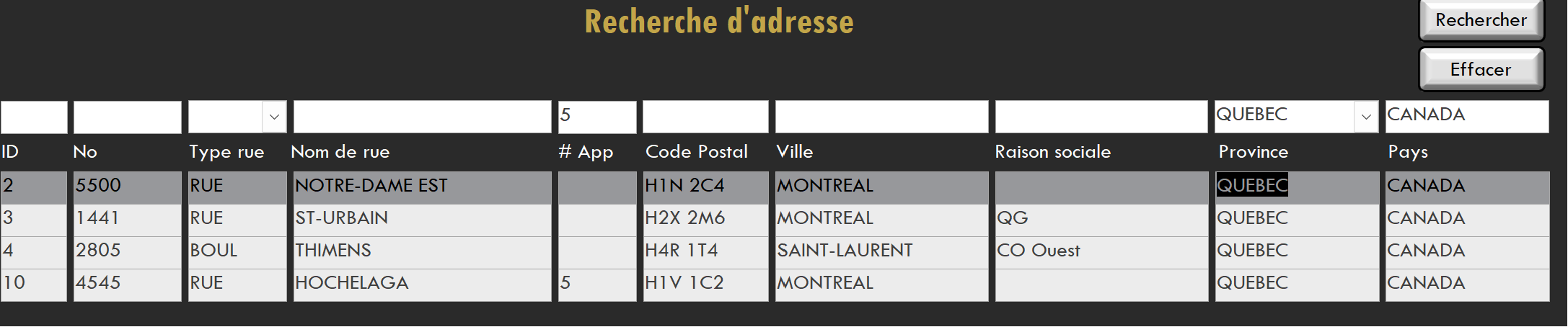
I have a problem with RechApp and RechRaison because I will get null values in both fields when searching for records but I don't want them, see the picture
Simon Levesque OP  @Reply  
     
2 years ago

Simon Levesque OP  @Reply  
     
2 years ago
In the screenshot, I don't want records 2, 3 and 4...
Richard Rost  @Reply  
          
2 years ago
What is it about those records that you don't want? What's the criteria you're looking for in English? Your SQL statement is just a jumble to me. Sorry.
Kevin Yip  @Reply  
     
2 years ago
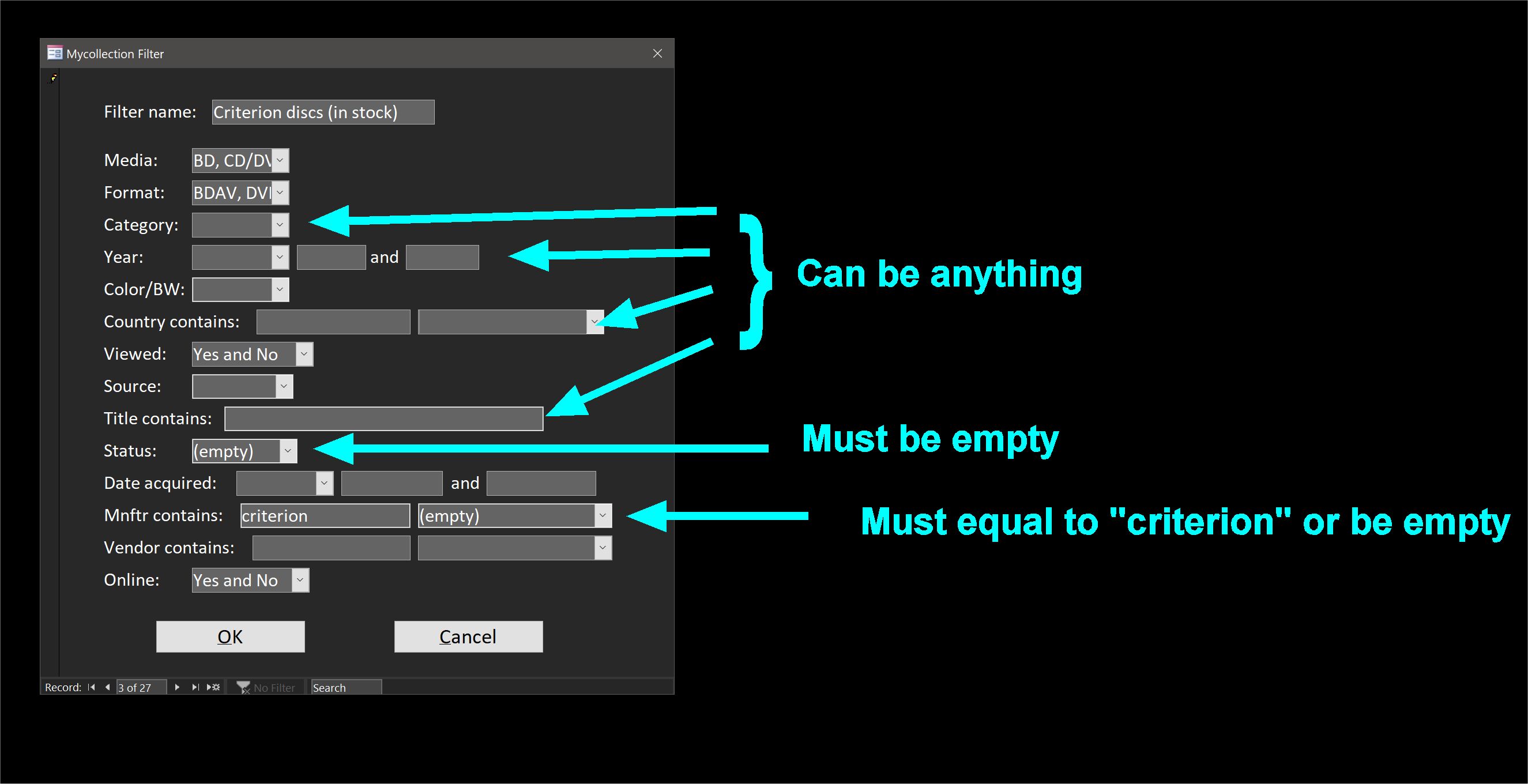
Hi Simon, if you sometimes want to include null and sometimes not, then you can only use OR Is Null when you want to include null, and cannot use OR Is Null when you don't.  If you want your App field to include only "5" but not blanks, then you have to delete "OR NoApp Is Null" from your SQL.  Later if you want to include "5" and blanks, put it back in.  What's more, the user needs to have a way to "tell" Access whether to include blanks in the search results or not.  Put a checkbox for "Include blanks" on the form, for EVERY field that you want to do this for.  Then you use VBA to dynamically add (or not add) OR Is Null.  This is not a trivial task, naturally, so maybe that's why Richard doesn't include this in his Search Form 2.0 video.  But it is needed to do what you are describing, as far as I know.  I do a similar thing in my app too (see picture below).  I let the user specify "Empty" specifically if they need to include empty fields in the results.  If the user leaves an entry blank, that means any value of that field will be returned.
Kevin Yip  @Reply  
     
2 years ago

This thread is now CLOSED. If you wish to comment, start a NEW discussion in Access Developer Forum.
 

Next Unseen

 
New Feature: Comment Live View


The following is a paid advertisement
Computer Learning Zone is not responsible for any content shown or offers made by these ads.
 

Learn
 
Access - index
Excel - index
Word - index
Windows - index
PowerPoint - index
Photoshop - index
Visual Basic - index
ASP - index
Seminars
More...
Customers
 
Login
My Account
My Courses
Lost Password
Memberships
Student Databases
Change Email
Info
 
Latest News
New Releases
User Forums
Topic Glossary
Tips & Tricks
Search The Site
Code Vault
Collapse Menus
Help
 
Customer Support
Web Site Tour
FAQs
TechHelp
Consulting Services
About
 
Background
Testimonials
Jobs
Affiliate Program
Richard Rost
Free Lessons
Mailing List
PCResale.NET
Order
 
Video Tutorials
Handbooks
Memberships
Learning Connection
Idiot's Guide to Excel
Volume Discounts
Payment Info
Shipping
Terms of Sale
Contact
 
Contact Info
Support Policy
Mailing Address
Phone Number
Fax Number
Course Survey
Email Richard
[email protected]
Blog RSS Feed    YouTube Channel

LinkedIn
Copyright 2026 by Computer Learning Zone, Amicron, and Richard Rost. All Rights Reserved. Current Time: 5/6/2026 2:39:21 PM. PLT: 1s