Free Lessons
Courses
Seminars
TechHelp
Fast Tips
Templates
Topic Index
Forum
ABCD
 
Home   Courses   TechHelp   Forums   Help   Contact   Merch   Join   Order   Logon  
 
Back to Access Developer Forum    Comments List
Upload Images   @Reply   Bookmark    Link   Email   Next Unseen 
Locking rec of cont for
Sami Shamma 
             
2 years ago
Greetings friends,

Is there a way to lock a record on a continuous form based on a tick box being ticked? Just a regular AfterUpdate on the tick box will lock all the records in that continuous form.

Can anyone think of a way of stopping the users from changing one record on a continuous form?
Sandra Truax  @Reply  
         
2 years ago
He does this in the Check Register Seminar. He as it so if the check has cleared the bank, it is locked and can't be changed.
Sandra Truax  @Reply  
         
2 years ago
I forgot to say, he uses an IsCleared checkbox for the transaction to lock the field.
Kevin Yip  @Reply  
     
2 years ago
One way is to use the Current event to set the form's AllowEdits and AllowDeletions properties to the criteria you need.  The criteria need to be record-specific, of course, and doesn't need to be from a checkbox.  You can set the criteria so that records from a certain date range can't be edited, for instance.  Even though AllowEdits and AllowDeletions affect the whole form, you can make them affect only the records that satisfy the criteria with the Current event.
Sami Shamma OP  @Reply  
             
2 years ago
Thank you Sandra and Kevin

I will check the check register seminar
Thomas Gonder  @Reply  
      
2 years ago
Hey Sami, Is that two questions? How to lock all the records and/or maybe just one? When you say "lock", what exactly do you mean?
Sami Shamma OP  @Reply  
             
2 years ago
Hi Thomas
Just one question. @Sandrah example is a good one. A continued form containing Check Book information. You check a box IsCleared. Now you want to prevent the user from changing 'lock' that record.
Sami Shamma OP  @Reply  
             
2 years ago
Hi Sandrah

I watch the Check register videos where Richard creates the form. unfortunately I did not see him locking the record that has been "IsCleared". i wonder if the boss will chime in on this thread.
Sami Shamma OP  @Reply  
             
2 years ago
HI Kevin.
can you please elaborate on what you said? how can I effectively only disable AllowEdits and AllowDeletions for only a record that meets a criterion and not have that affect the entire record set in the continuous form?
Kevin Yip  @Reply  
     
2 years ago
The user can only edit one record at a time, not all records simultaneously.  So it doesn't matter if the whole form is disabled or enabled.  The user can only put the cursor on one record at any time.  Wherever the cursor is put, the Current event for that record is run.  So as long as the Current event sets the right criteria, the user can only edit records that are allowed to be edited by the criteria.

This only affects user activities on the form, of course.  It has no effect on action queries from VBA that affect the form's data, for instance.
Sami Shamma OP  @Reply  
             
2 years ago
Thank you Kevin. I will try it this weekend.
Richard Rost  @Reply  
          
2 years ago
AfterUpdate event for the IsCleared box makes that record locked (lock the individual controls, or set AllowEdits to NO). OnCurrent event checks that field when you move from record to record. You'll have to also disable AllowDeletions, which I normally do anyways so I can control those with my own button. Don't I cover all of this in Disallow Editing Data?
Sami Shamma OP  @Reply  
             
2 years ago
Thanks Richard.

I will check the  Disallow Editing Data? this weekend.
Sandra Truax  @Reply  
         
2 years ago
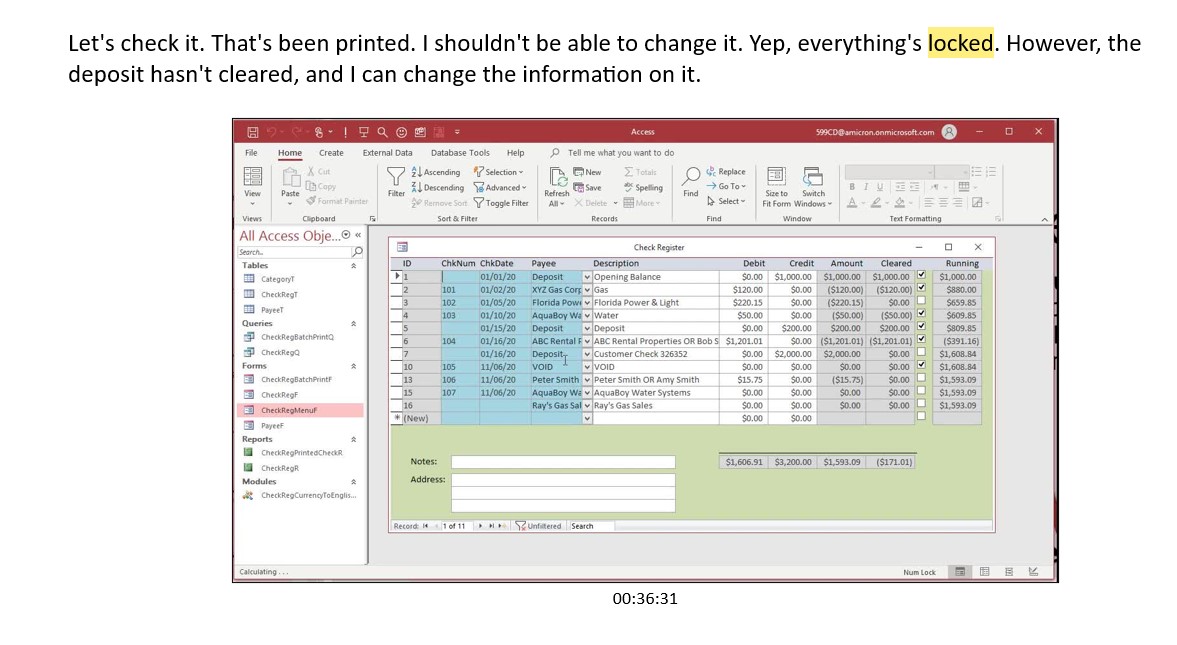
Sami, did you watch the Check Register Seminar or free Tech Help video. This is from the handbook.

Let's check it. That's been printed. I shouldn't be able to change it. Yep, everything's locked. However, the
deposit hasn't cleared, and I can change the information on it.
Sandra Truax  @Reply  
         
2 years ago

Sami Shamma OP  @Reply  
             
2 years ago
Hi Sandra
I was watching the actual seminar; however, I may have not watched long enough to the check printing part. I will do that next.
Many thanks

This thread is now CLOSED. If you wish to comment, start a NEW discussion in Access Developer Forum.
 

Next Unseen

 
New Feature: Comment Live View


The following is a paid advertisement
Computer Learning Zone is not responsible for any content shown or offers made by these ads.
 

Learn
 
Access - index
Excel - index
Word - index
Windows - index
PowerPoint - index
Photoshop - index
Visual Basic - index
ASP - index
Seminars
More...
Customers
 
Login
My Account
My Courses
Lost Password
Memberships
Student Databases
Change Email
Info
 
Latest News
New Releases
User Forums
Topic Glossary
Tips & Tricks
Search The Site
Code Vault
Collapse Menus
Help
 
Customer Support
Web Site Tour
FAQs
TechHelp
Consulting Services
About
 
Background
Testimonials
Jobs
Affiliate Program
Richard Rost
Free Lessons
Mailing List
PCResale.NET
Order
 
Video Tutorials
Handbooks
Memberships
Learning Connection
Idiot's Guide to Excel
Volume Discounts
Payment Info
Shipping
Terms of Sale
Contact
 
Contact Info
Support Policy
Mailing Address
Phone Number
Fax Number
Course Survey
Email Richard
[email protected]
Blog RSS Feed    YouTube Channel

LinkedIn
Copyright 2026 by Computer Learning Zone, Amicron, and Richard Rost. All Rights Reserved. Current Time: 5/6/2026 6:26:39 AM. PLT: 0s