Free Lessons
Courses
Seminars
TechHelp
Fast Tips
Templates
Topic Index
Forum
ABCD
 
Home   Courses   TechHelp   Forums   Help   Contact   Merch   Join   Order   Logon  
 
Back to Access Email Seminar    Comments List
Upload Images   @Reply   Bookmark    Link   Email   Next Unseen 
Gmail Authentication Issue
Joe Holland 
      
2 years ago
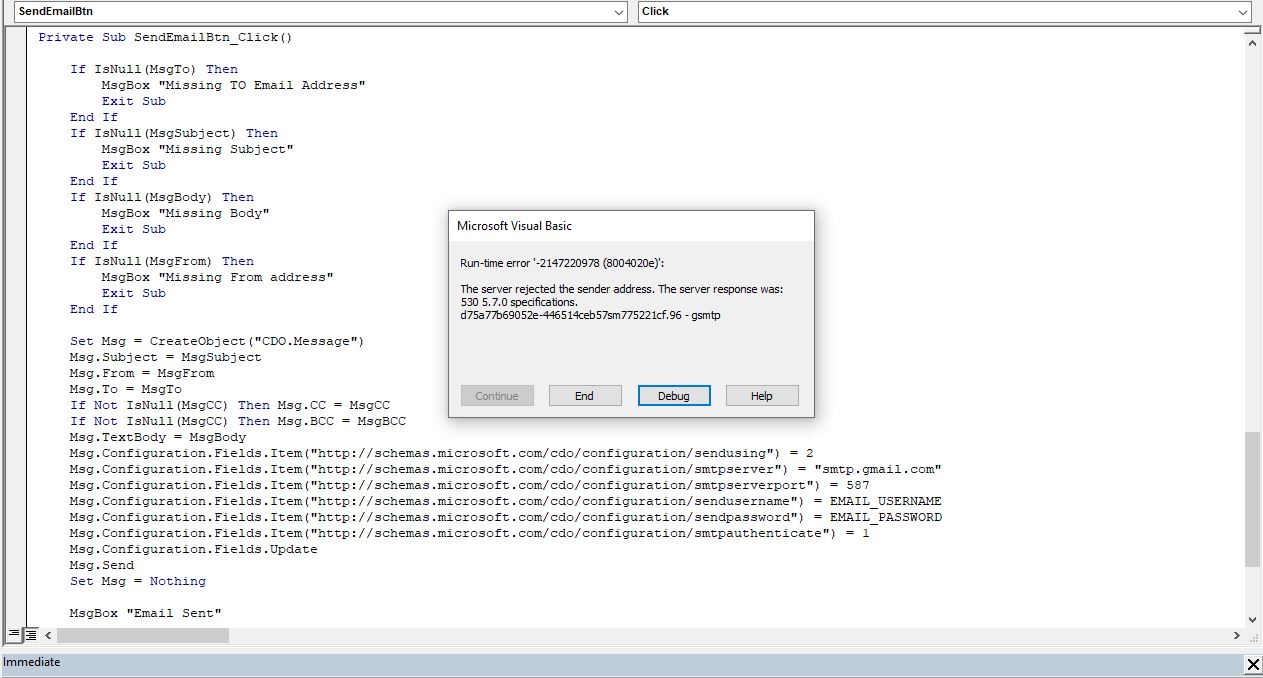
I am implementing email into my Access database following along with the Email Seminar. I am trying to get email to send through Gmail. I get an error "Run-time error '-2147220978 (8004020e)': The server rejected the sender email address. The server response was: 530 5.7.0 specifications. d75a77b69052e-446514ceb57sm4775221cf.96-gsmtp". I have Googled the hell out of all the codes and checked the vba code A LOT. I simply cannot figure it out. Maybe your fresh eyes looking at the issue will help. I will post and image of the error with the code shortly.
Joe Holland OP  @Reply  
      
2 years ago

Joe Holland OP  @Reply  
      
2 years ago
I created an Google app password, removed the spaces from it and put the password and my username inside of quotes in the global constants.
Kevin Robertson  @Reply  
          
2 years ago
Read the 'Other Updates' section on the Email Seminar Lessons page.
Joe Holland OP  @Reply  
      
2 years ago
Thanks Kevin but I don't use Microsoft Exchange Server or Outlook. I use Gmail. What am I missing?
Joe Holland OP  @Reply  
      
2 years ago
The next video shows to add this line for GMail:

Msg.Configuration.Fields.Item("http://schemas.microsoft.com/cdo/configuration/smtpusessl") = 1

I have done this and now the error is gone but the emails do not seem to be landing in the receiver's email inbox. I will keep checking my code to see what I am missing.
Joe Holland OP  @Reply  
      
2 years ago
I had Msg.Send remarked out. I corrected that and now I get "Run time error - 2147220973 (80040213) The transport failed to contact to the server"
Joe Holland OP  @Reply  
      
2 years ago
The answer turned out to be changing the email port from 587 to 25.
Joe Holland OP  @Reply  
      
2 years ago
I can send email using your code and it works perfectly. Thank you.

I would like to add one-click unsubscribe to my emails but I cannot figure out or find online how to code it. I need to add the following to the header of each email.

List-Unsubscribe:  <mailto: https://sidmar.com/unsubscribe.html?subject=unsubscribe>, <https://sidmar.com/unsubscribe.html>
List-Unsubscribe-Post: List-Unsubscribe=One-Click

More info can be read here: https://datatracker.ietf.org/doc/html/rfc2369

This thread is now CLOSED. If you wish to comment, start a NEW discussion in Access Email Seminar.
 

Next Unseen

 
New Feature: Comment Live View


The following is a paid advertisement
Computer Learning Zone is not responsible for any content shown or offers made by these ads.
 

Learn
 
Access - index
Excel - index
Word - index
Windows - index
PowerPoint - index
Photoshop - index
Visual Basic - index
ASP - index
Seminars
More...
Customers
 
Login
My Account
My Courses
Lost Password
Memberships
Student Databases
Change Email
Info
 
Latest News
New Releases
User Forums
Topic Glossary
Tips & Tricks
Search The Site
Code Vault
Collapse Menus
Help
 
Customer Support
Web Site Tour
FAQs
TechHelp
Consulting Services
About
 
Background
Testimonials
Jobs
Affiliate Program
Richard Rost
Free Lessons
Mailing List
PCResale.NET
Order
 
Video Tutorials
Handbooks
Memberships
Learning Connection
Idiot's Guide to Excel
Volume Discounts
Payment Info
Shipping
Terms of Sale
Contact
 
Contact Info
Support Policy
Mailing Address
Phone Number
Fax Number
Course Survey
Email Richard
[email protected]
Blog RSS Feed    YouTube Channel

LinkedIn
Copyright 2026 by Computer Learning Zone, Amicron, and Richard Rost. All Rights Reserved. Current Time: 4/30/2026 2:59:54 AM. PLT: 1s