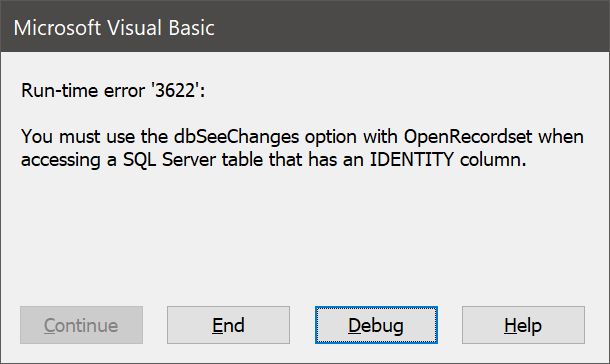
Following my upload of tables to SQL Server, action queries in my Access VBA code throw an error related to not having the dbSeeChanges option specified. This is NOT for a recordset (which Richard specifies requires the dbSeeChanges option.) These are simple action queries in VBA. They seem to work after appending a comma and the term "dbSeeChanges." Is this something new since the SQL Server course was created?
Kevin Yip
@Reply 2 years ago
This has been the case as far as I can remember (decades maybe): the dbSeeChanges option is required if an SQL Server table has an "identity" column, stated verbatim in the error message pictured below. This is true for both recordsets and action queries. For instance, the following action query will cause a run-time pictured below if the table has an identity column and the dbSeeChanges option is omitted:
CurentDb.Execute "DELETE FROM Table1 WHERE field1='abc'", dbSeeChanges
I don't have access to any of Richard's paid courses. Maybe he mentions it somewhere else in his courses.
An identity column in SQL Server is an autonumber field that is also a primary key field. You can have a PK field that is not autonumber, and it will not need the dbSeeChanges option.
Kevin Yip
@Reply 2 years ago
Kevin Yip
@Reply 2 years ago
By the way, even if you run CurentDb.Execute, the error will still say "OpenRecordset" as pictured above. Maybe that's where the confusion comes from?
If you are a Visitor, go ahead and post your reply as a
new comment, and we'll move it here for you
once it's approved. Be sure to use the same name and email address.
This thread is now CLOSED. If you wish to comment, start a NEW discussion in
Access SQL Server Lessons.